6. Collector Service
Collector Service is one component of the Observability Framework. Collector Service scalably collects and distributes telemetry data forwarded by Monitoring Library 2.0 in a Connext application. It collects telemetry data from Connext applications and distributes this data to third-party observability backends for monitoring, or Admin Console for remote debugging. Collector Service is distributed as both an executable and a Docker image. See Installation for details on how to obtain and run Collector Service.
For metrics, logs, and security events Collector Service provides native integration with Prometheus, as the time-series database to store Connext metrics, and Grafana Loki, as the log aggregation system to store Connext logs. Integration with other backends is possible using OpenTelemetry and the OpenTelemetry Collector.
Collector Service also collects non-metric data (configuration and discovery data) that is currently consumed by Admin Console to support the remote debugging feature. For additional information on remote debugging with Admin Console see Remote Debugging with Admin Console in the Admin Console User’s Manual.
For detailed information on the telemetry data collected by Collector Service, see What is Telemetry Data.
To improve scalability, a Collector Service instance can be configured to forward telemetry data to another Collector Service. This approach is especially useful in large systems where applications run across multiple networks. In such environments, it is recommended to run one Collector Service per network and configure each to forward telemetry data to a central Collector Service. The central instance can then store the data in third-party backends or forward it to Admin Console for remote debugging.
Collector Service receives data by instantiating receiver endpoints, and it forwards data by instantiating exporter endpoints. Currently, the only supported receiver endpoint is a DDS receiver endpoint, which receives telemetry data from Monitoring Library 2.0 in a Connext application or from another Collector Service instance.
The following exporter endpoints are supported:
Prometheus exporter, which exports metrics to a Prometheus server.
Grafana Loki exporter, which exports logs to a Grafana Loki server.
OTLP exporter, which exports metrics and logs to an OpenTelemetry Collector using the OpenTelemetry protocol (OTLP).
WebSocket exporter, which provides observables to RTI Admin Console for remote debugging using a WebSocket API.
DDS exporter, which forwards telemetry data to another Collector Service instance.
Note
The Websocket API provided by Collector Service is not publicly available in this release.
When configured with both a DDS receiver and a DDS exporter, Collector Service acts as a forwarder, receiving telemetry from Connext applications and relaying it to another Collector Service instance. This configuration allows for scalable distribution of telemetry data across multiple Collector Service instances.
Collector Service includes native integration with Prometheus and Grafana Loki to store metrics and logs (including security events), respectively.
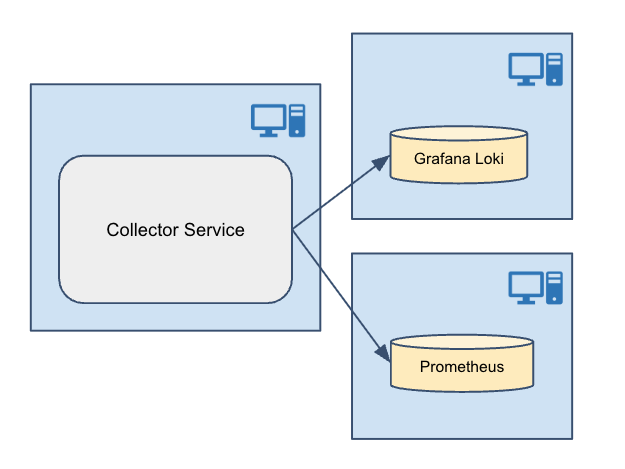
Figure 6.1 Native Integration
This release also allows integrating with other third-party storage components using OpenTelemetry and the OpenTelemetry Collector.
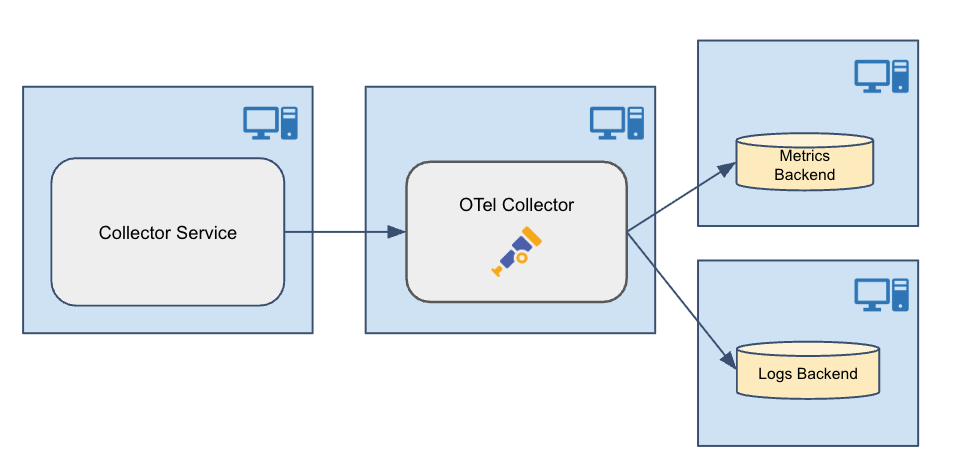
Figure 6.2 OpenTelemetry Integration
6.1. Installation
Collector Service is pre-installed as part of Connext Professional. It is also available as a standalone container-based deployment on RTI’s Docker Hub registry.
For details on installing Connext Professional, see the RTI Connext Installation Guide.
6.1.1. HTTPS/WSS support
Collector Service is built with support for HTTPS and WSS. To run the Collector Service executable, you must install OpenSSL. The package is available from the RTI Customer Portal.
Be sure to install both the host and target OpenSSL packages.
The host package enables OpenSSL for Collector Service, as well as other RTI applications such as RTI Routing Service, rtiddsspy, etc.
The target package provides OpenSSL libraries that can be used to secure your applications.
6.2. Usage
This chapter explains how to use Collector Service after installing Connext Professional. Collector Service can be run either from the distributed command-line executable or as a Docker image. The configuration of Collector Service is done by selecting one of the builtin configuration profiles, which automatically set up Collector Service with a DDS receiver and various exporters, depending on the selected configuration profile. These builtin configuration profiles are designed to work in different environments, such as LAN or WAN, and with different security settings. The configuration profiles have default values for the configuration parameters, which can be overridden by setting environment variables or providing volume mapping as required by the Collector Service deployment. For details on the builtin configuration profiles and how to select and modify them, see Configuration.
For details on the use of security with Collector Service, see Security.
6.2.1. Executable
Collector Service can be run as an application. The script to run the executable is in <NDDSHOME>/bin.
rticollectorservice [options]
In this section we will see:
How to Start Collector Service executable (Starting Collector Service executable).
How to Stop Collector Service executable (Stopping Collector Service executable).
Collector Service Command-line Parameters (Collector Service executable command-line parameters).
6.2.1.1. Starting Collector Service executable
To start Collector Service with a default configuration, enter:
$ NDDSHOME/bin/rticollectorservice -cfgName default
This command will run Collector Service indefinitely until you stop it. See Stopping Collector Service executable.
The -cfgName command-line parameter specifies the configuration name to use.
This parameter is required; if not specified, Collector Service will not start. For details
on the builtin configuration profiles available and the parameters that can be
configured, see Configuration. Configuration parameters
can be set by environment variables or by specifying on the command-line using the
-DVARIABLE=value syntax. See Collector Service executable command-line parameters
for details.
Table 6.1 describes the command-line parameters.
Collector Service is provided for the host platform. The Collector Service runs for the host platform
(located in resource/app/bin/<host>).
6.2.1.2. Stopping Collector Service executable
To stop Collector Service, press Ctrl-c. Collector Service will perform a clean shutdown.
6.2.1.3. Collector Service executable command-line parameters
The following table describes all the command-line parameters available in
Collector Service. To list the available commands, run
rticollectorservice -help.
Parameter |
Description |
|---|---|
-appName <string> |
Application name used identify this application and to name the DDS participant. |
-cfgFile <string> |
Note: Custom XML configurations are not officially supported in this release.
The format of the configuration file is not described in the documentation,
and it is subject to change in future releases. If you need to provide your
own configuration, please contact RTI Support (support@rti.com). |
-cfgName <string> |
Configuration name used to find a <collector_service> matching tag in the
configuration file. See Collector Service Builtin Configurations
for supported configurations. |
-domainIdBase <int> |
This value is added to the domain IDs in the <dds_receiver> and <dds_exporter>
tags in the configuration file. For example, if you set it to 50 and use
domain IDs 0 and 1 in the configuration file, then RTI Collector Service
will use domains 50 and 51. |
-D<name>=<value> |
Defines a variable that can be used as an alternate replacement for
XML environment variables, specified in the form $(VAR_NAME). |
-help |
Prints this help and exits. |
-ignoreXsdValidation |
Loads the configuration even if the XSD validation fails. |
-maxObjectsPerThread <int> |
Maximum number of thread-specific objects that can be created (minimum 1024). |
-verbosity <service_level>[:<dds_level>] |
Controls what type of messages are logged.
Default: |
-version |
Prints the Collector Service version number and exits. |
The -cfgName command-line parameter is required. All other command-line parameters
are optional; if specified, they override the values of their corresponding settings
in the loaded XML configuration. See Configuration for
the set of XML elements that can be overridden with command-line parameters.
6.2.2. Docker image
Collector Service can be run as a Docker image. In this section we will see:
How to Start Collector Service Docker image (Starting Collector Service Docker image).
How to Stop Collector Service Docker image (Stopping Collector Service Docker image).
Note
A detailed description of the use of Docker is beyond the scope of this manual. For complete documentation on the use of Docker container commands see docker container.
6.2.2.1. Starting Collector Service Docker image
To start Collector Service Docker image with a default configuration, run the Docker command:
$ docker run --detach \
    --network host \
    -v $PWD/rti_license.dat:/opt/rti.com/rti_connext_dds-7.7.0/rti_license.dat \
    --name=collector_service \
    rticom/collector-service:latest
The above command starts a Collector Service Docker container in detached mode with a default
configuration. The --network host option allows the container to use the host’s
network stack, which is necessary for Collector Service to receive telemetry data from Connext
applications. The -v option mounts the RTI license file into the container,
which is required to run Collector Service. The --name option assigns a name to the container
for easier management.
Note
If Docker host networking is not desired in your environment, you can use the default bridge network and configure port mappings instead.
For details on the builtin configuration profiles available and the parameters that can be configured, see Configuration.
When using the Docker image, configuration parameters are set by environment variables or by providing volume mapping. For details on the configuration parameters, see Configuration.
Docker volume mounts are specified using the -v syntax when running the docker container:
docker run \
    -v /path/to/local/file:/path/in/container \
    ...
Docker environment variables are specified with the -e syntax when running the docker container:
docker run \
    -e VARIABLE_NAME="value" \
    ...
6.2.2.2. Stopping Collector Service Docker image
To stop a Collector Service Docker container, run the command:
$ docker stop collector_service
This example assumes that the container was started with the name “collector_service”. If a different name was used, replace “collector_service” with the actual name of the container.
6.2.3. Observability Framework evaluation
The Collector Service Docker image may also be configured and run as part of the Observability Framework evaluation environment. The Observability Framework evaluation provides a configuration file definition and scripts to ease the evaluation of the Observability Framework. The scripts will create a complete evaluation environment with Collector Service and third-party components. This environment can be used to explore the features of the Observability Framework by running a sample Connext application instrumented with Monitoring Library 2.0 to generate telemetry data. The generated telemetry data will be collected by Collector Service and stored in the third-party backends, allowing you to explore the features of the Observability Framework.
See Observability Framework for Evaluation for more information on running Collector Service with the builtin configurations in an evaluation deployment.
A complete tutorial using the Observability Framework evaluation environment to explore the features of the Observability Framework is available in Tutorial.
6.3. Configuration
To configure Collector Service for your use case, select a configuration profile, then set the configuration parameters for that profile. The configuration profile determines the setup of Collector Service, including the receiver and exporter endpoints, network settings, and security settings. The configuration parameters have default values that can be overridden as needed.
6.3.1. Builtin configuration profiles
The Collector Service includes a set of builtin configuration profiles. These automatically set up Collector Service with a DDS receiver and various exporters, depending on the selected configuration profile. These builtin configuration profiles are designed to work in different environments, such as LAN or WAN, and with different security settings.
The builtin configuration profiles available in this release are listed in Table 6.2.
Configuration Name |
Supported Exporter(s) |
Network |
Security |
|---|---|---|---|
NonSecureForwarderLANtoLAN |
dds_exporter |
LAN to LAN |
No |
NonSecureForwarderLANtoWAN |
dds_exporter |
LAN to WAN |
No |
NonSecureForwarderWANtoWAN |
dds_exporter |
WAN to WAN |
No |
LWSecureForwarderLANtoLAN |
dds_exporter |
LAN to LAN |
Yes |
LWSecureForwarderLANtoWAN |
dds_exporter |
LAN to WAN |
Yes |
LWSecureForwarderWANtoWAN |
dds_exporter |
WAN to WAN |
Yes |
SecureForwarderLANtoLAN |
dds_exporter |
LAN to LAN |
Yes |
SecureForwarderLANtoWAN |
dds_exporter |
LAN to WAN |
Yes |
SecureForwarderWANtoWAN |
dds_exporter |
WAN to WAN |
Yes |
NonSecureLAN (default) |
prometheus_exporter, loki_exporter, websocket_exporter |
LAN |
No |
NonSecureWAN |
prometheus_exporter, loki_exporter, websocket_exporter |
WAN |
No |
LWSecureLAN |
prometheus_exporter, loki_exporter, websocket_exporter |
LAN |
Yes |
LWSecureWAN |
prometheus_exporter, loki_exporter, websocket_exporter |
WAN |
Yes |
SecureLAN |
prometheus_exporter, loki_exporter, websocket_exporter |
LAN |
Yes |
SecureWAN |
prometheus_exporter, loki_exporter, websocket_exporter |
WAN |
Yes |
NonSecureOTelLAN |
otlp_exporter, websocket_exporter |
LAN |
No |
NonSecureOTelWAN |
otlp_exporter, websocket_exporter |
WAN |
No |
LWSecureOTelLAN |
otlp_exporter, websocket_exporter |
LAN |
Yes |
LWSecureOTelWAN |
otlp_exporter, websocket_exporter |
WAN |
Yes |
SecureOTelLAN |
otlp_exporter, websocket_exporter |
LAN |
Yes |
SecureOTelWAN |
otlp_exporter, websocket_exporter |
WAN |
Yes |
NonSecureRemoteDebuggingLAN |
websocket_exporter |
LAN |
No |
NonSecureRemoteDebuggingWAN |
websocket_exporter |
WAN |
No |
LWSecureRemoteDebuggingLAN |
websocket_exporter |
LAN |
Yes |
LWSecureRemoteDebuggingWAN |
websocket_exporter |
WAN |
Yes |
SecureRemoteDebuggingLAN |
websocket_exporter |
LAN |
Yes |
SecureRemoteDebuggingWAN |
websocket_exporter |
WAN |
Yes |
6.3.2. Configuration parameters
The builtin configuration profiles have configuration parameters with pre-set values. These parameters can be overridden by setting environment variables or providing volume mapping as required by the Collector Service deployment. Environment variables are used by both the Collector Service executable and the Collector Service Docker image, while volume mapping is only used by the Collector Service Docker image. The parameters that can be configured for each builtin configuration profile are described in the following sections.
6.3.2.1. General parameters
These parameters are common across all builtin configuration profiles. They include parameters to configure the network settings for Collector Service, such as the hostname and port to access Collector Service, and the domain IDs for receiving and forwarding telemetry data.
Environment Variable |
Description |
Default Value |
|---|---|---|
OBSERVABILITY_DOMAIN |
The domain ID in which Collector Service receives the telemetry data from Connext applications or from another Collector Service instance. |
101 |
OBSERVABILITY_HOSTNAME |
The hostname to access the Collector Service from a local network. |
localhost |
OBSERVABILITY_CONTROL_PORT |
The private TCP port to access the Collector Service control server for external commands and to distribute non-metric data for Admin Console remote debugging. This is the port the service listens to. |
19098 |
OBSERVABILITY_CONTROL_PUBLIC_HOSTNAME |
The public hostname to access the Collector Service control server from a public network. |
localhost |
OBSERVABILITY_PUBLIC_CONTROL_PORT |
The public TCP port to access the Collector Service control server from a public network. |
19098 |
OBSERVABILITY_OUTPUT_DOMAIN |
The domain ID in which Collector Service forwards the telemetry data to another Collector Service instance. |
102 |
OBSERVABILITY_OUTPUT_COLLECTOR_PEER |
The initial peer the Collector Service uses for discovery to send telemetry data to another Collector Service instance. |
builtin.udpv4://127.0.0.1 |
6.3.2.2. WAN parameters
These parameters are used to configure the Real-Time WAN Transport settings for Collector Service when using a builtin configuration profile that supports WAN deployment. They include parameters to configure the port, and public address for Collector Service to receive telemetry data from Connext applications or another Collector Service instance using the Real-Time WAN Transport.
Environment Variable |
Description |
Default Value |
|---|---|---|
OBSERVABILITY_RWT_PORT |
Both the host and public UDP port of Collector Service in which it will receive telemetry data from Connext applications or another Collector Service instance using the Real-Time WAN Transport. |
30000 |
OBSERVABILITY_RWT_PUBLIC_ADDRESS |
The public address of Collector Service in which it will receive telemetry data from Connext applications or another Collector Service instance using the Real-Time WAN Transport. |
localhost |
6.3.2.3. OpenTelemetry parameters
These parameters are used to configure the OpenTelemetry exporter settings for Collector Service when using a builtin configuration profile that supports OpenTelemetry integration. They include parameters to configure the hostname and ports for Collector Service to send telemetry data to an OpenTelemetry Collector using the OTLP protocol.
Environment Variable |
Description |
Default Value |
|---|---|---|
OBSERVABILITY_OTEL_HOSTNAME |
The hostname where the OpenTelemetry Collector runs. This is the hostname that Collector Service uses to send logs and telemetry data to the OpenTelemetry Collector using the OTLP protocol. |
localhost |
OBSERVABILITY_OTEL_METRIC_EXPORTER_PORT |
The TCP port of the OpenTelemetry Collector in which it will receive metrics from Collector Service using OTLP protocol. This is the port that the OpenTelemetry Collector listens to. |
4318 |
OBSERVABILITY_OTEL_LOG_EXPORTER_PORT |
The TCP port of the OpenTelemetry Collector in which it will receive logs from Collector Service using OTLP protocol. This is the port that the OpenTelemetry Collector listens to. |
4319 |
6.3.2.4. Prometheus parameters
These parameters are used to configure the Prometheus exporter settings for Collector Service when using a builtin configuration profile that supports Prometheus integration. They include parameters to configure the port for Collector Service to export telemetry data to a Prometheus server. This is the port that the Prometheus endpoint service listens to and uses to provide telemetry data via scrapes from the Prometheus server.
Environment Variable |
Description |
Default Value |
|---|---|---|
OBSERVABILITY_PROMETHEUS_EXPORTER_PORT |
The TCP port of the Prometheus endpoint for exporting telemetry data to Prometheus. This is the port that the Prometheus endpoint service listens to and uses to provide telemetry data via scrapes from the Prometheus server. |
19090 |
6.3.2.5. Grafana Loki parameters
These parameters are used to configure the Grafana Loki exporter settings for Collector Service when using a builtin configuration profile that supports Grafana Loki integration. They include parameters to configure the hostname and port for Collector Service to export logs to a Grafana Loki server. This is the hostname and port that the Grafana Loki server listens to and uses to receive logs from Collector Service.
Environment Variable |
Description |
Default Value |
|---|---|---|
OBSERVABILITY_LOKI_HOSTNAME |
The hostname where the Loki server runs. This is the hostname that Collector Service uses to send logs to the Loki server. |
localhost |
OBSERVABILITY_LOKI_EXPORTER_PORT |
The TCP port of the Grafana Loki server in which it will receive logs from Collector Service. |
3100 |
6.3.2.6. Security parameters
When using builtin configuration profiles that provide security, various security artifacts must be provided to Collector Service. The parameters that specify the value or location of these artifacts can be configured using environment variables or volume mapping as required by the Collector Service deployment.
6.3.2.6.1. HTTPS + Basic authentication parameters
These parameters are used to configure the HTTPS and Basic Authentication settings for Collector Service when using a builtin configuration profile that provides HTTPS and Basic Authentication security.
6.3.2.6.1.1. HTTPS + Basic authentication security file definitions
rootCALoki.crt must contain the root certificate of the CA that signed the server.pem certificate used to communicate with the Grafana Loki server.
rootCAOtel.crt must contain the root certificate of the CA that signed the server.pem certificate used to communicate with the OpenTelemetry Collector.
serverPrometheusEndpoint.pem must contain both a valid server certificate and the corresponding private key for the Prometheus endpoint created by Collector Service. The Prometheus endpoint is an HTTPS server that provides metrics to a Prometheus server.
serverControl.pem must contain both a valid server certificate and the corresponding private key for the control server created by Collector Service. The control server is an HTTPS server that receives commands from external clients such as the Grafana dashboards running in your browser.
htdigest_control is a password file that contains the username and password for BASIC-Auth. This file is used by the Controllability HTTP server started by Collector Service to authenticate the HTTP connections created by external clients (for example, to change the verbosity of an application). The htdigest file can be created using the Apache htdigest tool.
htdigest_prometheus is a password file that contains the username and password for BASIC-Auth. This file is used by the Prometheus HTTP server started by Collector Service to authenticate the HTTP connections created by external clients (for example, a Prometheus scraping request). The htdigest file can be created using the Apache htdigest tool.
6.3.2.6.1.2. HTTPS + Basic authentication environment variables
Environment Variable |
Description |
Default Value |
|---|---|---|
OBSERVABILITY_BASIC_AUTH_USERNAME |
The username to authenticate the HTTP connections (client) created by Collector Service. |
user |
OBSERVABILITY_BASIC_AUTH_PASSWORD |
The password to authenticate the HTTP connections (client) created by Collector Service. |
userpassword |
OBSERVABILITY_LOKI_ROOT_CA |
The path to the root certificate for the Loki server; used by the Loki exporter. |
/rti/security/https/rootCALoki.crt |
OBSERVABILITY_OTEL_ROOT_CA |
The path to the root certificate for the OpenTelemetry server; used by the OpenTelemetry exporter. |
/rti/security/https/rootCAOtel.crt |
OBSERVABILITY_PROMETHEUS_SERVER_PEM |
The path to the pem file providing the server certificate and corresponding private key for the Prometheus endpoint created by Collector Service. |
/rti/security/https/serverPrometheusEndpoint.pem |
OBSERVABILITY_CONTROL_SERVER_PEM |
The path to the pem file providing the server certificate and corresponding private key for the control server created by Collector Service. |
/rti/security/https/serverControl.pem |
OBSERVABILITY_CONTROL_BASIC_AUTH_FILE |
The path to the htdigest file providing the username and password for Basic Authentication for the control server created by Collector Service. |
/rti/security/https/htdigest_control |
OBSERVABILITY_PROMETHEUS_BASIC_AUTH_FILE |
The path to the htdigest file providing the username and password for Basic Authentication for the Prometheus server creaated by Collector Service. |
/rti/security/https/htdigest_prometheus |
6.3.2.6.1.3. HTTPS + Basic authentication file volume mapping
Local Path |
Container Path (fixed value) |
|---|---|
path/to/rootCA.crt |
/rti/security/https/rootCALoki.crt |
path/to/rootCA.crt |
/rti/security/https/rootCAOtel.crt |
path/to/serverPrometheusEndpoint.pem |
/rti/security/https/serverPrometheusEndpoint.pem |
path/to/serverControl.pem |
/rti/security/https/serverControl.pem |
path/to/htdigest_control |
/rti/security/https/htdigest_control |
path/to/htdigest_prometheus |
/rti/security/https/htdigest_prometheus |
6.3.2.6.2. DDS security parameters
These parameters are used to configure the security settings for Collector Service when using a builtin configuration profile that provides DDS security. They include parameters to configure the paths to the security artifacts for RTI® Security Plugins for the DDS receiver and DDS exporter in Collector Service.
6.3.2.6.2.1. DDS security file definitions
identity_ca.pem must contain the certificate of the CA that signed the identity_certificate.pem.
identity_certificate.pem must contain the certificate of the Collector Service receivers.
private*key.pem must contain the private key of the Collector Service receivers.
permissions_ca.pem must contain the certificate of the CA that signed the permissions.p7s and governance.p7s.
governance.p7s must contain the governance file of the Collector Service receivers.
permissions.p7s must contain the permissions file of the Collector Service receivers.
passphrase must contain the passphrase file of the Collector Service receivers.
identity_ca_output.pem must contain the certificate of the CA that signed the identity_certificate_output.pem.
identity_certificate_output.pem must contain the certificate of the Collector Service exporters.
private_key_output.pem must contain the private key of the Collector Service exporters.
permissions_ca_output.pem must contain the certificate of the CA that signed the permissions_output.p7s and governance_output.p7s.
governance_output.p7s must contain the governance file of the Collector Service exporters.
permissions_output.p7s must contain the permissions file of the Collector Service exporters.
passphrase_output must contain the passphrase file of the Collector Service exporters.
6.3.2.6.2.2. DDS security environment variables for DDS receiver and exporter
Environment Variable |
Description |
Default Value |
|---|---|---|
OBSERVABILITY_DDS_SECURITY_PASSPHRASE |
Path to a file OR the passphrase to be passed as dds.sec.crypto.rtps_psk_secret_passphrase for security plugins for the DDS receiver. |
/rti/security/dds/passphrase |
OBSERVABILITY_DDS_SECURITY_IDENTITY_CA |
Path to file to be passed as dds.sec.auth.identity_ca for RTI® Security Plugins for the DDS receiver. |
/rti/security/dds/identity_ca.pem |
OBSERVABILITY_DDS_SECURITY_PERMISSIONS_CA |
Path to file to be passed as dds.sec.access.permissions_ca for RTI® Security Plugins for the DDS receiver. |
/rti/security/dds/permissions_ca.pem |
OBSERVABILITY_DDS_SECURITY_IDENTITY_CERTIFICATE |
Path to file to be passed as dds.sec.auth.identity_certificate for RTI® Security Plugins for the DDS receiver. |
/rti/security/dds/identity_certificate.pem |
OBSERVABILITY_DDS_SECURITY_PRIVATE_KEY |
Path to file to be passed as dds.sec.auth.private_key for RTI® Security Plugins for the DDS receiver. |
/rti/security/dds/private_key.pem |
OBSERVABILITY_DDS_SECURITY_GOVERNANCE |
Path to file to be passed as dds.sec.access.governance for RTI® Security Plugins for the DDS receiver. |
/rti/security/dds/governance.p7s |
OBSERVABILITY_DDS_SECURITY_PERMISSIONS |
Path to file to be passed as dds.sec.access.permissions for RTI® Security Plugins for the DDS receiver. |
/rti/security/dds/permissions.p7s |
OBSERVABILITY_OUTPUT_DDS_SECURITY_PASSPHRASE |
Path to a file OR the passphrase to be passed as dds.sec.crypto.rtps_psk_secret_passphrase for security plugins for the DDS exporter. |
/rti/security/dds/passphrase_output |
OBSERVABILITY_OUTPUT_DDS_SECURITY_IDENTITY_CA |
Path to file to be passed as dds.sec.auth.identity_ca for RTI® Security Plugins for the DDS exporter. |
EN/rti/security/dds/identity_ca_output.pem |
OBSERVABILITY_OUTPUT_DDS_SECURITY_PERMISSIONS_CA |
Path to file to be passed as dds.sec.access.permissions_ca for RTI® Security Plugins for the DDS exporter. |
/rti/security/dds/permissions_ca_output.pem |
OBSERVABILITY_OUTPUT_DDS_SECURITY_IDENTITY_CERTIFICATE |
Path to file to be passed as dds.sec.auth.identity_certificate for RTI® Security Plugins for the DDS exporter. |
/rti/security/dds/identity_certificate_output.pem |
OBSERVABILITY_OUTPUT_DDS_SECURITY_PRIVATE_KEY |
Path to file to be passed as dds.sec.auth.private_key for RTI® Security Plugins for the DDS exporter. |
/rti/security/dds/private_key_output.pem |
OBSERVABILITY_OUTPUT_DDS_SECURITY_GOVERNANCE |
Path to file to be passed as dds.sec.access.governance for RTI® Security Plugins for the DDS exporter. |
/rti/security/dds/governance_output.p7s |
OBSERVABILITY_OUTPUT_DDS_SECURITY_PERMISSIONS |
Path to file to be passed as dds.sec.access.permissions for RTI® Security Plugins for the DDS exporter. |
/rti/security/dds/permissions_output.p7s |
6.3.2.6.2.3. DDS security file Volume mapping for DDS receiver and exporter
Local Path |
Container Path (fixed value) |
|---|---|
/path/to/identity_ca.pem |
/rti/security/dds/identity_ca.pem |
/path/to/permissions_ca.pem |
/rti/security/dds/permissions_ca.pem |
path/to/identity_certificate.pem |
/rti/security/dds/identity_certificate.pem |
path/to/private_key.pem |
/rti/security/dds/private_key.pem |
path/to/governance.p7s |
/rti/security/dds/governance.p7s |
path/to/permissions.p7s |
/rti/security/dds/permissions.p7s |
path/to/passphrase |
/rti/security/dds/passphrase |
path/to/identity_ca_output.pem |
/rti/security/dds/identity_ca_output.pem |
path/to/permissions_ca_output.pem |
/rti/security/dds/permissions_ca_output.pem |
path/to/identity_certificate_output.pem |
/rti/security/dds/identity_certificate_output.pem |
path/to/private_key_output.pem |
/rti/security/dds/private_key_output.pem |
path/to/governance_output.p7s |
/rti/security/dds/governance_output.p7s |
path/to/permissions_output.p7s |
/rti/security/dds/permissions_output.p7s |
path/to/passphrase_output |
/rti/security/dds/passphrase_output |
6.3.2.6.3. Lightweight security parameters
These parameters are used to configure the security settings for Collector Service when using a builtin configuration profile that uses the Lightweight Builtin Security Plugins. They include parameters to configure the passphrase, protection kind, and cipher for the Lightweight Builtin Security Plugins for both the DDS receiver and DDS exporter in Collector Service.
6.3.2.6.3.1. Lightweight Security file definitions
passphrase must contain the passphrase file of the Collector Service receivers.
passphrase_output must contain the passphrase file of the Collector Service exporters.
6.3.2.6.3.2. Lightweight Security environment variables for DDS receiver and exporter
Environment Variable |
Description |
Default Value |
|---|---|---|
OBSERVABILITY_DDS_SECURITY_PASSPHRASE |
Path to a file OR the passphrase to be passed as dds.sec.crypto.rtps_psk_secret_passphrase for the Lightweight Builtin Security Plugins for the DDS receiver. |
/rti/security/dds/passphrase |
OBSERVABILITY_DDS_SECURITY_PSK_PROTECTION_KIND |
The value to be passed as dds.sec.access.rtps_psk_protection_kind for the Lightweight Builtin Security Plugins for the DDS receiver. |
ENCRYPT |
OBSERVABILITY_DDS_SECURITY_PSK_CIPHER |
The value to be passed as dds.sec.crypto.rtps_psk_symmetric_cipher_algorithm for the Lightweight Builtin Security Plugins for the DDS receiver. |
AUTO |
OBSERVABILITY_OUTPUT_DDS_SECURITY_PASSPHRASE |
Path to a file OR the passphrase to be passed as dds.sec.crypto.rtps_psk_secret_passphrase for the Lightweight Builtin Security Plugins for the DDS exporter. |
/rti/security/dds/passphrase_output |
OBSERVABILITY_OUTPUT_DDS_SECURITY_PSK_PROTECTION_KIND |
The value to be passed as dds.sec.access.rtps_psk_protection_kind for the Lightweight Builtin Security Plugins for the DDS exporter. |
ENCRYPT |
OBSERVABILITY_OUTPUT_DDS_SECURITY_PSK_CIPHER |
The value to be passed as dds.sec.crypto.rtps_psk_symmetric_cipher_algorithm for the Lightweight Builtin Security Plugins for the DDS exporter. |
AUTO |
6.3.2.6.3.3. Lightweight Security file Volume mapping for DDS receiver and exporter
Local Path |
Container Path (fixed value) |
|---|---|
path/to/passphrase |
/rti/security/dds/passphrase |
path/to/passphrase_output |
/rti/security/dds/passphrase_output |
6.4. REST API Reference
Collector Service scalably distributes telemetry data forwarded by Monitoring Library 2.0 in a Connext application and sends it to configurable backends. A key feature of Collector Service is remote command forwarding to the Connext applications. These commands enable you to control the amount of telemetry data forwarded by Monitoring Library 2.0 from a Connext application.
This REST API reference describes the remote commands provided by Collector Service. These commands enable you to:
get the current logging collection and forwarding verbosity levels for applications
dynamically change the logging collection and forwarding verbosity levels for applications
get the current metric collection configuration for observable resources
dynamically configure the set of metrics collected and forwarded for observable resources
6.4.1. Definitions
The REST API commands in the following sections share the following common fields:
application
The application field is a Uniform Resource Identifier (URI) that identifies an application in responses to commands that get logging verbosity levels. For details on this Uniform Resource Identifier (URI) see the Application row in Table 9.1.
application_selector
The application_selector field is a resource selector that identifies one or more applications in commands that set logging verbosity levels. For details on specifying a resource selector for application_selector see Resource Pattern Definitions.
resource_selector
The resource_selector field is a resource selector that identifies one or more observable resources in a command. For details on specifying a resource_selector see Resource Pattern Definitions.
logging_settings
The logging_settings field is a list of objects that specify the logging level for different facilities within an application. Each object in the list has two properties:
verbosity levels can be
SILENT,DEBUG,INFORMATIONAL,NOTICE,WARNING,ERROR,CRITICAL,ALERT,EMERGENCY.facility can be
MIDDLEWARE,SERVICE,SECURITY_EVENTorUSER.Note that all verbosity levels may not be supported in the Observability Dashboards. See Logs for details on logging in Observability Framework.
metrics
The metrics field is a list of metric names in responses to commands that get metric subscription state. For details on metric names, see Metrics.
subscribe_metrics_selector
The subscribe_metrics_selector is a list of metric names to subscribe to. For details on how to specify metric selectors in a subscribe_metrics_selector list, see Metric Pattern Definitions.
unsubscribe_metrics_selector
The unsubscribe_metrics_selector field is a list of metric names to unsubscribe to. For details on how to specify metric selectors in a unsubscribe_metrics_selector list, see Metric Pattern Definitions.
6.4.2. Root endpoint (base URL)
The root endpoint for the Collector Service REST API is the URL of the Collector Service. It
is the base URL for all the commands in this reference. For example:
https://collector_service:19080.
The hostname and port number of the Collector Service service can be configured as follows:
For an Evaluation Deployment, the Collector Service Host and Port information can be configured using the following parameters in the configuration JSON file (see Defining the JSON configuration file).
collectorConfig.controlPublicHostname
collectorConfig.controlPublicPort
For Production Deployments where Collector Service is deployed as a standalone Docker container, the Host and Port information can be configured via two environment variables in the Collector Service Docker image (see the Collector Service article in Docker Hub).
OBSERVABILITY_CONTROL_PUBLIC_HOSTNAME
OBSERVABILITY_CONTROL_PUBLIC_PORT
In addition, the root endpoint for the Collector Service REST API is also part of the
label controllability_url, which is associated with each
application’s presence metric
(see Application Metrics).
This is useful when you have multiple Collector Service instances storing data into a metrics backend (for example, Prometheus), and you want to dynamically discover the Collector Service instance that is managing a particular application to send remote commands to it.
6.4.3. API overview
Resource |
Operation |
Description |
|---|---|---|
logging |
GET /rti/collector_service/rest1/logging:get_collection_level |
Get the collection logging level. |
GET /rti/collector_service/rest1/logging:get_forwarding_level |
Get the forwarding logging level. |
|
POST /rti/collector_service/rest1/logging:set_collection_level |
Set the collection logging level. |
|
POST /rti/collector_service/rest1/logging:set_forwarding_level |
Set the forwarding logging level. |
|
metrics |
GET /rti/collector_service/rest1/metrics:get_subscription_state |
Get the metrics subscription state. |
POST /rti/collector_service/rest1/metrics:set_subscription_state |
Set the metrics subscription state. |
|
POST /rti/collector_service/rest1/metrics:update_subscription_state |
Update the metrics subscription state. |
6.4.4. API reference
- GET /rti/collector_service/rest1/logging:get_collection_level
This method gets the collection verbosity level of a given application_selector.
- Request Headers:
Authorization – The authorization header is used to authenticate the user. The value of the header is the user’s credentials encoded in base64. The format is “Basic <base64 encoded username:password>”.
- Query Parameters:
application_selector –
Description: The application_selector to get the collection verbosity level.
Type:
stringRequired: true
Example: //app_*
GET http://.../rti/collector_service/rest1/logging:get_collection_level?application_selector=//app_* HTTP/1.1
- Response Headers:
Content-Length – Transfer-length of the message-body.
Content-Type – Valid values:
application/dds-web+json.
- Status Codes:
200 OK –
Description: If successful, this method returns the collection verbosity level for the applications that matched the application_selector.
- Example Response Body:
application/dds-web+json1[ 2 { 3 "application": "/applications/app_1", 4 "logging_settings": [ 5 { 6 "verbosity": "WARNING", 7 "facility": "MIDDLEWARE" 8 }, 9 { 10 "verbosity": "ERROR", 11 "facility": "SERVICE" 12 } 13 ] 14 }, 15 { 16 "application": "/applications/app_2", 17 "logging_settings": [ 18 { 19 "verbosity": "WARNING", 20 "facility": "MIDDLEWARE" 21 }, 22 { 23 "verbosity": "ERROR", 24 "facility": "SERVICE" 25 } 26 ] 27 } 28]
Description: In case of an invalid input, this method returns a response body with the error code and a message.
Example Response Body:
application/dds-web+json1{ 2 "code": "...", 3 "message": "..." 4}
Description: The application is not found or does not match any application.
Example Response Body:
application/dds-web+json1{ 2 "code": "...", 3 "message": "..." 4}
Description: Generic server error.
Example Response Body:
application/dds-web+json1{ 2 "code": "...", 3 "message": "..." 4}
- GET /rti/collector_service/rest1/logging:get_forwarding_level
This method gets the forwarding verbosity level of a given application_selector.
- Request Headers:
Authorization – The authorization header is used to authenticate the user. The value of the header is the user’s credentials encoded in base64. The format is “Basic <base64 encoded username:password>”.
- Query Parameters:
application_selector –
Description: The application_selector to get the forwarding verbosity level.
Type:
stringRequired: true
Example: app_1
GET http://.../rti/collector_service/rest1/logging:get_forwarding_level?application_selector=app_1 HTTP/1.1
- Response Headers:
Content-Length – Transfer-length of the message-body.
Content-Type – Valid values:
application/dds-web+json.
- Status Codes:
200 OK –
Description: If successful, this method returns the forwarding verbosity level for the applications that matched the application_selector.
- Example Response Body:
application/dds-web+json1[ 2 { 3 "application": "/applications/app_1", 4 "logging_settings": [ 5 { 6 "verbosity": "WARNING", 7 "facility": "MIDDLEWARE" 8 }, 9 { 10 "verbosity": "ERROR", 11 "facility": "SERVICE" 12 } 13 ] 14 } 15]
Description: In case of an invalid input, this method returns a response body with the error code and a message.
Example Response Body:
application/dds-web+json1{ 2 "code": "...", 3 "message": "..." 4}
Description: The application_selector is not found or does not match any application.
Example Response Body:
application/dds-web+json1{ 2 "code": "...", 3 "message": "..." 4}
Description: Generic server error.
Example Response Body:
application/dds-web+json1{ 2 "code": "...", 3 "message": "..." 4}
- POST /rti/collector_service/rest1/logging:set_collection_level
This method sets the collection logging level of a given application_selector.
- Request Headers:
Content-Length – Transfer-length of the message-body.
Content-Type – Valid values:
application/json, application/dds-web+json.Authorization – The authorization header is used to authenticate the user. The value of the header is the user’s credentials encoded in base64. The format is “Basic <base64 encoded username:password>”.
- Example Request Body:
application/dds-web+json1[ 2 { 3 "application_selector": "//app_1", 4 "logging_settings": [ 5 { 6 "verbosity": "WARNING", 7 "facility": "MIDDLEWARE" 8 }, 9 { 10 "verbosity": "ERROR", 11 "facility": "SERVICE" 12 } 13 ] 14 }, 15 { 16 "application_selector": "//GUID(AAAAAAAA.BBBBBBBB.CCCCCCCC.DDDDDDDD)", 17 "logging_settings": [ 18 { 19 "verbosity": "WARNING", 20 "facility": "MIDDLEWARE" 21 }, 22 { 23 "verbosity": "ERROR", 24 "facility": "SERVICE" 25 } 26 ] 27 } 28]
- Response Headers:
Content-Length – Transfer-length of the message-body.
Content-Type – Valid values:
application/dds-web+json.
- Status Codes:
Description: If successful, this method returns an empty response indicating the collection verbosity level has been set.
Description: In case of an invalid input, this method returns a response body with the error code and a message.
Example Response Body:
application/dds-web+json1{ 2 "code": "...", 3 "message": "..." 4}
Description: The application_selector is not found or does not match any application.
Example Response Body:
application/dds-web+json1{ 2 "code": "...", 3 "message": "..." 4}
Description: Generic server error.
Example Response Body:
application/dds-web+json1{ 2 "code": "...", 3 "message": "..." 4}
- POST /rti/collector_service/rest1/logging:set_forwarding_level
This method sets the Forwarding logging level of a given application_selector.
- Request Headers:
Content-Length – Transfer-length of the message-body.
Content-Type – Valid values:
application/json, application/dds-web+json.Authorization – The authorization header is used to authenticate the user. The value of the header is the user’s credentials encoded in base64. The format is “Basic <base64 encoded username:password>”.
- Example Request Body:
application/dds-web+json1[ 2 { 3 "application_selector": "//app_1", 4 "logging_settings": [ 5 { 6 "verbosity": "WARNING", 7 "facility": "MIDDLEWARE" 8 }, 9 { 10 "verbosity": "ERROR", 11 "facility": "SERVICE" 12 } 13 ] 14 } 15]
- Response Headers:
Content-Length – Transfer-length of the message-body.
Content-Type – Valid values:
application/dds-web+json.
- Status Codes:
Description: If successful, this method returns an empty response indicating the collection verbosity level has been set.
Description: In case of an invalid input, this method returns a response body with the error code and a message.
Example Response Body:
application/dds-web+json1{ 2 "code": "...", 3 "message": "..." 4}
Description: The application_selector is not found or does not match any application.
Example Response Body:
application/dds-web+json1{ 2 "code": "...", 3 "message": "..." 4}
Description: Generic server error.
Example Response Body:
application/dds-web+json1{ 2 "code": "...", 3 "message": "..." 4}
- GET /rti/collector_service/rest1/metrics:get_subscription_state
This method gets the metrics subscription state of a given resource_selector.
- Request Headers:
Authorization – The authorization header is used to authenticate the user. The value of the header is the user’s credentials encoded in base64. The format is “Basic <base64 encoded username:password>”.
- Query Parameters:
resource_selector –
Description: The resource_selector to get the metrics subscription state.
Type:
stringRequired: true
Example: //resource_1
GET http://.../rti/collector_service/rest1/metrics:get_subscription_state?resource_selector=//resource_1 HTTP/1.1
- Response Headers:
Content-Length – Transfer-length of the message-body.
Content-Type – Valid values:
application/dds-web+json.
- Status Codes:
200 OK –
Description: If successful, this method returns the metrics subscription state for the resources that matched the resource_selector. The list of metrics returned for each resource is enabled for collection.
- Example Response Body:
application/dds-web+json1[ 2 { 3 "resource": "//resource_1", 4 "metrics": [ 5 "dds_data_writer_protocol_received_nack_bytes_total", 6 "dds_data_writer_protocol_pulled_samples_total", 7 "dds_data_writer_protocol_sent_heartbeats_total" 8 ] 9 } 10]
Description: In case of an invalid input, this method returns a response body with the error code and a message.
- Example Response Body:
application/dds-web+json1{ 2 "code": "...", 3 "message": "..." 4}
Description: The resource_selector is not found or does not match any resource.
- Example Response Body:
application/dds-web+json1{ 2 "code": "...", 3 "message": "..." 4}
Description: Generic server error.
- Example Response Body:
application/dds-web+json1{ 2 "code": "...", 3 "message": "..." 4}
- POST /rti/collector_service/rest1/metrics:set_subscription_state
This method sets the metrics subscription state of a given resource_selector. The metric names provided in “subscribe_metric_selectors” are enabled for collection and distribution for the selected resource. All other metrics on the selected resource are disabled.
If no metrics match the provided selectors, no error is returned.
- Request Headers:
Content-Length – Transfer-length of the message-body.
Content-Type – Valid values:
application/json, application/dds-web+json.Authorization – The authorization header is used to authenticate the user. The value of the header is the user’s credentials encoded in base64. The format is “Basic <base64 encoded username:password>”.
- Example Request Body:
application/dds-web+json1[ 2 { 3 "resource_selector": "//GUID(AAAAAAAA.BBBBBBBB.CCCCCCCC.EEEEEEEE)", 4 "subscribe_metrics_selectors": [ 5 "dds_data_writer_protocol_received_nack_bytes_total", 6 "dds_data_writer_protocol_pulled_samples_total", 7 "dds_data_writer_protocol_sent_heartbeats_total" 8 ] 9 } 10]
- Response Headers:
Content-Length – Transfer-length of the message-body.
Content-Type – Valid values:
application/dds-web+json.
- Status Codes:
Description: If successful, this method returns an empty response indicating the metrics subscription state has been set.
Description: In case of an invalid input, this method returns a response body with the error code and a message.
- Example Response Body:
application/dds-web+json1{ 2 "code": "...", 3 "message": "..." 4}
Description: The resource_selector is not found or does not match any resource.
- Example Response Body:
application/dds-web+json1{ 2 "code": "...", 3 "message": "..." 4}
Description: Generic server error.
- Example Response Body:
application/dds-web+json1{ 2 "code": "...", 3 "message": "..." 4}
- POST /rti/collector_service/rest1/metrics:update_subscription_state
This method updates the metrics subscription state of a given resource_selector. The metric names provided in “subscribe_metric_selectors” are enabled for collection and distribution for the selected resource. The metric names provided in “unsubscribe_metric_selectors” are disabled for collection and distribution for the selected resource. The “subscribe_metric_selectors” list is applied before the “unsubscribe_metric_selectors” list. It a metric is in both lists it will be disabled.
If no metrics match the provided selectors, no error is returned.
- Request Headers:
Content-Length – Transfer-length of the message-body.
Content-Type – Valid values:
application/json, application/dds-web+json.Authorization – The authorization header is used to authenticate the user. The value of the header is the user’s credentials encoded in base64. The format is “Basic <base64 encoded username:password>”.
- Example Request Body:
application/dds-web+json1[ 2 { 3 "resource_selector": "//GUID(01234567.89ABCDEF.01234567.89ABCDEF)", 4 "subscribe_metrics_selectors": [ 5 "dds_data_writer_protocol_received_nack_bytes_total", 6 "dds_data_writer_protocol_sent_heartbeats_total" 7 ], 8 "unsubscribe_metrics_selectors": [ 9 "dds_data_writer_protocol_pulled_samples_total" 10 ] 11 } 12]
- Response Headers:
Content-Length – Transfer-length of the message-body.
Content-Type – Valid values:
application/dds-web+json.
- Status Codes:
Description: If successful, this method returns an empty response indicating the metrics subscription state has been set.
Description: In case of an invalid input, this method returns a response body with the error code and a message.
- Example Response Body:
application/dds-web+json1{ 2 "code": "...", 3 "message": "..." 4}
Description: The resource_selector is not found or does not match any resource.
- Example Response Body:
application/dds-web+json1{ 2 "code": "...", 3 "message": "..." 4}
Description: Generic server error.
- Example Response Body:
application/dds-web+json1{ 2 "code": "...", 3 "message": "..." 4}