3. Integrating Protocol Buffers with Connext
Protocol Buffers Extension allows your applications to use their existing Protocol Buffers
messages with Connext. It uses a generative process to produce
C++ source code from .proto files. The generated code enables Connext
applications to use the Protocol Buffers types with DDS Topics.
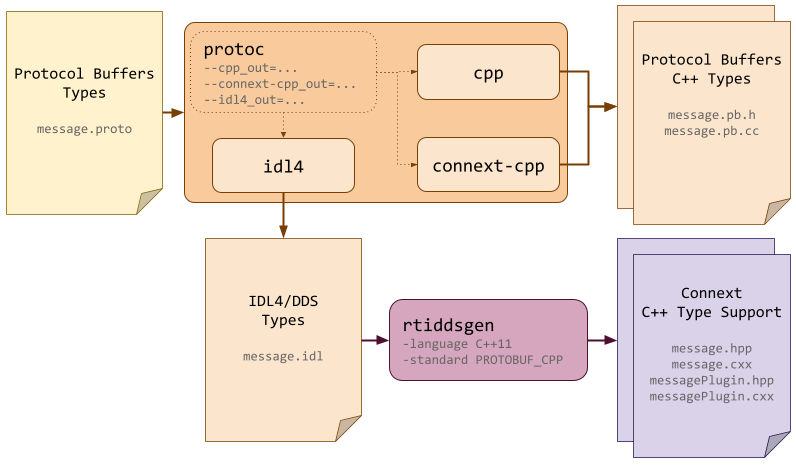
There are two methods to generate the necessary source code from an input
.proto file using Protocol Buffers Extension:
Two-phase generation. Execute
protocusing the RTI plugins and all necessary options, then runrtiddsgenon the resulting IDL file. We recommend this workflow because it simplifies the protoc configuration process.Single-phase generation. Invoke
rtiddsgenusing the.protofile as the direct input to generate all necessary files. This streamlined method is ideal for simple.protofiles that do not contain includes or require specificprotocconfiguration options.
3.1. Two-Phase Code Generation
In phase one, the protocol buffers compiler (protoc) is invoked
to:
Convert each
.protofile into an equivalent.idlfile.Generate C++ source code for each Protocol Buffers type.
In phase two, all input .proto files are processed by three protoc
plugins:
The Protocol Buffers Extension IDL4 Converter Plugin (
idl4) generates an.idlfile for each input.protofile. The generated.idlfiles use the type system defined by the Extensible and Dynamic Topic Types for DDS specification (DDS-XTypes) from the Object Management Group (OMG).The built-in C++ code generator (
cpp), part of the Protocol Buffers distribution, generates the C++ classes associated with each Protocol Buffers type.The Protocol Buffers Extension C++ Code Generator Plugin (
connext-cpp) decorates the C++ code produced bycppso that it can be efficiently integrated with Connext.
Phase two relies on RTI Code Generator (rtiddsgen)
to process the .idl files generated by protoc. rtiddsgen produces
the additional C++ source code necessary to use Protocol Buffers types as DDS
Topics within Connext applications.
3.2. Single-Phase Code Generation
You can generate code from a .proto file in a single step using
rtiddsgen. When a .proto file is used as input, rtiddsgen
automatically invokes protoc internally using the
RTI plugins.
Use the -protocPath option to specify the protoc executable location
if it is not in your system path.
Use the -protocOption flag to pass specific parameters directly to protoc.
3.3. Code Generation Commands
Table 3.1 shows the two commands used to generate
the necessary source code from an input .proto file using the
two-phase code generation method.
It lists the input files, the commands used to generate the output,
and the resulting files.
Command |
Input |
Output |
|---|---|---|
protoc --idl4_out=<outputdir> \
       --cpp_out=<outputdir> \
       --connext-cpp_out=<outputdir> \
       <input>
|
|
|
rtiddsgen -language C++11 \
          -standard PROTOBUF_CPP \
          <input>
|
|
|
In the example protoc command above, all plugins are run at once.
This is not a strict requirement; each protoc plugin can be invoked
independently. However, it is recommended to run protoc with all
plugins in a single command because other options (for example, #include
paths) should be kept consistent across different protoc calls.
Important
If the plugins are called independently, RTI’s connext-cpp plugin
must be run with (or after) the built-in cpp plugin.
If an input .proto file imports the RTI
omg/dds/descriptor.proto file, the directory
containing the file must be specified using the -I option in
the protoc command line. For example:
protoc --idl4_out=<outputdir> \
       --cpp_out=<outputdir> \
       --connext-cpp_out=<outputdir> \
       -I <NDDSHOME>/resource/proto \
       <input>
When using the single-phase code generation method,
a similar rtiddsgen command is used, but the input file is the original
.proto file instead of the generated IDL file. The following
example generates source code directly from example.proto:
rtiddsgen -language C++11 \
          -standard PROTOBUF_CPP
          example.proto \
          -protocPath <path to protoc installation> \
          -protocOption=--idl4_out=<outputdir>
3.4. Generating Code for Multiple Files
Most projects use multiple .proto files with dependencies between
them. These dependencies are typically expressed using import
statements in the .proto files. For these projects, you
need to make sure the code generation process respects the dependency order.
Note
If your project has multiple .proto files with dependencies, it is
recommended to use the two-phase code generation method.
This method simplifies the management of dependencies between files.
3.4.1. Integrating .proto files with dependencies
As an example, consider the following file structure:
.src/
├── a.proto
├── foo
│   └── b.proto
└── bar
    └── c.proto
Here, a.proto imports b.proto and c.proto
using import statements:
import "common/b.proto";
import "utils/c.proto";
After processing a.proto with the IDL4 Converter Plugin, the generated
a.idl would then have corresponding #include statements:
#include "foo/b.idl"
#include "bar/c.idl"
To ensure the generated #include statements are valid:
all imported
.protofiles must be converted to.idlfiles beforea.idlcan be processed byrtiddsgen.the generated
.idlfiles must be placed in a similar directory structure. For example:.build/ # generated by: ├── a.idl # └── protoc --idl4_out=... ├── foo │ └── b.idl └── bar └── c.idl
If a similar ordering requirement existed between b.proto and
c.proto, b.idl would have to be generated before
c.idl can be processed. If the two files were independent, they could
be processed simultaneously for faster processing in parallel.
In this example, code generation can be executed as follows using the two-phase code generation method:
First, process all
.protofiles withprotoc.protoc --idl4_out=build \ --cpp_out=build \ --connext-cpp_out=build \ -I src \ src/a.proto \ src/foo/b.proto \ src/bar/c.proto
This command compiles multiple related
.protofiles, generating both standard C++ code and Connext-specific integration code, with all output going to a single build directory.
Then, process all
.idlfiles withrtiddsgen.rtiddsgen -language C++11 \ -standard PROTOBUF_CPP \ -I build \ build/a.idl \ build/foo/b.idl \ build/bar/c.idl
This command generates C++ code from the related IDL files that were converted from Protocol Buffers types in step 1. It processes IDL files organized in different directories and resolves cross-file dependencies using the
#includepath.
When code generation is complete, the following C++ files are generated and made available for compilation in the output directory:
.build/              # generated by:
├── a.pb.cc          # ├── protoc --cpp_out=... --connext-cpp_out=...
├── a.pb.h           # ├── protoc --cpp_out=... --connext-cpp_out=...
├── a.cxx            # ├── rtiddsgen -language C++11 -standard PROTOBUF_CPP
├── a.hpp            # ├── rtiddsgen -language C++11 -standard PROTOBUF_CPP
├── aPlugin.cxx      # ├── rtiddsgen -language C++11 -standard PROTOBUF_CPP
├── aPlugin.hpp      # └── rtiddsgen -language C++11 -standard PROTOBUF_CPP
├── foo
│   ├── b.pb.cc
│   ├── b.pb.h
│   ├── b.cxx
│   ├── b.hpp
│   ├── bPlugin.cxx
│   └── bPlugin.hpp
└── bar
    ├── c.pb.cc
    ├── c.pb.h
    ├── c.cxx
    ├── c.hpp
    ├── cPlugin.cxx
    └── cPlugin.hpp
Warning
Both protoc and rtiddsgen can process multiple input
files from a single command line. However, when automating
code generation, it is recommended to use a single input file for each
invocation of these plugins.
This approach ensures that the length of the command-line invocation
does not exceed system command-line length limits, which is a risk
as the number of .proto files used by a project grows.
3.4.2. Managing dependencies
Managing these precise dependencies becomes increasingly complex as the number of input files grows. This complexity typically introduces additional maintenance overhead and makes a fully parallelized solution difficult to implement.
It is recommended to forego a bit of parallelization efficiency
in favor of simpler build rules. That’s why we recommend using the
two-phase code generation method when
working with multiple .proto files with dependencies.