4.9 Choosing a Domain Tag
The Domain tag is an intuitive way of subdividing Domains. It consists of a string value (with a maximum of 255 characters). The Domain tag is immutable: it cannot be changed after creating the DomainParticipant (that is, while Shapes Demo is running).
Note: The DomainParticipant only exists while Shapes Demo is running (after you've pressed Start). Once you press Stop, that DomainParticipant is deleted.
To set the Domain tag, use the Domain Tag text field in the Configuration dialog under the Controls menu.
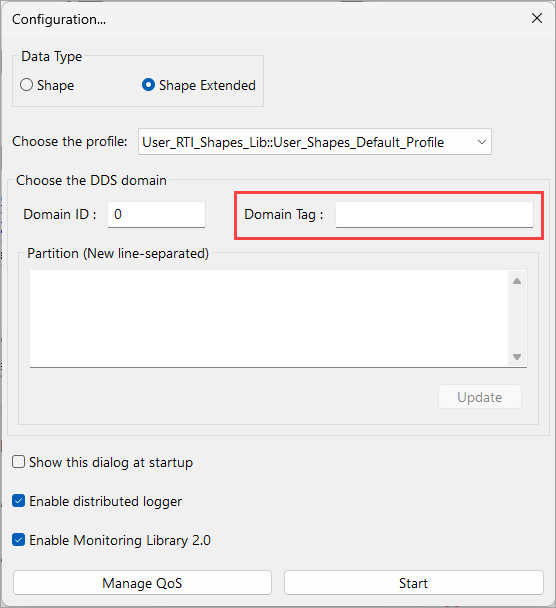
Note: The Domain Tag field is disabled while the application is running, so first click Stop in the Configuration dialog to make a change to the Domain tag.
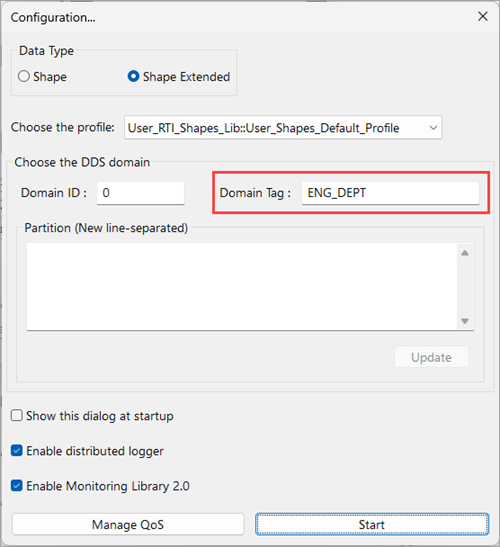
The Domain Tag text field will automatically use the Domain tag from the selected Profile if it has defined the DomainParticipant property, dds.domain_participant.domain_tag.
For example, Shapes Demo will automatically update the Domain Tag field to ENG. DEPT if you load the following profile:
<qos_library name="User_RTI_Shapes_Lib">
<qos_profile name="User_Domain_Tag">
<domain_participant_qos>
<property>
<value>
<element>
<name>dds.domain_participant.domain_tag</name>
<value>ENG. DEPT</value>
</element>
</value>
</property>
</domain_participant_qos>
</qos_profile>
For more information on Domain tags, please see Choosing a Domain Tag in the RTI Connext Core Libraries User's Manual.