23.1.1 Memory Management without Batching
Buffers for storing serialized samples come from a buffer pool. A buffer pool is a set of uniformly-sized buffers that are allocated and are not deallocated until the pool is deleted, typically during entity deletion. Buffers are retrieved from and returned to the buffer pool throughout the lifetime of the pool, and the number of buffers can grow over time if needed. Connext uses buffer pools for most situations where repeated allocations are needed to avoid dynamic memory allocation, since dynamic memory allocation can affect the determinism and performance of an application.
When a DataWriter is created, it will be created with either a single buffer pool or a set of buffer pools. Whether the DataWriter creates a single buffer pool or a buffer pool set is determined by the minimum and maximum serialized sample sizes of a type that the DataWriter is associated with. For any given type, there is a minimum and maximum serialized size that a sample of that type can be. For example, consider the following mutable structure:
@mutable
struct Foo {int32 l_non_optional;
@optional
int32 l_optional;
};
This structure will have a minimum sample serialized size of 12 if l_optional is not set and 20 if l_optional is set. (Mutable members have 4-byte headers when they are serialized, so an int32 member has a 4-byte header plus 4 bytes for the member value itself.)
You can see the minimum and maximum serialized sizes for a type by using the -typeSizes command-line argument in Code Generator (rtiddsgen). (See also 23.1.4 Troubleshooting Writer Queue Memory Management.)
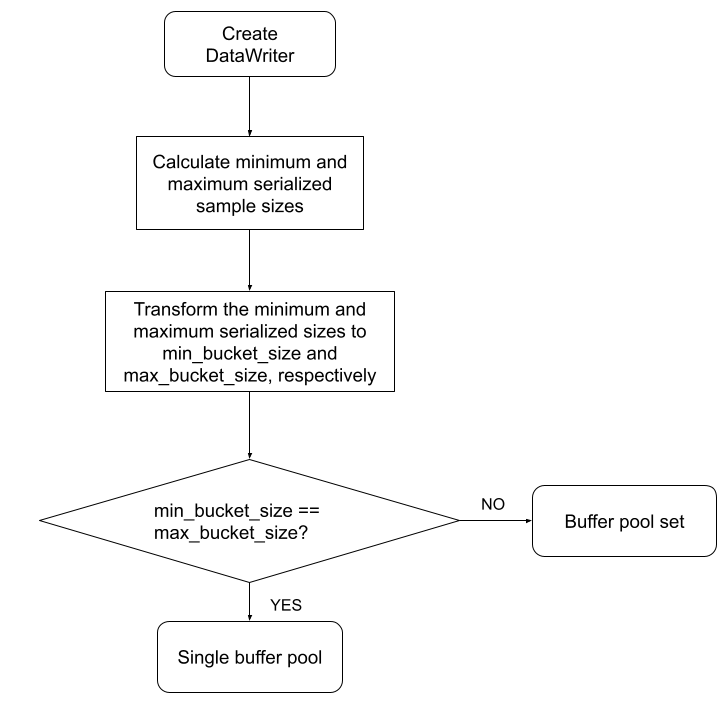
Connext has precomputed a set of buffer sizes ranging from 32 bytes to INT32_MAX bytes. These precomputed sizes are called 'buckets.' When a DataWriter is created, the minimum and maximum serialized sample sizes are calculated1 and mapped to the largest precomputed bucket size that they are smaller than. For example, say that three of the precomputed buckets are 256 bytes, 512 bytes, and 1024 bytes. (The bucket sizes and the formula used to calculate them are subject to change and therefore not documented here explicitly.) A minimum serialized size of 124 bytes falls into the 256-byte bucket. A maximum serialized size of 740 bytes falls into the 1024-byte bucket. If the minimum and maximum serialized sizes fall within the same bucket, then the DataWriter will create a single buffer pool with buffers the size of the maximum serialized sample size. If the minimum and maximum serialized sizes do not fall within the same bucket, then the DataWriter will use a set of buckets (that is, buffer pools) to hold written data of varying sizes.
Figure 23.1: Creating a DataWriter’s Serialized Sample Buffer Pool describes how the DataWriter determines whether to create a single buffer pool or a buffer pool set.
Figure 23.1: Creating a DataWriter’s Serialized Sample Buffer Pool
The reason that there are two different ways in which serialized sample buffers are managed is so that memory usage for samples and write() call performance can be optimized in the two different use cases.
For data types that have very similar minimum and maximum sizes, Connext can allocate buffers to the maximum serialized size and avoid calling get_serialized_sample_size() for each sample. Since samples of this type are similar in size, the performance cost of calculating the serialized size for every sample written, if you were to use multiple buffer pools, would outweigh the memory saved by using multiple buffer pools that are closer to the actual size of each sample.
In the case where the minimum and maximum sizes are not similar, there can be a significant memory savings in allocating buffers that are more closely sized to the samples that are being written. And for unbounded types, there is technically no maximum serialized sample size (see 20.10 Data Sample Serialization Limits), so preallocating buffers to any size is not even possible. The buffer pool set approach allows Connext to allocate pools of buffers that more closely match the size of the samples that are being written, reducing total memory allocation at the expense of calling a function to determine serialized size on each DataWriter::write() call.
23.1.1.1 Single Buffer Pool
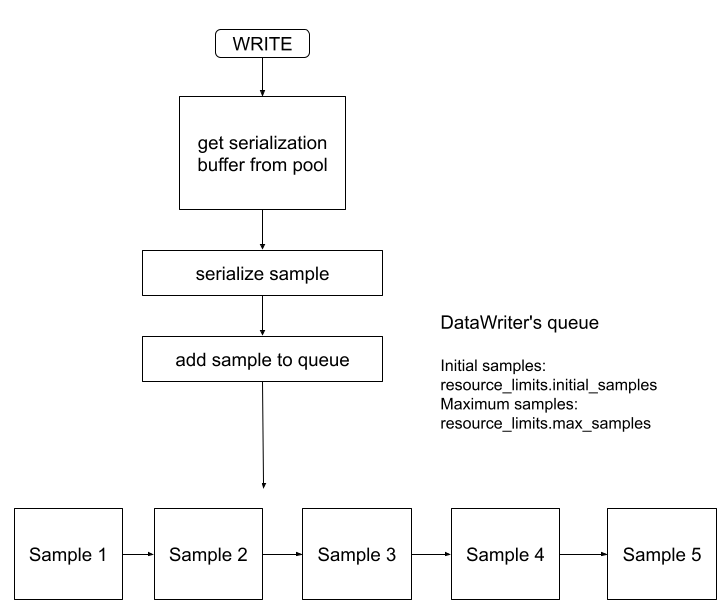
If the minimum and maximum serialized sizes fall within the same bucket, then the DataWriter will create a single buffer pool with buffers the size of the maximum serialized sample size. The initial number of buffers in this pool is configured by the ResourceLimits::initial_samples QoS. The maximum number of buffers that will be allocated by that pool is configured by the ResourceLimits::max_samples QoS. Any sample that the DataWriter writes is guaranteed to fit within one of those buffers.
A write() call from this writer will look like Figure 23.2: Fixed-Size Buffer Pool Writer:
Figure 23.2: Fixed-Size Buffer Pool Writer
23.1.1.2 Buffer Pool Set
If the minimum and maximum serialized sizes do not fall within the same bucket, then the DataWriter will manage a set of buffer pools. These buffer pools and the buffers they contain are created as samples are written; nothing is allocated during DataWriter creation and the ResourceLimits::initial_samples QoS does not apply to the sample serialization buffers2.
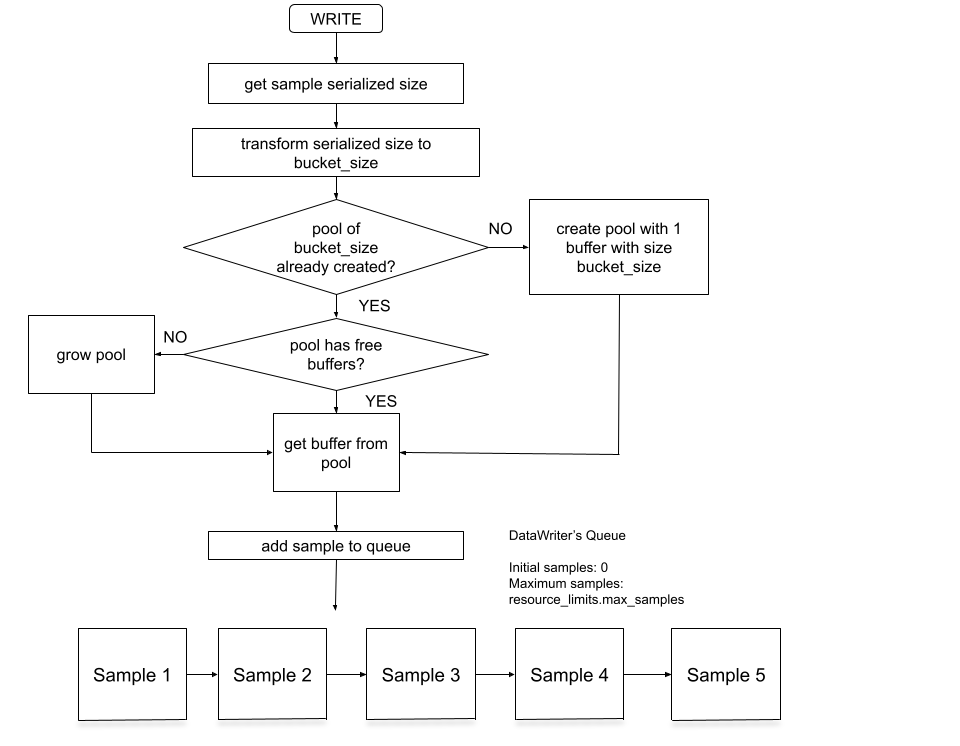
When a sample is written, the serialized size of the sample is calculated and that size is bucketized. If the DataWriter already has a buffer pool for buffers of the corresponding bucketized size, then it takes a buffer out of that buffer pool if there is an available buffer. If there is no available buffer in the pool, then the pool is grown first and then the DataWriter takes a buffer from the pool. If there is no buffer pool with buffers equal to that bucketized size, then a buffer pool is created with a single buffer and that single buffer is used for the sample.
A write() call from this writer will look like Figure 23.3: Dynamically-Sized Buffer Pool Writer:
Figure 23.3: Dynamically-Sized Buffer Pool Writer
23.1.1.3 Comparing Single Buffer Pools and Buffer Pool Sets
DataWriters that use buffer pool sets differ from DataWriters that use a single buffer pool in the following ways:
|
|
Initial memory allocation during DataWriter creation? |
Call to get_serialized_sample_size() during write() |
Maximum number of serialized samples == max_samples |
|---|---|---|---|
|
Single Buffer Pool |
Yes |
No |
Yes |
|
Buffer Pool Set |
No |
Yes |
No |
A DataWriter using a single buffer pool:
- Allocates ResourceLimits::initial_samples serialization buffers.
- Does not need to call get_serialized_sample_size() for every sample, because there is only one size buffer to get.
- Will only ever allocate ResourceLimits::max_samples number of serialization buffers because all buffers come from a single pool.
A DataWriter using a buffer pool set:
- Does not allocate any memory for serialization buffers during DataWriter creation.
- Calls get_serialized_sample_size() for every sample because it needs to calculate which size buffer to get for that sample. This may have an impact on throughput performance and the time it takes to write a sample. If your application has strict performance requirements and additional per-sample processing may impact your application performance, it may be useful to take a look at your type definition and see if you can put exact bounds on sequences or strings or eliminate variably-sized members like optional members and unions.
There are many operations and features that affect the performance of a write call—calculating the serialized size is just one potential place to look in case you are experiencing performance issues. How expensive this operation is depends on the complexity of the type.
- May allocate more than ResourceLimits::max_samples number of serialization buffers. For example, if a DataWriter sets ResourceLimits::max_samples to 10 and writes 10 samples with size 64 bytes, there will be 10 buffers allocated with size 64 bytes. If the DataWriter then writes 10 samples with size 1024 bytes, there will also be 10 buffers with size 1024 bytes for a total of 20 buffers allocated. The max_samples QoS still configures how many samples can be outstanding in the DataWriter's queue, so if the DataWriter was able to write the 10 samples of 1024 bytes, it's because they replaced the first 10 samples of size 64 bytes that were written in the DataWriter's queue.