4.5.1 Domain Library
A domain library provides a way to organize a set of domains that belong to the same system. A domain represents a data space where data can be shared by means of reading and writing the same Topics, each Topic having an associated data-type. Therefore, in a <domain> tag you can specify Topics and their data types.
Figure 4.3: Domain Library Tag
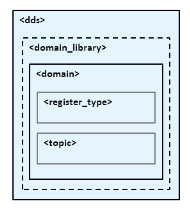
Figure 4.3: Domain Library Tag, Table 4.3 Domain Library Tags, and Table 4.4 Domain Tags describe what tags can be in a <domain_library>.
- The <register_type> tag specifies a type definition that will be registered in the DomainParticipants whenever they specify a Topic associated with that data type.
- The <topic> tag specifies a Topic by associating it with a <register_type> that contains the type information.
In a domain, you can also specify the domain ID to which the DomainParticipant associated with this domain will be bound.
|
Tags within <domain_library> |
Description |
Number of Tags allowed |
|
|
<domain> |
Specifies a domain. Attributes: |
1 or more |
|
|
name |
Domain name |
||
|
domain_id (optional) |
Domain ID (default id=0) |
||
|
base_name (optional) |
Base domain name. Specifies another domain from which properties will be inherited. |
||
|
Tags within <domain> |
Description |
Number of Tags allowed |
|
|
<register_type> |
Specifies the kind of data type to be registered. These are as follows: dynamicData Data type is defined within the <types> tag. userGenerated Data is defined by the type support code created by the code generator, rtiddsgen. Attributes: |
1 or more |
|
|
name |
Name used to refer to this registered type within the XML file. This is also the name under which the type is registered with the DomainParticipants unless overridden by the <registered_name> tag. |
||
|
type_ref (optional) |
Reference (fully qualified name) to a defined type within <types>. Indicates to use DynamicData if a type is not registered at participant creation time. |
||
|
<topic> |
Specifies a topic associating its data-type and optionally QoS. Attributes: |
1 or more |
|
|
name |
Name of the topic if no <registered_name> is specified. |
||
|
register_type_ref |
Name of a registered type support or reference (name) to a register_type within this domain with which this topic is associated. A built-in registered type can be specified by using one of these special values:
|
||
Note that a domain may inherit from another “base domain” definition by using the base_name attribute. A domain that declares a “base domain” might still override some of the properties in the base domain. Overriding is done simply by including elements in the derived domain with the same name as in the base domain.
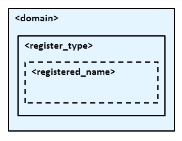
The <register_type> tag, described in Figure 4.4: Register Type Tag and Table 4.5 Register Type Tag, determines how a type is registered by specifying the type definition and the name with which it is registered.
|
Tags within <register_type> |
Description |
Number of tags allowed |
|
<registered_name> |
Name with which the type is registered. |
0 or 1 |
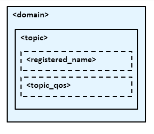
The <topic> tag, described in Figure 4.5: Topic Tag and Table 4.6 Topic Tag, describes a Topic by specifying the name and type of the Topic. It may also contain the QoS configuration for that Topic.
|
Tags within <topic > |
Description |
Number of tags allowed |
|
<registered_name> |
Name of the Topic. |
0 or 1 |
|
<topic_qos> |
Topic QoS configuration. |
0 or 1 |
Some elements may refer to already specified types and QoS tags. The definitions of these referenced tags may appear either in the same configuration file or in a different one—as long as it is one of the ones loaded by Connext as described in 4.2 Loading XML Configuration Files.
If a QoS is not specified for an Entity, then the QoS will be set to a default value that is either the default configured in the XML files, or if such default does not exist, then the Connext QoS defaults. Please see Configuring QoS with XML, in the RTI Connext Core Libraries User's Manual for more details.
For example:
<!-- types -->
<types>
	<struct name="MyType">
		<member name="message" type="string"/>
		<member name="count" type="int32"/>
	</struct>
</types>

<!-- Domain Library -->
<domain_library name="MyDomainLibrary" >
	<domain name="MyDomain" domain_id="10">
		<register_type name="MyRegisteredType"
		               type_ref="MyType"/>
		<topic name="MyTopic" register_type_ref="MyRegisteredType">
			<topic_qos base_name="qosLibrary::DefaultProfile"/>
		</topic>
	</domain>
</domain_library>
The above configuration defines a domain with name “MyDomain” and domain_id “10” containing a Topic called “MyTopic” with type “MyType” registered with the name “MyRegisteredType”:
- <register_type> defines the registration of a dynamic data type with name “MyRegisteredType” and definition “MyType”–defined in the same file.
- <topic> with name “MyTopic” and whose corresponding type is the one defined above with the name “MyRegisteredType” found within the same configuration. The Topic QoS configuration is the one defined by the profile “qosLibrary::DefaultProfile”, which is defined in a different file.
Note that the DomainParticipant created from a configuration profile bound to this domain will be created with domain_id=10, unless the domain_id is overridden in the participant configuration.