
Air Traffic Control#
Introduction#
The Air Traffic Control blueprint simulates a national air-traffic control system using RTI Connext. Aircraft fly between airports while control towers, terminal radar approach control (TRACON) facilities, and en-route centers coordinate traffic and transfer control of aircraft. Flight plan and weather services support the simulation, and a web dashboard displays the system in real time.
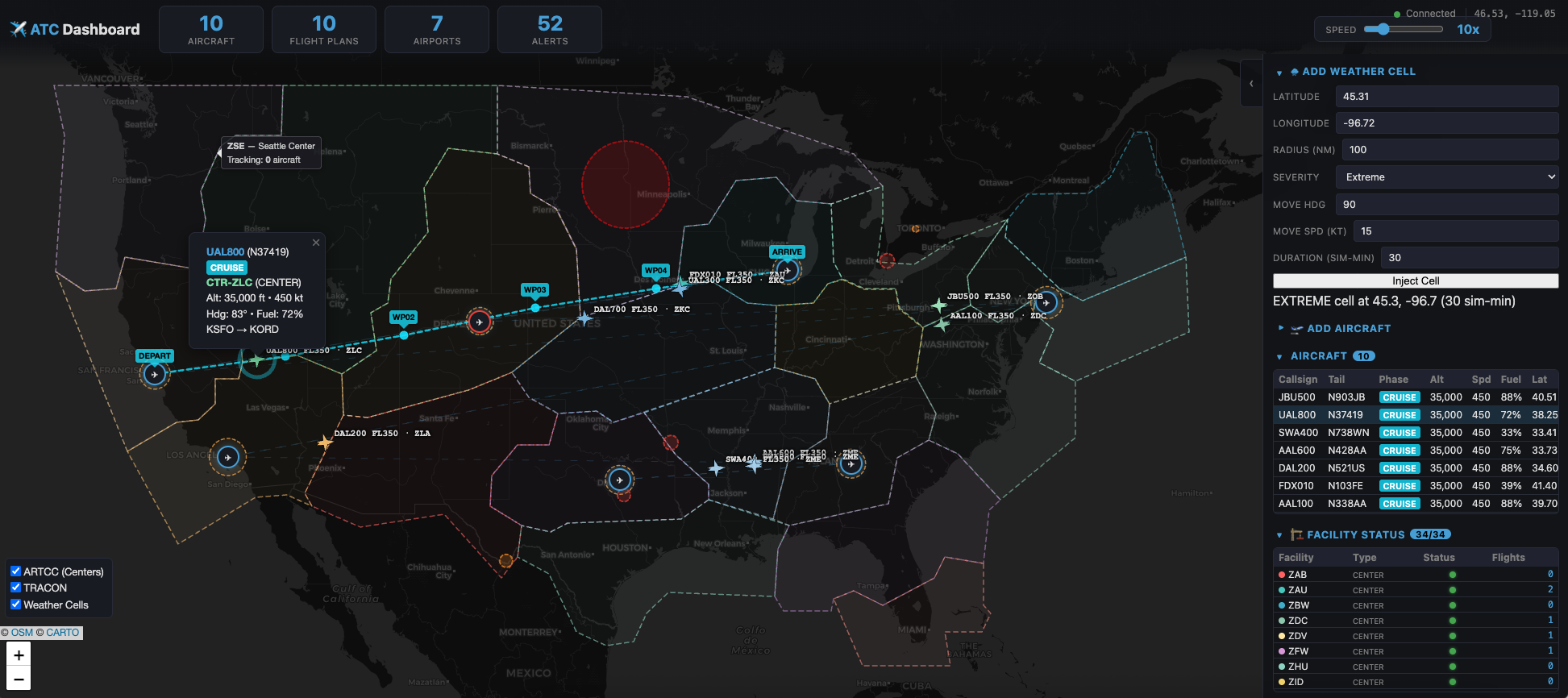
The dashboard displays aircraft, airspace regions, weather cells, and facility status.#
Each component runs as an independent application. Together, they demonstrate how publish-subscribe, request-reply, content filtering, discovery, and Quality of Service (QoS) work across a shared data space.
Objectives#
Air-traffic coordination brings several distributed-system requirements together: frequent position updates, reliable control exchanges, a consistent view of shared state, and applications that can join or restart while the system is running. This blueprint shows how to address those requirements with Connext:
Distribute live updates: Each aircraft publishes its position once, and interested facilities and the dashboard subscribe to those updates.
Select relevant data: Content filters let facilities receive data for their airspace or airport, reducing unnecessary network traffic.
Coordinate operations: Controllers and aircraft exchange instructions, acknowledgments, and handoffs through publish-subscribe. Flight plan filing and gate assignment use request-reply.
Handle changing availability: Automatic discovery connects applications, and transient-local durability supplies current state to late joiners while the publishing applications remain available.
Configure data delivery: QoS policies express reliability, freshness, deadlines, and liveliness requirements for different kinds of data.
Prerequisites#
Python 3.10 or later.
A Connext license file. See Python installation for the pip setup and instructions to obtain an evaluation license. You do not need a full Connext installation to run this blueprint.
A CARTO basemap API key for the dashboard. Request your own key at CARTO Basemaps and authorize
localhost. The dashboard and default full-demo launcher require this key; individual DDS applications can run without it.
Run the simulation#
The Air Traffic Control blueprint repository contains the application code and complete setup and run instructions. Continue there to try the simulation:
Explore the architecture. Start with the repository overview for the components and data flows, then read the Connext DDS design for the data model, interaction patterns, and QoS choices.
Set up or build the demo. Use the Quick Start to clone the repository and install the Python dependencies. The Python applications do not require a separate compilation step. For a container deployment, follow the Docker instructions to build the image and launch the demo.
Run and explore. Launch the simulation and open its real-time dashboard as described in the Quick Start. The Python README explains how to stop the demo and run individual applications. Use the scenario reference to explore airports, aircraft schedules, weather, and simulation time.
