
RTI Routing Service
User’s Manual
Version 5.0
RTI Routing Service
User’s Manual
Version 5.0

©
All rights reserved.
Printed in U.S.A. First printing.
August 2012.
Trademarks
Copy and Use Restrictions
No part of this publication may be reproduced, stored in a retrieval system, or transmitted in any form (including electronic, mechanical, photocopy, and facsimile) without the prior written permission of Real- Time Innovations, Inc. The software described in this document is furnished under and subject to the RTI software license agreement. The software may be used or copied only under the terms of the license agreement.
Technical Support
232 E. Java Drive
Sunnyvale, CA 94089
Phone: |
(408) |
Email: |
support@rti.com |
Website: |
|
||||
|
||||
|
||||
|
||||
|
||||
|
||||
|
||||
|
|
|||
|
|
|||
|
|
|||
|
|
|||
|
|
|||
|
|
|||
|
|
|||
|
|
|||
|
||||
|
||||
|
||||
|
|
|||
|
||||
|
||||
|
||||
|
||||
|
||||
|
||||
|
||||
|
|
|||
|
||||
|
||||
iii
|
||||
|
|
|||
|
|
|||
|
|
|||
|
|
|||
|
|
|||
|
|
|||
|
|
|||
|
|
|||
|
|
|||
|
|
|||
|
|
|||
|
|
|||
|
||||
|
||||
|
||||
|
||||
|
|
|||
|
|
|||
|
|
|||
|
|
|||
|
|
|||
|
||||
|
|
|||
|
|
|||
|
|
|||
|
|
|||
|
|
|||
|
|
|||
|
||||
|
||||
|
|
|||
|
|
|||
|
|
|||
|
|
|||
|
||||
|
|
|||
|
|
Setting Up the TCP Transport Properties with the PropertyQoSPolicy.............................. |
||
|
|
|||
|
||||
|
||||
|
||||
|
|
|||
|
|
|||
|
|
|||
iv
v
Chapter 1 Welcome to RTI Routing Service
Welcome to RTI® Routing Service, an out-
Connext systems using
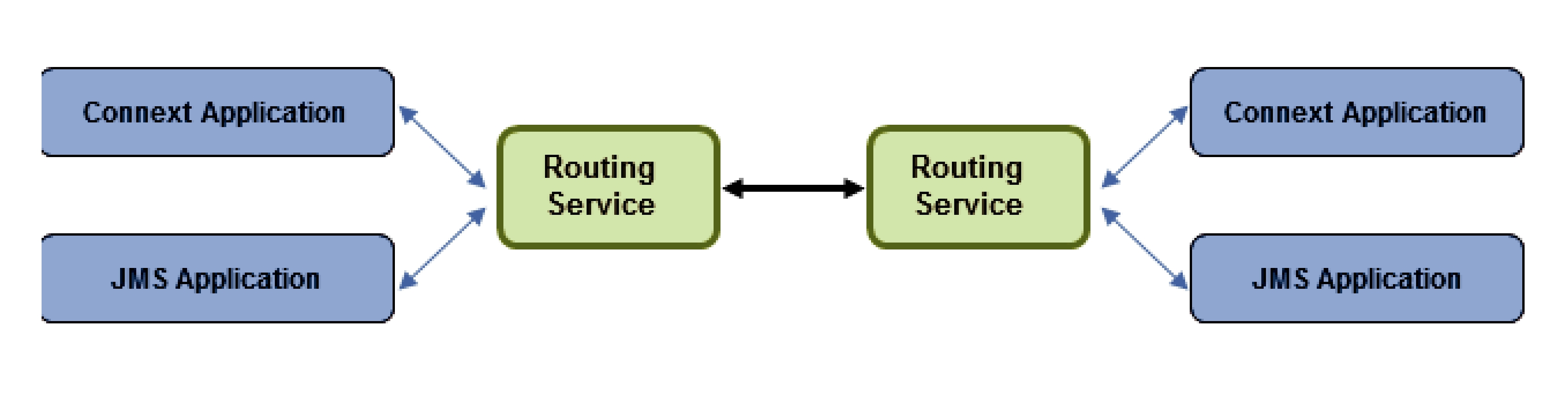
Traditionally, Connext applications can only communicate with applications in the same domain. With Routing Service, you can send and receive data across domains. You can even transform and filter the data along the way! Not only can you change the actual data values, you can change the data’s type. So the sending and receiving applications don’t even need to use the same data structure. You can also control which data is sent by using allow and deny lists.
Simply set up Routing Service to pass data from one domain to another and specify any desired data filtering and transformations. No changes are required in the Connext applications.
Key benefits of Routing Service:
❏It can significantly reduce the time and effort spent integrating and scaling Connext applications across Wide Area Networks and
Many systems today already rely on Connext to distribute their information across a Local Area Network (LAN). However, more and more of these systems are being integrated in Wide Area Networks (WANs). With Routing Service, you can scale Connext
make it available throughout a
❏With Routing Service, you can build modular systems out of existing systems. Data can be contained in private domains within subsystems and you can designate that only certain “global topics” can be seen across domains. The same mechanism controls the scope of discovery. Both
❏Routing Service provides secure deployment across multiple sites. You can partition networks and protect them with firewalls and NATS and precisely control the flow of data between the network segments.
❏It allows you to manage the evolution of your data model at the subsystem level. You can use Routing Service to transform data on the fly, changing topic names, type definitions, QoS, etc., seamlessly bridging different generations of Connext topic definitions.
❏Routing Service provides features for development, integration and testing. Multiple sites can each locally test and integrate their core application, expose selected topics of data, and accept data from remote sites to test integration connectivity, topic compatibility and specific
❏It connects remotely to live, deployed systems so you can perform live data analytics, fault condition analysis, and data verification.
❏RTI Routing Service Adapter SDK allows you to quickly build and deploy bridges to integrate Connext and
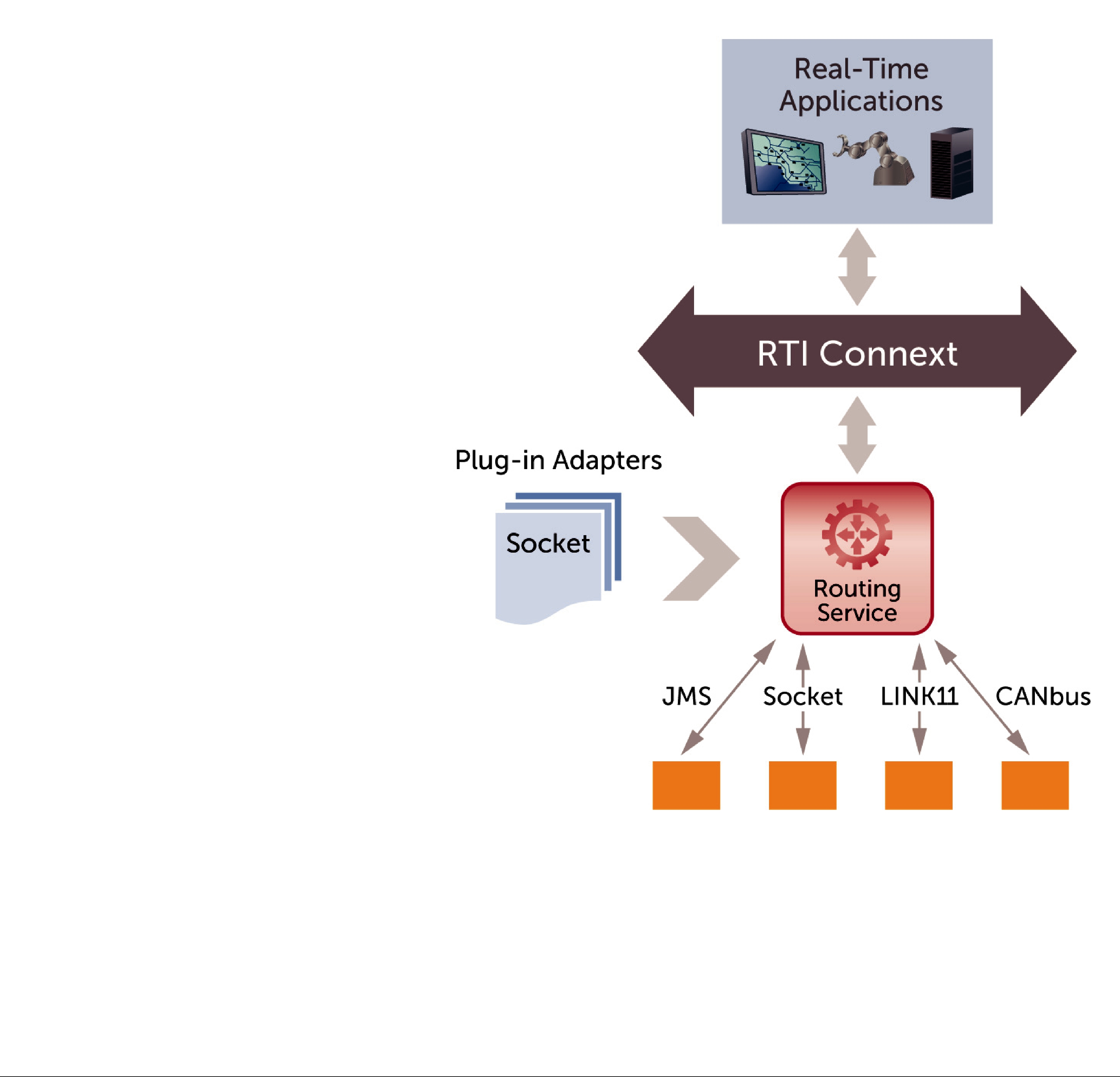
RTI Routing Service Adapter SDK offers an
Quickly build and deploy bridges between natively incompatible protocols and technologies using Connext
1.1Available Documentation
Routing Service documentation includes:
❏Getting Started Guide
❏Release Notes
❏User’s Manual
If the optional RTI Routing Service Adapter SDK is installed, you will also have the following documents:
❏RTI Routing Service Adapter SDK Installation Guide
❏RTI Routing Service Adapter SDK Release Notes

Chapter 2 Configuring Routing Service
This document describes how to configure Routing Service. To see installation instructions, or to walk through some simple examples, please see the Getting Started Guide.
When you start Routing Service, you can specify a configuration file in XML format (it is not required). In that file, you can set properties that control the behavior of the service. This chapter describes how to write a configuration file.
This chapter describes:
❏How to Load the XML Configuration (Section 2.2)
❏XML Syntax and Validation (Section 2.3)
❏XML Tags for Configuring Routing Service (Section 2.4)
❏Enabling and Disabling Routing Service Entities (Section 2.5)
❏Enabling RTI Distributed Logger in Routing Service (Section 2.6)
❏Support for Extensible Types (Section 2.7)
2.1Terms to Know
Before learning how to configure Routing Service, you should become familiar with a few key terms and concepts.
❏A routing service entity refers to an execution of Routing Service.
❏A domain route defines a
❏A session defines a
❏A route defines a
❏An auto route defines a set of potential routes that can be instantiated based on deny/ allow filters on the stream name and registered type name.

❏A transformation is a pluggable component that changes data from the “input” stream A to data in the “output” stream B.
❏An adapter is a pluggable component that allows Routing Service to consume and produce data for different data domains. By default, Routing Service is distributed with a
2.2How to Load the XML Configuration
Routing Service loads its XML configuration from multiple locations. This section presents the various approaches, listed in load order.
The first three locations only contain QoS Profiles and are inherited from Connext (see Chapter
15in the RTI Core Libraries and Utilities User's Manual).1
❏$NDDSHOME/resource/qos_profiles_5.0.x2/xml/NDDS_QOS_PROFILES.xml
This file contains the Connext default QoS values; it is loaded automatically if it exists.
(First to be loaded.)
❏File in NDDS_QOS_PROFILES
The files (or XML strings) separated by semicolons referenced in this environment vari- able are loaded automatically.
❏<working directory>/USER_QOS_PROFILES.xml
This file is loaded automatically if it exists.
The next locations are specific to Routing Service.
❏<Routing Service executable location>/../../resource/xml/ RTI_ROUTING_SERVICE.xml
This file contains the default Routing Service configuration; it is loaded if it exists. RTI_ROUTING_SERVICE.xml defines a service that automatically routes all types and topics between domains 0 and 1.
❏<working directory>/USER_ROUTING_SERVICE.xml
This file is loaded automatically if it exists.
❏File specified using the command line parameter
The
❏File specified using the remote command ‘load’
The load command (see Section 5.2.7) allows loading an XML file remotely. The file loaded using this command replaces to the file loaded using the
You may use a combination of the above approaches.
Figure 2.1 shows an example configuration file. You will learn the meaning of each line as you read the rest of this chapter.
1.See <Connext installation directory>/ndds.<version>/doc/pdf/RTI_CoreLibrariesAndUtilities_UsersManual.pdf.
2.x stands for the version number of the current release.

Figure 2.1 Example XML Configuration File
<?xml version="1.0"?> <dds>
<routing_service name="TopicBridgeExample" group_name="MyGroup"> <domain_route name="DomainRoute">
<participant_1> <domain_id>0</domain_id>
</participant_1>
<participant_2> <domain_id>1</domain_id>
</participant_2>
<session name="Session">
<topic_route name="SquaresToCircles"> <input participant="1">
<registered_type_name>ShapeType</registered_type_name> <topic_name>Square</topic_name>
</input>
<output> <registered_type_name>ShapeType</registered_type_name> <topic_name>Circle</topic_name>
</output> </topic_route>
</session> </domain_route>
</routing_service> </dds>
This file configures a simple bridge from Connext domain 0 to Connext domain 1 and changes the data’s topic from Square to Circle. Both topics use the same data type (ShapeType). You will find this example in <Routing Service installation directory>/example/shapes/topic_bridge.xml. Additional examples are in the same directory.
2.3XML Syntax and Validation
The XML configuration file must follow these syntax rules:
❏The syntax is XML; the character encoding is
❏Opening tags are enclosed in <>; closing tags are enclosed in </>.
❏A tag value is a
For example, " <tag> value </tag>" is the same as "<tag>value</tag>".
❏All values are
❏Comments are enclosed as follows:
❏The root tag of the configuration file must be <dds> and end with </dds>.
1.Leading and trailing spaces in enumeration fields will not be considered valid if you use the distributed XSD doc- ument to do validation at
Routing Service provides DTD and XSD files that describe the format of the XML content. We recommend including a reference to one of these documents in the XML file that contains the routine service’s
The DTD and XSD definitions of the XML elements are in <Routing Service installation directory>/resource/schema/rti_routing_service.dtd and <Routing Service installation directory>/resource/schema/rti_routing_service.xsd, respectively.
To include a reference to the XSD document in your XML file, use the attribute xsi:noNamespaceSchemaLocation in the <dds> tag. For example:
<?xml version="1.0"
<dds
"<Routing Service install directory>/resource/schema/rti_routing_service.xsd">
...
</dds>
To include a reference to the DTD document in your XML file, use the <!DOCTYPE> tag.
For example:
<?xml version="1.0"
<!DOCTYPE dds SYSTEM "<Routing Service install directory> /resource/schema/rti_routing_service.dtd">
<dds>
...
</dds>
We recommend including a reference to the XSD file in the XML documents; this provides stricter validation and better
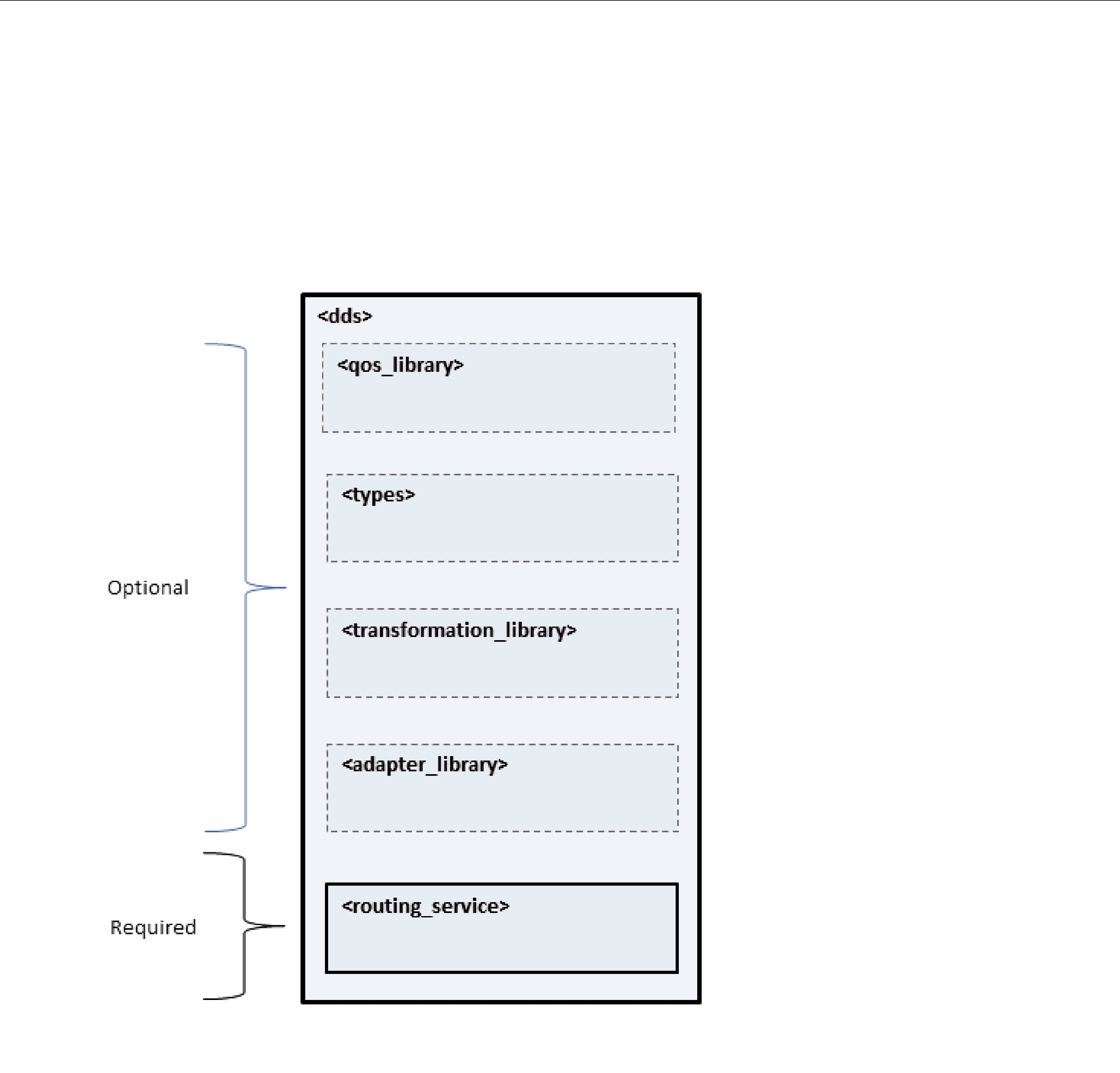
2.4XML Tags for Configuring Routing Service
This section describes the XML tags you can use in a Routing Service configuration file. The following diagram and Table 2.1 describe the
See RTI Core Libraries and Utilities User’s Manual (Ch. 15) (see note below)
Note: The RTI Core Libraries and Utilities User’s Manual is located in <Connext installation directory>/ ndds.<version>/doc/pdf/RTI_CoreLibrariesAndUtilities_UsersManual.pdf.
Table 2.1
|
|
Number |
|
Tags within <dds> |
Description |
of Tags |
|
|
|
Allowed |
|
|
|
|
|
|
Specifies a library of adapter plugins. |
|
|
<adapter_library> |
See Adapters (Section 2.4.8) and Chapter 8: Extending Routing |
0 or more |
|
|
|
||
|
|
|
|
|
Specifies a QoS library and profiles. |
|
|
<qos_library> |
The contents of this tag are specified in the same manner as for a |
0 or more |
|
|
Connext QoS profile |
|
|
|
and Utilities User’s Manual.1 |
|
|
<routing_service> |
Specifies a Routing Service configuration. See Routing Service |
1 or more |
|
(required) |
|||
|
|||
|
|
|
Table 2.1
|
|
Number |
|
Tags within <dds> |
Description |
of Tags |
|
|
|
Allowed |
|
|
|
|
|
|
Specifies a library of transformation plugins. |
|
|
<transformation_library> |
0 or more |
||
|
|
||
|
|
|
|
<types> |
Defines types that can be used by the routing service. |
0 or 1 |
|
See Defining Types in the Configuration File (Section 2.4.6.2). |
|||
|
|
||
|
|
|
1.See <Connext installation directory>/ndds.<version>/doc/pdf/RTI_CoreLibrariesAndUtilities_UsersManual.pdf.
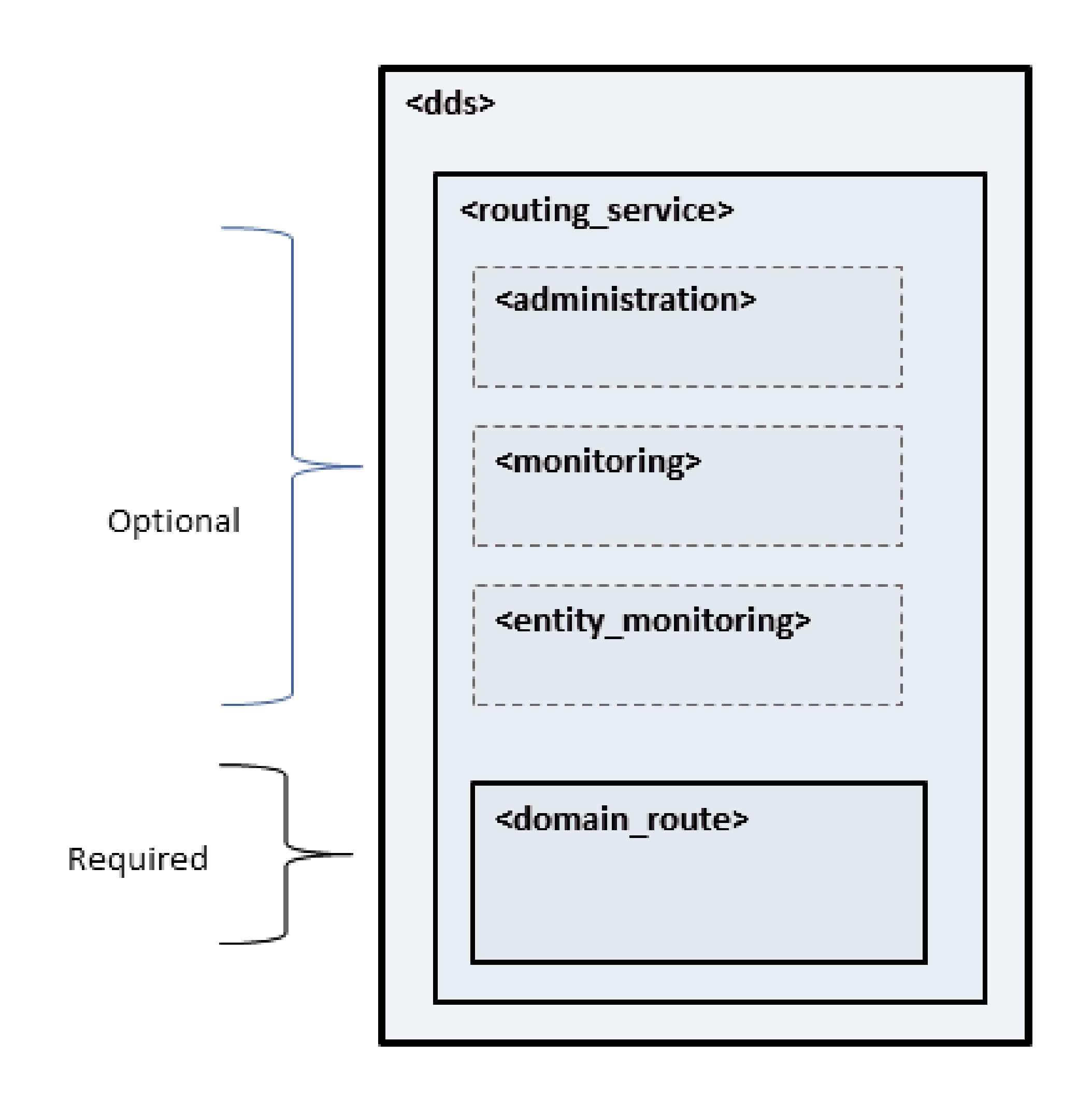
2.4.1Routing Service
A configuration file must have at least one <routing_service> tag; this tag is used to configure an execution of Routing Service. A configuration file may contain multiple <routing_service> tags.
When you start Routing Service, you can specify which <routing_service> tag to use to configure the service using the
For example:
<dds>
<routing_service name="Router1" group_name=”Group1”>
...
</routing_service>
<routing_service name="Router2" group_name=”Group1”>
...
</routing_service>
</dds>
Starting Routing Service with the following command will use the <routing_service> tag with the name Router1:
rtiroutingservice
Because a configuration file may contain multiple <routing_service> tags, one file can be used to configure multiple Routing Service executions.
A routing service may belong to a group of several routing services identified by a common group_name. This common name can be used to implement a specific policy when the communication happens between routing services of the same group.
For example, in the
If the <routing_service> tag does not have a group_name attribute, Routing Service will use the
|
following |
name: |
RTI_RoutingService_<Host |
Name>_<Process |
ID>, |
such |
as |
|
RTI_RoutingService_myhost_20024. |
|
|
|
|
||
|
describes |
the tags allowed within a <routing_service> tag. Notice that the |
|||||
|
<domain_route> tag is required. |
|
|
|
|
||
Table 2.2 Routing Service Tags |
|
|
|
|
|
||
|
|
|
|
|
|
|
|
|
Tags within |
|
|
|
Number |
||
|
Description |
|
of Tags |
||||
|
<routing_service> |
|
|||||
|
|
|
|
Allowed |
|||
|
|
|
|
|
|
||
|
|
|
|
|
|
||
|
|
|
|
|
|
||
|
|
|
Enables and configures remote administration. See Administration |
|
|
||
|
<administration> |
(Section 2.4.3) and Chapter 5: Administering Routing Service from a |
0 or 1 |
|
|||
|
|
|
|
|
|
|
|
|
|
|
|
|
|
||
|
|
|
Contains a <documentation> tag that can be used to provide a routing |
|
|
||
|
<annotation> |
service description. This description will show up when you run |
0 or 1 |
|
|||
|
|
|
Routing Service without the |
|
|
|
|
|
|
|
|
|
|
|
|
|
<domain_route> |
Defines a mapping between two data domains. See Section 2.4.2. |
1 or |
more |
|||
|
(required) |
||||||
|
|
|
|
|
|
||
|
|
|
|
|
|||
|
<entity_monitoring> |
Enables and configures remote monitoring for the routing_service |
0 or 1 |
|
|||
|
|
|
entity. |
|
|
|
|

Table 2.2 Routing Service Tags
Tags within |
|
Number |
|
Description |
of Tags |
||
<routing_service> |
|||
|
Allowed |
||
|
|
|
Configures the Java JVM used to load and run Java adapters such as |
|
|
the JMS Adapter. For example: |
|
|
<jvm> |
|
|
<class_path> |
|
|
<element>SocketAdapter.jar</element> |
|
|
</class_path> |
|
|
<options> |
|
|
|
|
|
|
|
<jvm> |
</options> |
0 or 1 |
|
</jvm> |
|
|
The class path for the Java adapters can be set using either the |
|
|
<class_path> tag or by setting the CLASSPATH environment variable. |
|
|
Routing Service will always add <Routing Service executable loca- |
|
|
tion>/../../class/rtiroutingservicesdk.jar and <Routing Service execut- |
|
|
able location>/../../class/dds.jar at the end of the user defined class |
|
|
path. |
|
|
You can use the <options> tag to specify options for the JVM, such as |
|
|
the initial and maximum Java heap sizes. |
|
|
|
|
|
Enables and configures general remote monitoring. General |
|
<monitoring> |
monitoring settings are applicable to all the Routing Service entities |
0 or 1 |
|
unless they are explicitly overridden. See Monitoring (Section 2.4.4). |
|
2.4.2Domain Route
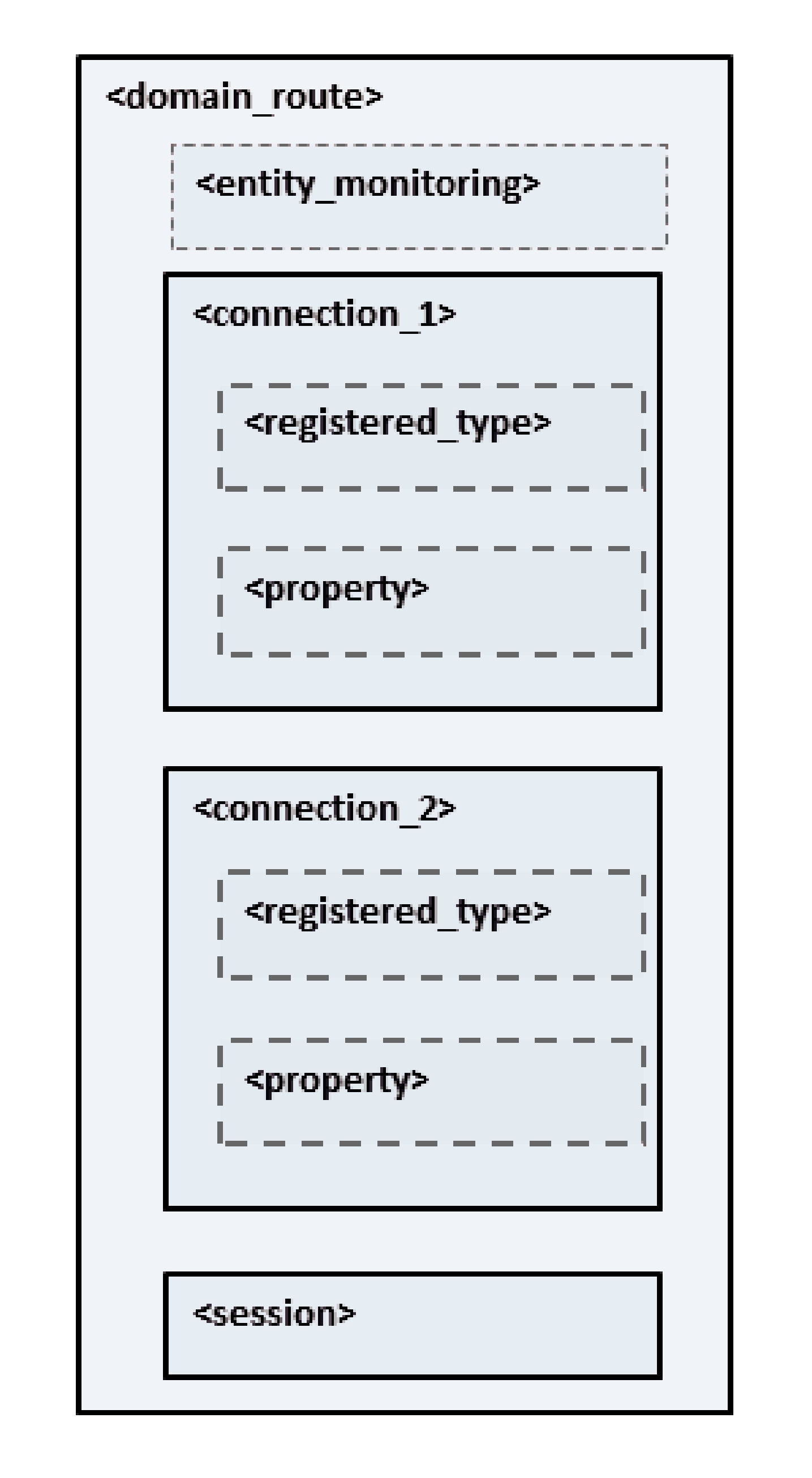
A domain route defines a mapping between two data domains. Data available in either of these data domains can be routed to the other one. For example, a domain route could define a mapping between two different Connext domains or between a Connext domain and a JMS provider's network. How this data is actually read and written is defined in specific routes.
A domain route creates two connections, known as connection_1 and connection_2. Each connection belongs to one of the two data domains.
For example:
<dds>
<routing_service name="Router1" group_name="Group1">
<domain_route name="DomainRoute1"> <connection_1 plugin_name=”...”>
. . .
</connection_1>
<connection_2 plugin_name=”...”>
...
</connection_2>
<session name="Session">
...
</session> </domain_route>
...
</routing_service> </dds>
The connection tags require the specification of the attribute plugin_name, which will be used to associate a connection with an adapter plugin defined within <adapter_library> (see Section 2.1).
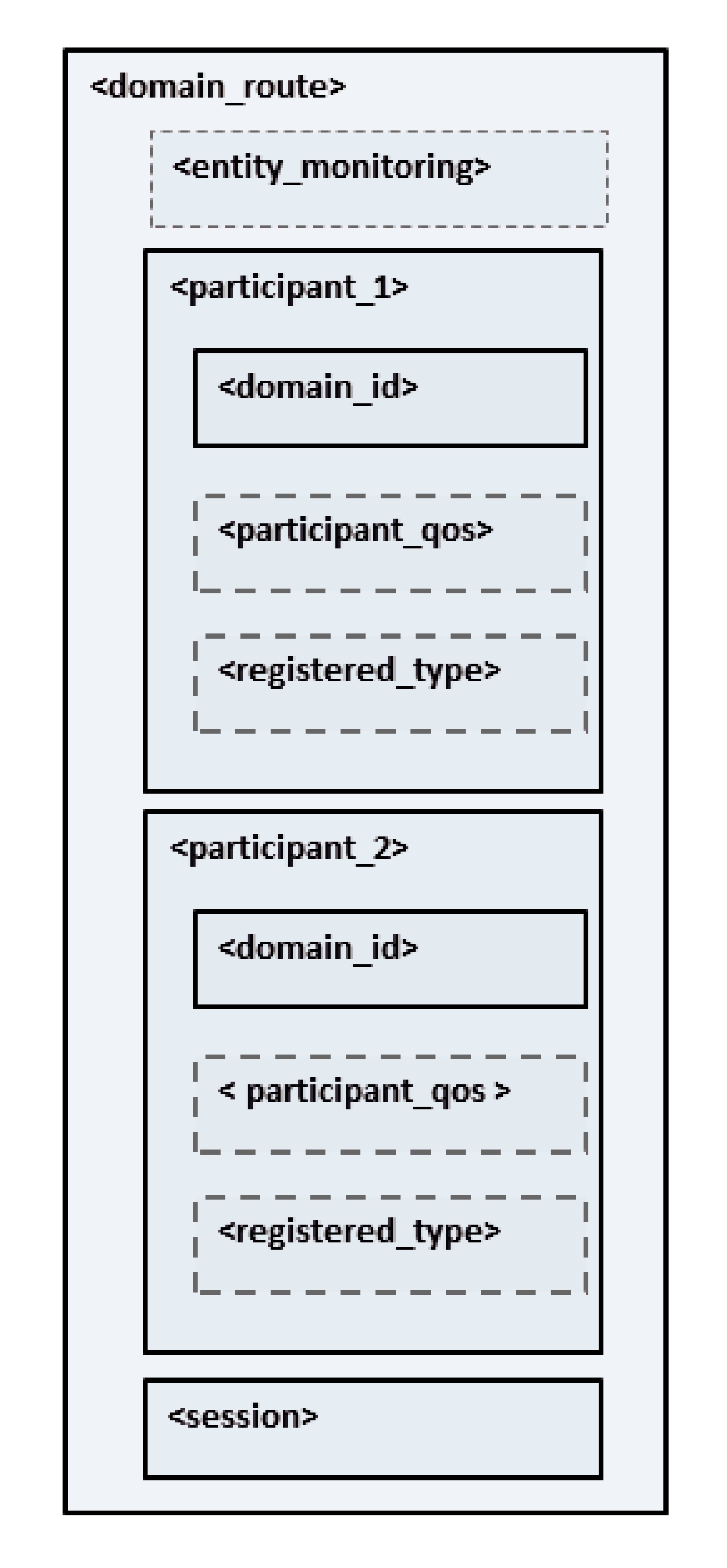
For Connext domains, the connections are specified using the tags participant_1 and participant_2. Each tag has one associated DomainParticipant.
The following example routes information between two Connext domains.
<dds>
<routing_service name="Router1" group_name="Group1">
<domain_route name="DomainRoute1"> <participant_1>
<domain_id>54</domain_id>
...
</participant_1>
<participant_2> <domain_id>55</domain_id>
...
</participant_2>
<session name="Session">
...
</session> </domain_route>
...
</routing_service> </dds>
Configurations mixing connections and participants are allowed to provide communication between Connext domains and other data domains.
The following example routes information between a JMS provider network and a Connext domain.
<dds>
<routing_service name="Router1" group_name="Group1"> <domain_route name="DomainRoute1">
<connection_1 plugin_name=”adapter_library::jms”>
...
</connection_1>
<participant_2> <domain_id>55</domain_id>
...
</participant_2>
<session name="Session">
...
</session> </domain_route>
...
</routing_service> </dds>
Table 2.3 lists the tags allowed within a <domain_route> tag. Notice that most of these tags are required.
Table 2.4 lists the tags allowed within <connection_1> and <connection_2> tags.
Table 2.5 lists the tags allowed within <participant_1> and <participant_2> tags. Notice that the <domain_id> tag is required.
Table 2.3 Domain Route Tags
|
Tags within |
|
|
|
Number of |
|
|
Description |
|
Tags |
|
|
<domain_route> |
|
|
||
|
|
|
|
Allowed |
|
|
|
|
|
|
|
|
|
|
|
|
|
|
|
|
|
|
|
|
<connection_1> |
|
Applicable to |
|
1 (required) |
|
|
Configures the first connection. See Table 2.4. |
|
||
|
|
|
|
|
|
|
|
|
|
|
|
|
<connection_2> |
|
Applicable to |
|
1 (required) |
|
|
Configures the second connection. See Table 2.4. |
|
||
|
|
|
|
|
|
|
|
|
|
|
|
|
<entity_monitoring> |
|
Enables and configures remote monitoring for the domain route. See |
|
0 or 1 |
|
|
|
|
|
|
|
<participant_1> |
|
Only applicable to Connext domains. |
|
1 (required) |
|
|
Configures the first participant. See Table 2.5. |
|
||
|
|
|
|
|
|
|
|
|
|
|
|
|
<participant_2> |
|
Only applicable to Connext domains. |
|
1 (required) |
|
|
Configures the second participant. See Table 2.5. |
|
||
|
|
|
|
|
|
|
|
|
|
|
|
|
<session> |
|
Defines a |
|
1 or more |
|
|
to specified routes. See Session (Section 2.4.5). |
|
(required) |
|
|
|
|
|
||
|
|
|
|
|
|
Table 2.4 Connection Tags |
|
|
|
|
|
|
|
|
|
|
|
|
Tags within |
|
|
|
Number |
|
|
Description |
|
of Tags |
|
|
<connection_1/2> |
|
|
||
|
|
|
|
Allowed |
|
|
|
|
|
|
|
|
|
|
|
|
|
|
|
Registers a type name and associates it with a type representation. |
|
|
|
|
<registered_type> |
When you define a type in the configuration file (with the <types> tag), |
|
0 or more |
|
|
|
you have to register the type in order to use it in routes. See Route |
|
|
|
|
|
|
|
||
|
|
|
|
|
|
|
|
Sequence of name/value(string) pairs that can be used to configure the |
|
|
|
|
|
parameters of the connection. For example: |
|
|
|
|
|
|
<property> |
|
|
|
|
|
<value> |
|
|
|
<property> |
|
<element> |
|
0 or 1 |
|
|
<name>jms.connection.username</name> |
|
||
|
|
|
|
|
|
|
|
|
<value>myusername</value> |
|
|
|
|
|
</element> |
|
|
|
|
|
</value> |
|
|
|
|
|
</property> |
|
|
|
|
|
|
|
|
Table 2.5 Participant Tags
Tags within |
|
|
Number of |
Description |
|
Tags |
|
<participant_1/2> |
|
||
|
|
Allowed |
|
|
|
|
|
|
|
|
|
<domain_id> |
Sets the domain ID associated with the participant. |
|
1 (required) |
|
|
|
|
|
Configures certain aspects of how Connext allocates internal memory. |
|
|
|
The configuration is per domain_route's participant and therefore |
|
|
|
affects all the contained Connext readers and Connext writers. For |
|
|
|
example: |
|
|
|
<domain_route name="test"> |
|
|
|
<participant_1> |
|
|
|
<domain_id>0</domain_id> |
|
|
|
... |
|
|
|
<memory_management> |
|
|
|
<sample_buffer_min_size>X</sample_buffer_min_size> |
|
|
|
<sample_buffer_trim_to_size> |
|
|
|
true |
|
|
|
</sample_buffer_trim_to_size> |
|
|
|
</memory_management> |
|
|
|
</participant_1> |
|
|
<memory_ |
... |
|
|
|
|
0 or more |
|
management> |
The <memory_management> tag can include the following tags: |
|
|
|
|
||
|
❏ sample_buffer_min_size: For all Connext readers/writers, |
the |
|
|
way Connext allocates memory for samples is as follows: Connext |
|
|
|
|
||
|
writer queues. If a sample has an actual size greater than X, the |
|
|
|
memory is allocated dynamically for that sample. The default size |
|
|
|
is DDS_LENGTH_UNLIMITED (meaning no dynamic memory is |
|
|
|
used; the maximum sample size is |
|
|
|
❏ sample_buffer_trim_to_size: If set to true, after allocating |
|
|
|
dynamic memory for very large samples, that memory will be |
|
|
|
released when possible. If false, that memory will not be released |
|
|
|
but kept for future samples if needed. The default is false. |
|
|
|
This feature is useful when a data type has a very high maximum size |
|
|
|
(e.g., megabytes) but most of the samples sent are much smaller than |
|
|
|
the maximum possible size (e.g., kilobytes). In this case, the memory |
|
|
|
footprint is reduced dramatically, while still correctly handling the |
|
|
|
rare cases in which very large samples are published. |
|
|
|
|
|
|
Table 2.5 Participant Tags
Tags within |
|
Number of |
|
Description |
Tags |
||
<participant_1/2> |
|||
|
Allowed |
||
|
|
||
|
|
|
|
|
Registers a type name and associates it with a type code. When you |
|
|
<registered_type> |
define a type in the configuration file (with the <types> tag), you have |
0 or more |
|
|
to register the type in order to use it in topic routes. See Route Types |
|
|
|
|
||
|
|
|
|
|
Sets the participant QoS. |
|
|
|
The contents of this tag are specified in the same manner as a Connext |
|
|
|
QoS profile |
|
|
|
User’s Manual.1 |
|
|
|
If not specified, the default is used. |
|
|
|
You can use a <participant_qos> tag inside a <qos_library>/ |
|
|
|
<qos_profile> previously defined in your configuration file by |
|
|
|
referring to it like this: |
|
|
|
<participant_qos base_name="MyLibrary::MyProfile"/> |
|
|
<participant_qos> |
To use that profile but override just some values: |
0 or 1 |
|
<participant_qos base_name="MyLibrary::MyProfile"> |
|||
|
|
||
|
<discovery> |
|
|
|
<initial_peers> |
|
|
|
<element>udpv4://192.168.1..12</element> |
|
|
|
<element>shmem://</element> |
|
|
|
</initial_peers> |
|
|
|
</discovery> |
|
|
|
</participant_qos> |
|
|
|
(This applies to all QoS tags: <publisher_qos>, <subscriber_qos> in |
|
|
|
sessions; <datareader_qos>, <datawriter_qos> in topic routes and |
|
|
|
auto topic routes.) |
|
|
|
|
|
1.See <Connext installation directory>/ndds.<version>/doc/pdf/RTI_CoreLibrariesAndUtilities_UsersManual.pdf.
2.4.3Administration
You can create a Connext application that can remotely control Routing Service. The <administration> tag is used to enable remote administration and configure its behavior.
By default, remote administration is turned off in Routing Service for security reasons. A remote administration section is not required in the configuration file.
For example:
<dds>
<routing_service>
<administration>
<domain_id>55</domain_id>
<save_path>
/home/david/mysaved_config.xml
</save_path>
</administration>
...
</routing_service>
</dds>
When remote administration is enabled, Routing Service will create a DomainParticipant, Publisher, Subscriber, DataWriter, and DataReader. These entities are used to receive commands and send responses. You can configure these entities with QoS tags within the <administration> tag.
Table 2.6 lists the tags allowed within <administration> tag. Notice that the <domain_id> tag is required.
For more details, please see Chapter 5: Administering Routing Service from a Remote Location.
Note: The
Table 2.6 Remote Administration Tags
Tags within |
|
Number |
|
Description |
of Tags |
||
<administration> |
|||
|
Allowed |
||
|
|
||
|
|
|
|
|
|
|
|
|
A boolean that, if true, automatically triggers a save command when |
|
|
|
configuration updates are received. It is false by default. |
|
|
<autosave_on_ |
This value is mutable when an update (Section 5.2.12) command |
|
|
targets a routing service. |
0 or 1 |
||
update> |
|||
This value is sent as part of the monitoring configuration data for the |
|
||
|
|
||
|
routing service (see Configuration Data for Routing Service (Section |
|
|
|
6.2.1)). |
|
|
|
|
|
|
|
Configures the DataReader QoS for remote administration. |
|
|
|
If the tag is not defined, Routing Service will use the Connext defaults |
|
|
|
with the following changes: |
|
|
<datareader_qos> |
reliability.kind = DDS_RELIABLE_RELIABILITY_QOS (this value |
0 or 1 |
|
|
cannot be changed) |
|
|
|
history.kind = DDS_KEEP_ALL_HISTORY_QOS |
|
|
|
resource_limits.max_samples = 32 |
|
|
|
|
|
|
|
Configures the DataWriter QoS for remote administration. |
|
|
|
If the tag is not defined, Routing Service will use the Connext defaults |
|
|
<datawriter_qos> |
with the following changes: |
0 or 1 |
|
|
history.kind = DDS_KEEP_ALL_HISTORY_QOS |
|
|
|
resource_limits.max_samples = 32 |
|
|
|
|
|
|
<distributed_logger> |
Configures RTI Distributed Logger. |
0 or 1 |
|
See Enabling RTI Distributed Logger in Routing Service (Section 2.6). |
|||
|
|
||
|
|
|
|
<domain_id> |
Specifies which domain ID Routing Service will use to enable remote |
1 |
|
administration. |
(required) |
||
|
|||
|
|
|
|
<participant_qos> |
Configures the DomainParticipant QoS for remote administration. |
0 or 1 |
|
If the tag is not defined, Routing Service will use the Connext defaults. |
|||
|
|
||
|
|
|
|
<publisher_qos> |
Configures the Publisher QoS for remote administration. |
0 or 1 |
|
If the tag is not defined, Routing Service will use the Connext defaults. |
|||
|
|
||
|
|
|
|
|
Specifies the file that will contain the saved configuration. It is empty |
|
|
|
by default. |
|
|
|
A <save_path> must be specified if you want to use the save (Section |
|
|
|
5.2.10) command. If the file specified by <save_path> already exists, |
|
|
<save_path> |
the file will be overwritten when save is executed. |
0 or 1 |
|
This value is mutable when an update (Section 5.2.12) command |
|||
|
|
||
|
targets a routing service. |
|
|
|
This value is sent as part of the monitoring configuration data for the |
|
|
|
routing service (see Configuration Data for Routing Service (Section |
|
|
|
6.2.1)). |
|
|
|
|
|
|
<subscriber_qos> |
Configures the Subscriber QoS for remote administration. |
0 or 1 |
|
If the tag is not defined, Routing Service will use the Connext defaults. |
|||
|
|
||
|
|
|
2.4.4Monitoring
You can create a Connext application that can remotely monitor the status of Routing Service. To enable remote monitoring and configure its behavior, use the <monitoring> and
<entity_monitoring> tags.
By default, remote monitoring is turned off in Routing Service for security and performance reasons. A remote monitoring section is not required in the configuration file.
For example:
<dds>
<routing_service>
<enabled>true</enabled>
<monitoring>
<domain_id>55</domain_id>
<status_publication_period>
<sec>1</sec>
</status_publication_period>
</monitoring>
...
</routing_service>
</dds>
Routing Service allows monitoring of the following kinds of entities:
❏<routing_service> (see Section 2.4.1)
❏<domain_route> (see Section 2.4.2)
❏<session> (see Section 2.4.5)
❏<route> (see Section 2.4.6)
❏<topic_route> (see Section 2.4.6)
❏<auto_route> (see Section 2.4.7)
❏<auto_topic_route> (see Section 2.4.7)
For each entity, Routing Service can publish two kinds of information:
❏Entity data
❏Entity status
Entity data provides information about the configuration of the entity. For example, the route data contains information such as the stream name and the type name. Entity data information is republished every time the entity is enabled, disabled or has configuration changes.
Entity status provides information about the operational status of an entity. This kind of information changes continuously and is computed and published periodically. For example, the route status contains information such as the route’s latency and throughput.
For more information about entity data and status, see Chapter 6: Monitoring Routing Service from a Remote Location.
When remote monitoring is enabled, Routing Service will create one DomainParticipant, one Publisher, five DataWriters for data publication (one for each kind of entity), and five DataWriters for status publication (one for each kind of entity). You can configure the QoS of these entities with the <monitoring> tag defined under <routing_service>.
The general remote monitoring parameters specified using the <monitoring> tag in
<routing_service> (except domain_id, participant_qos, publisher_qos, and datawriter_qos) can be overwritten on a per entity basis using the <entity_monitoring> tag.
For example:
<dds> <routing_service>
<monitoring>
<domain_id>55</domain_id> <status_publication_period>
<sec>1</sec>
</status_publication_period>
</monitoring>
...
<domain_route>
<entity_monitoring>
<status_publication_period> <sec>4</sec>
</status_publication_period> </entity_monitoring>
...
</domain_route> </routing_service>
</dds>
Table 2.7 lists the tags allowed within <monitoring> tag.
Table 2.7 Monitoring tags
Tags within |
|
Number of |
|
Description |
Tags |
||
<monitoring> |
|||
|
Allowed |
||
|
|
||
|
|
|
|
|
Configures the DataWriter QoS for remote monitoring. |
|
|
<datawriter_qos> |
If the tag is not defined, Routing Service will use the Connext defaults |
0 or 1 |
|
|
with the following change: |
|
|
|
durability.kind = DDS_TRANSIENT_LOCAL_DURABILITY_QOS |
|
|
|
|
|
|
<domain_id> |
Specifies which domain ID Routing Service will use to enable remote |
1 (required) |
|
|
monitoring. |
|
|
|
Enables/disables general remote monitoring. |
|
|
|
Setting this value to true (default value) in the <monitoring> tag |
|
|
|
under <routing_service> enables monitoring in all the entities |
|
|
|
unless they explicitly disable it by setting this tag to false in their |
|
|
<enabled> |
local <entity_monitoring> tags. |
0 or 1 |
|
|
Setting this tag to false in the <monitoring> tag under |
|
|
|
<routing_service> disables monitoring in all the Routing Service |
|
|
|
entities. In this case, any monitoring configuration settings in the |
|
|
|
entities are ignored. |
|
|
|
|
|
Table 2.7 Monitoring tags
Tags within |
|
Number of |
|
Description |
Tags |
||
<monitoring> |
|||
|
Allowed |
||
|
|
||
|
|
|
|
|
Enables or disables the publication of statistics calculated within |
|
|
|
fixed time windows. |
|
|
|
By default, Routing Service only publishes the statistics |
|
|
|
corresponding to the window between two status publications. |
|
|
|
By using this tag, you can get the following additional windows: |
|
|
|
❏ 5 seconds |
|
|
|
❏ 1 minute |
|
|
|
❏ 5 minutes |
|
|
|
❏ 1 hour |
|
|
<historical_statistics> |
❏ Up time (since the entity was enabled) |
0 or 1 |
|
For example: |
|||
|
|
||
|
<historical_statistics> |
|
|
|
<five_second>true</five_second> |
|
|
|
<one_minute>true</one_minute> |
|
|
|
<five_minute>false</five_minute> |
|
|
|
<one_hour>true</one_hour> |
|
|
|
<up_time>false</up_time> |
|
|
|
</historical_statistics> |
|
|
|
If a window is not present (inside the tag <historical_statistics>), it |
|
|
|
is considered disabled. |
|
|
|
Historical statistics can be overwritten on a per entity basis. |
|
|
|
|
|
|
|
Configures the DomainParticipant QoS for remote monitoring. |
|
|
<participant_qos> |
If the tag is not defined, Routing Service will use the Connext defaults |
0 or 1 |
|
|
with the following change: |
|
|
|
resource_limits.type_code_max_serialized_length = 4096 |
|
|
|
|
|
|
|
Configures the Publisher QoS for remote monitoring. |
|
|
<publisher_qos> |
If the tag is not defined, Routing Service will use the Connext |
0 or 1 |
|
|
defaults. |
|
|
|
|
|
|
|
Specifies the frequency at which status statistics are gathered. |
|
|
|
Statistical variables such as latency, are part of the entity status. For |
|
|
|
example: |
|
|
|
<statistics_sampling_period> |
|
|
|
<sec>1</sec> |
|
|
|
<nanosec>0</nanosec> |
|
|
<statistics_sampling_ |
</statistics_sampling_period> |
0 or 1 |
|
period> |
|
||
The statistics period for a given entity should be smaller than the |
|
||
|
|
||
|
publication period. |
|
|
|
If the tag is not defined, the period is 1 second. |
|
|
|
The statistics sampling period defined in <routing_service> is |
|
|
|
inherited by all the entities inside <routing_service>. |
|
|
|
An entity can overwrite the period. |
|
|
|
|
|
Table 2.7 Monitoring tags
Tags within |
|
Number of |
|
Description |
Tags |
||
<monitoring> |
|||
|
Allowed |
||
|
|
||
|
|
|
|
|
Specifies the frequency at which the status of an entity is published. |
|
|
|
For example: |
|
|
|
<status_publication_period> |
|
|
|
<sec>3</sec> |
|
|
<status_publication_ |
<nanosec>0</nanosec> |
0 or 1 |
|
</status_publication_period> |
|||
period> |
|||
|
|||
|
If the tag is not defined, the period is 5 seconds. |
|
|
|
The status publication period defined in <routing_service> is |
|
|
|
inherited by all the entities inside <routing_service>. |
|
|
|
An entity can overwrite the period. |
|
|
|
|
|
2.4.4.1Monitoring Configuration Inheritance
The monitoring configuration defined in <routing_service> is inherited by all the entities defined inside the tag.
An entity can overwrite three elements of the monitoring configuration:
❏The status publication period
❏The statistics sampling period
❏The historical statistics windows
Each one of this three elements is inherited and can be overwritten independently using the
<entity_monitoring> tag.
For example:
<dds>
<routing_service name=”MonitoringExample”> <monitoring>
<domain_id>55</domain_id> <status_publication_period>
<sec>1</sec> </status_publication_period> <statistics_sampling_period>
<sec>1</sec>
<nanosec>0</nanosec> </statistics_sampling_period>
</monitoring>
...
<domain_route> <entity_monitoring>
<status_publication_period> <sec>4</sec>
</status_publication_period> </entity_monitoring>
...
</domain_route> </routing_service>
</dds>
In the previous example, the domain route overwrites the status publication period to 4 seconds and inherits the statistics sampling period.
Table 2.8 Entity Monitoring Tags
Tags within |
|
|
|
|
Number |
|
|
Description |
|
of Tags |
|||
<entity_monitoring> |
|
|
||||
|
|
|
|
Allowed |
||
|
|
|
|
|
||
|
|
|
|
|||
|
Enables/disables remote monitoring for a given entity. |
|
|
|||
<enabled> |
If general monitoring is disabled this value is ignored. |
|
0 or 1 |
|||
|
Default value: true |
|
|
|
|
|
|
|
|
||||
|
Enables or disables the publication of statistics calculated within fixed |
|
||||
|
time windows. |
|
|
|
|
|
|
By default, Routing Service only publishes the statistics corresponding |
|
||||
|
to the window between two status publications. |
|
|
|||
|
By using this tag, you can get the following additional windows: |
|
|
|||
|
❏ 5 seconds |
|
|
|
|
|
|
❏ 1 minute |
|
|
|
|
|
|
❏ 5 minutes |
|
|
|
|
|
|
❏ 1 hour |
|
|
|
|
|
|
❏ Up time (since the entity was enabled) |
|
|
|||
<historical_statistics> |
For example: |
|
|
|
0 or 1 |
|
|
<historical_statistics> |
|
|
|
||
|
<five_second>true</five_second> |
|
|
|
||
|
<one_minute>true</one_minute> |
|
|
|
||
|
<five_minute>false</five_minute> |
|
|
|
||
|
<one_hour>true</one_hour> |
|
|
|
||
|
<up_time>false</up_time> |
|
|
|
||
|
</historical_statistics> |
|
|
|
||
|
If a window is not present (inside the tag <historical_statistics>), it is |
|
||||
|
considered disabled. |
|
|
|
|
|
|
If this tag is not defined, historical statistics are inherited from the |
|
||||
|
general monitoring settings. |
|
|
|
||
|
|
|
||||
|
Specifies the frequency at which status statistics are gathered. Statistical |
|
||||
|
variables such as latency, are part of the entity status. For example: |
|
|
|||
|
<statistics_sampling_period> |
|
|
|
||
|
<sec>1</sec> |
|
|
|
|
|
|
<nanosec>0</nanosec> |
|
|
|
||
<statistics_sampling_ |
</statistics_sampling_period> |
|
|
|
||
The statistics period for a given entity should be smaller than the |
0 or 1 |
|||||
period> |
||||||
|
publication period. |
|
|
|
|
|
|
If the tag is not defined, the period is inherited from the general |
|
||||
|
monitoring settings. |
|
|
|
|
|
|
This tag is only present in the <entity_monitoring> tag of <route>, |
|
||||
|
<topic_route>, |
<auto_route>, |
<auto_topic_route> |
and |
|
|
|
<routing_service>. |
|
|
|
|
|
|
|
|
||||
|
Specifies the frequency at which the status of an entity is published. For |
|
||||
|
example: |
|
|
|
|
|
|
<status_publication_period> |
|
|
|
||
<status_publication_ |
<sec>3</sec> |
|
|
|
0 or 1 |
|
period> |
<nanosec>0</nanosec> |
|
|
|||
|
|
|
||||
|
</status_publication_period> |
|
|
|
||
|
If the tag is not defined, its value is inherited from the general |
|
||||
|
monitoring settings. |
|
|
|
|
|
|
|
|
|
|
|
|
2.4.5Session
A <session> tag defines a
to specified routes (Section 2.4.6) and auto routes (Section 2.4.7).
Each session will have an associated session thread that will serialize access to the routes in the session.
For example:
<dds>
...
<routing_service name=”MyRoutingService”>
...
<domain_route>
...
<session name="Session1">
...
<route name=”Route1” >
...
</route>
...
</session>
...
</domain_route>
...
</routing_service>
...
</dds>
Sessions that bridge Connext domains will create a Publisher and a Subscriber in the participants (participant_1 or participant_2) associated with the Connext domains.
Table 2.9 lists the tags allowed within a <session> tag.
Table 2.9 Session Tags
Tags within |
|
Number |
|
Description |
of Tags |
||
<session> |
|||
|
Allowed |
||
|
|
||
|
|
|
|
|
|
|
|
<auto_route> |
Defines a general route based on type and stream filters. See Auto Routes |
0 or more |
|
|
|
||
<auto_topic_ |
Defines a general Connext topic route based on type and topic filters. See Auto |
0 or more |
|
route> |
|
||
|
Enables and configures remote monitoring for the session. See Monitoring |
|
|
<monitoring> |
(Section 2.4.4) and Chapter 6: Monitoring Routing Service from a Remote |
0 or 1 |
|
|
|
||
|
|
|
|
|
Sequence of name/value(string) pairs that can be used to configure certain |
|
|
|
parameters of the session. For example: |
|
|
|
<property> |
|
|
|
<value> |
|
|
|
<element> |
|
|
<property> |
<name>com.rti.socket.timeout</name> |
0 or 1 |
|
|
<value>1</value> |
|
|
|
</element> |
|
|
|
</value> |
|
|
|
</property> |
|
|
|
These properties are only used in |
|
|
|
|
|
Table 2.9 Session Tags
Tags within |
|
Number |
|
Description |
of Tags |
||
<session> |
|||
|
Allowed |
||
|
|
||
|
|
|
|
|
Only applicable to Connext. |
|
|
|
Sets the QoS associated with the session Publishers. There is one Publisher per |
|
|
<publisher_ |
participant. |
|
|
The contents of this tag are specified in the same manner as a Connext QoS |
0 or 1 |
||
qos> |
|||
profile |
|
||
|
|
||
|
and Utilities User’s Manual.1 |
|
|
|
If the tag is not defined, Routing Service will use the Connext defaults. |
|
|
|
|
|
|
<route> |
Defines a data mapping between two streams. See Routes (Section 2.4.6) |
0 or more |
|
|
|
|
|
|
Only applicable to Connext. |
|
|
|
Sets the QoS associated with the session Subscribers. There is one Subscriber |
|
|
<subscriber_ |
per participant. |
|
|
The contents of this tag are specified in the same manner as a Connext QoS |
0 or 1 |
||
qos> |
|||
profile |
|
||
|
|
||
|
and Utilities User’s Manual.1 |
|
|
|
If the tag is not defined, Routing Service will use the Connext defaults. |
|
|
|
|
|
|
|
Sets the mask, priority and stack size of the thread associated with this session. |
|
|
|
Example: |
|
|
|
<session> |
|
|
|
<thread> |
|
|
|
<mask>MASK_DEFAULT</mask> |
|
|
|
<priority>THREAD_PRIORITY_DEFAULT</priority> |
|
|
|
<stack_size>THREAD_STACK_SIZE_DEFAULT</stack_size> |
|
|
<thread> |
</thread> |
0 or 1 |
|
|
... |
|
|
|
</session> |
|
|
|
Default values: |
|
|
|
mask = MASK_DEFAULT |
|
|
|
priority = THREAD_PRIORITY_DEFAULT |
|
|
|
stack_size = THREAD_STACK_SIZE_DEFAULT |
|
|
|
|
|
|
<topic_route> |
Defines a data mapping between two Connext topics. See Routes (Section |
0 or more |
|
|
|
|
Table 2.9 Session Tags
Tags within |
|
Number |
|
Description |
of Tags |
||
<session> |
|||
|
Allowed |
||
|
|
||
|
|
|
|
|
Configures the WaitSet used to sleep and notify the session thread when data |
|
|
|
is available. |
|
|
|
Example: |
|
|
|
<session> |
|
|
|
<wait_set> |
|
|
|
<max_event_count>5</max_event_count> |
|
|
|
<max_event_delay> |
|
|
|
<sec>1</sec> |
|
|
|
<nanosec>0</nanosec> |
|
|
|
</max_event_delay> |
|
|
<wait_set> |
</wait_set> |
0 or 1 |
|
|
... |
|
|
|
</session> |
|
|
|
In the previous example, the session thread wakes up and tries to read data |
|
|
|
after a 1 second timeout expires (max_event_delay) or after it has been notified |
|
|
|
five times across routes that new data is available (max_event_count). |
|
|
|
Default values: |
|
|
|
max_event_count = 1 |
|
|
|
max_event_delay.sec = DURATION_INFINITE_SEC |
|
|
|
max_event_delay.nanosec = DURATION_INFINITE_NSEC |
|
|
|
|
|
1.See <Connext installation directory>/ndds.<version>/doc/pdf/RTI_CoreLibrariesAndUtilities_UsersManual.pdf.
2.4.6Routes
A route explicitly defines a mapping between an “input” data stream on one domain and an “output” data stream on the other domain.
For example, the following route defines a mapping between a Connext topic called Square and a JMS queue called Square.
<dds>
...
<routing_service>
...
<domain_route> <participant_1>
<domain_id>54</domain_id> </participant_1>
<connection_2 plugin_name=”my_adapter_library::jms> </connection_2>
...
<session name="Session1">
...
<route name="DDSSquaresToJMSSquares">
<dds_input participant=”1”>
<topic_name>Square</topic_name>
<registered_type_name>ShapeType</registered_type_name>
...
</dds_input>
<output>
<stream_name>Square</topic_name>
<registered_type_name>ShapeType</registered_type_name>
...
</output>
...
</route>
</session>
...
</domain_route>
...
</routing_service>
...
</dds>
Connext inputs and outputs within a route are defined using the XML tags <dds_input> and <dds_output>. Input and outputs from other data domains are defined using the tags <input> and <output>. A topic route is a special kind of route that defines a mapping between an “input” topic on one Connext domain and an “output” topic on other Connext domain. For example, the following topic route will subscribe to topic Square on domain 54 and will republish those samples on domain 55 as samples of topic Circle.
<dds>
...
<routing_service>
...
<domain_route> <participant_1>
<domain_id>54</domain_id> </participant_1>
<participant_2> <domain_id>55</domain_id>
</participant_2>
...
<session name="Session1">
...
<topic_route name="SquaresToCircles">
<input participant=”1”>
<topic_name>Square</topic_name> <registered_type_name>ShapeType</registered_type_name>
...
</input>
<output>
<topic_name>Circle</topic_name>
<registered_type_name>ShapeType</registered_type_name>
...
</output>
...
</topic_route>
</session>
...
</domain_route>
...
</routing_service>
...
</dds>
In the previous example, the direction of the mapping is defined by the attribute participant of the tag <input>. Therefore, to change the above example to read Squares from domain 55 and
write Circles on domain 54, we would use <input participant=”2”>. There is an equivalent attribute for
Inputs and outputs in a route or topic route have an associated StreamReader and StreamWriter, respectively. For Connext domains, the StreamReader will contain a DataReader and the StreamWriter will contain a DataWriter. The Connext DataReaders and DataWriters belong to the corresponding session’s Subscriber and Publisher.
The read and write operations in a route will be performed in the context of the thread associated with the session.
Routes vs. Auto Routes: A route is an explicit route of data for two specific streams. An auto route (defined with a different tag, <auto_route>) is a way to automatically create routes based on
Table 2.10 lists the tags allowed within a <route>.
Table 2.11 lists the tags allowed within a <topic_route>.
Table 2.12 lists the tags allowed within the input and output tags in a <route> tag.
Table 2.13 lists the tags allowed within the Connext input and output tags. in a <route> or
<topic_route> tag.
Table 2.10 Route Tags
|
|
Number |
|
Tags within <route> |
Description |
of Tags |
|
|
|
Allowed |
|
|
|
|
|
<dds_input> |
Only applicable to Connext inputs. |
1 |
|
Defines the route’s input topic. See Table 2.13. |
(required) |
||
|
|||
|
|
|
|
<dds_output> |
Only applicable to Connext outputs. |
1 |
|
Defines the route’s output topic. See Table 2.13. |
(required) |
||
|
|||
|
|
|
|
|
Configures remote monitoring for the route. See Monitoring (Section |
|
|
<entity_monitoring> |
2.4.4) and Chapter 6: Monitoring Routing Service from a Remote |
0 or 1 |
|
|
|
||
|
|
|
|
<input> |
Only applicable to |
1 |
|
Defines the route’s input stream. See Table 2.13. |
(required) |
||
|
|||
|
|
|
|
<output> |
Only applicable to |
1 |
|
Defines the route’s output stream. See Table 2.13. |
(required) |
||
|
|||
|
|
|
|
|
When this tag is true, the data samples read from the input stream are |
|
|
|
written into the output stream with the same timestamp that was |
|
|
<publish_with_ |
associated with them when they were made available in the input |
|
|
domain. |
0 or 1 |
||
original_timestamp> |
|
||
This option may not be applicable in some adapter implementations in |
|
||
|
which the concept of timestamp is unsupported. |
|
|
|
Default: false |
|
|
|
|
|
|
|
Defines if the input connection will use types discovered in the output |
|
|
|
connection and vice versa for the creation of StreamWriters and |
|
|
<route_types> |
StreamReaders in the route. |
0 or 1 |
|
|
|||
|
|
||
|
Default: false |
|
|
|
|
|
|
<transformation> |
Sets a data transformation to be applied for every data sample (see |
0 or 1 |
|
|
|
Table 2.11 Topic Route Tags
|
Tags within |
|
|
Number |
|
Description |
|
of Tags |
|
|
<topic_route> |
|
||
|
|
|
Allowed |
|
|
|
|
|
|
|
|
|
|
|
|
|
Configures remote monitoring for the topic route. See Monitoring |
|
|
|
<entity_monitoring> |
(Section 2.4.4) and Chapter 6: Monitoring Routing Service from a |
|
0 or 1 |
|
|
|
|
|
|
|
|
|
|
|
<input> |
Defines the topic route’s input topic. See Table 2.13. |
|
1 (required) |
|
|
|
|
|
|
<output> |
Defines the topic route’s output topic. See Table 2.13. |
|
1 (required) |
|
|
|
|
|
|
|
Indicates whether or not disposed samples (NOT_ALIVE_DISPOSE) |
|
|
|
|
must be propagated by the topic route. |
|
|
|
<propagate_dispose> |
This action maybe be overwritten by the execution of a |
|
0 or 1 |
|
|
transformation. |
|
|
|
|
Default: true |
|
|
|
|
|
|
|
|
|
Indicates whether or not NOT_ALIVE_NO_WRITERS samples must |
|
|
|
|
be propagated by the topic route by using the unregister_instance() |
|
|
|
<propagate_ |
operation |
|
0 or 1 |
|
|
|
||
|
unregister> |
This action maybe be overwritten by the execution of a |
|
|
|
|
transformation. |
|
|
|
|
Default: true |
|
|
|
|
|
|
|
|
|
Writes the data sample as if they came from its original writer. Setting |
|
|
|
<publish_with_ |
this option to true allows having redundant routing services and |
|
0 or 1 |
|
original_info> |
prevents the applications from receiving duplicate samples. |
|
|
|
|
|
||
|
|
Default: false |
|
|
|
|
|
|
|
|
<publish_with_ |
When this tag is set to true, the data samples are written with their |
|
|
|
original source timestamp. |
|
0 or 1 |
|
|
original_timestamp> |
|
||
|
Default: false |
|
|
|
|
|
|
|
|
|
|
|
|
|
|
|
Defines if the input domain will use types discovered in the output |
|
|
|
|
domain and vice versa for the creation of DataWriters and |
|
|
|
<route_types> |
DataReaders in the topic route. |
|
0 or 1 |
|
|
|
||
|
|
|
|
|
|
|
Default: false |
|
|
|
|
|
|
|
|
<transformation> |
Sets a data transformation to be applied for every data sample (see |
|
0 or 1 |
|
|
|
|
|
Table 2.12 Input and Output Tags for a Route |
|
|
||
|
|
|
|
|
|
Tags within |
|
|
Number |
|
<input> and |
Description |
|
of Tags |
|
<output> |
|
|
Allowed |
|
|
|
|
|
|
|
Specifies when to create the StreamReader/StreamWriter. |
|
|
|
<creation_mode> |
Default: IMMEDIATE |
|
0 or 1 |
|
|
|||
|
|
|
|
|
|
|
|
|
|
|
|
|
|
|
|
|
Sequence of name/value(string) pairs that can be used to configure |
|
|
|
|
certain parameters of the StreamReaders/StreamWriters. For example: |
|
|
|
|
<property> |
|
|
|
|
<value> |
|
|
|
<property> |
<element> |
|
0 or 1 |
|
<name>com.rti.socket.port</name> |
|
||
|
|
|
|
|
|
|
<value>16556</value> |
|
|
|
|
</element> |
|
|
|
|
</value> |
|
|
|
|
</property> |
|
|
|
|
|
|
|
Table 2.12 Input and Output Tags for a Route
|
Tags within |
|
|
|
|
|
|
|
|
Number |
|
<input> and |
|
|
|
Description |
|
|
|
|
of Tags |
|
<output> |
|
|
|
|
|
|
|
|
Allowed |
|
|
|
|
|
|
|
|
|||
|
<registered_type_ |
|
Sets the registered type name of this stream. See Route Types (Section |
|
1 |
|||||
|
name> |
|
|
|
|
(required) |
||||
|
|
|
|
|
|
|
|
|
|
|
|
<stream_name> |
|
Sets the stream name. |
|
|
|
|
1 |
||
|
|
|
|
|
|
(required) |
||||
|
|
|
|
|
|
|
|
|
||
|
|
|
|
|
|
|
|
|
|
|
Table 2.13 Connext Input and Output Tags for a Route or Topic Route |
|
|
|
|
|
|||||
|
|
|
|
|
|
|
|
|
|
|
|
Tags within |
|
|
Tags within < |
|
|
|
|
|
Number |
|
<topic_route><input> |
|
topic_route><output> |
|
|
|
|
|
||
|
|
|
Description |
|
|
|
of Tags |
|||
|
and |
|
|
and |
|
|
|
|
||
|
|
|
|
|
|
|
|
Allowed |
||
|
<route><dds_input> |
|
<route><dds_output> |
|
|
|
|
|
||
|
|
|
|
|
|
|
|
|||
|
|
|
|
|
|
|
|
|||
|
|
|
|
|
|
|
|
|||
|
<registered_type_name> |
Sets the registered type name of this topic. See |
|
1 |
||||||
|
|
|
|
(required) |
||||||
|
|
|
|
|
|
|
|
|||
|
|
|
|
|
|
|
|
|
|
|
|
<topic_name> |
|
Sets the topic name. |
|
|
|
1 |
|||
|
|
|
|
|
(required) |
|||||
|
|
|
|
|
|
|
|
|
|
|
|
|
|
|
|
|
|
|
|||
|
|
|
|
|
Specifies when to create the DataReader/ |
|
|
|||
|
|
|
|
|
DataWriter. |
|
|
|
|
|
|
<creation_mode> |
Default: IMMEDIATE |
|
|
|
0 or 1 |
||||
|
See Creation |
|
||||||||
|
|
|
|
|
|
|
||||
|
|
|
|
|
|
|
||||
|
|
|
|
|
|
|
|
|
||
|
|
|
|
|
|
|
|
|||
|
|
|
|
|
Defines a SQL content filter for the |
|
|
|||
|
|
|
|
|
DataReader. |
|
|
|
|
|
|
|
|
|
|
Example: |
|
|
|
|
|
|
|
|
|
|
<topic_route> |
|
|
|
|
|
|
|
|
|
|
... |
|
|
|
|
|
|
|
|
|
|
<input> |
|
|
|
|
|
|
|
|
|
|
... |
|
|
|
|
|
|
<content_filter> |
|
|
N/A |
<content_filter> |
|
|
|
0 or 1 |
|
|
|
|
<expression> |
|
|
|
||||
|
|
|
|
|
|
|
|
|
||
|
|
|
|
|
x > 100 |
|
|
|
|
|
|
|
|
|
|
</expression> |
|
|
|
|
|
|
|
|
|
|
</content_filter> |
|
|
|
|
|
|
|
|
|
|
... |
|
|
|
|
|
|
|
|
|
|
</input> |
|
|
|
|
|
|
|
|
|
|
... |
|
|
|
|
|
|
|
|
|
|
</topic_route> |
|
|
|
|
|
|
|
|
|
|
|
|
|
|
|
|
|
|
|
|
|
Sets the DataReader or DataWriter QoS. |
|
|
|
|
|
|
|
|
|
|
The contents of this tag are specified in the |
|
|
|||
|
|
|
|
|
same manner as a Connext QoS profile file— |
|
|
|||
|
<datareader_qos> |
|
|
<datawriter_qos> |
see the chapter on Configuring QoS with XML |
|
0 or 1 |
|||
|
|
|
|
|
in the RTI Core Libraries and Utilities User’s |
|
|
|||
|
|
|
|
|
Manual.1 |
|
|
|
|
|
|
|
|
|
|
If the tag is not defined, Routing Service will |
|
|
|||
|
|
|
|
|
use the Connext defaults. |
|
|
|
|
|
|
|
|
|
|
|
|
|
|
|
|
1. See <Connext installation directory>/ndds.<version>/doc/pdf/RTI_CoreLibrariesAndUtilities_UsersManual.pdf.
2.4.6.1Route Types
The tag <registered_type_name> within the <input> and <output> tags contains the registered type name of the stream. The actual definition of that type can be set in the configuration file (see Section 2.4.6.2) or it can be discovered by the connections (see Section 2.4.6.3).
2.4.6.2Defining Types in the Configuration File
To define and use a type in your XML configuration file:
1.Define your type within the <types> tag. (This is one of the
2.Register it in the connection(s)/participant(s) where you will use it.
3.Refer to it in the domain route(s) that will use it.
For example:
<dds>
...
<types>
<struct name="PointType">
...
</struct>
</types>
...
<routing_service name=”MyRoutingService”>
...
<domain_route>
<connection_1>
...
<registered_type name="Position" type_name="PointType"/>
</connection_1>
<participant_2>
...
<registered_type name="Position" type_name="PointType"/>
</participant_2>
...
<session> <topic_route>
<input participant="2"> <registered_type_name>Position</registered_type_name>
</input>
<output>
...
</output> </topic_route> </session>
...
</domain_route>
...
</routing_service>
...
<dds>

The type description is done using the Connext XML format for type definitions. For more information, see Section 3.4 in the RTI Core Libraries and Utilities User's Manual.1
2.4.6.3Discovering Types
If a route refers to types that are not defined in the configuration file, Routing Service has to discover their type representation (e.g. typecode). A route cannot be created without the type representation information.
By default, the StreamReader creation will be tied to the discovery of types (e.g. typecodes) in the input domain and the StreamWriter creation will be tied to the discovery of types (e.g typecodes) in the output domain. If you want to use types discovered in either one of the domains for the creation of both the StreamReader and StreamWriter, you must set the
<route_types> tag to true.
In the following example, both the StreamWriter and StreamReader will be created as soon as the type ShapeType is discovered in either domain.
<topic_route> <route_types>true</route_types>
<input participant="1"> <creation_mode>IMMEDIATE</creation_mode> <registered_type_name>ShapeType</registered_type_name>
...
</input>
<output> <creation_mode>IMMEDIATE</creation_mode>
<registered_type_name>ShapeType</registered_type_name>
...
</output>
...
</topic_route>
In this next example, the StreamReader will be created only when the type ShapeType is discovered in the input domain; the StreamWriter will be created only when the type ShapeType is discovered in the output domain.
<topic_route> <route_types>false</route_types>
<input participant="1"> <creation_mode>IMMEDIATE</creation_mode> <registered_type_name>ShapeType</registered_type_name>
...
</input>
<output> <creation_mode>IMMEDIATE</creation_mode>
<registered_type_name>ShapeType</registered_type_name>
...
</output>
...
</topic_route>
1. See <Connext installation directory>/ndds.<version>/doc/pdf/RTI_CoreLibrariesAndUtilities_UsersManual.pdf.
2.4.6.4Creation
The way a route creates its StreamReader and StreamWriter and starts reading and writing data can be configured.
The <creation_mode> tag in a route’s <input> and <output> tags controls when the routing service StreamReader/StreamWriter is created. Table 2.14 lists the possible values for the
<creation_mode> tag.
Table 2.14 Creation Modes
<creation_mode> Values |
Description |
|
|
|
|
|
The route StreamReader/StreamWriter is created as soon as possible; that is, as |
|
|
soon as the types are available. Note that if the type is defined in the |
|
IMMEDIATE (default) |
configuration file, the creation will occur when the routing service starts. |
|
|
If the type is not defined in the configuration file, it has to be discovered; see |
|
|
||
|
|
|
|
The route StreamReader is not created until the associated connection |
|
|
discovers a data Producer on the same stream. |
|
|
For example, for a Connext domain, Routing Service will not create the route |
|
|
DataReader until a DataWriter for the same topic is discovered on the same |
|
ON_DOMAIN_MATCH |
domain. |
|
The routing service StreamWriter is not created until the associated connection |
||
|
||
|
discovers a data Consumer on the same stream. |
|
|
For example, for a Connext domain, Routing Service will not create the route |
|
|
DataWriter until a DataReader for the same topic is discovered on the same |
|
|
domain. |
|
|
|
|
ON_ROUTE_MATCH |
The routing service StreamReader/StreamWriter is not created until its |
|
counterpart in the route is created. |
||
|
||
|
|
|
ON_DOMAIN_AND_ |
Both conditions must be true. |
|
ROUTE_MATCH |
||
|
||
|
|
|
ON_DOMAIN_OR_ |
At least one of the conditions must be true. |
|
ROUTE_MATCH |
||
|
||
|
|
Route Destruction:
The same rules that are applied to create the route StreamWriter and StreamReader also apply to their destruction. When the condition that triggered the creation of that entity becomes false, the entity is destroyed. (Note that IMMEDIATE will never become false.)
For example, if the creation mode of a topic route's <input> tag is ON_DOMAIN_MATCH, when all the matching user DataWriters in the input domain are deleted, the topic route's DataReader is deleted.
Example 1
In this example, data is routed as soon as a user DataWriter is publishing it on the first domain.
<topic_route>
<input participant="1"> <creation_mode>ON_DOMAIN_MATCH</creation_mode>
...
</input>
<output> <creation_mode>
ON_ROUTE_MATCH
</creation_mode>
...
</output>
</topic_route>
Example 2
In this example, data is not routed until a user DataWriter is publishing and a user DataReader is already expecting it.
<topic_route>
<input participant="1"> <creation_mode>
ON_DOMAIN_AND_ROUTE_MATCH
</creation_mode>
...
</input>
<output> <creation_mode>
ON_DOMAIN_AND_ROUTE_MATCH
</creation_mode>
...
</output>
</topic_route>
Example 3
In this example, all the data is received by the topic route's DataReader, because it is created as soon as a user DataWriter is discovered on the first domain. However, the data is not resent until a user DataReader on the other domain subscribes to it.
<topic_route>
<input participant="1">
<creation_mode>
ON_DOMAIN_MATCH
</creation_mode>
...
</input>
<output> <creation_mode>
ON_DOMAIN_AND_ROUTE_MATCH
</creation_mode>
...
</output>
</topic_route>
2.4.6.5Data Transformation
A route can transform the incoming data using a transformation, an object created by a transformation plugin.
For example, the following transformation switches the coordinates of the input sample: x becomes y, and y becomes x.
<topic_route name="SquareSwitchCoord">
<input participant="1"> <topic_name>Square</topic_name>
<registered_type_name> ShapeType
</registered_type_name> </input>
<output> <topic_name>Square</topic_name> <registered_type_name>
ShapeType </registered_type_name>
</output>
<transformation plugin_name=”transformationLib::assign">
<property>
<value>
<element>
<name>X</name>
<value>Y</value>
</element>
<element>
<name>Y</name>
<value>X</value>
</element>
</value>
</property>
</transformation> </topic_route>
To include a transformation in a route:
1.Implement the transformation plugin API and generate a shared library. See Chapter 4: Transforming Data with Routing Service for more information.
2.Register that library in the configuration file by creating a <transformation_plugin> tag inside a <transformation_library> tag. (As noted in Table 2.1, <transformation_library> is a
3.Instantiate a transformation by creating a <transformation> tag inside a <route> or a
<topic_route> tag.
Table 2.15 lists the tags allowed within a <transformation> tag.
For additional information about transformations see Chapter 4: Transforming Data with Routing Service.
Table 2.15 Transformation Tags
Tags within |
Description |
Number of |
|
<transformation> |
Tags Allowed |
||
|
|||
|
|
|
|
<input_type_name> |
Type name of the data samples this transformation receives |
0 or 1 |
|
|
|
|
|
<output_type_name> |
Type name of the data samples this transformation creates |
0 or 1 |
|
|
|
|
|
|
Sequence of name/value(string) pairs that can be used to |
|
|
|
configure certain parameters of the transformation. For example: |
|
|
|
<property> |
|
|
|
<value> |
|
|
<property> |
<element> |
0 or 1 |
|
<name>scaling_factor</name> |
|||
|
|
||
|
<value>2</value> |
|
|
|
</element> |
|
|
|
</value> |
|
|
|
</property> |
|
|
|
|
|
2.4.7Auto Routes
The tag <auto_route> defines a set of potential routes, with the same input and output type and same input and output stream name. A route can eventually be instantiated when a new stream is discovered with a type name and a stream name that match the filters in the auto route. When this happens, a route is created (but not necessarily started; see Section 2.4.6.4) with the configuration defined in the auto route tag.
For example:
<dds>
...
<routing_service>
...
<domain_route> <participant_1>
<domain_id>54</domain_id> </participant_1>
<connection_2 plugin_name=”my_adapter_library::jms> </connection_2>
...
<session>
...
<auto_route name="AutoRoute1">
...
<dds_input participant="1">
<allow_topic_name_filter>*
</allow_topic_name_filter> <allow_registered_type_name_filter>
ShapeType </allow_registered_type_name_filter>
...
</dds_input> <output>
<allow_stream_name_filter>A*
</allow_stream_name_filter>
<allow_registered_type_name_filter>
B*
</allow_registered_type_name_filter>
...
</output>
</auto_route>
...
</session>
...
</domain_route>
...
</routing_service>
...
</dds>
The above auto route will lead to the creation of a route every time any topic of type ShapeType is discovered on the Connext domain or a JMS queue/topic starting with A with a type starting with B is discovered on the output JMS connection.
For example, discovering the topic “Triangle” of “ShapeType” will trigger the creation of a topic route that routes triangles from the Connext domain to the JMS domain. Discovering a topic “Atopic” of type “Btype” on the JMS domain will trigger the creation of a topic route that routes “Atopic” from the Connext domain to the JMS domain.
Connext inputs and outputs within an auto route are defined using the XML tags <dds_input> and <dds_output>. Input and outputs from other data domains are defined using the tags
<input> and <output>.
An auto topic route is a special kind of route that defines a mapping between two Connext domains.
Please see the following tables for more information on allowable tags:
❏Table 2.16 on page
❏Table 2.17 on page
❏Table 2.18 on page
❏Table 2.19 on page
Table 2.16 Auto Route Tags
Tags within |
|
Number of |
|
Description |
Tags |
||
<auto_route> |
|||
|
Allowed |
||
|
|
||
|
|
|
|
|
|
|
|
|
Only applicable to Connext inputs. |
|
|
<dds_input> |
Defines the auto route’s input stream (topic). See Auto Routes |
1 (required) |
|
|
|
||
|
|
|
|
|
Only applicable to Connext outputs. |
|
|
<dds_output> |
Defines the auto route’s output stream (topic). See Auto Routes |
1 (required) |
|
|
|
||
|
|
|
|
|
Enables and configures remote monitoring for the auto route. See |
|
|
<entity_monitoring> |
Monitoring (Section 2.4.4) and Chapter 6: Monitoring Routing |
0 or 1 |
|
|
|
||
|
|
|
|
|
Only applicable to |
|
|
<input> |
Defines the auto route’s input stream. See Auto Routes (Section |
1 (required) |
|
|
|
||
|
|
|
|
|
Only applicable to |
|
|
<output> |
Defines the auto route’s output stream. See Auto Routes (Section |
1 (required) |
|
|
|
||
|
|
|
Table 2.16 Auto Route Tags
|
Tags within |
|
|
|
|
|
|
Number of |
||
|
|
|
|
|
|
Description |
|
Tags |
||
|
<auto_route> |
|
|
|
|
|
|
|||
|
|
|
|
|
|
|
|
Allowed |
||
|
|
|
|
|
|
|
|
|
|
|
|
|
|
|
|
|
|
|
|
|
|
|
|
|
|
|
When this tag is true, the data samples read from the input streams |
|
|
|||
|
|
|
|
|
are written into the output streams with the same timestamp that |
|
|
|||
|
<publish_with_ |
|
|
was associated with them when they were made available in the |
|
|
||||
|
|
|
input domain. |
|
0 or 1 |
|||||
|
original_timestamp> |
|
|
|
|
|
|
|||
|
|
|
This option may not be applicable in some adapter’s |
|
|
|||||
|
|
|
|
|
implementations where the concept of timestamp is not supported. |
|
|
|||
|
|
|
|
|
Default: false |
|
|
|
||
|
|
|
|
|
|
|
|
|
|
|
Table 2.17 |
|
|
|
|
|
|
||||
|
|
|
|
|
|
|
|
|
|
|
|
Tags within |
|
|
|
|
|
|
Number of |
||
|
|
|
|
|
|
Description |
|
Tags |
||
|
<auto_topic_route> |
|
|
|
|
|
|
|||
|
|
|
|
|
|
|
|
Allowed |
||
|
|
|
|
|
|
|
|
|
|
|
|
|
|
|
|
|
|
|
|
|
|
|
|
|
|
|
|
|
|
|
|
|
|
|
|
|
|
|
Enables and configures remote monitoring for the auto topic route. |
|
|
||
|
<entity_monitoring> |
|
|
|
See Monitoring (Section 2.4.4) and Chapter 6: Monitoring Routing |
0 or 1 |
||||
|
|
|
|
|
|
|
|
|||
|
|
|
|
|
|
|
|
|
|
|
|
<input> |
|
|
|
Defines the auto topic route’s input topic. See Auto Routes (Section |
1 (required) |
||||
|
|
|
|
|
|
|
|
|
|
|
|
<output> |
|
|
|
Defines the auto topic route’s output topic. See Auto Routes |
1 (required) |
||||
|
|
|
|
|
|
|
|
|||
|
|
|
|
|
|
The topic routes are created with this configuration. |
|
|
||
|
|
|
|
|
|
When this flag is set to true, the NOT_ALIVE_DISPOSE samples |
|
|
||
|
<propagate_dispose> |
|
|
|
received by the topic routes’ DataReaders are not published with |
0 or 1 |
||||
|
|
|
|
|
|
the topic routes’ DataWriters. |
|
|
||
|
|
|
|
|
|
Default: true |
|
|
|
|
|
|
|
|
|
|
|
|
|
|
|
|
|
|
|
|
|
The topic routes are created with this configuration. |
|
|
||
|
|
|
|
|
|
When this flag is set to true, the NOT_ALIVE_NO_WRITERS |
|
|
||
|
<propagate_unregister> |
|
samples received by the topic routes’ DataReaders are not |
0 or 1 |
||||||
|
|
published with the topic routes’ DataWriters as unregister |
||||||||
|
|
|
|
|
|
samples. |
|
|
|
|
|
|
|
|
|
|
Default: true |
|
|
|
|
|
|
|
|
|
|
|
|
|
|
|
|
|
|
|
|
|
The topic routes are created with this configuration. |
|
|
||
|
|
|
|
|
|
When this flag is set to true, if you have N topic routes for the same |
|
|
||
|
<publish_with_ |
|
|
|
topic (in different routers or in the same one), each sample that was |
0 or 1 |
||||
|
original_info> |
|
|
|
written from a DataWriter in the input domain will be routed N |
|||||
|
|
|
|
|
|
times, but DataReaders on the output domain will only see one. |
|
|
||
|
|
|
|
|
|
Default: false |
|
|
|
|
|
|
|
|
|
|
|
|
|
|
|
|
|
|
|
|
|
The topic routes are created with this configuration. |
|
|
||
|
<publish_with_ |
|
|
|
When this tag is set to true, the data samples are written with their |
0 or 1 |
||||
|
original_timestamp> |
|
|
|
original source timestamp. |
|
|
|||
|
|
|
|
|
|
Default: false |
|
|
|
|
|
|
|
|
|
|
|
||||
Table 2.18 Input and Output Tags for the <auto_route> Tag |
|
|
||||||||
|
|
|
|
|
|
|
|
|
|
|
|
Tags within |
|
Tags within |
|
|
|
Number |
|||
|
|
|
Description |
|
of Tags |
|||||
|
<input> |
|
|
|
<output> |
|
|
|||
|
|
|
|
|
|
|
Allowed |
|||
|
|
|
|
|
|
|
|
|
|
|
|
|
|
|
|
|
|
|
|
|
|
|
|
|
|
|
|
|
|
|
|
|
|
|
|
|
|
|
|
|
A registered type name filter.1 |
|
|
|
<allow_registered_type_name_filter> |
|
You may use a |
0 or 1 |
||||||
|
|
|
|
|
|
|
|
than one filter. |
|
|
|
|
|
|
|
|
|
|
Default:* (allow all) |
|
|
|
|
|
|
|
|
|
|
|
|
|
Table 2.18 Input and Output Tags for the <auto_route> Tag
Tags within |
Tags within |
|
|
|
|
|
|
Number |
|
|
Description |
|
|
of Tags |
|||
<input> |
<output> |
|
|
|
|
|||
|
|
|
|
|
|
Allowed |
||
|
|
|
|
|
|
|
|
|
|
|
|
|
|
|
|
||
|
|
A stream name filter.1 |
|
|
|
|
||
<allow_stream_name_filter> |
You may use a |
0 or 1 |
||||||
|
|
than one filter. |
|
|
|
|
|
|
|
|
Default:* (allow all) |
|
|
|
|
|
|
|
|
|
|
|||||
|
|
The routes are created with this configuration. See |
|
|||||
<creation_mode> |
|
0 or 1 |
||||||
|
|
|
|
|||||
|
|
|
|
|
||||
|
|
The topic routes are created with this configuration. |
|
|
||||
|
|
The contents of this tag are specified in the same |
|
|||||
<datareader_qos> |
<datawriter_qos> |
manner as for a Connext QoS profile |
0 or 1 |
|||||
15 in the RTI Core Libraries and Utilities User’s Manual.2 |
||||||||
|
|
If the tag is not defined, Routing Service will use the |
|
|||||
|
|
Connext defaults. |
|
|
|
|
|
|
|
|
|
|
|||||
|
|
A registered type name filter1 that should be denied |
|
|||||
|
|
(excluded). |
This |
is |
applied |
after |
the |
|
<deny_registered_type_name_filter> |
<allow_registered_type_name_filter>. |
|
|
0 or 1 |
||||
You may use a |
||||||||
|
|
than one filter. |
|
|
|
|
|
|
|
|
Default: Not applied |
|
|
|
|
|
|
|
|
|
|
|||||
|
|
A stream name filter1 that should be denied |
|
|||||
|
|
(excluded). |
This |
is |
applied |
after |
the |
|
<deny_stream_name_filter> |
<allow_stream_name_filter>. |
|
|
|
0 or 1 |
|||
You may use a |
||||||||
|
|
than one filter. |
|
|
|
|
|
|
|
|
Default:* (allow all) |
|
|
|
|
|
|
|
|
|
|
|||||
|
|
A topic name filter1 that should be denied (excluded). |
|
|||||
|
|
This is applied after the <allow_topic_name_filter>. |
|
|||||
<deny_topic_name_filter> |
You may use a |
0 or 1 |
||||||
|
|
than one filter. |
|
|
|
|
|
|
|
|
Default: Not applied |
|
|
|
|
|
|
|
|
|
|
|
||||
|
|
The topic routes are created with this configuration. |
|
|
||||
|
|
Sequence of name/value(string) pairs that can be used |
|
|||||
|
|
to configure certain parameters of the StreamReaders/ |
|
|||||
|
|
StreamWriters associated with the routes created from |
|
|||||
|
|
the auto route. For example: |
|
|
|
|
||
|
|
<property> |
|
|
|
|
|
|
<property> |
|
<value> |
|
|
|
|
|
0 or 1 |
|
|
<element> |
|
|
|
|
|
|
|
|
<name> com.rti.socket.port</name> |
|
|
|
|||
|
|
<value>16556</value> |
|
|
|
|
||
|
|
</element> |
|
|
|
|
|
|
|
|
</value> |
|
|
|
|
|
|
|
|
</property> |
|
|
|
|
|
|
|
|
|
|
|
|
|
|
|
1.As defined by the POSIX fnmatch API
2.See <Connext installation directory>/ndds.<version>/doc/pdf/RTI_CoreLibrariesAndUtilities_UsersManual.pdf.
Table 2.19 Connext Input and Output Tags for the <auto_topic_route> and <auto_route> Tags
Tags within |
Tags within |
|
|
|
|
|
Number |
<auto_topic_route><input> |
<auto_topic_route><output> |
|
|
|
|
|
|
|
Description |
|
of Tags |
||||
and |
and |
|
|
||||
|
|
|
|
|
Allowed |
||
<auto_route><dds_input> |
<auto_route><dds_output> |
|
|
|
|
|
|
|
|
|
|
|
|
||
|
|
|
|
||||
|
|
A registered type name filter.1 |
|
||||
<allow_registered_type_name_filter> |
You may use a |
0 or 1 |
|||||
|
|
to specify more than one filter. |
|
||||
|
|
Default:* (allow all) |
|
|
|
||
|
|
|
|
|
|
||
|
|
A topic name filter.1 |
|
|
|
||
<allow_topic_name_filter> |
|
You may use a |
0 or 1 |
||||
|
|
to specify more than one filter. |
|
||||
|
|
Default:* (allow all) |
|
|
|
||
|
|
|
|
||||
|
|
The topic routes are created with a |
|
||||
|
|
SQL content filter topic with this |
|
||||
|
|
expression. |
|
|
|
|
|
|
|
<auto_topic_route> |
|
|
|
||
|
|
... |
|
|
|
|
|
|
|
<input> |
|
|
|
|
|
|
|
... |
|
|
|
|
|
<content_filter> |
N/A |
<content_filter> |
|
|
0 or 1 |
||
|
<expression> |
|
|
||||
|
|
|
|
|
|
||
|
|
|
x > 100 |
|
|
|
|
|
|
|
</expression> |
|
|
|
|
|
|
</content_filter> |
|
|
|
||
|
|
|
... |
|
|
|
|
|
|
</input> |
|
|
|
|
|
|
|
... |
|
|
|
|
|
|
|
</auto_topic_route> |
|
|
|
||
|
|
|
|
||||
|
|
The topic routes are created with |
|
||||
|
|
this |
configuration. |
See |
|
||
<creation_mode> |
|
|
0 or 1 |
||||
|
|
|
|||||
|
|
|
|||||
|
|
|
|
||||
|
|
The topic routes are created with |
|
||||
|
|
this configuration. |
|
|
|
||
|
|
The contents of this tag are specified |
|
||||
|
|
in the same manner as for a Connext |
|
||||
<datareader_qos> |
<datawriter_qos> |
QoS profile |
0 or 1 |
||||
|
|
the RTI Core Libraries and Utilities |
|
||||
|
|
User’s Manual.2 |
|
|
|
|
|
|
|
If the tag is not defined, Routing |
|
||||
|
|
Service will use the Connext defaults. |
|
||||
|
|
|
|
||||
|
|
A registered type name filter1 that |
|
||||
|
|
should be denied (excluded). |
|
||||
|
|
This |
is |
applied |
after |
|
|
<deny_registered_type_name_filter> |
<allow_registered_type_name_filt |
0 or 1 |
|||||
er>. |
|
|
|
|
|||
|
|
|
|
|
|
|
|
|
|
You may use a |
|
||||
|
|
to specify more than one filter. |
|
||||
|
|
Default: Not applied |
|
|
|
||
|
|
|
|
|
|
|
|

Table 2.19 Connext Input and Output Tags for the <auto_topic_route> and <auto_route> Tags
Tags within |
Tags within |
|
|
Number |
<auto_topic_route><input> |
<auto_topic_route><output> |
|
|
|
Description |
|
of Tags |
||
and |
and |
|
||
|
|
Allowed |
||
<auto_route><dds_input> |
<auto_route><dds_output> |
|
|
|
|
|
|
||
|
|
|
|
|
|
|
A topic name filter1 that should be |
|
|
|
|
denied (excluded). |
|
|
|
|
This is applied after |
the |
|
<deny_topic_name_filter> |
|
<allow_topic_name_filter>. |
|
0 or 1 |
|
|
You may use a |
|
|
|
|
to specify more than one filter. |
|
|
|
|
Default: Not applied |
|
|
|
|
|
|
|
1.As defined by the POSIX fnmatch API
2.See <Connext installation directory>/ndds.<version>/doc/pdf/RTI_CoreLibrariesAndUtilities_UsersManual.pdf.
2.4.8Adapters
Adapters are pluggable components that allow Routing Service to consume and produce data for different data domains (e.g., Connext, JMS, Socket, etc.). By default, Routing Service is distributed with a
<adapter_library> tag.
To support new data domains:
1.Implement the adapter plugin API in Java or C. See Chapter 8: Extending Routing Ser- vice with Adapters for more information.
2.Register the plugin in the configuration file by creating an <adapter_plugin> tag or a
<java_adapter_plugin> inside an <adapter_library> tag. (As noted in Table 2.1, <adapter_library> is a
3.Instantiate an adapter connection by creating a <connection> tag inside a <domain_route> tag that refers to the adapter plugin.
For additional information about adapters see Chapter 8: Extending Routing Service with Adapters.
2.5Enabling and Disabling Routing Service Entities
The Routing Service entities associated with the tags <routing_service>, <domain_route>,
<route>, <topic_route>, <auto_route>, and <auto_topic_route> can be created enabled or disabled using the attribute enabled.
By default, the value of the enabled attribute is true.
For example:
<dds>
<routing_service name="TopicBridgeExample"
group_name="rti.router.default" enabled="true">
<domain_route name="DomainRoute" enabled ="false">
<participant_1>
<domain_id>0</domain_id> </participant_1>
<participant_2> <domain_id>1</domain_id>

</participant_2>
<session name="Session">
<topic_route name="SquaresToCircles" enabled="false"> <input participant="1">
<registered_type_name>ShapeType </registered_type_name> <topic_name>Square</topic_name>
</input>
<output> <registered_type_name>ShapeType </registered_type_name> <topic_name>Circle</topic_name>
</output> </topic_route> </session>
</domain_route> </routing_service>
</dds>
When an entity is created disabled, it can be enabled remotely using the commands enable (Section 5.2.5) and disable (Section 5.2.4). A routing_service can be created disabled by setting the attribute enabled to false or by using the
2.6Enabling RTI Distributed Logger in Routing Service
Routing Service provides integrated support for RTI Distributed Logger.
When you enable Distributed Logger, Routing Service will publish its log messages to Connext. Then you can use RTI Monitor1 to visualize the log message data. Since the data is provided in a Connext topic, you can also use rtiddsspy or even write your own visualization tool.
To enable Distributed Logger, modify the Routing Service XML configuration file. In the <administration> section, add the <distributed_logger> tag as shown in the example below.
<routing_service name="default">
<administration>
...
<distributed_logger>
<enabled>true</enabled>
</distributed_logger>
</administration>
...
</routing_service>
There are more configuration tags that you can use to control Distributed Logger’s behavior. For example, you can specify a filter so that only certain types of log messages are published. For details, see the RTI Distributed Logger Getting Started Guide.
1. RTI Monitor is a separate CUI application that can run on the same host as your application or on a different host.

2.7Support for Extensible Types
Routing Service includes partial support for the "Extensible and Dynamic Topic Types for DDS" specification from the Object Management Group (OMG)1. This section assumes that you are familiar with Extensible Types and you have read the Core Libraries and Utilities Getting Started Guide Addendum for Extensible Types.
❏Topic Routes can subscribe to and publish topics associated with final and extensible types.
❏You can select the type version associated with a topic route by providing the type description in the XML configuration file. The XML description supports structure inheritance. If you have the Connext Core Libraries and Utilities, you can learn more about
structure inheritance in the Core Libraries and Utilities Getting Started Guide Addendum for Extensible Types2.
❏The TypeConsistencyEnforcementQosPolicy can be specified on a
❏Within a domain_route, a topic cannot be associated with more than one type version. This prevents the same domain route from having two topic routes with different versions of a type for the same Topic. To achieve this behavior, create two different domain routes, each associating the topic with a different type version.
The type declared in a topic route input is the version that is passed to the output (or to a transformation). The topic route can subscribe to
For example:
struct A { long x;
};
struct B {
long x; long y;
};
Samples published by |
Samples forwarded by a Routing Service |
Samples received |
||
topic route for type A |
||||
two writers of types A |
||||
|
|
by a B reader |
||
and B, respectively |
Input |
Output |
||
|
||||
|
|
|||
|
|
|
|
|
A [x=1] |
A [x=1] |
A [x = 1] |
B [x=1, y=0] |
|
|
A [x=10] |
A [x=10] |
B [x=10, y=0] |
|
B [x=10, y=11] |
||||
|
|
|
|
|
Note that the second sample loses the extended field when it is forwarded by Routing Service. A topic route using the extended type would avoid that truncation:
|
Samples published by |
Samples forwarded by a Routing Service topic |
Samples received |
|||
|
|
|
route for type B |
|||
|
two writers of types A |
|
|
|||
|
|
|
|
|
by a B reader |
|
|
and B, respectively |
|
Input |
|
Output |
|
|
|
|
|
|||
|
|
|
|
|
||
|
|
|
|
|
|
|
|
A [x=1] |
B [x=1, y=0] |
|
B [x = 1, y=0] |
B [x=1, y=0] |
|
|
|
|
|
|
|
|
|
B [x=10, y=11] |
B [x=10, y=11] |
|
B [x=10, y = 11] |
B [x=10, y=11] |
|
|
|
|
|
|
|
|
|
|
|
|
|
|
|
1.
2.<Connext installation directory>/ndds.<version>/doc/pdf/
RTI_CoreLibrariesAndUtilities_GettingStarted_ExtensibleTypesAddendum.pdf)
2.7.1Example
The following XML configuration file showcases the features mentioned in the previous section.
<?xml version="1.0"?>
<dds
xsi:noNamespaceSchemaLocation= "resource/schema/ rti_routing_service.xsd">
<types>
<struct name="MyBaseType" extensibility="extensible"> <member name="x" type="long"/>
<member name="y" type="long"/>
</struct>
<struct name="MyDerivedType" baseType="MyBaseType" extensibility="extensible">
<member name="z" type="long"/>
</struct>
</types>
<routing_service name="ExtensibleTypesTest">
<domain_route name="test_dr"> <participant_1>
<domain_id>0</domain_id>
type_name="MyDerivedType"/>
</participant_1>
<participant_2> <domain_id>1</domain_id>
<registered_type name="MyDerivedType" type_name="MyDerivedType"/>
</participant_2>
<session name="test_s" enabled="true"> <topic_route name="derived_tr">
<input participant="1"> <topic_name>MyTopic</topic_name>
MyDerivedType </registered_type_name>
<datareader_qos>
<type_consistency> <kind>
ALLOW_TYPE_COERCION </kind>
</type_consistency> </datareader_qos>
</input>
<output>
<topic_name>MyTopic</topic_name>
<registered_type_name>
MyDerivedType
</registered_type_name>
</output>
</topic_route>
</session>
</domain_route>
</routing_service>
</dds>

Chapter 3 Running Routing Service
3.1Starting Routing Service
Routing Service runs as a separate application. The script to run the executable is located in
<Routing Service installation directory>/scripts.
Routing Service supports loading Java adapters. If your configuration is set up to load a Java adapter, follow these steps:
1.On Windows Systems: To use a Java adapter, you must have the Visual Studio 2005
service pack 1 redistributable libraries. You can obtain this package from Microsoft or RTI (see the RTI Core Libraries and Utilities Release Notes1 for details).
2.Make sure Java 1.5 or higher is available.
3.Make sure you add the directory of the Java Virtual Machine dynamic library to your environment variable: LD_LIBRARY_PATH (on
setenv LD_LIBRARY_PATH \
${LD_LIBRARY_PATH}:/local/java/jdk1.5.0_07/jre/lib/i386/client
To start Routing Service, enter:
cd <Routing Service installation directory> scripts/rtiroutingservice [options]
Example:
cd <Routing Service installation directory>
scripts/rtiroutingservice
Table 3.1 describes the
3.2Stopping Routing Service
To stop Routing Service, press
1. See <Connext installation directory>/ndds.<version>/doc/pdf/RTI_CoreLibrariesAndUtilities_ReleaseNotes.pdf.
Table 3.1 RTI Routing Service
Option |
Description |
|
|
|
|
|
|
|
|
Assigns a name to the execution of the Routing Service. |
|
|
Remote commands and status information will refer to the routing |
|
|
service using this name. See the Routing Service User’s Manual for more |
|
information. |
||
In addition, the name of DomainParticipants created by Routing |
||
|
||
|
Service will be based on this name. |
|
|
Default: The name given with |
|
|
“RTI_Routing_Service”. |
|
|
|
|
Specifies a configuration file to be loaded. |
||
|
||
|
|
|
|
Specifies a configuration name. Routing Service will look for a matching |
|
<routing_service> tag in the configuration file. |
||
This parameter is required unless you use |
||
|
||
|
||
|
|
|
|
Sets the base domain ID. |
|
|
This value is added to the domain IDs in the configuration file. For |
|
example, if you set |
||
in the configuration file, then the Routing Service will use domains 50 |
||
|
||
|
and 51. |
|
|
Default: 0 |
|
|
|
|
Displays help information. |
||
|
|
|
|
Appends the host name and process ID to the service name provided |
|
with the |
||
administration and monitoring. |
||
|
||
|
For example: MyRoutingService_myhost_20024 |
|
|
|
|
|
Specifies the license file (path and filename). Only applicable to |
|
licensed versions of Routing Service. |
||
If not specified, Routing Service looks for the license as described in |
||
|
||
|
Installing the License File (Section 2.3) in the Getting Started Guide. |
|
|
|
|
Parameter for the DomainParticipantFactory. |
||
|
|
|
|
Starts Routing Service in a disabled state. |
|
|
Use this option if you plan to enable Routing Service remotely, as |
|
described in the User’s Manual. |
||
|
This option overwrites the value of the enable attribute in the |
|
|
<routing_service> tag. |
|
|
|
|
|
Enables remote administration and sets the domain ID for remote |
|
|
communication. |
|
|
When remote administration is enabled, Routing Service will create a |
|
|
DomainParticipant, Publisher, Subscriber, DataWriter, and DataReader in |
|
the designated domain. The QoS values for these entities are described |
||
in the Routing Service User’s Manual. |
||
<ID> |
||
This option overwrites the value of the tag <domain_id> within a |
||
|
||
|
<administration> tag. (See the Routing Service User’s Manual for |
|
|
information on configuring remote access). |
|
|
Default: Remote administration is not enabled unless it is enabled from |
|
|
the XML file. |
|
|
|
Table 3.1 RTI Routing Service
Option |
|
Description |
|
|
|
|
|
|
|
Enables remote monitoring and sets the domain ID for status |
|
|
publication. |
|
|
When remote monitoring is enabled, Routing Service will create one |
|
|
DomainParticipant, one Publisher, five DataWriters for data |
|
|
publication (one for each kind of entity), and five DataWriters for |
|
status publication (one for each kind of entity). The QoS values for |
||
these entities are described in the Routing Service User’s Manual. |
||
|
This option overwrites the value of the tag <domain_id> within a |
|
|
<monitoring> tag. (See the Routing Service User’s Manual for |
|
|
information on configuring remote monitoring). |
|
|
Default: Remote monitoring is not enabled unless it is enabled from |
|
|
the XML file. |
|
|
|
|
Stops the service after the specified number of seconds. |
||
|
|
|
|
Enables compatibility with RTI Data Distribution Service 4.2e. |
|
|
This option should be used when compatibility with 4.2e is required |
|
and the topic data types contain double, long long, unsigned long |
||
|
long, or long double members. |
|
|
Default: Disabled |
|
|
|
|
|
Controls what type of messages are logged: |
|
|
0 |
- Silent |
|
1 |
- Exceptions (Connext and Routing Service) (default) |
|
2 |
- Warnings(Routing Service) |
3 - Information (Routing Service) |
||
|
4 |
- Warnings (Connext and Routing Service) |
|
5 |
- Tracing (Routing Service) |
|
6 |
- Tracing (Connext and Routing Service) |
|
Each verbosity level, n, includes all the verbosity levels smaller than n. |
|
|
|
|
Prints the Routing Service version number. |
||
|
|
|

Chapter 4 Transforming Data with Routing Service
As described in Data Transformation (Section 2.4.6.5), a route can transform the incoming data using a transformation, which is an object created by a transformation plugin.
Transformation plugins implement the transformation API and must be provided as shared libraries that Routing Service will load dynamically.
Currently, the transformation plugin API is only supported in C.
This chapter describes:
❏Transformation Usage and Configuration (Section 4.1)
❏Transformations Distributed with Routing Service (Section 4.2)
❏Creating New Transformations (Section 4.3)
4.1Transformation Usage and Configuration
In the XML configuration file, transformation plugins must be defined within a transformation library.
For example:
<dds>
<transformation_library name="MyTransfLib">
<transformation_plugin name="MyTransfPlugin">
<dll>mytransformation</dll>
<create_function>MyTransfPlugin_create</create_function>
</transformation_plugin>
...
</transformation_library>
...
<routing_service>
...
</routing_service>
...
</dds>
Table 4.1 on page
Table 4.2 on page
Once a transformation plugin is registered, a route can use it to create a data transformation. For example, the following route uses a transformation to switch the coordinates of the input sample: x becomes y, and y becomes x.
<topic_route name="SquareSwitchCoord"> <input participant="1">
<topic_name>Square</topic_name> <registered_type_name>ShapeType</registered_type_name>
</input>
<output> <topic_name>Square</topic_name>
<registered_type_name>ShapeType</registered_type_name> </output>
<transformation plugin_name=”MyTransfLib::MyTransPlugin">
<property>
<value>
<element>
<name>X</name>
<value>Y</value>
</element>
<element>
<name>Y</name>
<value>X</value>
</element>
</value>
</property>
</transformation> </topic_route>
Table 4.1 Transformation Plugin Tags
Tags within |
|
Number |
|
<transformation_ |
Description |
of Tags |
|
plugin> |
|
Allowed |
|
|
|
|
|
|
Shared library containing the implementation of the transformation plugin. |
|
|
|
The <dll> tag may specify the exact name of the file (for example, lib/lib- |
|
|
|
mytransformation.so) or a general name (no file extension) which will be |
|
|
|
completed as follows: |
|
|
|
<dll> value: dir/mytransformation |
|
|
<dll> |
Final Path |
1 |
|
Final Path (Windows systems): dir/mytransformation.dll |
(required) |
||
|
|||
|
If the library specified with the <dll> tag cannot be opened (because the |
|
|
|
library path is not in the Path environment variable on Windows or the |
|
|
|
LD_LIBRARY_PATH environment variables on |
|
|
|
Routing Service will look for the library in <Routing Service installation |
|
|
|
directory>/bin/<architecture>. |
|
|
|
|
|
|
<create_function> |
This tag will contain the name of the function used to create the transfor- |
1 |
|
mation plugin (see Section 4.3.1). |
(required) |
||
|
The function must be implemented in the shared library. |
||
|
|
||
|
|
|

Table 4.2 Transformation Tags
Tags within |
|
Number |
|
Description |
of Tags |
||
<transformation> |
|||
|
Allowed |
||
|
|
||
|
|
|
|
|
Sequence of name/value(string) pairs that can be used to configure the |
|
|
|
parameters of the transformation. For example: |
|
|
|
<property> |
|
|
|
<value> |
|
|
|
<element> |
|
|
|
<name>X</name> |
|
|
|
<value>Y</value> |
|
|
|
</element> |
|
|
<property> |
<element> |
0 or 1 |
|
|
<name>Y</name> |
|
|
|
<value>X</value> |
|
|
|
</element> |
|
|
|
</value> |
|
|
|
</property> |
|
|
|
In this example, the properties are used to define the field assignments. The |
|
|
|
semantics associated with the transformation property value depends on the |
|
|
|
plugin implementation. |
|
|
|
|
|
4.2Transformations Distributed with Routing Service
Routing Service provides a transformation that is able to map fields of the input type to fields of the output type using the property tag inside the transformation to provide this mapping. For example:
<dds>
...
<transformation_library name="TransformationLib"> <transformation_plugin name="Assignment"> <dll>rtirsassigntransf</dll>
<create_function> RTI_RoutingServiceAssignTransformationPlugin_create
</create_function> </transformation_plugin>
...
</transformation_library>
...
<routing_service name=”MyService”> <domain_route name=”MyDomainRoute”> <session name=”MySession”>
<route name=”MyRoute”>
...
<transformation plugin_name= "TransformationLib::Assignment">
<property>
<value>
<element>
<name>X</name>
<value>Y</value>
</element>
<element>
<name>Y</name>

<value>X</value>
</element>
</value>
</property>
</transformation>
</route>
...
</session>
...
</domain_route>
...
</routing_service>
...
</dds>
This transformation plugin is implemented in the shared library, <Routing Service installation directory>/bin/<architecture>/librtirsassigntransf.so (or rtirsassigntransf.dll for Windows systems).
Important:
The assign transformation only supports the assignment of primitive fields (including strings) that are not part of arrays or sequences. For example:
<transformation plugin_name= "TransformationLib::Assignment">
<property>
<value>
<element>
<name>position.x</name>
<value>position.y</value>
</element>
<element>
</element>
<element>
</element>
</value>
</property>
</transformation>
4.3Creating New Transformations
Routing Service provides a transformation SDK in C to support the creation of custom transformation plugins.
The SDK contains two main components:
❏API header file: <Routing Service installation directory>/include/routingservice/ routingservice_transformation.h.
The transformation plugin will include this header.
❏Infrastructure library: <Routing Service installation directory>/lib/<architecture>/ librtirsinfrastructure.so (for
The transformation plugin will link with this library.
Transformation plugins working with TypeCode and DynamicData must also link with the Connext libraries.
Important: Because RTI only distributes the release version of Routing Service, your transformation should be linked against the release version of the Connext shared libraries when needed.
4.3.1Transformation Plugin API
Every transformation plugin will implement a plugin constructor (entry point to the shared library) that will be used by Routing Service to create a plugin instance.
typedef struct RTI_RoutingServiceTransformationPlugin *
(*RTI_RoutingServiceTransformationPlugin_create)(
RTI_RoutingServiceEnvironment * env);
The structure RTI_RoutingServiceTransformationPlugin will contain the plugin implementation as a set of function pointers.
struct RTI_RoutingServiceTransformationPlugin { RTI_RoutingServiceTransformationPlugin_DeleteFcn
transformation_plugin_delete; RTI_RoutingServiceTransformationPlugin_CreateTransformationFcn
transformation_plugin_create_transformation; RTI_RoutingServiceTransformationPlugin_DeleteTransformationFcn
transformation_plugin_delete_transformation; RTI_RoutingServiceTransformation_TransformFcn
transformation_transform; RTI_RoutingServiceTransformation_ReturnLoanFcn
transformation_return_loan; RTI_RoutingServiceConfigurableEntity_UpdateFcn
transformation_update; void * user_object;
};
The rest of this section introduces the different transformation functions. For detailed information about the API, please see the online (HTML) Routing Service documentation.
❏ delete
Deletes the transformation plugin instance.
typedef void (*RTI_RoutingServiceTransformationPlugin_delete)(
struct RTI_RoutingServiceTransformationPlugin * plugin,
RTI_RoutingServiceEnvironment * env);
❏ create_transformation
Creates a new transformation. The function is called when the route containing the transformation is ready to forward data.
typedef RTI_RoutingServiceTransformation (*RTI_RoutingServiceTransformationPlugin_create_transformation)(
struct RTI_RoutingServiceTransformationPlugin * plugin,
const struct RTI_RoutingServiceTypeInfo * input_type_info,
const struct RTI_RoutingServiceTypeInfo * output_type_info,
const struct RTI_RoutingServiceProperties * properties,
RTI_RoutingServiceEnvironment * env);
The behavior of the transformation can be configured using the properties parameter.
❏ delete_transformation
Deletes a transformation. The function is called when the route containing the transformation is disabled.
typedef void (*RTI_RoutingServiceTransformationPlugin_delete_transformation)(
struct RTI_RoutingServiceTransformationPlugin * plugin, RTI_RoutingServiceTransformation transformation, RTI_RoutingServiceEnvironment * env);
The transformation parameter corresponds to the value returned by the function create_transformation().
❏ transform
This function is called in a route to transform a sequence of input data samples into a sequence of output data samples.
typedef void (*RTI_RoutingServiceTransformation_transform)
( RTI_RoutingServiceTransformation transformation,
RTI_RoutingServiceSample ** out_sample_lst,
RTI_RoutingServiceSampleInfo ** out_info_lst,
unsigned int * out_count,
RTI_RoutingServiceSample * in_sample_lst,
RTI_RoutingServiceSampleInfo * in_info_lst,
unsigned int in_count,
RTI_RoutingServiceEnvironment * env);
When the routing service is done using the transformation by calling the return_loan()
output samples, it will ‘return the loan' to the operation.
The transformation parameter corresponds to the value returned by the function create_transformation().
❏ return_loan
Indicates to the transformation that the routing service is done accessing the sequence of data samples obtained by an earlier invocation of transform().
typedef void (*RTI_RoutingServiceTransformation_return_loan)
( RTI_RoutingServiceTransformation transformation,
RTI_RoutingServiceSample * sample_lst,
RTI_RoutingServiceSampleInfo * info_lst,
unsigned int count,
RTI_RoutingServiceEnvironment * env);
The transformation parameter corresponds to the value returned by the function create_transformation().
❏ update
This function is called when the configuration of a transformation changes as a result of a remote update command.
typedef void (*RTI_RoutingServiceTransformation_UpdateFcn)(
RTI_RoutingServiceTransformation transformation,
const struct RTI_RoutingServiceProperties * properties,
RTI_RoutingServiceEnvironment * env);

Chapter 5 Administering Routing Service from a Remote Location
Routing Service can be controlled remotely by sending commands through a special Connext Topic. Any Connext application can be implemented to send these commands and receive the corresponding responses. A shell application that sends/receives these commands is provided with Routing Service.
The script for the shell application is in <Routing Service installation directory>/scripts/rtirssh.
Entering rtirssh
RTI Routing Service Shell
Usage: rtirssh [options]...
Options:
Domain id for the remote configuration |
||
<seconds> |
Max time to wait a remote response |
|
<file> Run commands in this file |
||
Displays this information |
||
5.1Enabling Remote Administration
By default, remote administration is disabled in Routing Service for security reasons.
To enable remote administration you can use the <administration> tag (see Section 2.4.3) or the
When remote administration is enabled, Routing Service will create a DomainParticipant, Pub- lisher, Subscriber, DataWriter, and DataReader in the designated domain. (The QoS values for these entities are described in Section 2.4.3.)

5.2Remote Commands
This section describes the remote commands using the shell interface; Section 5.3 explains how to use remote administration from a Connext application.
Remote commands:
•add_peer <target_routing_service> <domain_route_name> p1|p2 <peer_list>
•create <target_routing_service> domain_route|session|topic_route|auto_route [<parent_entity_name>] <xml_url> [remote|local]
•delete <target_routing_service> [<entity_name>]
•disable <target_routing_service> [<entity_name>]
•enable <target_routing_service> [<entity_name>]
•get <target_routing_service>
•load <target_routing_service> <cfg_name><xml_url> [remote|local]
•pause <target_routing_service> [<entity_name>]
•resume <target_routing_service> [<entity_name>]
•save <target_routing_service>
•update <target_routing_service> [<entity_name>] [<xml_url>|<assignment_expr>] [remote|local]
Parameters:
❏<assignment_expr> can be used instead of <xml_url> to modify single values in an entity configuration.
The assignment expression has the form: <fully qualified value name> = <value> For example:
update ShapeRouter DomainRoute1::Session1::SquareToCircles topic_route.input.datareader_qos.deadline.period.sec = 3
update ShapeRouter DomainRoute1::Session1::SquareToCircles topic_route.input.content_filter.expression = “x < 30”
❏<domain_route_name> is the fully qualified name of a domain route entity
❏<entity_name> is a fully qualified name. For example, consider the following XML config- uration:
<routing_service name="ShapeRoutingService">
...
<domain_route name="DomainRoute1">
...
<session name="Session">
<topic_route name="SquaresToCircles">
...
The above XML configuration would allow you to use commands such as:
•enable ShapeRoutingService DomainRoute1::Session::SquaresToCircles
•enable ShapeRoutingService DomainRoute1
Note that the fully qualified name does not include the name of the routing service.
❏ <peer_list> is a

❏<target_routing_service> can be:
•The application name of a routing service, such as “MyRoutingService1”, as specified at
•A regular expression1 for a routing service name, such as “MyRoutingService*”
❏<xml_url> can be:
•A file URL, such as file:///home/user/myconfig.xml
•A string URL, such as:
str://"<topic_route><input><datareader_qos>...
</datareader_qos></input></topic_route>"
If you omit the URL schema name, Routing Service will assume a file name; for example,
/home/user/myconfig.xml is equivalent to file:///home/user/myconfig.xml.
In either case, the XML code can represent either a whole
The [remote|local] parameter is used with file URLs to indicate if the file is local to the shell (local) or local to the routing service (remote). If the file is local to the shell (local), the shell application will read it and will send it as a string URL. If the file is local to the routing service (remote), the shell will send it as a file URL that will be read by the rout- ing service. The default value is remote.
If a relative path is specified, the path will be relative to the working directory in which the routing service (if remote is specified) or shell (if local is specified) is running.
5.2.1add_peer
add_peer <target_routing_service> <domain_route_name> p1|p2 <peer_list>
The add_peer command passes the peer_list to the underlying DomainParticipant's add_peer() function. It is only valid for DomainParticipants in a domain route.
<domain_route_name> is like <entity_name>, but must be a domain route entity.
p1|p2 specifies if the DomainParticipant associated with <participant_1> or <participant_2> configuration is selected.
<peer_list> is a
5.2.2create
create <target_routing_service> domain_route|session|topic_route|auto_route [<parent_entity_name>] <xml_url> [remote|local]
The create command is similar to update (Section 5.2.12), but the configuration is applied to a newly created entity instead of an existing one.
The second parameter (domain_route|session|topic_route|auto_route) is the kind of entity to be created. If the kind is a domain_route, there will be no parent. For the other kinds (session, topic_route, or auto_route), a <parent_entity_name> must be specified.
<xml_url> and [remote|local] are the same as used in update (Section 5.2.12), except that only XML snippets matching the entity kind are allowed. A full file (starting with <dds>...) is not valid.
1. As defined by the POSIX fnmatch API
For example (this would be entered as a single command, with no
create example topic_route DomainRoute::Session str://"<topic_route name="TrianglesToTriangles">
<input participant="1"><registered_type_name>ShapeType </registered_type_name><topic_name>Triangle</topic_name></input> <output><registered_type_name>ShapeType</registered_type_name> <topic_name>Triangle</topic_name></output></topic_route>"
5.2.3delete
delete <target_routing_service> [<entity_name>]
You can invoke the delete command on domain routes, routes and auto routes. It acts like the disable (Section 5.2.4) command, but also purges the configuration data for the target entity.
For example:
delete example DomainRoute::Session::CirclesToCircles
A deleted entity cannot be
5.2.4disable
disable <target_routing_service> [<entity_name>]
The disable command disables a routing service entity by destroying its
❏Routing
❏Domain
❏ Route, topic route, auto route and auto topic
5.2.5enable
enable <target_routing_service> [<entity_name>]
The enable command enables an entity that has been disabled or marked as ‘enabled=false’ in the configuration file.
This command can be used to enable the following entities:
❏Routing
❏Domain
❏Route, topic route, auto route, and auto topic
5.2.6get
get <target_routing_service>
The get command retrieves the current configuration.
The retrieved configuration, provided in an XML string format, is functionally equivalent to the loaded XML file, plus any updates (either from an update command or other remote commands that change the configuration, such as add_peer). However, the retrieved configuration may not be textually equivalent. For example, the retrieved configuration may explicitly contain default values that were not in the initial XML.
5.2.7load
load <target_routing_service> <cfg_name> <xml_url> [remote|local]
The load command loads specific XML configuration code. The target_routing_service must be disabled. For more information, see How to Load the XML Configuration (Section 2.2).
The XML code received must represent a valid routing service configuration file. The name of the <routing_service> tag to load is identified with <cfg_name>.
5.2.8pause
pause <target_routing_service> <entity_name>
When the pause command is called in a route, the session thread containing this route will stop reading data from the route’s StreamReader.
For routing service, domain routes, auto routes, and auto topic routes, the execution of this com- mand will pause the contained topic routes and routes.
5.2.9resume
resume <target_routing_service> <entity_name>
When the resume command is called in a route, the session thread containing this route will con- tinue reading data from the route’s StreamReader.
For routing service, domain routes, auto routes and auto topic routes, the execution of this com- mand will resume the contained topic routes and routes.
5.2.10save
save <target_routing_service>
This command writes the current configuration to a file. The file itself is specified with <save_path> (see page
The saved configuration is functionally equivalent to the loaded XML file plus any updates (either from an update command or other remote commands that change the configuration, such as add_peer). However it may not be textually equivalent. For example, the saved XML configuration may explicitly contain default values that were not in the initial XML.
5.2.11unload
unload <target_routing_service>
The unload command unloads the current configuration that the target_routing_service is using, so you can change it with a subsequent load (Section 5.2.7) command.
The target_routing_service must be disabled for this command to succeed.
5.2.12update
update <target_routing_service> [<entity_name>] [<xml_url>|<assignment_expr> [remote|local]
The update command changes the configuration of a specific entity. Table 5.1 shows the param- eters that can be changed for each entity.
Table 5.1 Changeable Parameters
Entity |
Mutable |
Immutable |
|
(changeable any time) |
(only changeable when entity is disabled)1 |
||
|
|
|
|
|
<monitoring>/<enabled> |
<monitoring>/<statistics_sampling_period> |
|
|
<monitoring>/<historical_statistics> |
||
|
<monitoring>/<status_publication_period> |
||
|
<monitoring>/<domain_id> |
||
Routing |
<entity_monitoring>/<enabled> |
||
<entity_monitoring>/<statistics_sampling_period> |
|||
Service |
<entity_monitoring>/<status_publication_period> |
||
<entity_monitoring>/<historical_statistics> |
|||
|
<administration>/<save_path> |
||
|
<administration>/ |
||
|
<administration>/<autosave_on_update> |
||
|
<all except save_path and autosave_on_update> |
||
|
|
||
|
|
|
|
|
<connection_x>: Mutable properties in |
<connection_x>: Immutable properties in |
|
|
<property> (adapter specific) |
<property> (adapter specific). |
|
Domain |
<participant_x>: Mutable QoS policies in |
<participant_qos>: Immutable QoS policies in |
|
route |
<participant_qos> |
<participant_qos> |
|
|
<entity_monitoring>/<enabled> |
<entity_monitoring>/<statistics_sampling_period> |
|
|
<entity_monitoring>/<status_publication_period> |
<entity_monitoring>/<historical_statistics> |
|
|
|
|
|
|
For |
For |
|
|
<property> (adapter specific) |
<property> (adapter specific) |
|
Session |
For Connext adapter: Mutable QoS policies in |
For Connext adapter: Immutable QoS policies in |
|
<publisher_qos> and <subscriber_qos> |
<publisher_qos> and <subscriber_qos> |
||
|
|||
|
<entity_monitoring>/<enabled> |
<entity_monitoring>/<statistics_sampling_period> |
|
|
<entity_monitoring>/<status_publication_period> |
<entity_monitoring>/<historical_statistics> |
|
|
|
|
|
|
Mutable properties in <property> (adapter specific) |
Immutable properties in <property> |
|
|
Mutable properties in |
(adapter specific) |
|
Route |
Immutable properties in |
||
<transformation>/<property> |
|||
|
<transformation>/<property> |
||
|
(transformation specific) |
||
|
(transformation specific) |
||
|
|
||
|
|
|
|
|
Mutable QoS policies in <datawriter_qos> and |
|
|
|
<datareader_qos> |
|
|
|
Mutable properties in |
|
|
|
<transformation>/<property> |
Immutable QoS policies in <datawriter_qos> and |
|
|
(transformation specific) |
<datareader_qos> |
|
Topic |
<route_types> |
<creation_mode> |
|
Route |
<propagate_dispose> |
<content_filter>/<expression> |
|
|
<propagate_unregister> |
<entity_monitoring>/<statistics_sampling_period> |
|
|
<publish_with_original_info> |
<entity_monitoring>/<historical_statistics> |
|
|
<content_filter>/<parameter> |
|
|
|
<entity_monitoring>/<enabled> |
|
|
|
<entity_monitoring>/<status_publication_period> |
|
|
|
|
|
Table 5.1 Changeable Parameters
Entity |
Mutable |
Immutable |
|
(changeable any time) |
(only changeable when entity is disabled)1 |
||
|
|
|
|
Auto |
Mutable properties in <property> (adapter specific) |
Immutable properties in <property> |
|
Route |
|
(adapter specific) |
|
|
|
Immutable QoS policies in <datawriter_qos> and |
|
|
Mutable QoS policies in <datawriter_qos> and |
<datareader_qos> |
|
|
<datareader_qos> |
<creation_mode> |
|
Auto |
<propagate_dispose> |
<allow_topic_name_filter> |
|
<propagate_unregister> |
<allow_registered_type_name_filter> |
||
Topic |
|||
<publish_with_original_info> |
<deny_topic_name_filter> |
||
Route |
|||
<content_filter>/<parameter> |
<deny_registered_type_name_filter> |
||
|
|||
|
<entity_monitoring>/<enabled> |
<content_filter>/<expression> |
|
|
<entity_monitoring>/<status_publication_period> |
<entity_monitoring>/<statistics_sampling_period> |
|
|
|
<entity_monitoring>/<historical_statistics> |
|
|
|
|
1. Monitoring parameters can also be changed when monitoring is disabled (even when the entity is enabled).
If you try to change an immutable parameter in an entity that is enabled, you will receive an error message. To change an immutable parameter, you must disable the routing service entity, change the parameter, and then enable the routing service entity again.
You can send an XML snippet (or an assignment expression) that only contains the values you want to change for that entity, or you can send a whole
❏If you send an XML snippet (or an assignment expression), only the changes you specify will take effect.
For example, suppose you send this command:
update ShapeRouter DomainRoute1::Session1::SquareToCircles str://"<topic_route><input><datareader_qos><deadline><period> <sec>1</sec></period></deadline></datareader_qos></input></topic_route>"
or
update ShapeRouter DomainRoute1::Session1::SquareToCircles topic_route.input.datareader_qos.deadline.period.sec = 1
The topic route DomainRoute1::Session1::SquareToCircles will only change the period value in the Deadline QoS for that particular DataReader.
Now suppose that later on you send this command:
update ShapeRouter DomainRoute1::Session1::SquareToCircles str://"<topic_route><input><datareader_qos><property><value><element> <name>MyProp</name><value>MyValueRemote</value></element></value> </property><datareader_qos></input></topic_route>"
This would only change the Property QoS; the Deadline QoS would keep the setting from the prior command.
❏If you send a

5.3Accessing Routing Service from a Connext Application
You can create a DataWriter for the command topic to write Routing Service administration commands and optionally create a DataReader for the response topic to receive confirmations.
A more powerful and easier way is to use the
The topics are:
❏rti/routing_service/administration/command_request
❏rti/routing_service/administration/command_response
The types are:
❏RTI::RoutingService::Administration::CommandRequest
❏RTI::RoutingService::Administration::CommandResponse
You can find the IDL definitions for these types in <Routing Service installation directory>/ resource/idl/RoutingServiceAdministration.idl.
The QoS configurations of yur DataWriter and DataReader, or your Requester (if you are using the
When you send an XML string URL (str://"<xml_code>") with the load and update commands, if the string is longer than XML_URL_MAX_LENGTH (in the IDL file), you will have to split the string and send several samples, setting the "final" field to false in all but the last sample.
Likewise, the get command may generate a response longer than RESPONSE_MAX_LENGTH (in the IDL file) that will be received as several samples. You will have to concatenate the mes- sages from each one of the samples until a sample with the “final” field set to true is received. This sample is the last sample of the response.
Example 1:
The following example shows how to send a command to update the Deadline QoS policy for a topic route's DataReader:
/* Create entities: participant, publisher, topic, datawriter...*/
/* ... */
RTI_RoutingService_CommandRequest * cmdRequest =
RTI_RoutingService_CommandRequestTypeSupport::create_data();
/* By specifying a unique ID for this command, you can identify its response later on */
/* Send this command to a routing service called MyRouter */

/* The command type is update */
/* Specify entity name to update and XML code to define a new configuration */
/* When we use an XML snippet, the first tag we specify is that of the entity, <topic_route> in this case */
<input>\ <datareader_qos>\ <deadline>\
<period>\
<sec>10</sec>\
</period>\
</deadline>\ </datareader_qos>\ </input>\ </topic_route>\"");
/* The content above is small enough to send it in one sample. Otherwise (if the length were > XML_URL_MAX_LENGTH) we would have to split it in multiple partial strings,
each < XML_URL_MAX_LENGTH, and set final = 0 for all the samples but the last one */
Example 2, Using the
This example uses the RTI Connext Messaging
Note: In the command topic, the values for id.host and id.app are not relevant in this example, but they are still needed when using the regular Connext API.
import RTI.RoutingService.Administration.CommandKind;
import RTI.RoutingService.Administration.CommandRequest;
import RTI.RoutingService.Administration.CommandRequestTypeSupport;
1. The
Core Libraries and Utilities User’s Manual or API Reference HTML documentation.
import RTI.RoutingService.Administration.CommandResponse;
import RTI.RoutingService.Administration.CommandResponseTypeSupport;
import com.rti.connext.infrastructure.Sample;
import com.rti.connext.infrastructure.WriteSample;
import com.rti.connext.requestreply.Requester;
import com.rti.connext.requestreply.RequesterParams;
import com.rti.dds.domain.DomainParticipant;
import com.rti.dds.domain.DomainParticipantFactory;
import com.rti.dds.infrastructure.Duration_t;
import com.rti.dds.infrastructure.InstanceHandleSeq;
import com.rti.dds.infrastructure.StatusKind;
import com.rti.dds.publication.DataWriterQos;
/**
* How to use Routing Service administration through a Requester */
public class CommandExample {
static final String COMMAND_TOPIC =
"rti/routing_service/administration/command_request";
static final String RESPONSE_TOPIC =
"rti/routing_service/administration/command_response";
private static final Duration_t MAX_WAIT = new Duration_t(10, 0);
public static void main(String[] args) throws InterruptedException {
//
// Create DomainParticipant
//
DomainParticipant participant = DomainParticipantFactory.get_instance() .create_participant(
55, DomainParticipantFactory.PARTICIPANT_QOS_DEFAULT, null, StatusKind.STATUS_MASK_NONE);
if (participant == null) {
throw new IllegalStateException("Participant creation failed");
}
try {
//
// Create requester for Routing Service
//
Requester<CommandRequest, CommandResponse> requester = new Requester<CommandRequest, CommandResponse>(
new RequesterParams(participant, CommandRequestTypeSupport.get_instance(), CommandResponseTypeSupport.get_instance())
.setRequestTopicName(COMMAND_TOPIC)
.setReplyTopicName(RESPONSE_TOPIC));
DataWriterQos writerQos = new DataWriterQos();
requester.getRequestDataWriter().get_qos(writerQos);
System.out.println("rel" + writerQos.reliability.kind);
try { System.out.println(
"Waiting to discover Routing Service");
InstanceHandleSeq handles = new InstanceHandleSeq();
while (handles.isEmpty()) { requester.getRequestDataWriter().
get_matched_subscriptions(handles); Thread.sleep(200);
}
System.out.println("Matched subscription");
//
// Send DISABLE command
//
WriteSample<CommandRequest> request = requester .createRequestSample();
request.getData().id.host = 1;
request.getData().id.app = 1;
request.getData().id.invocation = 1;
request.getData().target_router = "TestRouter";
request.getData().command._d = CommandKind.RTI_ROUTING_SERVICE_COMMAND_DISABLE;
requester.sendRequest(request);
// Receive the reply
Sample<CommandResponse> reply = requester.createReplySample();
boolean received = requester.receiveReply(reply, MAX_WAIT);
if (!received) {
throw new IllegalStateException("Response not received");
}
System.out.println("Received response: " + reply.getData().message);
//
// Send ENABLE command
//
request.getData().id.invocation = 2;
request.getData().command._d = CommandKind.RTI_ROUTING_SERVICE_COMMAND_ENABLE;
requester.sendRequest(request);
// Receive the reply
received = requester.receiveReply(reply, MAX_WAIT);
if (!received) {
throw new IllegalStateException("Response not received");
}
System.out.println("Received response: " + reply.getData().message);
} finally { requester.close();
}
} finally { participant.delete_contained_entities();
DomainParticipantFactory.get_instance().delete_participant( participant);
}
}
}
Chapter 6 Monitoring Routing Service from a Remote Location
You can monitor Routing Service remotely by subscribing to special Connext topics. By subscribing to these topics, any Connext application can receive information about the configuration and operational status of Routing Service.
Being able to monitor the state of a Routing Service instance is an important tool that allows you to detect problems. For example, looking at the latency statistics for a route might show you that the performance of a transformation in the route is not as expected. Looking at the input samples per second in the different sessions, you might see that one session is receiving most of the traffic. In that case, you could reassign some of the routes to other sessions to improve load balancing.
Routing Service can publish status for the following kinds of entities:
1.Routing Service itself (<routing_service>)
2.Domain Route <domain_route>)
3.Session (<session>)
4.Route (<route> and <topic_route>)
5.Topic Route (<auto_route> and <auto_topic_route>)
For each of the above kinds of entities, Routing Service creates two topics:
❏rti/routing_service/monitoring/<tag>_data describes the entity’s configuration
❏rti/routing_service/monitoring/<tag>_status_set describes the entity’s operational status
With the corresponding types:
❏RTI::RoutingService::Monitoring::<tag>Data
❏RTI::RoutingService::Monitoring::<tag>StatusSet
Where <tag> is one of the following entity kind tags: RoutingService, DomainRoute, Session,
Route, or AutoRoute.

6.1Enabling Remote Monitoring
By default, remote monitoring is disabled in Routing Service for security and performance reasons.
To enable remote monitoring, you can use the <monitoring> tag (see Section 2.4.4) or the
When remote monitoring is enabled, Routing Service creates:
❏1 DomainParticipant
❏1 Publisher
❏5 DataWriters for publishing configuration data (one for each kind of entity)
❏5 DataWriters for publishing status (one for each kind of entity).
The QoS values for these entities are described in Section 2.4.4.
6.2Monitoring Configuration Data
Configuration data for Routing Service entities is published in entity data topics. These topics are similar to the Connext builtin topics (DCPSParticipant, DCPSPublication, and DCPSSubscription) that provide information about the configuration of remote Connext entities.
This configuration data is published when:
❏An entity is created or enabled.
❏An entity is disabled or destroyed (a dispose message is published).
❏The entity’s configuration is modified using the remote command “update” (see Section 5.2.12).
❏The entity’s configuration is modified due to certain events in Routing Service. For exam- ple, discovery events may trigger the creation of StreamWriters and StreamReaders in a route.
The following sections describe the data available for each kind of Routing Service entity.
❏Configuration Data for Routing Service (Section 6.2.1)
❏Configuration Data for a Domain Route (Section 6.2.2)
❏Configuration Data for a Session (Section 6.2.3)
❏Configuration Data for a Route (Section 6.2.4)
❏Configuration Data for an Auto Route (Section 6.2.5)
Each section describes the IDL for the topics’ underlying data types. The IDL is also in the file
<Routing Service installation directory>/resource/idl/RoutingServiceMonitoring.idl.
6.2.1Configuration Data for Routing Service
The topic that publishes configuration data is called rti/routing_service/monitoring/ routing_service_data. This topic describes the configuration of the routing service but not its contained entities.
The IDL definition of the data type is:
struct RoutingServiceAdministrationData {
string<EXPRESSION_MAX_LENGTH> save_path;
boolean autosave_on_update;
};
struct RoutingServiceData {
string<ENTITY_NAME_MAX_LENGTH> name; //@key
string<ENTITY_NAME_MAX_LENGTH> group_name;
string<ENTITY_NAME_MAX_LENGTH> host_name;
long host_id;
long app_id;
RoutingServiceAdministrationData administration;
};
Table 6.1 on page
Table 6.1 RoutingServiceData
Field Name |
Description |
|
|
|
|
|
|
|
|
Key field. |
|
|
Name of the routing service instance. |
|
name |
The name associated with the routing service instance can be assigned explicitly using |
|
the |
||
|
<routing_service> tag name provided with |
|
|
identifyExecution, the host name and process ID are appended to the name. For |
|
|
example: RTI_RoutingService_myhost_1234 |
|
|
|
|
|
Name of the group to which the routing service belongs. |
|
|
Routing services in the same group will not communicate with each other. |
|
group_name |
The group name is assigned using the attribute group_name in the <routing_service> |
|
|
tag. If the attribute is not defined, the group name is automatically set to |
|
|
RTI_RoutingService_<Host Name>_<Process ID> |
|
|
|
|
host_name |
Name of the host where the routing service is running. |
|
|
|
|
host_id |
Identifies the host where the routing service instance is running. |
|
|
|
|
app_id |
Process (task) ID of the routing service instance. |
|
|
|
|
administration. |
Specifies the file that will contain the saved configuration. |
|
save_path |
||
|
||
|
|
|
administration. |
A boolean that, if true, automatically triggers a save command when configuration |
|
auto_save_on_update |
updates are received. |
|
|
|
Routing Service data samples are published when:
❏The routing service instance is enabled.
❏The routing service instance is disabled (dispose sample).
❏Monitoring is enabled via remote administration.
6.2.2Configuration Data for a Domain Route
The topic that publishes domain route configuration data is called rti/routing_service/ monitoring/domain_route_data. The domain route data describes the configuration of the domain route and its connections but not its contained entities. Each connection can be defined with two different types, depending on if it is a Connext connection (<participant_1> or <participant_2) or a generic connection using an adapter (<connection_1 or <connection_2).
The IDL definition of the data type RTI::RoutingService::Monitoring::DomainRouteData is:
struct DomainRouteParticipantData {
long domain_id;
BuiltinTopicKey_t participant_key;
};
struct DomainRouteAdapterConnectionData {
string<ENTITY_NAME_MAX_LENGTH> plugin_name; sequence<Property, MAX_PROPERTIES> property;
};
union
DomainRouteConnectionData switch(AdapterKind) {
case RTI_ROUTING_SERVICE_DDS_ADAPTER_KIND: DomainRouteParticipantData dds;
case RTI_ROUTING_SERVICE_GENERIC_ADAPTER_KIND: DomainRouteAdapterConnectionData generic;
};
struct DomainRouteData {
string<ENTITY_NAME_MAX_LENGTH> routing_service_name; //@key string<ENTITY_NAME_MAX_LENGTH> name; //@key
DomainRouteConnectionData connection_1;
DomainRouteConnectionData connection_2;
};
Table 6.2 describes the members of the DomainRouteData data type.
Table 6.2 DomainRouteData
Field Name |
Description |
|
|
|
|
|
|
|
routing_service_name |
Key field |
|
The routing service name (assigned using |
||
|
||
|
|
|
|
Key field |
|
name |
The domain route name. This is configured using the name attribute in the |
|
|
<domain_route> tag. |
|
|
|

Table 6.2 DomainRouteData
Field Name |
Description |
|
|
|
|
|
The configuration of the <connection_1> or <participant_1>. |
|
connection_1 |
If it is a <connection_1>, the union discriminator is |
|
RTI_ROUTING_SERVICE_GENERIC_ADAPTER_KIND; if it is a <participant_1>, |
||
|
||
|
the union discriminator is RTI_ROUTING_SERVICE_DDS_ADAPTER_KIND |
|
|
|
|
cconnection_1.dds. |
Domain ID of the first domain route participant. |
|
This domain ID is configured using the XML tag <domain_id> inside |
||
domain_id |
||
<participant_1>. |
||
|
||
|
|
|
connection_1.dds. |
Unique identifier for the first participant. |
|
participant_key |
||
|
||
|
|
|
connection_1.generic. |
The name of the plugin used by the first connection (<connection_1>) |
|
plugin_name |
||
|
||
|
|
|
connection_1.generic. |
The sequence of properties defined in the tag <property> inside <connection_1> |
|
property |
||
|
||
|
|
|
|
The configuration of the <connection_2> or <participant_2>. |
|
connection_2 |
If it is a <connection_2>, the union discriminator is |
|
RTI_ROUTING_SERVICE_GENERIC_ADAPTER_KIND; if it is a <participant_2>, |
||
|
||
|
the union discriminator is RTI_ROUTING_SERVICE_DDS_ADAPTER_KIND |
|
|
|
|
connection_2.dds. |
Domain ID of the second domain route participant. |
|
This domain ID is configured using the XML tag <domain_id> inside |
||
domain_id |
||
<participant_1>. |
||
|
||
|
|
|
connection_2.dds. |
Unique identifier for the second participant. |
|
participant_key |
||
|
||
|
|
|
connection_2.generic. |
The name of the plugin used by the second connection (<connection_2>) |
|
plugin_name |
||
|
||
|
|
|
connection_2.generic. |
The sequence of properties defined in the tag <property> inside <connection_2> |
|
property |
||
|
||
|
|
A domain route using Connext can be correlated with its corresponding participants using the fields connection_1.dds.participant_key and/or connection_2.dds.participant_key.
For example, let’s assume that we want to get the value of the PropertyQosPolicy associated with the first DomainParticipant of a domain route. To do that, we would subscribe to the participant Connext builtin topic and look for a sample where the key member is equal to participant1_key. From this sample, we can get the PropertyQosPolicy by accessing the member called property.
For additional information on how to subscribe to Connext builtin topics, see the RTI Core Libraries and Utilities User’s Manual.1
❏The domain route is enabled.
❏The domain route is disabled (dispose sample).
❏Monitoring is enabled via remote administration.
6.2.3Configuration Data for a Session
The topic that publishes session configuration data is called rti/routing_service/monitoring/ session_data. The session data describes the configuration of the session but not its contained entities.
1.See <Connext installation directory>/ndds.<version>/doc/pdf/RTI_CoreLibrariesAndUtilities_UsersManual.pdf.
The IDL definition of the data type is:
struct SessionData {
string<ENTITY_NAME_MAX_LENGTH> routing_service_name; //@key string<ENTITY_NAME_MAX_LENGTH> domain_route_name; //@key string<ENTITY_NAME_MAX_LENGTH> name; //@key
long enabled_route_count;
sequence<Property, MAX_PROPERTIES> property;
};
Table 6.3 describes the fields in the SessionData data type.
Table 6.3 SessionData
Field Name |
Description |
|
|
|
|
|
|
|
routing_service_name |
Key field |
|
The routing service name (assigned using |
||
|
|
|
domain_route_name |
Key field |
|
The domain route name. |
||
|
||
|
|
|
name |
Key field |
|
The session name, which is configured with the name attribute in the <session> tag. |
||
|
||
|
|
|
enabled_route_count |
The number of enabled routes. |
|
|
|
|
property |
The sequence of properties defined in the tag <property> inside <session> |
|
|
|
Session data samples are published when:
❏The session is enabled.
❏The session is disabled (dispose sample).
❏An auto route/route inside the session is enabled.
❏An auto route/route inside the session is disabled.
❏Monitoring is enabled via remote administration.
6.2.4Configuration Data for a Route
The topic that publishes route configuration data is called rti/routing_service/monitoring/ route_data.
The IDL definition of the data type RTI::RoutingService::Monitoring::RouteData is:
struct TransformationData {
string<ENTITY_NAME_MAX_LENGTH> plugin_name; sequence<Property, MAX_PROPERTIES> property;
};
struct RouteAdapterData {
sequence<Property, MAX_PROPERTIES> property;
};
struct RouteDdsInputData {
long domain_id;
BuiltinTopicKey_t datareader_key;
string<EXPRESSION_MAX_LENGTH> content_filter_expression;
};
union
RouteInputAdapterData switch(AdapterKind) {
case RTI_ROUTING_SERVICE_DDS_ADAPTER_KIND: RouteDdsInputData dds;
case RTI_ROUTING_SERVICE_GENERIC_ADAPTER_KIND: RouteAdapterData generic;
};
struct RouteDdsOutputData {
long domain_id;
BuiltinTopicKey_t datawriter_key;
};
union RouteOutputAdapterData switch(AdapterKind) {
case RTI_ROUTING_SERVICE_DDS_ADAPTER_KIND: RouteDdsOutputData dds;
case RTI_ROUTING_SERVICE_GENERIC_ADAPTER_KIND: RouteAdapterData generic;
};
struct RouteInputData {
string<TOPIC_NAME_MAX_LENGTH> stream_name;
string<TYPE_NAME_MAX_LENGTH> registered_type_name;
long connection;
RouteCreationMode creation_mode;
DDSEntityState state;
RouteInputAdapterData adapter_data;
};
struct RouteOutputData {
string<TOPIC_NAME_MAX_LENGTH> stream_name;
string<TYPE_NAME_MAX_LENGTH> registered_type_name;
RouteCreationMode creation_mode;
DDSEntityState state;
RouteOutputAdapterData adapter_data;
};
struct RouteData {
string<ENTITY_NAME_MAX_LENGTH> routing_service_name;//@key
string<ENTITY_NAME_MAX_LENGTH> domain_route_name; //@key
string<ENTITY_NAME_MAX_LENGTH> session_name; //@key
string<ENTITY_NAME_MAX_LENGTH> name; //@key
string<ENTITY_NAME_MAX_LENGTH> auto_route_name;
boolean propagate_dispose;
boolean propagate_unregister;
boolean publish_with_original_info;
boolean publish_with_original_timestamp;
boolean route_types;
RouteInputData input;
RouteOutputData output;
sequence<TransformationData, MAX_TRANSFORMATIONS> transformations;
boolean paused;
};
Table 6.4 describes the fields in the RouteData topic data type.
Table 6.4 RouteData
Field Name |
Description |
|
|
|
|
|
|
|
routing_service_name |
Key field |
|
The routing service name (assigned with |
||
|
||
|
|
|
domain_route_name |
Key field |
|
The domain route name. |
||
|
||
|
|
|
session_name |
Key field |
|
The session name. |
||
|
||
|
|
|
|
Key field |
|
name |
The route name, which is configured using the name attribute in the <route> or |
|
|
<topic_route> tag. |
|
|
|
Table 6.4 RouteData
Field Name |
Description |
|
|
|
|
|
|
|
auto_route_name |
If the route is contained in an |
|
Otherwise, the field is initialized with the empty string. |
||
|
||
|
|
|
|
(Connext topic routes only) Indicates if the topic route propagates |
|
propagate_dispose |
NOT_ALIVE_DISPOSE samples. |
|
The propagation of NOT_ALIVE_DISPOSE samples is configured using the tag |
||
|
||
|
<propagate_dispose> in <topic_route>. |
|
|
|
|
|
(Connext topic routes only) Indicates if the topic route propagates |
|
propagate_unregister |
NOT_ALIVE_NO_WRITERS samples. |
|
The propagation of NOT_ALIVE_NO_WRITERS samples is configured using the |
||
|
||
|
tag <propagate_unregister> in <topic_route>. |
|
|
|
|
|
(Connext topic routes only) Indicates if the topic route publishes the samples with |
|
|
original writer info. Setting this option to true allows redundant topic routes and |
|
publish_with_original_info |
prevents the applications from receiving duplicate samples. |
|
|
The publication with original writer info is configured using the tag |
|
|
<publish_with_original_info> inside <topic_route>. |
|
|
|
|
publish_with_original_ |
Indicates if the route is configured to publish the output samples with the same |
|
timestamp |
timestamp as that of the input sample. |
|
|
|
|
|
Indicates if the input connection will use types discovered in the output |
|
route_types |
connection and viceversa for the creation of StreamWriters and StreamReaders. |
|
The route types flag is configured using the tag <route_types> inside <route> or |
||
|
||
|
<topic_route>. |
|
|
|
|
input |
The configuration of the route’s input, as contained in the tag <input> or |
|
<dds_input> inside <route> or <topic_route> |
||
|
||
|
|
|
|
Input stream name. |
|
input. |
The input stream name is configured using the tag <topic_name> inside |
|
stream_name |
<topic_route>/<input> or inside <route>/<dds_input> or the tag |
|
|
<stream_name> inside <route>/<input>. |
|
|
|
|
input. |
Input registered name. |
|
registered_type_ |
The input registered name is configured using the tag <registered_type_name> |
|
name |
inside <topic_route>/<input>, <route>/<dds_input> or <route>/<input>. |
|
|
|
|
input. |
Index of the input connection or participant (1 or 2). |
|
The value of this field is used to determine whether the input of this route is the |
||
connection |
||
domain route’s connection 1/participant 1 or the connection 2/participant 2. |
||
|
||
|
|
|
input. |
Indicates when the StreamReader is created in the input. |
|
creation_mode |
The input creation mode is configured using the tag <creation_mode>. |
|
|
|
|
input. |
Indicates whether or not the StreamReader associated with a route is created. |
|
state |
||
|
||
|
|
|
|
Contains the configuration of the route’s input that is specific to either the |
|
|
Connext adapter or a generic adapter. |
|
input. |
When a generic input is defined (<route>/<input>) then the union discriminator |
|
adapter_data |
is RTI_ROUTING_SERVICE_GENERIC_ADAPTER_KIND; if it is a Connext |
|
|
input (<topic_route>/<input> or <route>/<dds_input>), then the union |
|
|
discriminator is RTI_ROUTING_SERVICE_DDS_ADAPTER_KIND |
|
|
|
|
input. |
|
|
adapter_data. |
(Connext input only) Domain ID of the input participant |
|
dds. |
||
|
||
domain_id |
|
|
|
|
Table 6.4 RouteData
Field Name |
Description |
|
|
|
|
|
|
|
input. |
(Connext input only) Unique identifier for the DataReader. |
|
adapter_data. |
||
The value of this field is meaningful only when the state is |
||
dds. |
||
RTI_ROUTING_SERVICE_CREATED_AND_ENABLED. |
||
datareader_key |
||
|
||
|
|
|
input. |
(Connext input only) Content filter expression associated with the content filter |
|
adapter_data. |
||
for the topic route DataReader. |
||
dds. |
||
The expression is configured using the tag <content_filter>/<expression> inside |
||
content_filter_ |
||
<topic_route>/<input> or <route>/<dds_input> |
||
expression |
||
|
||
|
|
|
input. |
|
|
adapter_data. |
(Not applicable for Connext input) The properties used to configure this route’s |
|
generic. |
StreamReader, specified with the tag <property> inside <route>/<input> |
|
property |
|
|
|
|
|
output |
The configuration of the route’s output, as contained in the tag <output> or |
|
<dds_output> inside <route> or <topic_route> |
||
|
||
|
|
|
|
Output stream name. |
|
output. |
The output stream name is configured using the tag <topic_name> inside |
|
stream_name |
<topic_route>/<output> or inside <route>/<dds_output> or the tag |
|
|
<stream_name> inside <route>/<output>. |
|
|
|
|
output. |
Output registered name. |
|
registered_type_ |
The output registered name is configured using the tag <registered_type_name> |
|
name |
inside <topic_route>/<output>, <route>/<dds_output> or <route>/<output>. |
|
|
|
|
output. |
Indicates when the StreamWriter in created in the output. |
|
creation_mode |
The output creation mode is configured using the tag <creation_mode>. |
|
|
|
|
output. |
Indicates whether or not the StreamWriter associated with a route is created. |
|
state |
||
|
||
|
|
|
|
Contains the configuration of the route’s output that is specific to either the |
|
|
Connext adapter or a generic adapter. |
|
output. |
When a generic output is defined (<route>/<output>) then the union |
|
adapter_data |
discriminator is RTI_ROUTING_SERVICE_GENERIC_ADAPTER_KIND; if it is |
|
|
a Connext output (<topic_route>/<output> or <route>/<dds_output>), then the |
|
|
union discriminator is RTI_ROUTING_SERVICE_DDS_ADAPTER_KIND |
|
|
|
|
output. |
|
|
adapter_data. |
(Connext output only) Domain ID of the output participant |
|
dds. |
||
|
||
domain_id |
|
|
|
|
|
output. |
(Connext output only) Unique identifier for the DataWriter. |
|
adapter_data. |
||
The value of this field is only meaningful when datawriter_state is |
||
dds. |
||
RTI_ROUTING_SERVICE_CREATED_AND_ENABLED. |
||
datawriter_key |
||
|
||
|
|
|
output. |
|
|
adapter_data. |
(Not applicable for Connext output) The properties used to configure this route’s |
|
generic. |
StreamWriter, specified with the tag <property> inside <route>/<output> |
|
property |
|
|
|
|

Table 6.4 RouteData
Field Name |
Description |
|
|
|
|
|
|
|
|
List of transformations associated with a route. |
|
|
For each transformation you will be able to retrieve the transformation plugin |
|
transformations |
name, and the properties. |
|
Transformations are defined using the <transformation> tag inside <route> or |
||
|
||
|
<topic_route>. |
|
|
Note: in this version, only one transformation per route is supported. |
|
|
|
|
paused |
Indicates if a route or auto route has been paused with the remote command |
|
pause. |
||
|
||
|
|
The correlation between a route using Connext and its DataReader and DataWriter can be done using the fields datareader_key and datawriter_key.
For example, let’s assume that we want to retrieve the value of the DurabilityQosPolicy associated with the route’s DataWriter. To do that, we would subscribe to the publication Connext builtin topic and we would look for a sample where the key member is equal to datawriter_key. From this sample, we can get the DurabilityQosPolicy value accessing the member durability.
For additional information on how to subscribe to the Connext builtin topics, see the RTI Core Libraries and Utilities User’s Manual.1
Route data samples are published when:
❏The route is enabled.
❏The route is disabled (dispose sample).
❏The route configuration is modified using the remote command update.
❏The route’s StreamReader is created.
❏The route’s StreamReader is destroyed.
❏The route’s StreamWriter is created.
❏The route’s StreamWriter is destroyed.
❏Monitoring is enabled via remote administration.
6.2.5Configuration Data for an Auto Route
The topic that publishes auto route configuration data is called rti/routing_service/monitoring/ auto_route_data.
The IDL definition of the data type RTI::RoutingService::Monitoring::AutoRouteData is:
struct AutoRouteAdapterData {
sequence<Property, MAX_PROPERTIES> property;
};
struct AutoRouteDdsInputData {
long domain_id;
string<EXPRESSION_MAX_LENGTH> content_filter_expression;
};
1. See <Connext installation directory>/ndds.<version>/doc/pdf/RTI_CoreLibrariesAndUtilities_UsersManual.pdf.
union AutoRouteInputAdapterData switch(AdapterKind) {
case RTI_ROUTING_SERVICE_DDS_ADAPTER_KIND: AutoRouteDdsInputData dds;
case RTI_ROUTING_SERVICE_GENERIC_ADAPTER_KIND: AutoRouteAdapterData generic;
};
struct AutoRouteDdsOutputData {
long domain_id;
};
union AutoRouteOutputAdapterData switch(AdapterKind) {
case RTI_ROUTING_SERVICE_DDS_ADAPTER_KIND: AutoRouteDdsOutputData dds;
case RTI_ROUTING_SERVICE_GENERIC_ADAPTER_KIND: AutoRouteAdapterData generic;
};
struct AutoRouteInputData {
string<TOPIC_NAME_MAX_LENGTH> allow_stream_name_filter; string<TYPE_NAME_MAX_LENGTH> allow_registered_type_name_filter; string<TOPIC_NAME_MAX_LENGTH> deny_stream_name_filter; string<TYPE_NAME_MAX_LENGTH> deny_registered_type_name_filter;
long connection; RouteCreationMode creation_mode;
AutoRouteInputAdapterData adapter_data;
};
struct AutoRouteOutputData {
string<TOPIC_NAME_MAX_LENGTH> allow_stream_name_filter; string<TYPE_NAME_MAX_LENGTH> allow_registered_type_name_filter; string<TOPIC_NAME_MAX_LENGTH> deny_stream_name_filter; string<TYPE_NAME_MAX_LENGTH> deny_registered_type_name_filter; RouteCreationMode creation_mode;
AutoRouteOutputAdapterData adapter_data;
};
struct AutoRouteData {
string<ENTITY_NAME_MAX_LENGTH> routing_service_name; //@key string<ENTITY_NAME_MAX_LENGTH> domain_route_name; //@key string<ENTITY_NAME_MAX_LENGTH> session_name; //@key string<ENTITY_NAME_MAX_LENGTH> name; //@key
boolean propagate_dispose;
boolean propagate_unregister;
boolean publish_with_original_info;
boolean publish_with_original_timestamp;
long enabled_route_count; AutoRouteInputData input; AutoRouteOutputData output; boolean paused;
};
Table 6.5 describes the fields in the AutoRouteData data type.
❏The auto route is enabled.
❏The auto route is disabled (dispose sample).
❏The auto route configuration is modified using the remote command update.
❏A new route is created from the auto route
❏Monitoring is enabled via remote administration.
Table 6.5 AutoRouteData
Field Name |
Description |
|
|
|
|
|
|
|
routing_service_name |
Key field |
|
The routing service name (assigned using |
||
|
||
|
|
|
domain_route_name |
Key field |
|
The domain route name. |
||
|
||
|
|
|
session_name |
Key field |
|
The session name. |
||
|
||
|
|
|
|
Key field |
|
name |
The auto route name, which is configured using the name attribute in the |
|
|
<auto_route> or <auto_topic_route> tags. |
|
|
|
|
|
(Connext auto_topic routes only) Indicates if the topic route propagates |
|
propagate_dispose |
NOT_ALIVE_DISPOSE samples. |
|
The propagation of NOT_ALIVE_DISPOSE samples is configured using the |
||
|
||
|
tag <propagate_dispose> in <topic_route>. |
|
|
|
|
|
(Connext auto_topic routes only) Indicates if the topic routes propagate |
|
propagate_unregister |
NOT_ALIVE_NO_WRITERS samples. |
|
The propagation of NOT_ALIVE_NO_WRITERS samples is configured using |
||
|
||
|
the tag <propagate_unregister> in <auto_topic_route>. |
|
|
|
Table 6.5 AutoRouteData
Field Name |
Description |
|
|
|
|
|
|
|
|
(Connext auto_topic routes only) Indicates if the topic routes publish the |
|
|
samples with original writer information. Setting this option to true allows |
|
publish_with_original_info |
redundant topic routes and prevents applications from receiving duplicate |
|
samples. |
||
|
||
|
The publication with original writer info is configured using the tag |
|
|
<publish_with_original_info> inside <auto_topic_route>. |
|
|
|
|
publish_with_original_ |
Indicates if the routes are configured to publish the output samples with the |
|
timestamp |
same timestamp as that of the input sample. |
|
|
|
|
enabled_route_count |
The number of enabled routes associated with the auto route. |
|
|
|
|
input |
The configuration of the auto route input, as contained in the tag <input> or |
|
<dds_input> inside <auto_route> or <auto_topic_route> |
||
|
||
|
|
|
|
Topics that do not pass this filter in the input participant will not trigger the |
|
input. |
creation of routes. |
|
allow_stream_ |
This filter is configured using the tag <allow_topic_name_filter> inside |
|
name_filter |
<auto_topic_route>/<input> or inside <auto_route>/<dds_input> or the tag |
|
|
<allow_stream_name_filter> inside <auto_route>/<input> |
|
|
|
|
|
Topic with types that do not pass this filter in the input participant will not |
|
input. |
trigger the creation of routes. |
|
allow_registered_ |
This filter is configured using the tag <allow_registered_type_name_filter> |
|
type_name_filter |
inside <auto_topic_route>/<input>, <auto_route>/<dds_input>, or |
|
|
<auto_route>/<input>. |
|
|
|
|
|
Topics that pass this filter in the input participant will not trigger the creation |
|
input. |
of routes. |
|
deny_stream_ |
This filter is configured using the tag <deny_topic_name_filter> inside |
|
name_filter |
<auto_topic_route>/<input>. or inside <auto_route>/<dds_input> or the |
|
|
tag <deny_stream_name_filter> inside <auto_route>/<input>. |
|
|
|
|
|
Topics with types that pass this filter in the input participant will not trigger |
|
input. |
the creation of routes. |
|
deny_registered_ |
The input deny registered type name filter is configured using the tag |
|
type_name_filter |
<deny_registered_type_name_filter> inside <auto_topic_route>/<input>, |
|
|
<auto_route>/<dds_input>, or <auto_route>/<input>. |
|
|
|
|
|
Index of the input connection or participant (1 or 2). |
|
input. |
The value of this field is used to determine whether the input of this auto |
|
connection |
route is the domain route’s connection 1/participant 1 or the connection 2/ |
|
|
participant 2. |
|
|
|
|
input. |
Indicates when the StreamReader is created in the input. |
|
creation_mode |
The input creation mode is configured using the tag <creation_mode>. |
|
|
|
|
|
Contains the configuration of the auto route’s input that is specific to either |
|
|
the Connext adapter or a generic adapter. |
|
input. |
When a generic input is defined (<auto_route>/<input>), the union |
|
discriminator is RTI_ROUTING_SERVICE_GENERIC_ADAPTER_KIND; if |
||
adapter_data |
||
it is a Connext input (<auto_topic_route>/<input> or <auto_route>/ |
||
|
||
|
<dds_input>), the union discriminator is |
|
|
RTI_ROUTING_SERVICE_DDS_ADAPTER_KIND. |
|
|
|
|
input. |
|
|
adapter_data.dds. |
(Connext input only) Domain ID of the input participant |
|
domain_id |
|
|
|
|
|
input. |
(Connext input only) Content filter expression associated with the content |
|
filter for the topic route DataReader. |
||
adapter_data.dds. |
||
The expression is configured using the tag <content_filter>/<expression> |
||
content_filter_expression |
||
|
inside <topic_route>/<input> or <route>/<dds_input> |

Table 6.5 AutoRouteData
Field Name |
Description |
|
|
|
|
|
|
|
input. |
(Not applicable for Connext input) The properties used to configure this |
|
adapter_data. |
route’s StreamReader, specified with the tag <property> inside <route>/ |
|
generic.property |
<input> |
|
|
|
|
output |
The configuration of the auto route output, as contained in the tag <output> |
|
or <dds_output> inside <auto_route> or <auto_topic_route> |
||
|
||
|
|
|
|
Topics that do not pass this filter in the output participant will not trigger the |
|
output. |
creation of routes. |
|
allow_stream_ |
This filter is configured using the tag <allow_topic_name_filter> inside |
|
name_filter |
<auto_topic_route>/<output> or inside <auto_route>/<dds_output> or the |
|
|
tag <allow_stream_name_filter> inside <auto_route>/<output>. |
|
|
|
|
|
Topics with types that do not pass this filter in the output participant will not |
|
output. |
trigger the creation of routes. |
|
allow_registered_ |
This filter is configured using the tag <allow_registered_type_name_filter> |
|
type_name_filter |
inside <auto_topic_route>/<output>, <auto_route>/<dds_ioutput>, or |
|
|
<auto_route>/<output>. |
|
|
|
|
|
Topics that pass this filter in the output participant will not trigger the |
|
output. |
creation of routes. |
|
The output deny topic name filter is configured using the tag |
||
deny_stream_ |
||
<deny_topic_name_filter> inside <auto_topic_route>/<output>. or inside |
||
name_filter |
||
<auto_route>/<dds_output> or the tag <deny_stream_name_filter> inside |
||
|
||
|
<auto_route>/<output>. |
|
|
|
|
|
Topics with types that pass this filter in the output participant will not trigger |
|
output. |
the creation of routes. |
|
deny_registered_ |
The output deny registered type name filter is configured using the tag |
|
type_name_filter |
<deny_registered_type_name_filter> inside <auto_topic_route>/<output>, |
|
|
<auto_route>/<dds_output> , or <auto_route>/<output>. |
|
|
|
|
output. |
Indicates when the StreamWriter in created in the output. |
|
creation_mode |
The output creation mode is configured using the tag <creation_mode>.. |
|
|
|
|
|
Contains the configuration of the auto_route’s output that is specific to either |
|
|
the Connext adapter or a generic adapter. |
|
output. |
When a generic output is defined (<auto_route>/<output>), the union |
|
discriminator is RTI_ROUTING_SERVICE_GENERIC_ADAPTER_KIND; if |
||
adapter_data |
||
it is a Connext output (<auto_topic_route>/<output> or <auto_route>/ |
||
|
||
|
<dds_output>), the union discriminator is |
|
|
RTI_ROUTING_SERVICE_DDS_ADAPTER_KIND. |
|
|
|
|
output. |
|
|
adapter_data.dds. |
(Connext output only) Domain ID of the output participant |
|
domain_id |
|
|
|
|
|
output. |
(Not applicable for Connext output) The properties used to configure this |
|
adapter_data. |
route’s StreamWriter, specified with the tag <property> inside <route>/ |
|
generic.property |
<output> |
|
|
|
|
paused |
Indicates if a route or auto route has been paused with the remote command |
|
pause. |
||
|
||
|
|
6.3Monitoring Status
Operational status for Routing Service entities is published in entity status_set topics. This information changes continuously and is computed and published periodically.
The status information for the different entities is composed primarily of statistics. Section 6.3.1 explains how these statistics are calculated and published. These sections describe the status information associated with each kind of entity:
❏Status Information for the Routing Service (Section 6.3.2)
❏Domain Route Status (Section 6.3.3)
❏Status Information for a Session (Section 6.3.4)
❏Status Information for a Route (Section 6.3.5)
❏Status Information for an Auto Route (Section 6.3.6)
Each section describes the IDL for the topics’ underlying data types. The IDL is also in the file
<Routing Service installation directory>/resource/idl/RoutingServiceMonitoring.idl.
6.3.1How the Statistics are Generated
6.3.1.1Statistics Publication
Routing Service reports multiple statistics as part of the different status sets. For example, for a route the status contains statistical metrics about the input and output samples per second (throughput).
struct RouteStatusSet {
...
StatisticVariable input_samples_per_s;
StatisticVariable output_samples_per_s;
...
};
The statistical information is published periodically in the form StatisticVariables.
The period at which statistics are published is configurable using the tag <status_publication_ period> (see Section 2.4.4).
For a given variable, Routing Service computes the metrics in StatisticMetrics during specific time frames.
struct StatisticMetrics {
unsigned long long period_ms;
long long count;
float mean;
float minimum;
float maximum;
float std_dev;
};
struct StatisticVariable {
StatisticMetric publication_period_metrics;
sequence
<StatisticMetrics, MAX_HISTORICAL_METRICS> historical_metrics;
};
The count is the sum of all the values received during the time frame. For example, in the case of input_sample_per_s and output_sample_p_s, count is the number of samples received during the time frame. For latency, count is the sum of all the latency times for the samples received during the time frame.
If status publication is enabled (see Section 2.4.4), Routing Service always publishes the statistics corresponding to the time between two status publications (publication_period_metrics). You can also select additional windows on a per entity basis using the tag <historical_statistics> (see Section 2.4.4). The sequence historical_metrics in StatisticVariable contains values corresponding to the windows that have been enabled:
❏
❏
❏
❏
❏
Each window has a field called period_ms that identifies its size in milliseconds. For the publication_period_metrics, this field contains the publication period. For the
6.3.1.2Statistics Calculation
The accuracy of the statistics calculation process is determined by the value of the statistics sampling period. This period specifies how often statistics are gathered and is configured on a per entity basis using the tag <statistics_sampling_ period> (see Section 2.4.4).
As a general rule, the statistics_sampling_period of an entity must be smaller than its status_publication_period. A small statistics_sampling_period provides more accurate statistics at expense of increasing the memory consumption and decreasing performance.
6.3.2Status Information for the Routing Service
The topic that publishes routing service status is called rti/routing_service/monitoring/ routing_service_status _set.
The IDL definition of the data type is:
struct RoutingServiceStatusSet {
string<ENTITY_NAME_MAX_LENGTH> name; //@key
StatisticVariable cpu_usage_percentage;
StatisticVariable physical_memory_kb;
StatisticVariable total_memory_kb;
long uptime;
StatisticVariable host_cpu_usage_percentage;
StatisticVariable host_free_memory_kb; unsigned long host_total_memory_kb;
StatisticVariable host_free_swap_memory_kb; unsigned long host_total_swap_memory_kb;
long host_uptime;
};
Table 6.6 describes the fields in the RoutingServiceStatusSet data type.
Table 6.6 RoutingServiceStatusSet
Field Name |
Description |
|
|
|
|
|
|
|
|
Key field |
|
|
Name of the routing service instance. |
|
|
The name associated with the Routing Service instance can be assigned |
|
name |
explicitly by using the |
|
not used, the <routing_service> tag name provided with |
||
|
||
|
you use the |
|
|
the process ID are appended to the name. For example: |
|
|
RTI_RoutingService_myhost_1234 |
|
|
|
|
|
Statistic variable that provides the percentage of CPU usage of the Routing |
|
cpu_usage_percentage |
Service process over different time windows. |
|
|
This variable is only supported on Windows and Linux systems. |
|
|
|
|
|
Statistic variable that provides the physical memory utilization of the Routing |
|
physical_memory_kb |
Service process.This variable is only supported on Windows and Linux |
|
|
systems. |
|
|
|
|
|
Statistic variable that provides the virtual memory utilization of the Routing |
|
total_memory_kb |
Service process.This variable is only supported on Windows and Linux |
|
|
systems. |
|
|
|
|
uptime |
Contains the time elapsed since the Routing Service process started running. |
|
This value is only supported on Windows and Linux systems. |
||
|
||
|
|
|
|
Statistic variable that provides the global percentage of CPU usage on the host |
|
host_cpu_usage_percentage |
where Routing Service is running. This variable is only supported on Windows |
|
|
and Linux systems. |
|
|
|
|
|
Statistic variable that provides the amount of free physical memory on the host |
|
host_free_memory_kb |
where Routing Service is running. This variable is only supported on Windows |
|
|
and Linux systems. |
|
|
|
Table 6.6 RoutingServiceStatusSet
Field Name |
Description |
|
|
|
|
|
|
|
host_total_memory_kb |
Contains the total memory of the host where Routing Service is running. This |
|
variable is only supported on Linux systems. |
||
|
||
|
|
|
|
Statistic variable that provides the amount of free swap memory on the host |
|
host_free_swap_memory_kb |
where Routing Service is running. This value is only supported on Linux |
|
|
systems. |
|
|
|
|
host_total_swap_memory_kb |
Contains the total swap memory of the host on which Routing Service is |
|
|
running. This value is only supported on Linux systems. |
|
host_uptime |
Contains the time elapsed since the host on which Routing Service is running |
|
started running. This value is only supported on Windows and Linux systems. |
||
|
||
|
|
6.3.3Domain Route Status
The topic that publishes domain route status is called rti/routing_service/monitoring/ domain_route_status_set.
The domain route status aggregates the statistics of the routes contained in it: the mean of the means in the routes, the absolute maximum and minimum across routes, the mean of the standard deviation and the total count.
The IDL definition of the data type is:
struct DomainRouteStatusSet {
string<ENTITY_NAME_MAX_LENGTH> routing_service_name; //@key string<ENTITY_NAME_MAX_LENGTH> name; //@key
StatisticVariable input_samples_per_s;
StatisticVariable input_bytes_per_s;
StatisticVariable output_samples_per_s;
StatisticVariable output_bytes_per_s;
StatisticVariable latency_s;
};
Table 6.7 describes the fields in the DomainRouteStatusSet data type.
Table 6.7 DomainRouteStatusSet
Field Name |
Description |
|
|
|
|
|
|
|
routing_service_name |
Key field |
|
|
The routing service name (assigned with |
|
|
Key field |
|
name |
The domain route name, configured using the name attribute in the <domain_route> |
|
|
tag. |
|
|
|
|
|
Statistic variable that provides information about the input samples per second across |
|
input_samples_per_s |
routes. |
|
Input samples refer to the samples that are taken by the sessions from the routes’s |
||
|
||
|
StreamReaders. |
|
|
|
|
|
Statistic variable that provides information about the input bytes per second across |
|
input_bytes_per_s1 |
routes. Input bytes refer to the bytes that are taken by the sessions from the routes’s |
|
StreamReaders. These bytes only refer to the serialized samples. The protocol headers |
||
|
||
|
(UDP, RTPS) are not included. |
|
|
|
Table 6.7 DomainRouteStatusSet
Field Name |
Description |
|
|
|
|
|
Statistic variable that provides information about the output samples per second |
output_samples_per_s |
across routes. |
Output samples refer to the samples that are published out by the session threads |
|
|
using the route’s StreamWriters. |
|
|
|
Statistic variable that provides information about the output bytes per second across |
|
routes. |
output_bytes_per_s |
Output bytes refer to the bytes that are published out by the session threads using the |
|
route’s StreamWriters. The variable only considers the bytes of the serialized samples. |
|
Protocol headers (UDP, RTPS) are not included. |
|
|
|
Statistic variable that provides information about the latency in seconds across routes. |
latency_s |
The latency in a route refers to the time elapsed between the sample read and write. |
|
This is a good metric to monitor the health and performance of transformations. |
|
|
1. The throughput measured in bytes can only be computed if the samples are DynamicData samples. If not, only the throughput measured in samples per second is available. This statement applies to all the statistic variables described in this chapter that measure throughput in bytes per second.
6.3.4Status Information for a Session
The topic that publishes session status is called rti/routing_service/monitoring/ session_status_set.
The session status aggregates the statistics of the routes contained in it: the mean of the means in the routes, the absolute maximum and minimum across routes, the mean of the standard deviation and the total count.
The IDL definition of the data type is:
struct SessionStatusSet {
string<ENTITY_NAME_MAX_LENGTH> routing_service_name; //@key string<ENTITY_NAME_MAX_LENGTH> domain_route_name; //@key string<ENTITY_NAME_MAX_LENGTH> name; //@key
StatisticVariable input_samples_per_s;
StatisticVariable input_bytes_per_s;
StatisticVariable output_samples_per_s;
StatisticVariable output_bytes_per_s;
StatisticVariable latency_s;
};
Table 6.8 describes the fields in the SessionStatusSet data type.
Table 6.8 SessionStatusSet
Field Name |
Description |
|
|
|
|
|
|
|
routing_service_name |
Key field |
|
The routing service name (assigned with |
||
|
|
|
domain_route_name |
Key field |
|
The domain route name |
||
|
||
|
|
|
|
Key field |
|
name |
The session name. |
|
|
The domain route name is configured using the name attribute in the <session> tag. |
|
|
|
Table 6.8 SessionStatusSet
Field Name |
Description |
|
|
|
|
|
|
|
|
Statistic variable that provides information about the input samples per second across |
|
input_samples_per_s |
routes. |
|
Input samples refer to the samples that are taken by the session from the routes’s |
||
|
||
|
StreamReaders. |
|
|
|
|
|
Statistic variable that provides information about the input bytes per second across |
|
|
routes. |
|
input_bytes_per_s |
Input bytes refer to the bytes that are taken by the sessions from the routes’s |
|
StreamReaders. |
||
|
||
|
These bytes only refer to the serialized samples. The protocol headers (UDP, RTPS) are |
|
|
not included. |
|
|
|
|
|
Statistic variable that provides information about the output samples per second across |
|
output_samples_per_s |
routes. |
|
|
Output samples refer to the samples that are published out by the session thread using |
|
|
the route’s StreamWriters. |
|
|
|
|
|
Statistic variable that provides information about the output bytes per second across |
|
|
routes. |
|
output_bytes_per_s |
Output bytes refer to the bytes that are published out by the session thread using the |
|
|
route’s StreamWriters. The variable only considers the bytes of the serialized samples. |
|
|
Protocol headers (UDP, RTPS) are not included. |
|
|
|
|
|
Statistic variable that provides information about the latency in seconds across routes. |
|
latency_s |
The latency in a route refers to the time elapsed between the sample read and write. |
|
|
This is a good metric to monitor the health and performance of transformations. |
|
|
|
6.3.5Status Information for a Route
The topic that publishes route status is called rti/routing_service/monitoring/route_status_set.
The IDL definition of the data type is:
struct RouteStatusSet {
string<ENTITY_NAME_MAX_LENGTH> routing_service_name; //@key string<ENTITY_NAME_MAX_LENGTH> domain_route_name; //@key string<ENTITY_NAME_MAX_LENGTH> session_name; //@key string<ENTITY_NAME_MAX_LENGTH> name; //@key
StatisticVariable input_samples_per_s;
StatisticVariable input_bytes_per_s;
StatisticVariable output_samples_per_s;
StatisticVariable output_bytes_per_s;
StatisticVariable latency_s;
};
Table 6.9 describes the fields in the RouteStatusSet data type.
Table 6.9 RouteStatusSet
Member Name |
Description |
|
|
|
|
|
|
|
routing_service_name |
Key field |
|
The routing service name (assigned with |
||
|
||
|
|
|
domain_route_name |
Key field |
|
The domain route name |
||
|
||
|
|
|
session_name |
Key field |
|
The session name. |
||
|
||
|
|
|
|
Key field |
|
name |
The route name. |
|
The route name is configured using the name attribute in the <topic_route> or |
||
|
||
|
<route> tags. |
|
|
|
|
|
Statistic variable that provides information about the input samples per second in the |
|
input_samples_per_s |
route. |
|
Input samples refer to the samples that are taken by the session from the route’s |
||
|
||
|
StreamReader. |
|
|
|
|
|
Statistic variable that provides information about the input bytes per second in the route. |
|
|
Input bytes refer to the bytes that are taken by the session from the route’s |
|
input_bytes_per_s |
StreamReader. |
|
|
These bytes only refer to the serialized samples. The protocol headers (UDP, RTPS) are |
|
|
not included. |
|
|
|
|
|
Statistic variable that provides information about the output samples per second in the |
|
output_samples_per_s |
routes. |
|
Output samples refer to the samples that are published out by the session thread using |
||
|
||
|
the route’s StreamWriters. |
|
|
|
|
|
Statistic variable that provides information about the output bytes per second in routes. |
|
output_bytes_per_s |
Output bytes refer to the bytes that are published out by the session thread using the |
|
route’s StreamWriter. The variable only considers the bytes of the serialized samples. |
||
|
||
|
Protocol headers (UDP, RTPS) are not included. |
|
|
|
|
|
Statistic variable that provides information about the latency in seconds in the routes. |
|
latency_s |
The latency in a route refers to the time elapsed between the sample read and write. This |
|
|
is a good metric to monitor the health and performance of transformations. |
|
|
|
6.3.6Status Information for an Auto Route
The topic that publishes auto route status is called rti/routing_service/monitoring/ route_status_set.
The auto route status aggregates the statistics of the routes created from it: the mean of the means in the routes, the absolute maximum and minimum across routes, the mean of the standard deviation and the total count.
The IDL definition of the data type is:
struct AutoRouteStatusSet {
string<ENTITY_NAME_MAX_LENGTH> routing_service_name; //@key string<ENTITY_NAME_MAX_LENGTH> domain_route_name; //@key string<ENTITY_NAME_MAX_LENGTH> session_name; //@key string<ENTITY_NAME_MAX_LENGTH> name; //@key
StatisticVariable input_samples_per_s;
StatisticVariable input_bytes_per_s;
StatisticVariable output_samples_per_s;
StatisticVariable output_bytes_per_s;
StatisticVariable latency_s;
};
Table 6.10 describes the fields in the AutoRouteStatusSet data type.
Table 6.10 AutoRouteStatusSet
Member Name |
Description |
|
|
|
|
|
|
|
routing_service_name |
Key field |
|
The routing service name (assigned with |
||
|
|
|
domain_route_name |
Key field |
|
The domain route name. |
||
|
||
|
|
|
session_name |
Key field |
|
The session name. |
||
|
||
|
|
|
|
Key field |
|
name |
The auto route name. |
|
The auto route name is configured using the name attribute in the <auto_topic_route> |
||
|
||
|
or <auto_route> tags. |
|
|
|
|
|
Statistic variable that provides information about the input samples per second across |
|
input_samples_per_s |
routes. |
|
Input samples refer to the samples that are taken by the session from the auto routes’s |
||
|
||
|
StreamReaders. |
|
|
|
|
|
Statistic variable that provides information about the input bytes per second across |
|
|
routes. |
|
input_bytes_per_s |
Input bytes refer to the bytes that are taken by the session from the auto routes’s |
|
StreamReaders. |
||
|
||
|
These bytes only refer to the serialized samples. The protocol headers (UDP, RTPS) are |
|
|
not included. |
|
|
|
|
|
Statistic variable that provides information about the output samples per second across |
|
output_samples_per_s |
routes. |
|
Output samples refer to the samples that are published out by the session thread using |
||
|
the auto route’s StreamWriters. |
|
|
|
|
|
Statistic variable that provides information about the output bytes per second across |
|
|
routes. |
|
output_bytes_per_s |
Output bytes refer to the bytes that are published out by the session thread using the |
|
|
auto route’s StreamWriters. The variable only considers the bytes of the serialized |
|
|
samples. Protocol headers (UDP, RTPS) are not included. |
|
|
|
|
|
Statistic variable that provides information about the latency in seconds across routes. |
|
latency_s |
The latency in a route refers to the time elapsed between the sample read and write. |
|
|
This is a good metric to monitor the health and performance of transformations. |
|
|
|
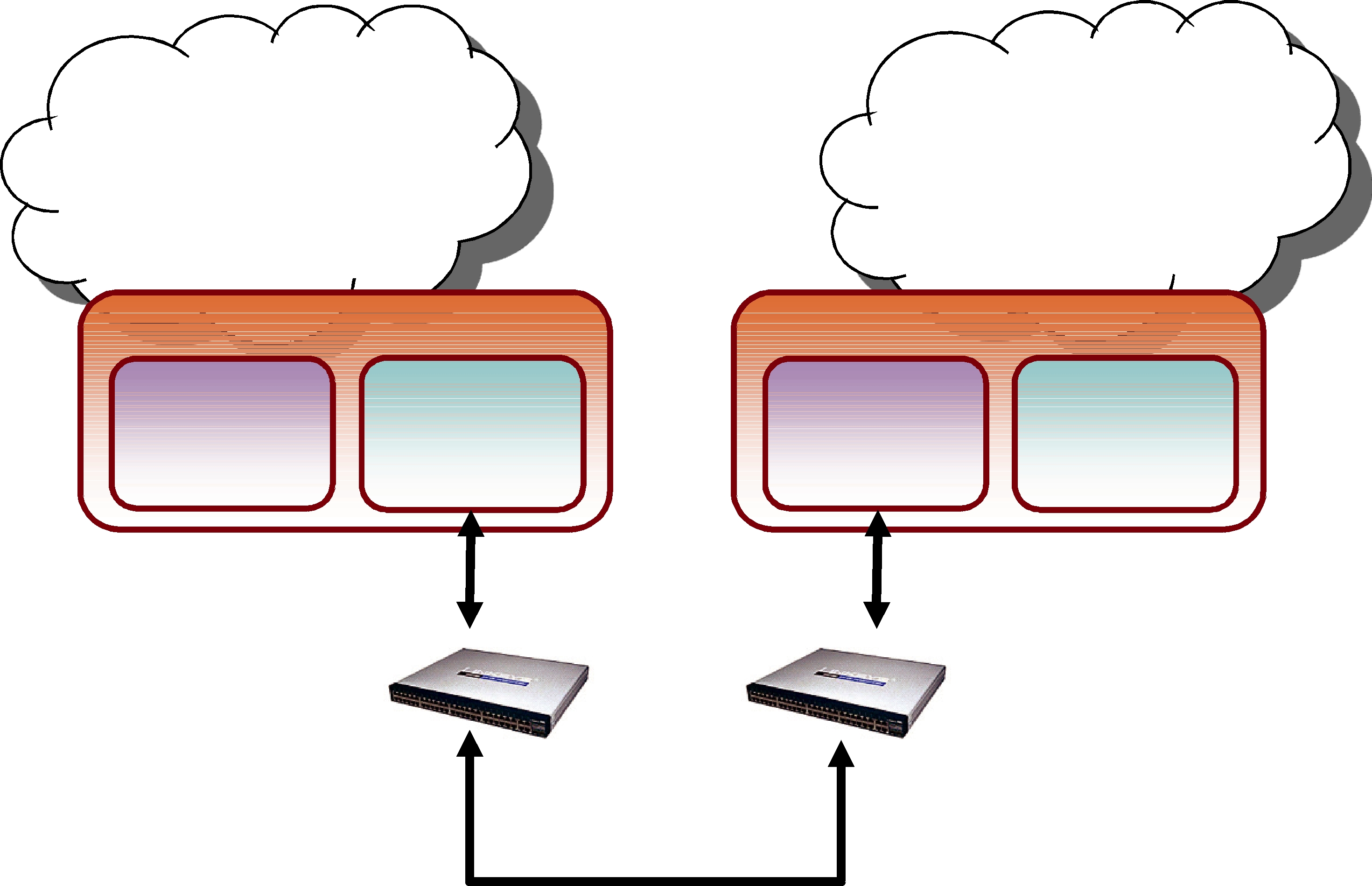
Chapter 7 Traversing Wide Area Networks
Many systems today already rely on Connext to distribute their information across a Local Area Network (LAN). However, more and more of these systems are being integrated in Wide Area Networks (WANs). With Routing Service, you can scale Connext
Out of the box, Routing Service only uses UDPv4 and Shared Memory transports to communicate with other Routing Services and Connext applications. This configuration is appropriate for systems running within a single LAN. However, using UDPv4 introduces several problems when trying to communicate with Connext applications running in different LANs:
UDPv4 traffic is usually filtered out by the LAN firewalls for security reasons.
Forwarded ports are usually TCP ports.
Each LAN may run in its own private IP address space and use NAT (Network Address Translation) to communicate with other networks.
To overcome these issues, Routing Service is distributed with a TCP transport that is NAT friendly. The transport can be configured via XML using the PropertyQosPolicy of the Routing Service’s participants. Figure 7.1 shows a typical scenario where two Routing Services are used to bridge two Connext applications running in two different LANs.
Figure 7.1 WAN Communication Using TCP Transport
Connext application 1 (LAN1) 
Routing Service (LAN 1)
Participant 1 |
Participant 2 |
UDPv4 |
TCPv4 |
Transport |
Transport |
Connext application 2 (LAN2) 
Routing Service (LAN 2)
Participant 1 |
Participant 2 |
TCPv4 |
UDPv4 |
Transport |
Transport |
Firewall/NAT |
Firewall/NAT |
Router |
Router |
|
TCP traffic only |
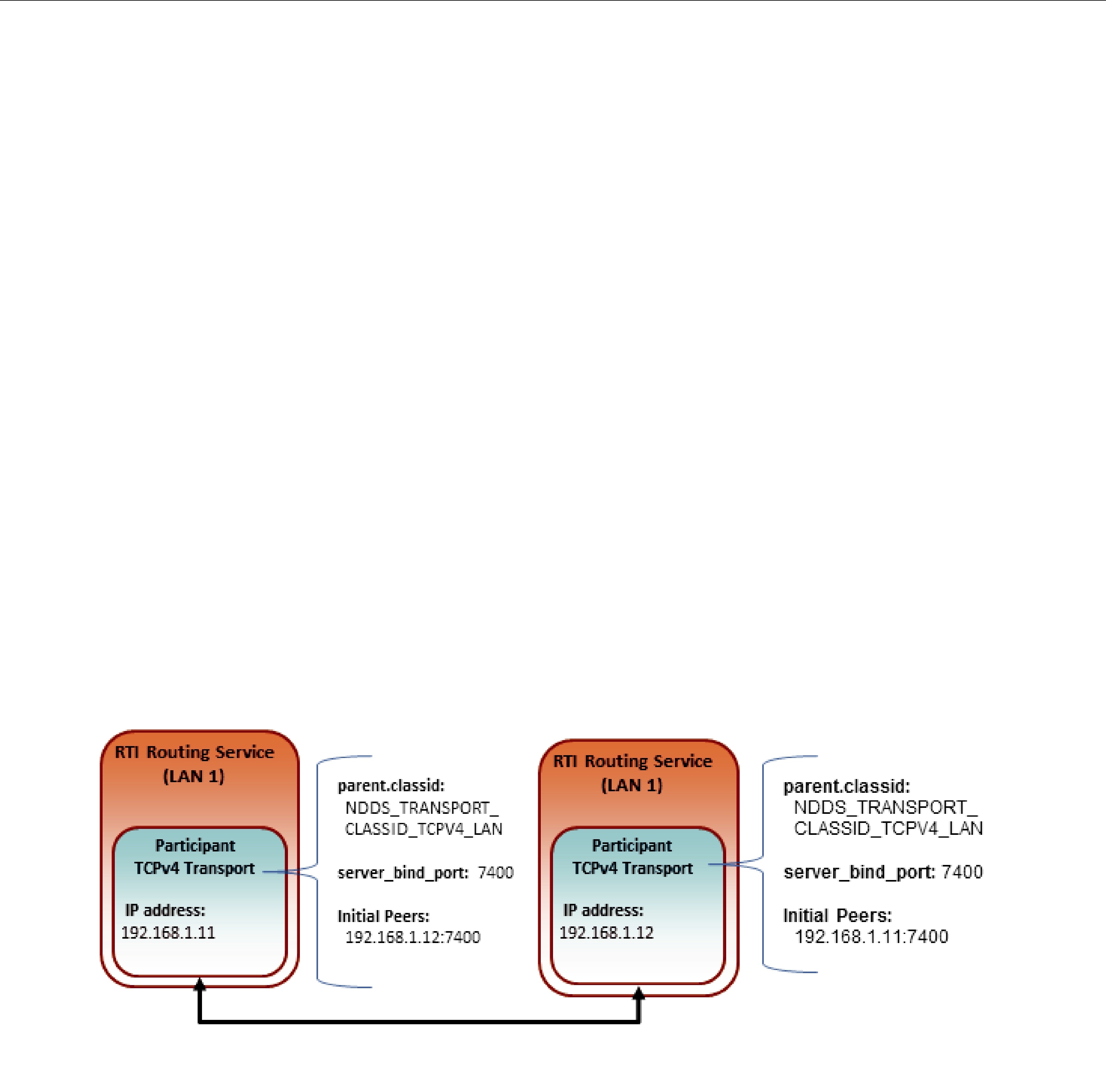
The next sections explain how to use and configure the TCP transport with Routing Service.
7.1TCP Communication Scenarios
The TCP transport distributed with Routing Service can be used to address multiple communication scenarios that go from simple communication within a single LAN to complex communication scenarios across LANs where NATs and firewalls may be involved.
7.1.1Communication Within a Single LAN
TCP transport can be used as an alternative to UDPv4 to communicate Connext applications running inside the same LAN.
Figure 7.2 shows how to configure the TCP transport in this scenario.
parent.classid, transport_mode and server_bind_port are transport properties configured using the PropertyQosPolicy of the participant.
Initial Peers represents the peers to which the participant will be announced to. Usually, these peers are configured using the DiscoveryQosPolicy of the participant or the environment variable NDDS_DISCOVERY_PEERS. For information on the format of initial peers, see Section 7.2.1.
Figure 7.2 Communication within a Single LAN
7.1.2Symmetric Communication Across NATs
In NAT communication scenarios, each one of the LANs has a private IP address space. The communication with other LANs is done through NAT routers that translate private IP addresses and ports into public IP addresses and ports.
In symmetric communication scenarios, any instance of Routing Service can initiate TCP connections with other routing services. Figure 7.3 shows how to configure the TCP transport in this scenario.
Notice that initial peers refer to the public address of the Routing Service instances and not the LAN address. In addition, the transport associated with a Routing Service instance will have to be configured with its public_address so that this information can be propagated as part of the discovery process.
Because the public address and port of the Routing Service instances must be known before the communication is established, the NAT Routers will have to be configured statically to translate (forward) the private server_bind_port into a public port. This process is known as “static
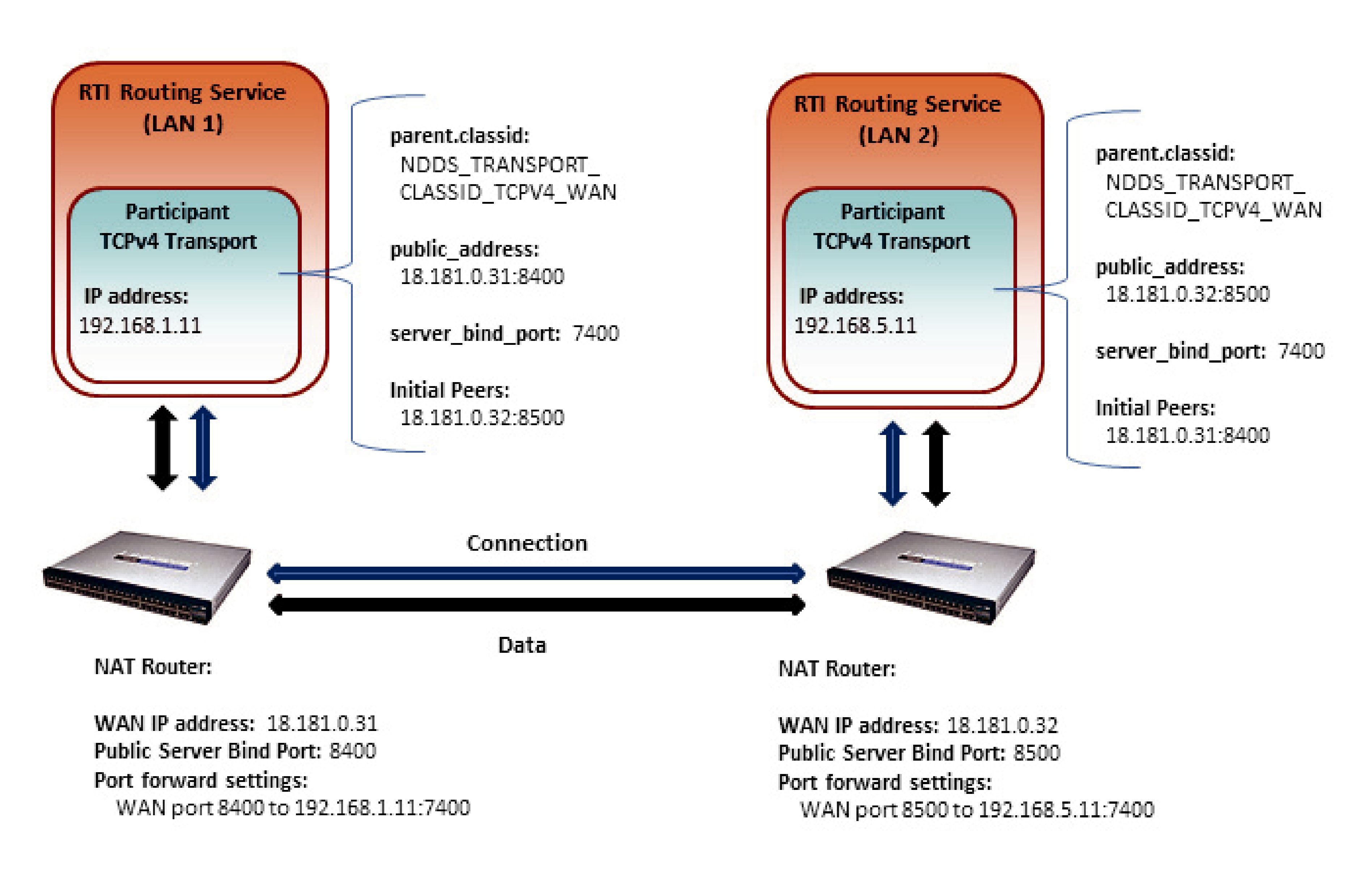
NAT“ or “port forwarding” and it allows traffic originating in outer networks to reach designated peers in the LAN behind the NAT router.
Figure 7.3 Symmetric Communication across NATs
7.1.3Asymmetric Communication Across NATs
This scenario is similar to the previous one, except in this case the TCP connections can be initiated only by the Routing Service instance in LAN1. For security reasons, incoming connections to LAN1 are not allowed. Figure 7.4 shows how to configure the TCP transport in this scenario.
7.1.4Secure Communication
Security can be added on top of any of the above scenarios. You can have secure communication within the same LAN or across NATs.
To enable secure communication, modify the previous configurations as follows:
Change the transport class ID property (parent.classid) to be one of the following values: NDDS_TRANSPORT_CLASSID_TLSV4_LAN NDDS_TRANSPORT_CLASSID_TLSV4_WAN
Set at least a certificate of authority (through either the tls.verify.ca_file or tls.verify.ca_path properties), and the certificate identity (through either the tls.identity.certificate_chain, or tls.identity.certificate_chain_file properties)
Make sure to use ‘tlsv4_lan’ or ‘tlsv4_wan’ in the initial peers list as the prefix for all destination addresses.
To see the differences between a WAN scenario and the same scenario with TLS enabled, you can compare the two example configuration files:
shapes/tcp_transport.xml
shapes/tcp_transport_tls.xml
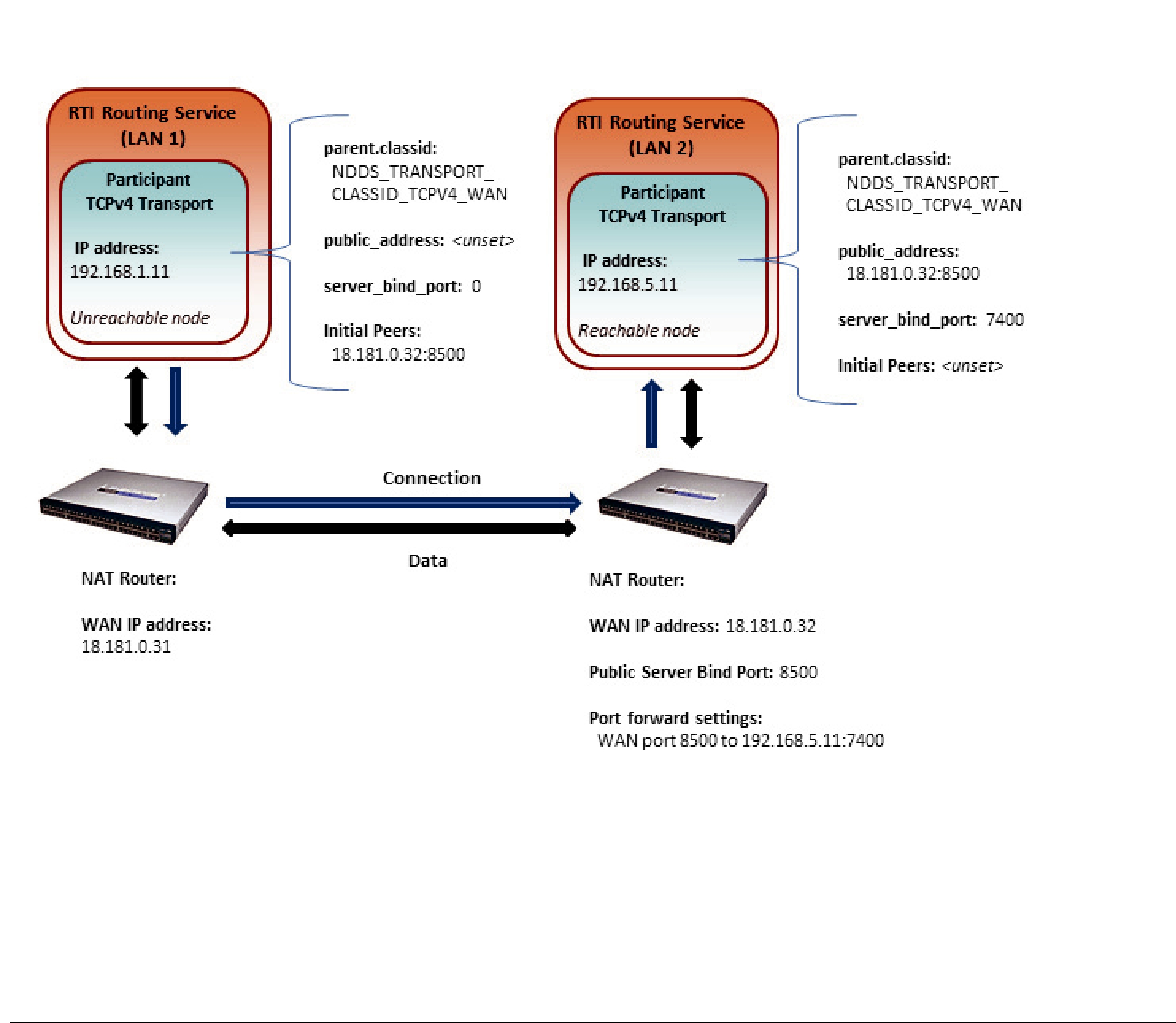
Figure 7.4 Asymmetric Communication Across NATs
Notice that the Routing Service on LAN 1 now does not have a public_address set (and its server_bind_port is set to zero), meaning that it cannot be reached from the outside network.
7.2Configuring the TCP Transport
The TCP transport is distributed as a shared library in <Routing Service installation directory>/ bin/<architecture>. The library is called nddstransporttcp.dll on Windows and libnddstransporttcp.so on
For an example on how to use and configure the TCP transport with Routing Service see Example 8 - Using the TCP Transport with Routing Service (Section 4.8) in the Getting Started Guide.
As seen in the example, you can configure the properties of the transport in the XML configuration file using the appropriate name/value pairs in the DomainParticipant’s PropertyQoSPolicy. This will cause Routing Service to dynamically load the TCP transport library at run time and then implicitly create and register the transport plugin with Connext.
7.2.1TCP Transport Initial Peers
With the TCP transport, the addresses of the initial peers (NDDS_DISCOVERY_PEERS) that will be contacted during the discovery process have the following format:
For WAN communication: tcpv4_wan://<IP address or hostname>:<port>
For LAN communication: tcpv4_lan://<IP address or hostname>:<port>
For WAN+TLS communication: tlsv4_wan://<IP address or hostname>:port
For LAN+TLS communication: tlsv4_lan://<IP address or hostname>:port
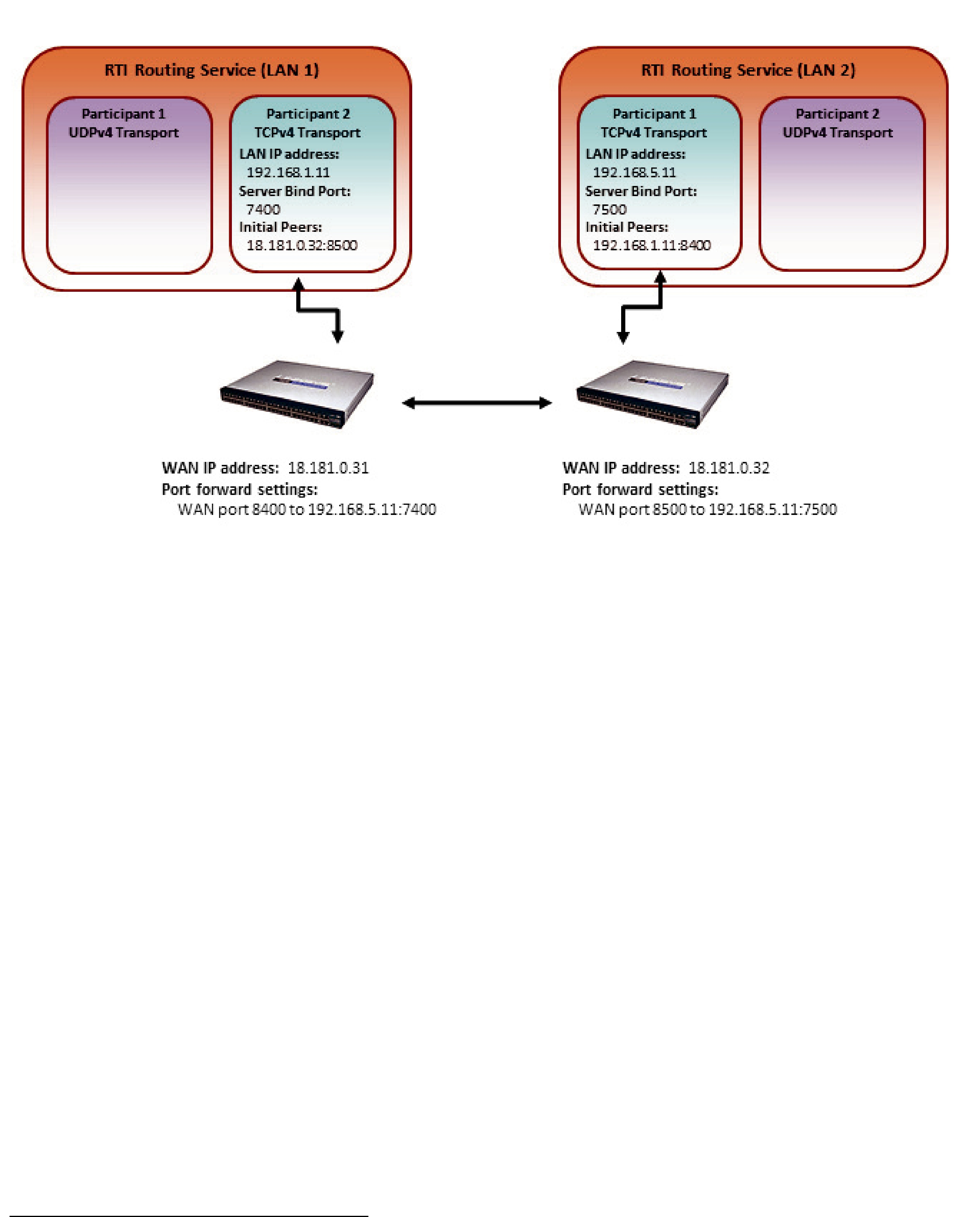
For example:
setenv NDDS_DISCOVERY_PEERS tcpv4_wan://10.10.1.165:7400,tcpv4_wan://10.10.1.111:7400,tcpv4_lan://192.168.1.1:7500
When the TCP transport is configured for LAN communication (with the parent.classid property), the IP address is the LAN address of the peer and the port is the server port used by the transport (the server_bind_port property).
When the TCP transport is configured for WAN communication (with the parent.classid property), the IP address is the WAN or public address of the peer and the port is the public port that is used to forward traffic to the server port in the TCP transport.
When TLS is enabled, the transport settings are similar to WAN and LAN over TCP.
Figure 7.5 Initial Peers in WAN Communication
7.2.2Setting Up the TCP Transport Properties with the PropertyQoSPolicy
The PropertyQosPolicy allows you to set up name/value pairs of data and attach them to an entity, such as a DomainParticipant. The configuration of the TCP transport with Routing Service is done using the PropertyQosPolicy of the Domain Participants that are going to use the transport.
For a list of the properties that you can set for the TCP transport, see the RTI Core Libraries and Utilities User’s Manual.1
In the following example, participant_1 will communicate with other participants on the same LAN using UDP and Shared Memory transports; participant_2 will communicate with other participants in different LANs using the TCP transport.
<dds>
<routing_service name=”MyRoutingService”> <domain_route name=”MyDomainRoute”>
<participant_1> <domain_id>56</domain_id>
</participant_1>
1. See <Connext installation directory>/ndds.<version>/doc/pdf/RTI_CoreLibrariesAndUtilities_UsersManual.pdf.
<participant_2> <domain_id>57</domain_id> <participant_qos>
<transport_builtin> <mask>MASK_NONE</mask>
</transport_builtin> <property>
<value>
<element> <name>dds.transport.load_plugins</name> <value>dds.transport.TCPv4.tcp1</value> </element>
<element>
<name>dds.transport.TCPv4.tcp1.library</name>
<value>libnddstransporttcp.so</value>
</element>
<element> <name>dds.transport.TCPv4.tcp1.create_function </name> <value>NDDS_Transport_TCPv4_create</value> </element>
<element>
<name>dds.transport.TCPv4.tcp1.parent.classid
</name> <value>NDDS_TRANSPORT_CLASSID_TCPV4_WAN </value>
</element>
<element> <name>dds.transport.TCPv4.tcp1.public_address </name>
<value>18.181.0.31:8400</value>
</element>
<element> <name>dds.transport.TCPv4.tcp1.server_bind_port </name>
<value>7400</value>
</element>
</value>
</property> </participant_qos> </participant_2>
</domain_route> </routing_service>
</dds>

7.2.3TCP/TLS Transport Properties
Table 7.1 describes the TCP and TLS transport properties.
Table 7.1 TCP/TLS Transport Properties (over LAN or WAN) — NDDS_Transport_TCPv4_Property_t
Property Name
(prefix with Description ‘dds.transport.TCPv4.
tcp1.’)1
Required
dds.transport.
load_plugins
loaded by Connext. For example: “dds.transport.TCPv4.tcp1". You will use this (Note: this does not take a string as the prefix to the property names. See Footnote 1 on page
prefix)
Note: you can load up to 8 plugins.
|
Required Must be "nddstransporttcp". |
|
library |
This library needs to be in the path during run time (in the LD_LIBRARY_PATH |
|
|
environment variable on UNIX systems, in PATH for Windows systems). |
|
|
|
|
create_function |
Required Must be “NDDS_Transport_TCPv4_create”. |
|
|
|
|
|
Used to register the transport plugin returned by |
|
|
NDDS_Transport_TCPv4_create() (as specified by <TCP_prefix>.create_function) |
|
aliases |
to the DomainParticipant. Aliases should be specified as a |
|
with each comma delimiting an alias. |
||
|
||
|
||
|
Must be set to one of the following values: |
|
|
NDDS_TRANSPORT_CLASSID_TCPV4_LAN |
|
|
for TCP communication within a LAN |
|
|
NDDS_TRANSPORT_CLASSID_TLSV4_LAN |
|
parent.classid |
for TLS communication within a LAN |
|
NDDS_TRANSPORT_CLASSID_TCPV4_WAN |
||
|
||
|
for TCP communication across LANs and firewalls |
|
|
NDDS_TRANSPORT_CLASSID_TLSV4_WAN |
|
|
for TLS communication across LAN and firewalls |
|
|
Default: NDDS_TRANSPORT_CLASSID_TCPV4_LAN |
|
|
|
|
|
Specifies the maximum number of buffers that Connext can pass to the send() |
|
|
function of the transport plugin. |
|
|
The transport plugin send() operation supports a |
|
|
send() call can take several discontiguous buffers, assemble and send them in a |
|
|
single message. This enables Connext to send a message from parts obtained from |
|
|
different sources without first having to copy the parts into a single contiguous |
|
parent.gather_send_ |
buffer. |
|
However, most transports that support a |
||
buffer_count_max |
||
on the number of buffers that can be gathered and sent. Setting this value will |
||
|
||
|
prevent Connext from trying to gather too many buffers into a send call for the |
|
|
transport plugin. |
|
|
Connext requires all |
|
|
least a minimum number of buffers. This minimum number is defined as |
|
|
NDDS_TRANSPORT_PROPERTY_GATHER_SEND_BUFFER_COUNT_MIN. |
|
|
Default: 128 |
Table 7.1 TCP/TLS Transport Properties (over LAN or WAN) — NDDS_Transport_TCPv4_Property_t
Property Name |
|
|
(prefix with |
Description |
|
‘dds.transport.TCPv4. |
||
|
||
tcp1.’)1 |
|
|
|
|
|
|
The maximum size of a message, in bytes, that can be sent or received by the |
|
|
transport plugin. |
|
parent. |
If you set this higher than the default, the DomainParticipant’s buffer_size (in the |
|
message_size_max |
RECEIVER_POOL QosPolicy, see the RTI Core Libraries and Utilities User’s Manual2) |
|
|
should also be changed. |
|
|
Default: 9216 |
|
|
|
|
|
A list of strings, each identifying a range of interface addresses that can be used by |
|
|
the transport. |
|
|
Interfaces must be specified as |
|
parent. |
delimiting an interface. |
|
|
||
allow_interfaces_list |
For example: 10.10.*, 10.15.* |
|
|
If the list is |
|
|
||
|
Default: All available interfaces are used. |
|
|
|
|
|
A list of strings, each identifying a range of interface addresses that will not be used |
|
|
by the transport. |
|
|
If the list is |
|
parent. |
Interfaces must be specified as |
|
delimiting an interface. |
||
deny_interfaces_list |
||
For example: 10.10.* |
||
|
||
|
This "black" list is applied after parent. allow_interfaces_list and filters out the |
|
|
interfaces that should not be used. |
|
|
Default: No interfaces are denied |
|
|
|
|
|
Size, in bytes, of the send buffer of a socket used for sending. On most operating |
|
|
systems, setsockopt() will be called to set the SENDBUF to the value of this |
|
|
parameter. |
|
send_socket_buffer_size |
This value must be greater than or equal to parent. message_size_max |
|
or |
||
|
||
|
The maximum value is operating |
|
|
Default: |
|
|
the socket) |
|
|
|
|
|
Size, in bytes, of the receive buffer of a socket used for receiving. |
|
|
On most operating systems, setsockopt() will be called to set the RECVBUF to the |
|
|
value of this parameter. |
|
recv_socket_buffer_size |
This value must be greater than or equal to parent. message_size_max |
|
|
or |
|
|
Default: |
|
|
of the socket) |
|
|
|
Table 7.1 TCP/TLS Transport Properties (over LAN or WAN) — NDDS_Transport_TCPv4_Property_t
Property Name |
|
|
(prefix with |
Description |
|
‘dds.transport.TCPv4. |
||
|
||
tcp1.’)1 |
|
|
|
|
|
|
Prevents the transport plugin from using the IP loopback interface. |
|
|
This property is ignored when parent.classid is |
|
|
NDDS_TRANSPORT_CLASSID_TCPV4_WAN or |
|
|
NDDS_TRANSPORT_CLASSID_TLSV4_WAN. |
|
|
Two values are allowed: |
|
ignore_loopback_ |
0: Enable local traffic via this plugin. The plugin will use and report the IP |
|
loopback interface only if there are no other network interfaces (NICs) up on the |
||
interface |
||
system. |
||
|
||
|
1: Disable local traffic via this plugin. This means “do not use the IP loopback |
|
|
interface, even if no NICs are discovered.” This setting is useful when you want |
|
|
applications running on the same node to use a more efficient plugin like shared |
|
|
memory instead of the IP loopback. |
|
|
Default: 1 |
|
|
|
|
|
Prevents the transport plugin from using a network interface that is not reported as |
|
|
RUNNING by the operating system. |
|
|
The transport checks the flags reported by the operating system for each network |
|
|
interface upon initialization. An interface which is not reported as UP will not be |
|
|
used. This property allows the same check to be extended to the IFF_RUNNING |
|
|
flag implemented by some operating systems. The RUNNING flag means that "all |
|
|
resources are allocated" and may be off if no link is detected (e.g., the network cable |
|
ignore_nonrunning_ |
is unplugged). |
|
|
||
interfaces |
Two values are allowed: |
|
|
0: Do not check the RUNNING flag when enumerating interfaces, just make sure |
|
|
the interface is UP. |
|
|
1: Check the flag when enumerating interfaces, and ignore those that are not |
|
|
reported as RUNNING. This can be used on some operating systems to cause |
|
|
the transport to ignore interfaces that are enabled but not connected to the |
|
|
network. |
|
|
Default: 1 |
|
|
|
|
|
Mask for the transport priority field. This is used in conjunction with |
|
|
transport_priority_ mapping_low/transport_priority_ mapping_high to define the |
|
|
mapping from Connext transport priority to the IPv4 TOS field. Defines a |
|
|
contiguous region of bits in the |
|
transport_priority_mask |
generate values for the IPv4 TOS field on an outgoing socket. |
|
For example, the value 0x0000ff00 causes bits |
||
|
||
|
The value will be scaled from the mask range (0x0000 |
|
|
range specified by low and high. |
|
|
If the mask is set to zero, then the transport will not set IPv4 TOS for send sockets. |
|
|
Default: 0 |
|
|
|
|
transport_priority_ |
Sets the low and high values of the output range to IPv4 TOS. |
|
mapping_low |
These values are used in conjunction with transport_priority_mask to define the |
|
|
mapping from Connext transport priority to the IPv4 TOS field. Defines the low and |
|
transport_priority_ |
high values of the output range for scaling. |
|
Note that IPv4 TOS is generally an |
||
mapping_high |
||
Default transport_priority_mapping_low: 0 |
||
|
||
|
Default transport_priority_mapping_high: 0xFF |
|
|
|
|
server_socket_backlog |
Determines the maximum length of the queue of pending connections. |
|
Default: 5 |
||
|
||
|
|

Table 7.1 TCP/TLS Transport Properties (over LAN or WAN) — NDDS_Transport_TCPv4_Property_t
Property Name |
|
|
(prefix with |
Description |
|
‘dds.transport.TCPv4. |
||
|
||
tcp1.’)1 |
|
|
|
|
|
|
Required for WAN communication |
|
|
Public IP address and port (WAN address and port) associated with the transport |
|
|
instantiation.The address and port must be separated with ‘:’. |
|
|
For example: 10.10.9.10:4567 |
|
|
This field is only used when parent.classid is |
|
|
NDDS_TRANSPORT_CLASSID_TCPV4_WAN or |
|
|
NDDS_TRANSPORT_CLASSID_TLSV4_WAN. |
|
public_address |
The public address and port are necessary to support communication over a WAN |
|
|
that involves Network Address Translators (NATs). Typically, the address is the |
|
|
public address of the IP router that provides access to the WAN. The port is the IP |
|
|
router port that is used to reach the private server_bind_port inside the LAN from |
|
|
the outside. This value is expressed as a string in the form: ip[:port], where ip |
|
|
represents the IPv4 address and port is the external port number of the router. |
|
|
Note that host names are not allowed in the public_address because they may |
|
|
resolve to an internet address that is not what you want (i.e., ‘localhost’ may map to |
|
|
your local IP or to 127.0.0.1). |
|
|
|
|
|
Private IP port (inside the LAN) used by the transport to accept TCP connections. |
|
|
If this property is set to zero, the transport will disable the internal server socket, |
|
|
making it impossible for external peers to connect to this node. In this case, the node |
|
server_bind_port |
is considered unreachable and will communicate only using the asynchronous |
|
mode with other (reachable) peers. |
||
|
||
|
For WAN communication, this port must be forwarded to a public port in the NAT- |
|
|
enabled router that connects to the outer network. |
|
|
Default: 7400 |
|
|
|
|
|
Allocation settings applied to read buffers. |
|
|
These settings configure the initial number of buffers, the maximum number of |
|
|
buffers and the buffers to be allocated when more buffers are needed. |
|
read_buffer_allocation |
Default: |
|
❏ read_buffer_allocation.initial_count = 2 |
||
|
||
|
❏ read_buffer_allocation.max_count = |
|
|
❏ read_buffer_allocation.incremental_count = |
|
|
doubling on each allocation until it reaches max_count) |
|
|
|
|
|
Allocation settings applied to buffers used for an asynchronous |
|
|
write. |
|
|
These settings configure the initial number of buffers, the maximum number of |
|
|
buffers, and the buffers to be allocated when more buffers are needed. |
Default:
❏write_buffer_allocation.initial_count = 4
❏write_buffer_allocation.max_count = 1000
write_buffer_allocation
❏ write_buffer_allocation.incremental_count = 10
Note that for the write buffer pool, the max_count is not set to unlimited. This is to avoid having a fast writer quickly exhaust all the available system memory, in case of a temporary network slowdown. When this write buffer pool reaches the maximum, the
Table 7.1 TCP/TLS Transport Properties (over LAN or WAN) — NDDS_Transport_TCPv4_Property_t
Property Name |
|
|
(prefix with |
Description |
|
‘dds.transport.TCPv4. |
||
|
||
tcp1.’)1 |
|
|
|
|
|
|
Allocation settings applied to buffers used to serialize and send control messages. |
|
|
These settings configure the initial number of buffers, the maximum number of |
|
|
buffers, and the buffers to be allocated when more buffers are needed. |
|
control_buffer_allocation |
Default: |
|
❏ control_buffer_allocation.initial_count = 2 |
||
|
||
|
❏ control_buffer_allocation.max_count = |
|
|
❏ control_buffer_allocation.incremental_count = |
|
|
keep doubling on each allocation until it reaches max_count) |
|
|
|
|
|
Allocation settings applied to control messages. |
|
|
These settings configure the initial number of messages, the maximum number of |
|
|
messages, and the messages to be allocated when more messages are needed. |
|
control_message_ |
Default: |
|
allocation |
❏ control_message_allocation.initial_count = 2 |
|
|
❏ control_message_allocation.max_count = |
|
|
❏ control_message_allocation.incremental_count = |
|
|
will keep doubling on each allocation until it reaches max_count) |
|
|
|
|
|
Allocation settings applied to control messages attributes. |
|
|
These settings configure the initial number of attributes, the maximum number of |
|
|
attributes, and the attributes to be allocated when more attributes are needed. |
|
control_attribute_ |
Default: |
|
allocation |
❏ control_attribute_allocation.initial_count = 2 |
|
|
❏ control_attribute_allocation.max_count = |
|
|
❏ control_attribute_allocation.incremental_count = |
|
|
will keep doubling on each allocation until it reaches max_count) |
|
|
|
|
|
Forces an asynchronous send. When this parameter is set to 0, the TCP transport |
|
|
will attempt to send data as soon as the internal send() function is called. When it is |
|
|
set to 1, the transport will make a copy of the data to send and enqueue it in an |
|
|
internal send buffer. Data will be sent as soon as the |
|
|
space. |
|
|
Normally setting it to 1 delivers better throughput in a fast network, but will result |
|
force_asynchronous_send |
in a longer time to recover from various TCP error conditions. Setting it to 0 may |
|
|
cause the |
|
|
the lower socket buffer. For an application writing data at a very fast rate, it may |
|
|
cause the caller thread to block if the send socket buffer is full. This could produce |
|
|
lower throughput in those conditions (the caller thread could prepare the next |
|
|
packet while waiting for the send socket buffer to become available). |
|
|
Default: 0 |
|
|
|
|
|
The maximum size of a TCP segment. |
|
|
This parameter is only supported on Linux architectures. |
|
max_packet_size |
By default, the maximum size of a TCP segment is based on the network MTU for |
|
destinations on a local network, or on a default 576 for destinations on |
||
|
networks. This behavior can be changed by setting this parameter to a value |
|
|
between 1 and 65535. |
|
|
Default: |
|
|
|
Table 7.1 TCP/TLS Transport Properties (over LAN or WAN) — NDDS_Transport_TCPv4_Property_t
Property Name |
|
|
(prefix with |
Description |
|
‘dds.transport.TCPv4. |
||
|
||
tcp1.’)1 |
|
|
|
|
|
|
Configures the sending of KEEP_ALIVE messages in TCP. |
|
|
Setting this value to 1 causes a KEEP_ALIVE packet to be sent to the remote peer if a |
|
|
long time passes with no other data sent or received. |
|
|
This feature is implemented only on architectures that provide a |
|
|
implementation of the TCP |
|
enable_keep_alive |
On Windows systems, the TCP |
|
the system’s registry: \HKEY_LOCAL_MACHINE\SYSTEM\ |
||
|
||
|
CurrentControlSet\Tcpip\Parameters. Refer to MSDN documentation for more |
|
|
details. |
|
|
On Solaris systems, most of the TCP |
|
|
the kernel properties. |
|
|
Default: 0 |
|
|
|
|
|
Specifies the interval of inactivity, in seconds, that causes TCP to generate a |
|
keep_alive_time |
KEEP_ALIVE message. |
|
This parameter is only supported on Linux architectures. |
||
|
||
|
Default: |
|
|
|
|
|
Specifies the interval, in seconds, between KEEP_ALIVE retries. |
|
keep_alive_interval |
This parameter is only supported on Linux architectures. |
|
|
Default: |
|
|
|
|
|
The maximum number of KEEP_ALIVE retries before dropping the connection. |
|
keep_alive_retry_count |
This parameter is only supported on Linux architectures. |
|
|
Default: |
|
|
|
|
|
Disables the TCP nagle algorithm. |
|
disable_nagle |
When this property is set to 1, TCP segments are always sent as soon as possible, |
|
which may result in poor network utilization. |
||
|
||
|
Default: 0 |
|
|
|
|
|
Bitmap that specifies the verbosity of log messages from the transport. |
|
|
Logging values: |
|
|
❏ |
|
|
❏ 0x00: silence |
|
|
❏ 0x01: errors |
|
|
❏ 0x02: warnings |
|
|
❏ 0x04: local |
|
|
❏ 0x08: remote |
|
|
❏ 0x10: period |
|
logging_verbosity_ |
❏ 0x80: other (used for control protocol tracing) |
|
bitmap |
Default: |
|
|
||
|
Note: the logging verbosity is a global property shared across multiple instances of |
|
|
the TCP transport. If you create a new TCP Transport instance with |
|
|
logging_verbosity_bitmap different than |
|
|
instances as well. |
|
|
The default TCP transport verbosity is errors and warnings. |
|
|
Note: The option of 0x80 (other) is used only for tracing the internal control |
|
|
protocol. Since the output is very verbose, this feature is enabled only in the debug |
|
|
version of the TCP Transport library |
|
|
(libnddstransporttcpd.so / LIBNDDSTRANSPORTD.LIB). |
|
|
|
Table 7.1 TCP/TLS Transport Properties (over LAN or WAN) — NDDS_Transport_TCPv4_Property_t
Property Name |
|
|
(prefix with |
Description |
|
‘dds.transport.TCPv4. |
||
|
||
tcp1.’)1 |
|
|
|
|
|
|
Maximum number of outstanding connection cookies allowed by the transport |
|
|
when acting as server. |
|
|
A connection cookie is a token provided by a server to a client; it is used to establish |
|
|
a data connection. Until the data connection is established, the cookie cannot be |
|
|
reused by the server. |
|
outstanding_ |
To avoid wasting memory, it is good practice to set a cap on the maximum number |
|
connection_cookies |
||
of connection cookies (pending connections). |
||
|
||
|
When the maximum value is reached, a client will not be able to connect to the |
|
|
server until new cookies become available. |
|
|
Range: 1 or higher, or |
|
|
Default: 100 |
|
|
|
|
|
Maximum lifespan (in seconds) of the cookies associated with pending connections. |
|
outstanding_ |
If a client does not connect to the server before the lifespan of its cookie expires, it |
|
will have to request a new cookie. |
||
connection_cookies_ |
||
Range: 1 second or higher, or |
||
life_span |
||
|
||
|
Default : |
|
|
feature). |
|
|
|
|
|
A string that specifies the name of a file containing Certificate Authority certificates. |
|
|
The file should be in PEM format. See the OpenSSL manual page for |
|
tls.verify.ca_file |
SSL_load_verify_locations for more information. |
|
|
To enable TLS, ca_file or ca_path is required; both may be specified (at least one is |
|
|
required). |
|
|
|
|
|
A string that specifies paths to directories containing Certificate Authority |
|
|
certificates. Files should be in PEM format and follow the |
|
tls.verify.ca_path |
naming conventions. See the OpenSSL manual page for |
|
SSL_CTX_load_verify_locations for more information. |
||
|
||
|
To enable TLS, ca_file or ca_path is required; both may be specified (at least one is |
|
|
required). |
|
|
|
|
tls.verify.verify_depth |
Maximum certificate chain length for verification. |
|
|
|
|
tls.verify.crl_file |
Name of the file containing the Certificate Revocation List. |
|
File should be in PEM format. |
||
|
||
|
|
|
tls.cipher.cipher_list |
List of available TLS ciphers. See the OpenSSL manual page for SSL_set_cipher_list |
|
for more information on the format of this string. |
||
|
||
|
|
|
|
List of available |
|
|
For example: "foo.pem:512,bar.pem:256" means: |
|
tls.cipher. |
dh_param_files[0].file = foo.pem, |
|
dh_param_files |
dh_param_files[0].bits = 512, |
|
|
dh_param_files[1].file = bar.pem, |
|
|
dh_param_files[1].bits = 256 |
|
|
|
|
tls.cipher.engine_id |
String ID of OpenSSL cipher engine to request. |
|
|
|
|
|
A string containing an identifying certificate chain (in PEM format). |
|
tls.identity. |
An identifying certificate is required for secure communication. |
|
The string must be sorted starting with the certificate to the highest level (root CA). |
||
certificate_chain |
||
|
||
|
Either certificate_chain or certificate_chain_file is required. You must set exactly one |
|
|
of these. Do not set both of them (this would produce a configuration error. |
|
|
|
Table 7.1 TCP/TLS Transport Properties (over LAN or WAN) — NDDS_Transport_TCPv4_Property_t
Property Name |
|
|
(prefix with |
Description |
|
‘dds.transport.TCPv4. |
||
|
||
tcp1.’)1 |
|
|
|
|
|
|
A string that specifies the name of a file containing an identifying certificate chain |
|
|
(in PEM format). An identifying certificate is required for secure communication. |
|
tls.identity. |
The file must be sorted starting with the certificate to the highest level (root CA). |
|
Optionally, a private key may be appended to this file. If a private key is not |
||
certificate_chain_file |
||
appended to this file, then either private_key or private_key_file is required. |
||
|
||
|
Either certificate_chain or certificate_chain_file is required. You must set exactly |
|
|
ONE of these. Do not set both of them (this would produce a configuration error. |
|
|
|
|
tls.identity. |
A string that specifies the password for private key. |
|
private_key_password |
||
|
||
|
|
|
|
A string containing a private key (in PEM format). |
|
tls.identity. |
Either private_key or private_key_file may be specified. Do not set both of them |
|
private_key |
(this would produce a configuration error). If both are unspecified (NULL), the |
|
|
private key must be appended to the certificate chain file. |
|
|
|
|
|
A string that specifies the name of a file containing a private key (in PEM format). |
|
tls.identity. |
Either private_key or private_key_file may be specified. Do not set both of them |
|
private_key_file |
(this would produce a configuration error). If both are unspecified (NULL), the |
|
|
private key must be appended to the certificate chain file. |
|
|
|
1. Assuming you used ‘dds.transport.TCPv4.tcp1’ as the alias to load the plugin. If not, change the prefix to match the string used with dds.transport.load_plugins.
2. See <Connext installation directory>/ndds.<version>/doc/pdf/RTI_CoreLibrariesAndUtilities_UsersManual.pdf.
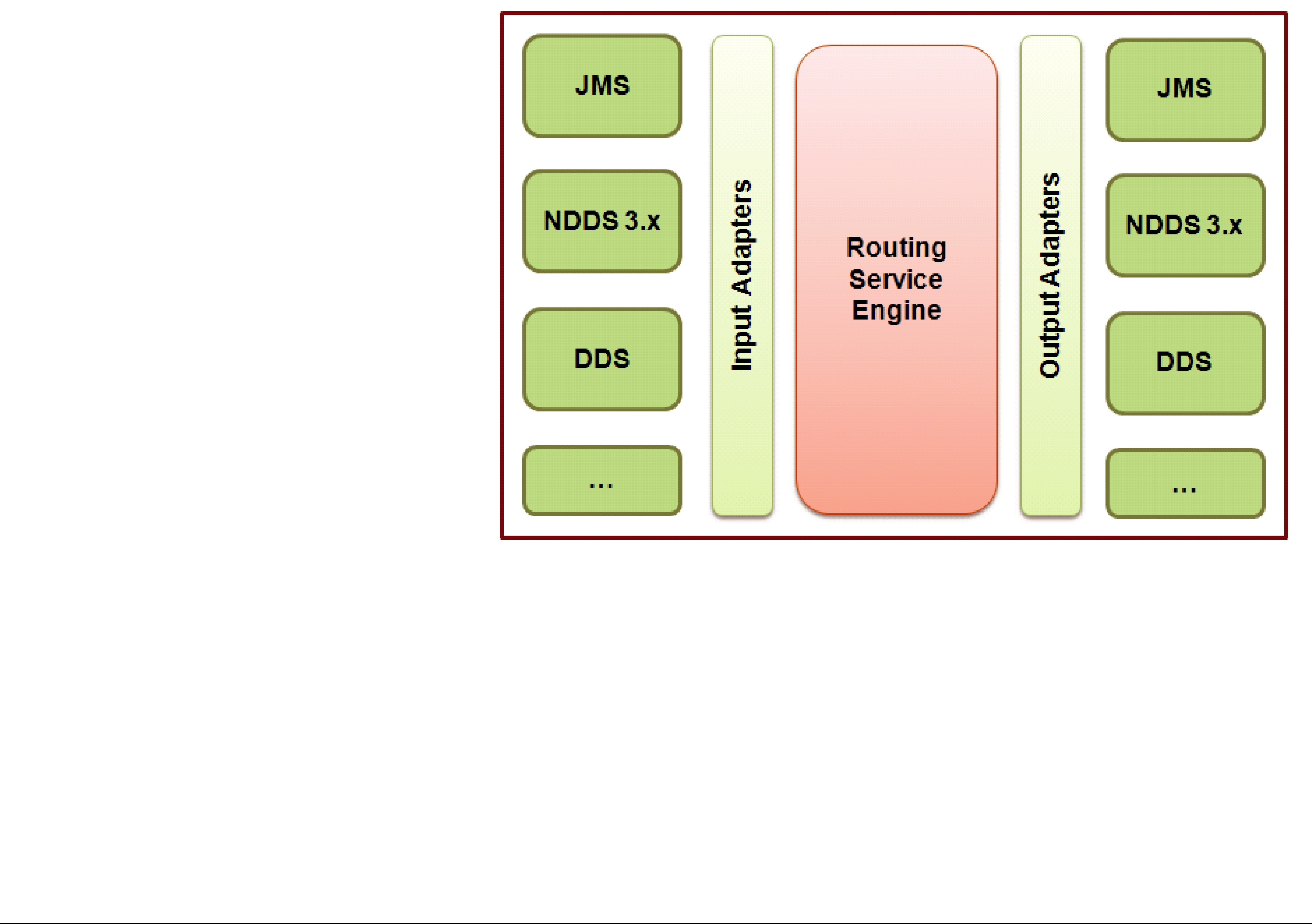
Chapter 8 Extending Routing Service with Adapters
As described in Section 2.4.8, adapters are pluggable components that allow Routing Service to consume and produce data for different data domains (e.g., Connext, JMS, Socket, etc.).
By default, Routing Service is distributed with a
<adapter_library> tag.
The figure to the right describes the Routing Service adapter architecture.
Input adapters are used to collect data samples from different data domains, such as Connext or JMS. The input samples are processed by the Routing Service engine and are passed along to custom transformations if they are defined. Finally, the transformed data is provided to the output adapters.
The adapter plugin API is used to create new adapters; it is supported in C and Java.
The rest of this chapter describes:
❏Adapter Usage and Configuration (Section 8.1)
❏Adapter API And Entity Model (Section 8.2)
❏Creating New Adapters (Section 8.3)
8.1Adapter Usage and Configuration
Adapter plugins must be registered within an adapter library in the XML configuration file.
For example:
<?xml version="1.0"?> <dds>
<adapter_library name=”MyAdapterLibrary”>
<adapter_plugin name=”MyCAdapterPlugin”>
<dll>mycadapter</dll> <create_function>MyCAdapterPlugin_create</create_function>
</adapter_plugin>
<java_adapter_plugin name=”MyJavaAdapter”>
<class_name>com.rti.adapters.MyJavaAdapter</class_name> </java_adapter_plugin>
</adapter_library>
...
</dds>
C adapters are registered using the tag <adapter_plugin>; Java adapters use the tag
<java_adapter_plugin>.
Table 8.1 lists the tags allowed within <adapter_plugin>.
Table 8.2 lists the tags allowed within <java_adapter_plugin>.
Once the adapter plugins are registered, they can be used to create connections within a domain route (see Section 2.4.2).
For example:
<dds>
<routing_service name="Router1" group_name="Group1"> <domain_route name="DomainRoute1">
<connection_1 plugin_name=”MyAdapterLibrary::MyCAdapterPlugin”>
...
</connection_1>
<connection_2 plugin_name=”MyAdapterLibrary::MyJavaAdapter”>
...
</connection_2>
<session name="Session">
...
</session> </domain_route>
...
</routing_service> </dds>
Table 8.1 C Adapter Plugin Tags
Tags within |
Description |
Number |
|
of Tags |
|||
<adapter_plugin> |
|||
|
Allowed |
||
|
|
||
|
|
|
|
|
Required |
|
|
|
Shared library containing the implementation of the adapter plugin. |
|
|
|
The <dll> tag may specify the exact name of the file (for example, |
|
|
|
lib/libmyadapter.so) or a general name (no file extension) which will be com- |
|
|
|
pleted as follows: |
|
|
<dll> |
• <dll> value: dir/myadapter |
1 |
|
• Final Path |
|||
|
|
||
|
• Final Path (Windows systems): dir/myadapter.dll |
|
|
|
If the library specified with the <dll> tag cannot be opened (because the |
|
|
|
library path is not in the Path environment variable on a Windows system or |
|
|
|
the LD_LIBRARY_PATH environment variables on a |
|
|
|
Routing Service will look for the library in <Routing Service installation |
|
|
|
directory>/bin/<architecture>. |
|
|
|
|
|

Table 8.1 C Adapter Plugin Tags
|
Tags within |
|
Description |
Number |
|
|
of Tags |
||
|
<adapter_plugin> |
|
||
|
|
|
Allowed |
|
|
|
|
|
|
|
|
|
|
|
|
|
Required |
|
|
|
<create_function> |
This tag must contain the name of the function used to create the adapter plu- |
1 |
|
|
gin. |
|
||
|
|
|
|
|
|
|
The function must be implemented in the adapter shared library. |
|
|
|
|
|
|
|
|
|
Sequence of name/value(string) pairs that can be used to configure the |
|
|
|
|
parameters of the adapter. For example: |
|
|
|
|
<property> |
|
|
|
|
<value> |
|
|
|
<property> |
|
<element> |
0 or 1 |
|
|
|
<name>username</name> |
|
|
|
|
<value>myusername</value> |
|
|
|
|
</element> |
|
|
|
</value> |
|
|
|
|
</property> |
|
|
|
|
|
|
|
Table 8.2 Java Adapter Plugin Tags |
|
|||
|
|
|
|
|
|
Tags within |
|
Description |
Number |
|
|
of Tags |
||
|
<java_adapter_plugin> |
|||
|
|
Allowed |
||
|
|
|
|
|
|
|
|
|
|
|
|
|
Required |
|
|
|
|
Name of the class that implements the adapter plugin. For example: |
|
|
|
|
com.rti.adapters.JMSAdapter |
|
|
<class_name> |
|
The classpath required to run the Java adapter must be part of the Rout- |
1 |
|
|
|
ing Service JVM configuration. See Routing Service Tags (Table 2.2) for |
|
|
|
|
additional information on JVM creation and configuration with the rout- |
|
|
|
|
ing service. |
|
|
|
|
|
|
|
|
|
Sequence of name/value(string) pairs that can be used to configure the |
|
|
|
|
parameters of the adapter. For example: |
|
|
|
|
<property> |
|
|
|
|
<value> |
|
|
<property> |
|
<element> |
0 or 1 |
|
|
|
<name>username</name> |
|
|
|
|
<value>myusername</value> |
|
|
|
|
</element> |
|
|
|
|
</value> |
|
|
|
|
</property> |
|
|
|
|
|
|
8.2Adapter API And Entity Model
There are five main classes in the adapter class model:
1.Adapter: An Adapter is a factory for Connections. See Table 8.3, “Adapter Operations,” on page
2.Connection: A Connection provides access to a data domain (such as a Connext domain or JMS provider network) and is a factory for Sessions, StreamReaders and StreamWriters.
In the
In an XML configuration file, connections are associated with the tags <connection_1> and <connection_2> within a domain route (see Section 2.4.2).
3.Session: A Session is a concurrency unit within a connection that has an associated set of
StreamReaders and StreamWriters. Access to the StreamReaders and StreamWriters in the same Session is serialized by Routing Service (two StreamReaders/StreamWriters cannot be accessed concurrently).
In the
4.StreamReader: A StreamReader provides a way to read samples of a specific type from a data domain.
In the
In an XML file, StreamReaders are associated with the tag <input> within <route> or <auto_route> (see Section 2.4.6).
See Table 8.6, “StreamReader Operations,” on page
5.StreamWriter: A StreamWriter provides a way to write samples of a specific type in a data domain.
In the
In an XML file, StreamWriters are associated with the tag <output> within <route> or <auto_route> (see Section 2.4.6).
See Table 8.7, “StreamWriter Operations,” on page
Figure 8.1 describes the adapter class model.
Table 8.3 Adapter Operations
|
Operation |
Description |
|
|
|
|
|
Creates a new connection. |
|
create_connection |
Connection objects are created when the domain routes that contain them are enabled. |
|
|
Implementation of this API is required. |
|
|
|
|
|
Deletes a previously created connection. |
|
delete_connection |
Connection objects are deleted when the domain routes that contain them are disabled. |
|
|
Implementation of this API is required. |
|
|
|
|
|
Returns the Adapter’s version. |
|
|
This method is only available in Java. |
|
getVersion |
In C, the version of the adapter is set on a member called plugin_version in the plugin |
|
structure RTI_RoutingServiceAdapterPlugin (see Section 8.3.2). |
|
|
|
|
|
|
The version of the adapter is only used for logging purposes. |
|
|
Implementation of this API is required. |
|
|
|
Table 8.4 Connection Operations |
||
|
|
|
|
Operation |
Description |
|
|
|
|
|
|
|
connection_to_ |
Returns the string representation of a connection for logging purposes. |
|
Implementation of this API is optional. If the API is not implemented, Routing Service |
|
|
string |
|
|
will use the fully qualified name of the adapter plugin. |
|
|
|
|
|
|
|
|
|
Creates a new session. |
|
create_session |
Connection session objects are created when the associated routing service sessions are |
|
enabled. |
|
|
|
|
|
|
Implementation of this API is optional. |
|
|
|
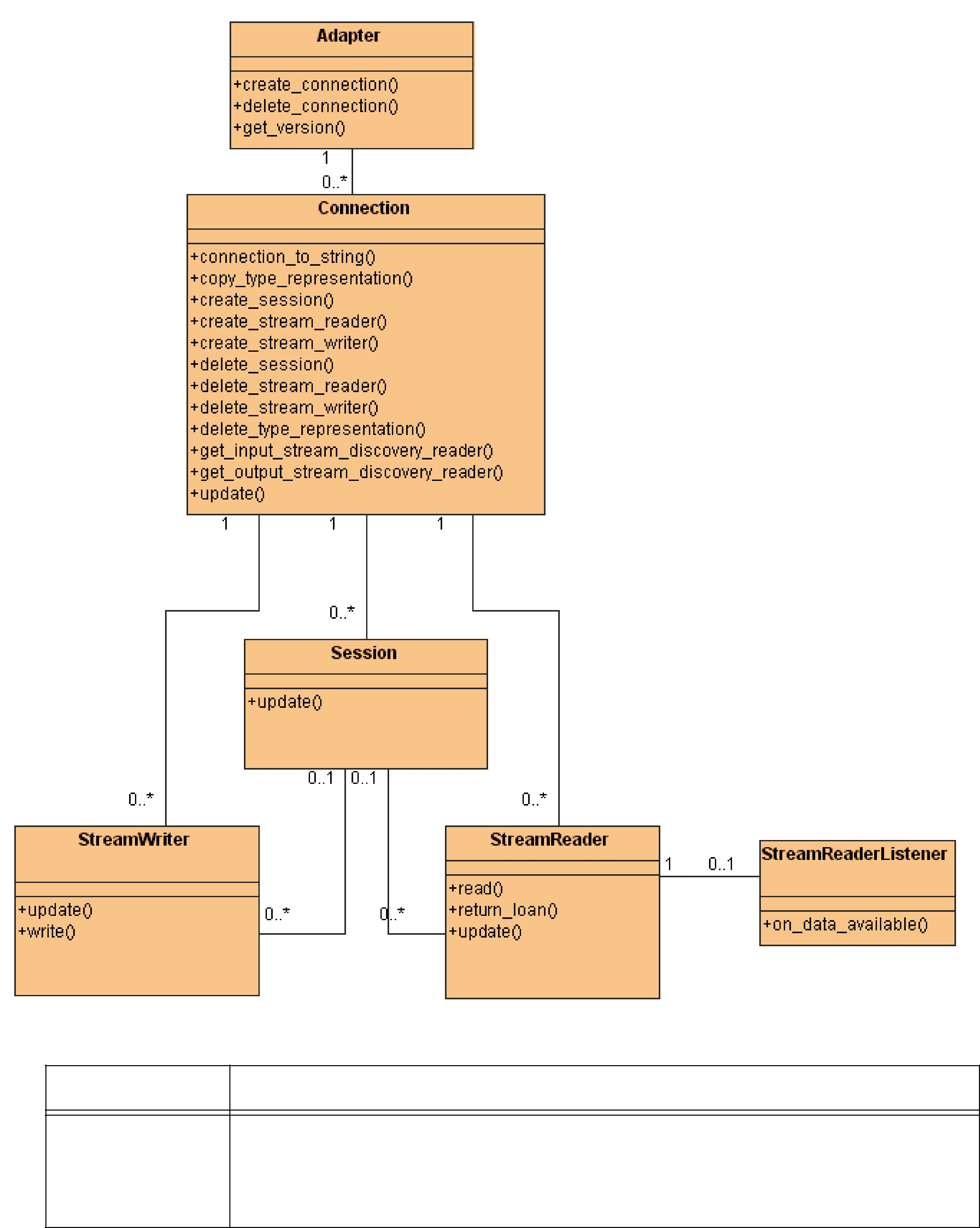
Figure 8.1 Adapter Class Model
Table 8.4 Connection Operations
Operation |
Description |
Deletes a previously created session.
delete_session
Connection session objects are deleted when the routing service sessions that contain them are disabled.
Implementation of this API is optional.
Table 8.4 Connection Operations
Operation |
|
|
Description |
|
|
|
|
|
|
|
|||
|
|
|
|
|||
|
Creates a new StreamReader within a routing service route. |
|
|
|||
|
This method is called when the route is enabled and the ‘creation mode’ condition asso- |
|||||
|
ciated with the <input> tag becomes true (see Section 2.4.6.4). |
|
|
|||
create_ |
One of the parameters received by the create_stream_reader() operation is the Stream- |
|||||
stream_reader |
ReaderListener. The StreamReaderListener interface provides a callback which will be |
|||||
|
used by the adapter to notify Routing Service of the existence of new data. |
|
||||
|
Implementation of this API is required only when there are routes using the adapter |
|||||
|
to receive data. |
|
|
|
|
|
|
|
|
|
|||
|
Deletes a previously created StreamReader. |
|
|
|||
delete_ |
This method is called when the route is disabled or when the ‘creation mode’ condition |
|||||
associated with the <input> tag becomes false (see Section 2.4.6.4). |
|
|||||
stream_reader |
|
|||||
Implementation of this API is required only when there are routes using the adapter |
||||||
|
||||||
|
to receive data. |
|
|
|
|
|
|
|
|
|
|||
|
Creates a new StreamWriter within a routing service route. |
|
|
|||
create_ |
This method is called when the route is enabled and the ‘creation mode’ condition asso- |
|||||
ciated with the <output> tag becomes true (see Section 2.4.6.4). |
|
|
||||
stream_writer |
|
|
||||
Implementation of this API is required only when there are routes using the adapter |
||||||
|
||||||
|
to produce data. |
|
|
|
|
|
|
|
|
|
|||
|
Deletes a previously created StreamWriter. |
|
|
|||
delete_ |
This method is called when the route is disabled or when the ‘creation mode’ condition |
|||||
associated with the <output> tag becomes false (see Section 2.4.6.4). |
|
|||||
stream_writer |
|
|||||
Implementation of this API is required only when there are routes using the adapter |
||||||
|
||||||
|
to produce data. |
|
|
|
|
|
|
|
|||||
|
Returns a StreamReader that is used by Routing Service to discover output streams. An |
|||||
|
output stream is a stream to which StreamWriters can write data. Disposed scenarios, |
|||||
get_output_ |
where an output stream disappears, are also notified using the discovery Stream- |
|||||
Reader. |
|
|
|
|
||
stream_discovery_ |
For additional information, see Stream Discovery (Section 8.2.2). |
|
|
|||
reader |
|
|
||||
Implementation of this API is optional. However, if none of the adapters in a domain |
||||||
|
||||||
|
route implement the discovery API, the routes’ types must be declared in the configura- |
|||||
|
tion file. |
|
|
|
|
|
|
|
|||||
|
Returns a StreamReader that is used by Routing Service to discover input streams. An |
|||||
|
input stream is a stream from which a StreamReader can read data. Disposed scenarios, |
|||||
get_input_stream_ |
where an input stream disappears, are also notified using the discovery StreamReader. |
|||||
For additional information, see Stream Discovery (Section 8.2.2). |
|
|
||||
discovery_reader |
|
|
||||
Implementation of this API is optional. However, if none of the adapters in a domain |
||||||
|
||||||
|
route implement the discovery API, the routes’ types must be declared in the configura- |
|||||
|
tion file. |
|
|
|
|
|
|
|
|
||||
|
Copies a type representation object (RoutingServiceTypeRepresentation). |
|
||||
|
The format of the type representation is given by the representation kind. For example, |
|||||
|
if |
the |
representation |
kind |
is |
|
copy_type_ |
RTI_ROUTING_SERVICE_TYPE_REPRESENTATION_DYNAMIC_TYPE, |
the |
||||
type_representation will be a Connext TypeCode. |
|
|
||||
representation |
|
|
||||
This method is part of the adapter discovery API and is used by Routing Service to copy |
||||||
|
||||||
|
the type representation of discovered streams (see Stream Discovery (Section 8.2.2). |
|
||||
|
Implementation |
of this |
API is optional and tied to the |
implementation |
of |
|
|
get_input_stream_discovery_reader() and get_output_stream_discovery_reader(). |
|
||||
|
|
|
|
|
|
|

Table 8.4 Connection Operations
Operation |
Description |
|
|
|
|
|
|
|
|
Deletes a previously created |
|
delete_type_ |
This method is part of the adapter discovery API. |
|
representation |
Implementation of this API is optional and tied to the implementation of |
|
|
||
|
get_input_stream_discovery_reader() and get_output_stream_discovery_reader(). |
|
|
|
|
|
Updates the connection’s configuration. |
|
update |
This method is called when the update command is received by the domain route con- |
|
taining the connection (see Section 5.2.12). |
||
|
||
|
Implementation of this API is optional. |
|
|
|
Table 8.5 Session Operations
Operation |
Description |
Updates the configuration of a session.
update
This method is called when the update command is received by the routing service ses- sion (<session> tag) containing the adapter session (see Section 5.2.12).
Implementation of this API is optional.
Table 8.6 StreamReader Operations
|
|
Description |
|
Operation |
The StreamReader API is required only when the adapter is used to receive |
|
data. Otherwise, it is optional. |
|
|
|
|
|
|
Updates the configuration of a StreamReader providing a new set of properties. |
|
update |
This method is called after the update command is received by the routing service route |
|
containing the StreamReader (see Section 5.2.12). |
|
|
|
|
|
|
Implementation of this API is optional. |
|
|
|
|
|
Reads a collection of data samples and sample infos from the StreamReader. |
|
read |
When Routing Service is done using the samples, it will 'return the loan' to the Stream- |
|
Reader by calling return_loan(). |
|
|
|
|
|
|
Implementation of this API is required if the adapter is used to receive data. |
|
|
|
|
|
Returns the loan on the read samples and infos. |
|
return_loan |
Routing Service calls this method to indicate that it is done accessing the collection of |
|
data samples and sample infos obtained by an earlier invocation to read. |
|
|
|
|
|
|
Implementation of this API is required if the adapter is used to receive data. |
|
|
|
Table 8.7 StreamWriter Operations |
||
|
|
|
|
|
Description |
|
Operation |
The StreamWriter API is only required when the adapter is used to pro- |
|
duce data. Otherwise it is optional. |
|
|
|
|
|
|
Updates the configuration of a StreamWriter providing a new set of properties. |
|
update |
This method is called after the update command is received by the routing service route |
|
containing the StreamWriter (see Section 5.2.12). |
|
|
|
|
|
|
Implementation of this API is optional. |
|
|
|
|
|
Writes a collection of data samples and sample infos in the data domain associated with |
|
write |
the StreamWriter. |
|
|
Implementation of this API is required if the adapter is used to produce data. |
|
|
|

8.2.1Entity Creation
The sequence diagram in Figure 8.2 shows how the different Routing Service entities are created.
Figure 8.2 Entity Creation Sequence Diagram
:RoutingService 
1: create() |
:Adapter |
|
<adapter_libraryname="adapters"> <adapter_plugin name="file">
<dll>fileadapter</dll> <create_function/>
</adapter_plugin> </adapter_library>
|
2: create_connection() |
|
|
<domain_route> |
3: create() |
Connection1 :Connection |
|
<connection_1 |
|
|
|
plugin_name="adapters::file"> |
|
|
|
<property> |
4: create_connection() |
|
|
<value> |
5: create() |
|
|
<element/> |
|
Connection2 :Connection |
|
</value> |
|
|
|
</property> |
|
|
|
</connection_1> |
|
|
|
<connection_2 |
|
|
|
plugin_name="adapters::file"> |
|
|
|
<property> |
|
|
|
<value> |
|
|
|
<element/> |
|
|
|
</value> |
|
|
|
</property> |
|
|
|
</connection_2> |
|
|
|
</domain_route> |
|
|
|
|
6: create_session() |
7: create() |
|
|
|
|
|
|
|
|
|
|
|||
<session name="session"> |
|
|
|
:Session |
|
|
|
|
|
|
|
||||
|
|
|
|
|
|
|
|
|
|
|
|||||
|
|
|
|
|
|
|
|
|
|
|
|
|
|
|
|
<property> |
|
|
|
|
|
|
|
|
|
|
|
|
|
|
|
<value> |
|
8: create_session() |
|
|
|
|
|
|
|
|
|
|
|||
<element/> |
|
|
|
|
|
|
|
|
|
|
|
||||
</value> |
|
|
|
|
|
|
|
|
|
9: create() |
|
|
|
||
</property> |
|
|
|
|
|
|
|
|
|
|
:Session |
||||
|
|
|
|
|
|
|
|
|
|
|
|||||
</session> |
10: create_stream_reader() |
11: create() |
|
|
|
|
|
|
|
|
|
|
|
|
|
|
|
|
|
|
|
|
|
|
|
|
|
|
|
||
|
|
|
|
|
|
|
|
|
|
|
|
|
|
||
|
|
|
|
|
|
|
|
|
|
|
|
|
|
||
<route name="route"> |
|
|
:StreamReader |
|
|
|
|
|
|
|
|
|
|
||
|
|
|
|
|
|
|
|
|
|
|
|
|
|||
<input connection="1"> |
|
|
|
|
|
|
|
|
|
|
|
|
|
|
|
<property> |
|
|
|
|
|
|
|
|
|
|
|
|
|
|
|
<value> |
|
12: create_stream_writer() |
|
|
|
|
|
|
|
|
|
|
|
||
<element/> |
|
|
|
|
|
|
|
|
|
13: create() |
:StreamWriter |
|
|
|
|
</value> |
|
|
|
|
|
|
|
|
|
|
|
|
|
||
</property> |
|
|
|
|
|
|
|
|
|
|
|
|
|
|
|
</input> |
|
|
|
|
|
|
|
|
|
|
|
|
|
|
|
<output> |
|
|
|
|
|
|
|
|
|
|
|
|
|
|
|
|
|
|
|
|
|
|
|
|
|
|
|
|
|
|
|
<property> |
|
|
|
|
|
|
|
|
|
|
|
|
|
|
|
<value> |
|
|
|
|
|
|
|
|
|
|
|
|
|
|
|
<element/> |
|
|
|
|
|
|
|
|
|
|
|
|
|
|
|
</value> |
|
|
|
|
|
|
|
|
|
|
|
|
|
|
|
</property> |
|
|
|
|
|
|
|
|
|
|
|
|
|
|
|
</output> |
|
|
|
|
|
|
|
|
|
|
|
|
|
|
|
</route> |
|
|
|
|
|
|
|
|
|
|
|
|
|
|
|
|
|
|
|
|
|
|
|
|
|
|
|
|
|
|
|
❏An Adapter object is created when the first domain route that refers to it is enabled.
❏A Connection object is created when the domain route (<domain_route>) that contain it is enabled.
❏A Session object is created when the associated routing service session (<session>) is enabled.
❏A route’s StreamReader is created when the route is enabled and the ‘creation mode’ condition associated with the <input> tag becomes true (see Section 2.4.6.4).
❏A route’s StreamWriter is created when the route is enabled and the ‘creation mode’ condition associated with the <output> tag becomes true (see Section 2.4.6.4).
8.2.2Stream Discovery
A route cannot forward data until the type representations (e.g., TypeCode) associated with the input and output streams are available.
If a route refers to types that are not defined in the configuration file, Routing Service has to discover their type representation (e.g., TypeCode) before creating StreamReaders and StreamWriters. The adapter discovery API is used to provide stream and type information in a data domain to Routing Service.
The discovery API consists of four methods:
❏Connection::get_input_stream_discovery_reader()
❏Connection::get_output_stream_discovery_reader()
❏Connection::copy_type_representation()
❏Connection::delete_type_representation()
The first two methods provide access to StreamReaders used to discover streams in the data domain associated with a connection.
The input StreamReader (get_input_stream_discovery_reader()) provides information about input streams. An input stream is a stream from which a StreamReader read data. Disposed scenarios, where an input stream disappears, are also notified using the input StreamReader.
In the
The output StreamReader (get_output_stream_discovery_reader()) provides information about output streams. An output stream is a stream to which StreamWriters can write data. Disposed scenarios, where an output stream disappears, are also notified using the output StreamReader.
In the
The |
samples |
provided |
by |
the |
discovery |
StreamReaders |
have |
the |
type RoutingServiceStreamInfo. |
|
|
|
|
|
|
||
struct RTI_RoutingServiceStreamInfo {
int disposed;
char * stream_name;
struct RTI_RoutingServiceTypeInfo type_info;
};
The dispose member is used to indicate whether the stream is a new discovered stream or a disposed stream.
The type_info member provides information about the type associated with the stream.
struct RTI_RoutingServiceTypeInfo {
char * type_name;
RTI_RoutingServiceTypeRepresentationKind type_representation_kind;
RTI_RoutingServiceTypeRepresentation type_representation;
};
The content associated with the type_representation depends on the type_representation_kind. For example, if the representation kind is
RTI_ROUTING_SERVICE_TYPE_REPRESENTATION_DYNAMIC_TYPE, the type_representation member will contain a Connext TypeCode. The method copy_type_representation() is used by Routing Service to copy the type representation associated with a discovered stream.
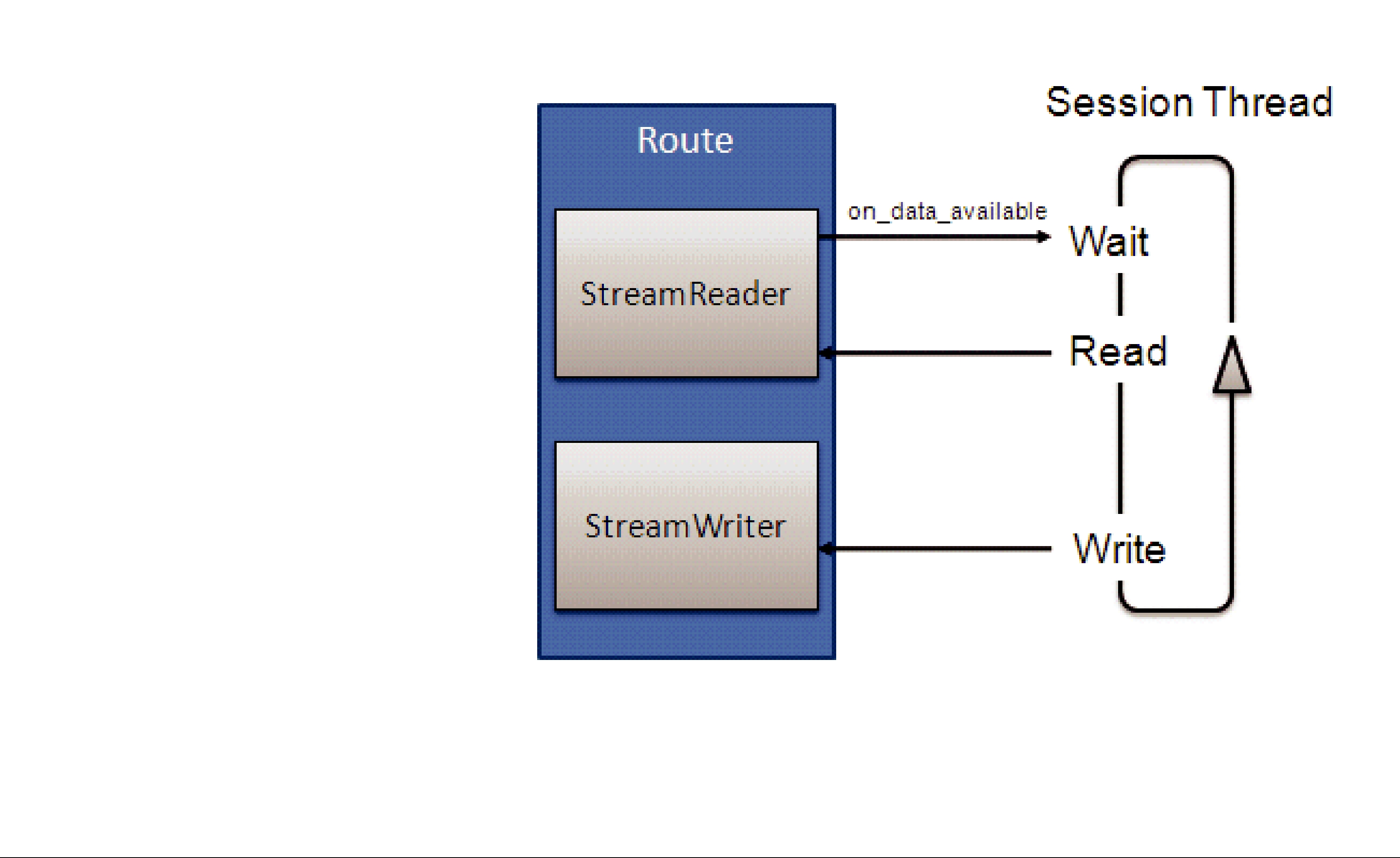
8.2.3Reading Data
Routing Service uses the session threads (there is one per <session> tag) to read data from StreamReaders.
Each session thread will block waiting for new data using a WaitSet. When a StreamReader receives new data, it will use the StreamReaderListener’s on_data_available() callback operation to wake up the session thread associated with it. After that, the session thread will invoke the StreamReader’s read() operation to get the new data.
The figure to the right describes how the session thread reads samples from a StreamReader.
8.3Creating New Adapters
Routing Service provides an adapter SDK in C and Java to support the creation of new adapter plugins.
The Routing Service Adapter SDK is distributed as a separate component that must be installed over an existing installation of Routing Service. For more information, see the Routing Service Adapter SDK SDK Installation Guide.
8.3.1Adapter SDK Components
After installing Routing Service Adapter SDK, the components in Table 8.8 will be available in the
Routing Service root folder.
Table 8.8 Adapter SDK Components
Component |
Description |
|
|
|
|
|
|
|
Release Notes and Installa- |
Adapter SDK release notes and installation guide. |
|
tion Guide |
<Routing Service home>/doc/pdf |
|
|
|
|
Adapter SDK Program- |
Chapter 8 in the Routing Service User’s Manual (this chapter). |
|
ming Guide |
|
|
|
C and Java API specification in HTML and PDF format. |
|
|
The C API specification describes the Adapter and Transformation API (see |
|
API Specification |
||
The Java API specification describes the Adapter API. |
||
|
||
|
<Routing Service home>/ReadMe.html |
|
|
<Routing Service home>/doc/pdf |
|
|
|
Table 8.8 Adapter SDK Components
Component |
|
Description |
|
|
|
||
|
|
||
|
The SDK provides three buildable adapter implementations, two in C (file and |
||
|
socket) and one in Java (JMS). |
|
|
Adapter Sample Code |
For instructions on compiling and using the sample adapters, see Section 4.9, |
||
Section 4.10, and Section 4.11 in the Getting Started Guide. |
|||
|
|||
|
Sample Code: |
<Routing Service home>/adapters |
|
|
Sample Configuration Files: <Routing Service home>/example/shapes |
||
|
|
||
|
The SDK .jar file provides the necessary interfaces and support classes to imple- |
||
SDK .jar file |
ment Java adapters (see Section 8.3.5). |
||
In addition, the JAR file also includes an implementation of a test adapter (Test- |
|||
(rtirsadapter.jar) |
|||
Adapter) that can be used to test new input adapters implementations. |
|||
|
|||
|
JAR Location: <Routing Service home>/class/rtirsadapter.jar |
||
|
|
||
SDK infrastructure shared |
The infrastructure library provides environment (see Section 8.3.2.1) and proper- |
||
ties management functions for C adapters. |
|||
library |
The C adapters will have to link with this library. |
||
([lib]rtirsinfrastruc- |
|||
Library Location: <Routing Service home>/bin/<architecture>/ |
|||
ture[.dll,.so]) |
|||
[lib]rtirsinfrastructure[.dll,.so] |
|||
|
|||
|
|
||
|
The C adapters will have to include two SDK header files: |
||
|
routingservice_adapter.h: This header file defines the adapter API. |
||
|
routingservice_infrastructure.h: This header file defines the public interface of |
||
SDK header files |
the infrastructure library. |
|
|
|
Header Location: |
|
|
|
<Routing Service home>/include/routingservice_infrastructure.h |
||
|
<Routing Service home>/include/routingservice_adapter.h |
||
|
|
|
|
8.3.2C Adapter API
This section does not intend to give complete information on all the C API functions, but rather to describe the aspects of the API that are specific to the C language.
For detailed information about the C API, please see the online (HTML) Routing Service documentation.
Every adapter plugin will implement a plugin constructor (entry point to the shared library) that will be used by Routing Service to create a plugin instance.
typedef struct RTI_RoutingServiceAdapterPlugin * (
* RTI_RoutingServiceAdapterPlugin_CreateFcn)(
const struct RTI_RoutingServiceProperties * properties, RTI_RoutingServiceEnvironment * env);
The entry point function is specified in the configuration file using the tag <create_function> within <adapter_plugin> (see Section 8.1).
The structure RTI_RoutingServiceAdapterPlugin will contain the plugin implementation as a set of function pointers. This structure also encapsulates the plugin version information that will be used by Routing Service for logging purposes.
struct RTI_RoutingServiceAdapterPlugin {
int _init;
struct RTI_RoutingServiceVersion _rs_version;
/* The version of the adapter */
struct RTI_RoutingServiceVersion plugin_version;
RTI_RoutingServiceAdapterPlugin_DeleteFcn
adapter_plugin_delete;
/* Adapter API */
RTI_RoutingServiceAdapterPlugin_CreateConnectionFcn
adapter_plugin_create_connection; RTI_RoutingServiceAdapterPlugin_DeleteConnectionFcn
adapter_plugin_delete_connection;
/* Connection API */
RTI_RoutingServiceConnection_CreateSessionFcn
connection_create_session; RTI_RoutingServiceConnection_DeleteSessionFcn
connection_delete_session; RTI_RoutingServiceConnection_CreateStreamReaderFcn
connection_create_stream_reader; RTI_RoutingServiceConnection_DeleteStreamReaderFcn
connection_delete_stream_reader; RTI_RoutingServiceConnection_CreateStreamWriterFcn
connection_create_stream_writer; RTI_RoutingServiceConnection_DeleteStreamWriterFcn
connection_delete_stream_writer; RTI_RoutingServiceConnection_GetDiscoveryReaderFcn
connection_get_input_stream_discovery_reader; RTI_RoutingServiceConnection_GetDiscoveryReaderFcn
connection_get_output_stream_discovery_reader; RTI_RoutingServiceConnection_CopyTypeRepresentationFcn
connection_copy_type_representation; RTI_RoutingServiceConnection_DeleteTypeRepresentationFcn
connection_delete_type_representation; RTI_RoutingServiceConnection_GetAttributesFcn
connection_get_attributes; RTI_RoutingServiceConnection_ToStringFcn
connection_to_string; RTI_RoutingServiceAdapterEntity_UpdateFcn
connection_update;
/* Session API*/
RTI_RoutingServiceAdapterEntity_UpdateFcn
session_update;
/* Stream Reader API */
RTI_RoutingServiceStreamReader_ReadFcn
stream_reader_read; RTI_RoutingServiceStreamReader_ReturnLoanFcn
stream_reader_return_loan; RTI_RoutingServiceAdapterEntity_UpdateFcn
stream_reader_update;
/* Stream Writer API */
RTI_RoutingServiceStreamWriter_WriteFcn
stream_writer_write; RTI_RoutingServiceAdapterEntity_UpdateFcn
stream_writer_update;
void * user_object;
};
The adapter plugin instance created by the entry point function must be initialized with the macro RTI_RoutingServiceAdapterPlugin_initialize (part of the adapter API). For example:
struct RTI_RoutingServiceAdapterPlugin * MyAdapterPlugin_create(
const struct RTI_RoutingServiceProperties * properties, RTI_RoutingServiceEnvironment * env)
{
struct RTI_RoutingServiceAdapterPlugin * adapter = NULL;
struct RTI_RoutingServiceVersion version = {1,0,0,0};
adapter = calloc ( 1, sizeof (
struct RTI_RoutingServiceAdapterPlugin));
if (adapter == NULL) { RTI_RoutingServiceEnvironment_set_error (
env, "Memory allocation error"); return NULL;
}
RTI_RoutingServiceAdapterPlugin_initialize(adapter);
/* Assign the function pointers */
}
8.3.2.1Environment
The last parameter of each adapter API is the environment (RTI_RoutingServiceEnvironment). This parameter is used to get information about the Routing Service execution such as the version or the verbosity. The environment is also used by the adapter implementations to provide error notification.
8.3.2.2Adapter Verbosity
The C adapter implementations can access the verbosity level used to run Routing Service by using the following environment function:
RTI_RoutingServiceVerbosity RTI_RoutingServiceEnvironment_get_verbosity (
const RTI_RoutingServiceEnvironment * self);
|
The mapping |
between the |
|
RTI_RoutingServiceVerbosity enumeration is as follows: |
|
Table 8.9 Mapping between |
||
|
|
|
|
RTI_RoutingServiceVerbosity |
|
|
|
|
|
|
|
|
0 |
RTI_ROUTING_SERVICE_VERBOSITY_NONE |
|
|
|
|
1 |
RTI_ROUTING_SERVICE_VERBOSITY_EXCEPTION |
|
|
|
|
2 |
RTI_ROUTING_SERVICE_VERBOSITY_WARN |
|
|
|
|
3 and 4 |
RTI_ROUTING_SERVICE_VERBOSITY_INFO |
|
|
|
|
5 and 6 |
RTI_ROUTING_SERVICE_VERBOSITY_DEBUG |
|
|
|
8.3.2.3Version Information
Routing Service and the different adapter implementations are identified by a version number.
The adapter version is provided to Routing Service using the member plugin_version in the RTI_RoutingServiceAdapterPlugin structure. This member must be initialized in the adapter entry point function; it is used by Routing Service for logging purposes.
The Routing Service version is provided to the C adapters through the environment. The adapters can access this information with the following function:
void RTI_RoutingServiceEnvironment_get_version( const RTI_RoutingServiceEnvironment * self, struct RTI_RoutingServiceVersion * version);
8.3.3My First C Adapter
This section shows how to create a simple C adapter on Windows and
The new Adapter will be a simple file adapter where the input adapter reads lines from a text file and the output adapter saves the provided lines to an output text file.
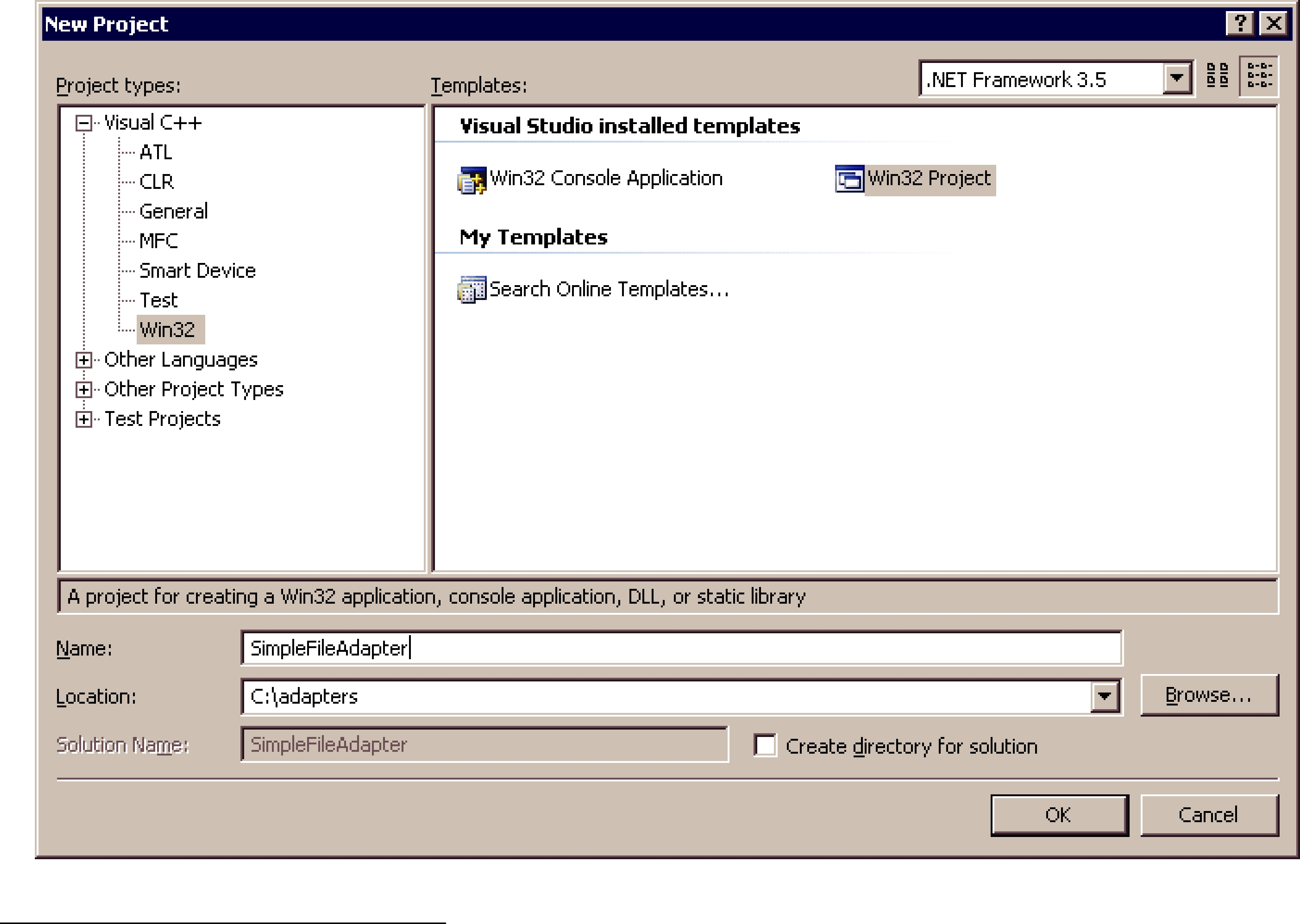
A more flexible and complex file adapter that is able to work with structured information is provided under <Routing Service home>/adapters/file.
The source code and projects that you will create in the next sections are provided in <Routing
Service home>/adapters/tutorial/C.
8.3.3.1Setting the Environment on the Development Machine
There are a few things to take care of before you start developing the simple file adapter.
1.Install Connext; see the Routing Service Release Notes for the compatible version of Connext.
The C adapter will use TypeCode as the type representation format and DynamicData as the data representation format. This will require linking against the Connext libraries and including the header files defining the TypeCode and DynamicData APIs.
For information on how to install Connext, see the RTI Core Libraries and Utilities Getting Started Guide.1
As part of the installation process, make sure that NDDSHOME points to the Connext installation directory.
2.Set the environment variable ROUTINGSERVICEHOME
Set ROUTINGSERVICEHOME to the Routing Service installation directory. (Routing Service itself does not require that you set the environment variable. It is used to build and compile new adapters).
8.3.3.2Creating a Visual Studio Project (Only for Windows systems)
In this section you will create a Visual Studio project for the adapter dynamic library. We will use Microsoft® Visual Studio® 2008.
1.Start Microsoft Visual Studio 2008.
2.Select File, New, Project, Visual C++, Win32, Win32 Project. Name the project
SimpleFileAdapter and select a location.
1. See <Connext installation directory>/ndds.<version>/doc/pdf/RTI_CoreLibrariesAndUtilities_GettingStarted.pdf.
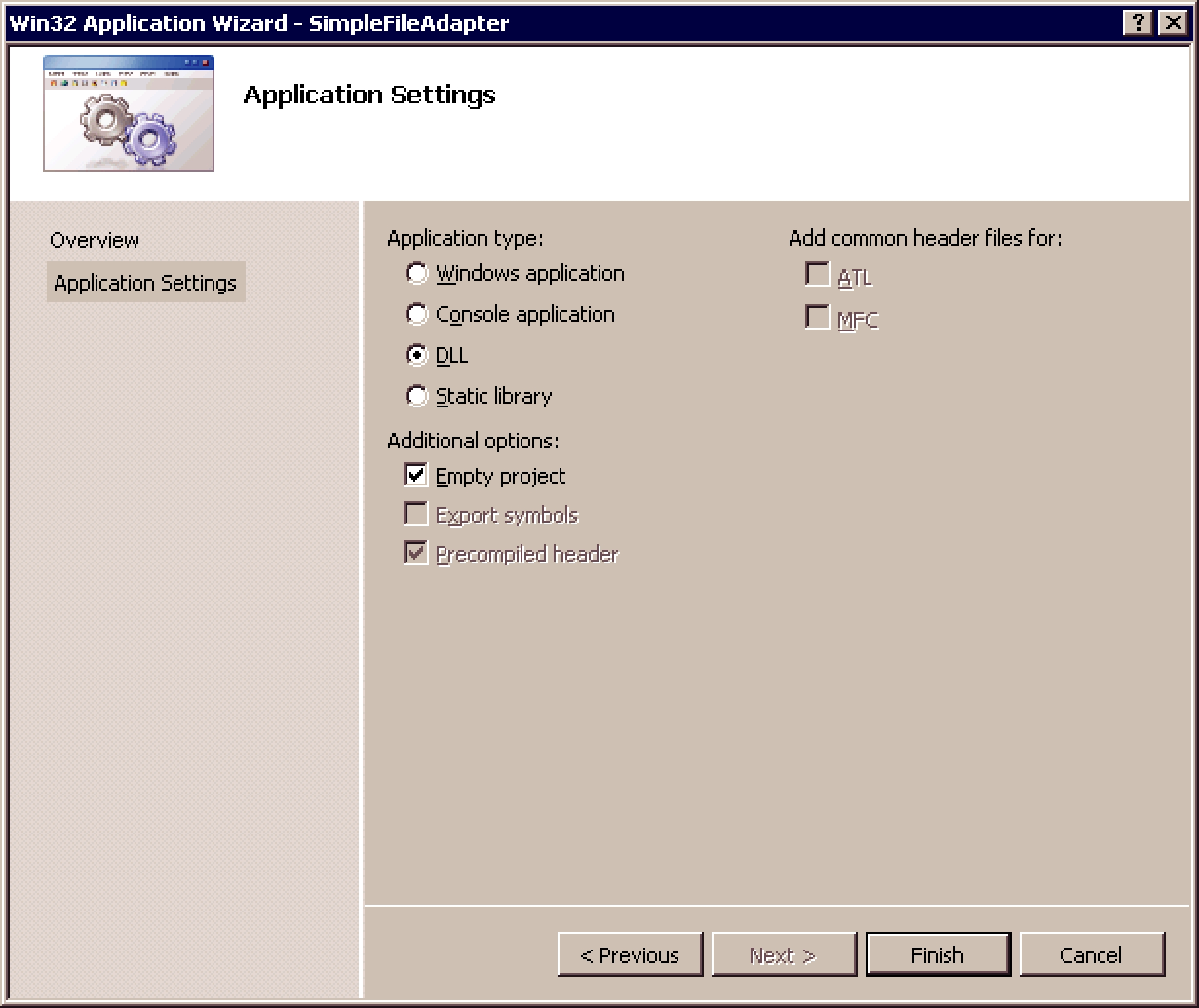
3. Select Application Settings and choose DLL. Click Finish.
4.Create a new file called SimpleFileAdapter.c with the following content. This file will contain the adapter implementation.
/********* Simple File Adapter *****/
#include <stdio.h>
#include <string.h>
#ifdef RTI_WIN32
#include <process.h>
#else
#include <pthread.h>
#endif
#include "ndds/ndds_c.h"
#include "routingservice/routingservice_adapter.h"
#ifdef RTI_WIN32
/* Disable strtok, fopen warnings */
#pragma warning (disable : 4996 )
#define DllExport __declspec( dllexport )
#else
#define DllExport
#endif
/*
DllExport
struct RTI_RoutingServiceAdapterPlugin * SimpleFileAdapter_create(
const struct RTI_RoutingServiceProperties * properties, RTI_RoutingServiceEnvironment * env)
{
return NULL;
}
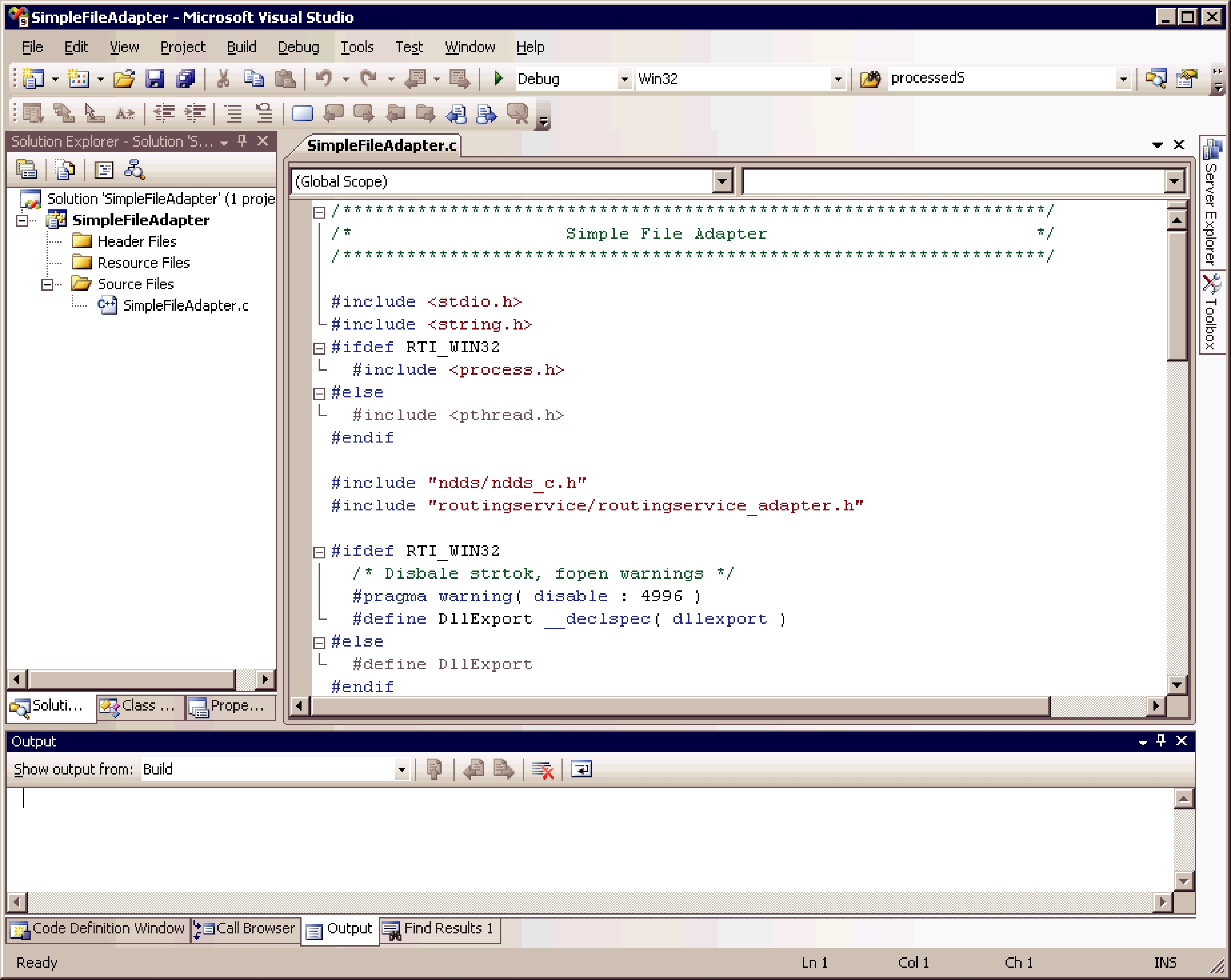
5. Add the new file to the project SimpleFileAdapter.
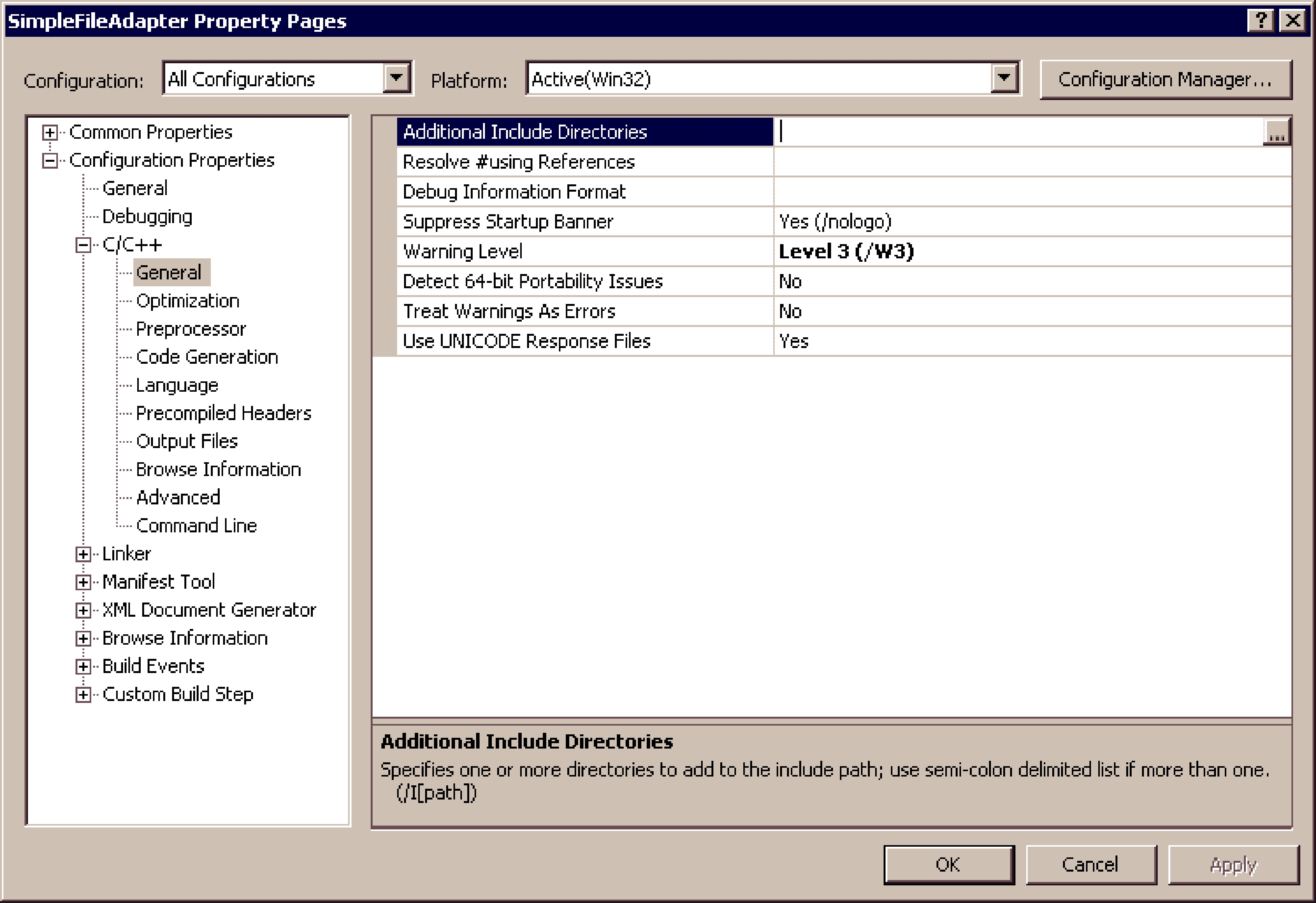
6.
•In the Configuration combo box, select All Configurations.
•Select Configuration Properties, C/C++, General.
• Add the following to Additional Include Directories:
$(NDDSHOME)\include;$(NDDSHOME)\include\ndds; $(ROUTINGSERVICEHOME)\include
•Select Configuration Properties, Linker, General; add the following to Additional Library Directories:
$(NDDSHOME)\lib\i86Win32VS2008; $(ROUTINGSERVICEHOME)\bin\i86Win32VS2008
•Select Configuration Properties, Linker, Input; add the following to Additional Dependencies:
rtirsinfrastructure.lib nddsc.lib nddscore.lib netapi32.lib advapi32.lib user32.lib WS2_32.lib
•In the Configuration combo box, select Debug.
•Select Configuration Properties, C/C++, Preprocessor; replace the contents of Preprocessor Definitions with:
WIN32;WIN32_LEAN_AND_MEAN;NDDS_DLL_VARIABLE;RTI_WIN32;_DEBUG
•In the Configuration combo box, select Release.
•Select Configuration Properties, C/C++, Preprocessor; replace the contents of Preprocessor Definitions with:
WIN32;WIN32_LEAN_AND_MEAN;NDDS_DLL_VARIABLE;RTI_WIN32;NDEBUG
• Click OK.
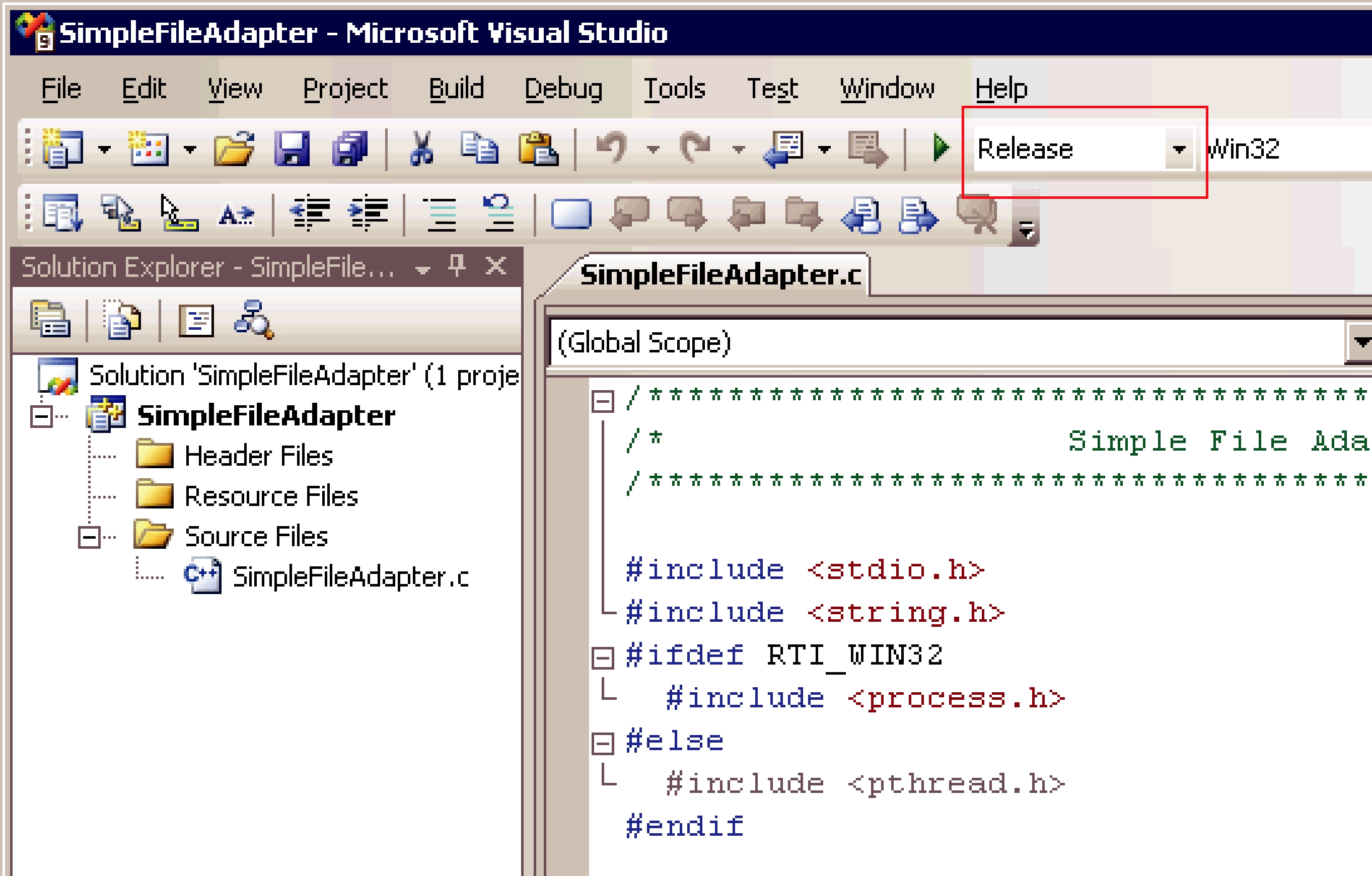
7. In the Solution Configuration combo box, select Release.
8.Build the SimpleFileAdapter project and verify that there are no errors.
8.3.3.3Creating an Adapter makefile [Only for
In this section you will create a makefile to generate and compile the adapter shared library.
1.The makefile that you will generate is intended to be used with the GNU distribution of the make utility. On modern Linux systems, the make binary typically is GNU make. On other systems, GNU make is called gmake. The instructions below use gmake. Make sure that the GNU make binary is on your path before continuing.
2.Create a directory that will contain the adapter makefile and implementation. The rest of this section assumes that /opt/adapters/simplefile is the adapter directory.
3.In /opt/adapters/simplefile, create a file called makefile with the following content.
##########################################
# Makefile to build libsimplefileadapter.so
##########################################
ARCH = i86Linux2.6gcc4.1.1
c_cc = gcc c_ld = gcc
ifeq ($(DEBUG),1) c_cc_flags =
c_cc_flags =
c_ld_flags =
DEFINES_ARCH_SPECIFIC =
DEFINES = $(DEFINES_ARCH_SPECIFIC)
INCLUDES =
-I$(NDDSHOME)/include/ndds
LIBS = \
COMMONSOURCES = SimpleFileAdapter.c
SHAREDLIB = lib/$(ARCH)/libsimplefileadapter.so
DIRECTORIES = lib.dir lib/$(ARCH).dir objs.dir objs/$(ARCH).dir
COMMONOBJS = $(COMMONSOURCES:%.c=objs/$(ARCH)/%.o)
$(ARCH) : $(DIRECTORIES) $(COMMONOBJS) $(SHAREDLIB)
$(SHAREDLIB) : $(COMMONOBJS)
$(c_cc) $(c_ld_flags)
objs/$(ARCH)/%.o : %.c
$(c_cc) $(c_cc_flags)
# Here is how we create those subdirectories automatically. %.dir :
@echo "Checking directory $*" @if [ !
echo "Making directory $*"; \ mkdir
fi;
clean:
@rm
The above makefile assumes that the architecture is i86Linux2.6gcc4.1.1. If you are build- ing for a different architecture, you can use the above makefile as an example.
4.Create a new file called SimpleFileAdapter.c with the following content. This file will contain the adapter implementation.
#include <stdio.h> #include <string.h>
#ifdef RTI_WIN32 #include <process.h>
#else
#include <pthread.h>
#endif
#include "ndds/ndds_c.h"
#include "routingservice/routingservice_adapter.h"
#ifdef RTI_WIN32
/* Disable strtok, fopen warnings */
#pragma warning( disable : 4996 )
#define DllExport __declspec( dllexport )
#else
#define DllExport
#endif
/* Entry point to the adapter plugin */
DllExport
struct RTI_RoutingServiceAdapterPlugin * SimpleFileAdapter_create(
const struct RTI_RoutingServiceProperties * properties, RTI_RoutingServiceEnvironment * env)
{
return NULL;
}
5.Compile the SimpleFileAdapter skeleton by executing gmake from the adapter directory.
>gmake
After compilation, you will find the adapter library in /opt/adapters/simplefile/lib/ <architecture>. The next few sections will show you how to complete the adapter implementation.
8.3.3.4Initializing the Adapter Entry Point Function
Every adapter plugin must implement a plugin constructor (entry point to the dynamic library) that will be used by Routing Service to create a plugin instance (see Section 8.3.2). In this example, the entry point is the function SimpleFileAdapter_create in the file SimpleFileAdapter.c. You have to initialize this function to create a new plugin.
/* Plugin destructor */
void SimpleFileAdapter_delete(
struct RTI_RoutingServiceAdapterPlugin * adapter, RTI_RoutingServiceEnvironment * env)
{
free(adapter);
}
/* Entry point to the adapter plugin */
DllExport struct RTI_RoutingServiceAdapterPlugin * SimpleFileAdapter_create(
const struct RTI_RoutingServiceProperties * properties, RTI_RoutingServiceEnvironment * env)
{
struct RTI_RoutingServiceAdapterPlugin * adapter = NULL;
struct RTI_RoutingServiceVersion version = {1,0,0,0};
int verbosity;
verbosity = RTI_RoutingServiceEnvironment_get_verbosity(env);
if (verbosity == RTI_ROUTING_SERVICE_VERBOSITY_DEBUG) { printf("CALL SimpleFileAdapter_create\n");
}
adapter = calloc ( 1, sizeof (
struct RTI_RoutingServiceAdapterPlugin));
if (adapter == NULL) {
RTI_RoutingServiceEnvironment_set_error ( env, "Memory allocation error");
return NULL;
}
RTI_RoutingServiceAdapterPlugin_initialize(adapter);
/* Assign the function pointers */
return (struct RTI_RoutingServiceAdapterPlugin *) adapter;
}
The structure RTI_RoutingServiceAdapterPlugin contains the plugin implementation as a set of function pointers. For now, you only need to implement adapter_plugin_delete that deletes the plugin instances created by SimpleFileAdapter_create(). You will initialize the other pointers in the plugin structure as you implement the adapter functionality.
The entry point function receives two parameters: the adapter properties and the environment, env.
The properties parameter (not used by the SimpleFileAdapter) is used to configure the adapter instance. The values contained in this parameter are provided as (name,value) pairs using the tag <property> within <adapter_plugin> (see Adapter Usage and Configuration (Section 8.1)).
The environment parameter, env, is part of every function in the adapter API. This parameter is used to get information about the Routing Service execution such as the version or the verbosity. In addition, the environment is also used to notify Routing Service of any error in the adapter execution.
8.3.3.5Implementing the Adapter Connection
The adapter plugin instances are connection factories. Connection objects provide access to data domains such as Connext domains or JMS network providers and they are configured using the XML tags <connection_1> and <connection_2> in a <domain_route> (see Section 2.4.2). In the SimpleFileAdapter example, the connection objects will provide access to a directory on your computer’s file system.
The next step consist on implementing the functions that create and delete a connection. Insert the following code in the “Simple File Adapter: Connection“ section of SimpleFileAdapter.c.
/* Connection */
struct SimpleFileAdapterConnection { char * directory;
};
/* Deletes a connection */
void SimpleFileAdapter_delete_connection(
struct RTI_RoutingServiceAdapterPlugin * adapter, RTI_RoutingServiceConnection connection, RTI_RoutingServiceEnvironment * env)
{
struct SimpleFileAdapterConnection * cx =
(struct SimpleFileAdapterConnection *) connection;
int verbosity; verbosity =
RTI_RoutingServiceEnvironment_get_verbosity(env);
if (verbosity == RTI_ROUTING_SERVICE_VERBOSITY_DEBUG) {
printf("CALL SimpleFileAdapter_delete_connection\n");
}
if
}
free(cx);
}
/* Creates a connection */ RTI_RoutingServiceConnection SimpleFileAdapter_create_connection(
struct RTI_RoutingServiceAdapterPlugin * adapter, const char * routing_service_name,
const char * routing_service_group_name,
const struct RTI_RoutingServiceStreamReaderListener * input_disc_listener,
const struct RTI_RoutingServiceStreamReaderListener * output_disc_listener,
const struct RTI_RoutingServiceTypeInfo
**registeredTypes, int registeredTypeCount,
const struct RTI_RoutingServiceProperties
*properties,
RTI_RoutingServiceEnvironment * env)
{
const char * directory;
struct SimpleFileAdapterConnection * cx; int verbosity;
verbosity =
RTI_RoutingServiceEnvironment_get_verbosity(env);
if (verbosity == RTI_ROUTING_SERVICE_VERBOSITY_DEBUG) {
printf("CALL SimpleFileAdapter_create_connection\n");
}
cx = calloc ( 1,
sizeof ( struct SimpleFileAdapterConnection));
if (cx == NULL) {
RTI_RoutingServiceEnvironment_set_error( env, "Memory allocation error");
return NULL;
}
directory = RTI_RoutingServiceProperties_lookup_property( properties,"directory");
if (directory == NULL) {
RTI_RoutingServiceEnvironment_set_error(
env, "directory property is required"); free(cx);
return NULL;
}
if
RTI_RoutingServiceEnvironment_set_error ( env, "Memory allocation error");
free(cx);
return NULL;
}
return cx;
}
From the implementation, you can see that the connection object encapsulates the name of the directory from which the StreamReaders and StreamWriters will read and write files.
The value of the RTI_RoutingServiceAdapterPlugin structure created in SimpleFileAdapter_create() must be updated to contain the two new functions.
8.3.3.6Implementing the StreamReader
The connection objects are factories of StreamReaders. A StreamReader provides a way to read data samples of a specific type from a data domain.
In the configuration file, StreamReaders are associated with the tag <input> within <route> or <auto_route> (see Section 2.4.6).
The StreamReaders created by the SimpleFileAdapter connections read text files from the connection directory.
The data samples provided to Routing Service (using the read operation) are DynamicData with the following IDL type:
struct TextLine { string<1024> value;
};
When a SimpleFileAdapter StreamReader is created, the name of the file is the input stream name with a .txt extension. You can use the read_period property to control how often the StreamReader notifies Routing Service about new lines. For example:
<route name="route"> <input connection="1">
<stream_name> HelloWorld </stream_name>
<registered_type_name> TextLine
</registered_type_name> <property>
<value>
<element> <name>read_period</name> <value>1000</value>
</element>
</value>
</property>
</input>
...
</route>
In the above example, the input StreamReader will read lines from a file called HelloWorld.txt and provide one line per second to Routing Service.
The next step is to implement the StreamReader functionality. You will implement five new functions:
❏SimpleFileAdapterStreamReader_read(): This function will be called by Routing Service after being notified that the are new lines available. Although the signature of the function allows returning more than one sample (line), for the sake of simplicity, the implementation only returns one line each time the function is called.
❏SimpleFileAdapterStreamReader_return_loan: The loan on the samples provided by
SimpleFileAdapterStreamReader_read() is returned to the adapter using this function. The SimpleFileAdapter implementation of return_loan() is empty because:
•The read operation does not create new samples and always returns a single sample stored in the StreamReader.
•Two calls to SimpleFileAdapterStreamReader_read() cannot occur in parallel.
❏SimpleFileAdapterStreamReader_run: Routing Service will not call the read operation until it is notified of the presence of new data (see Section 8.2.3). To provide data notification, the StreamReader implementation creates a thread that wakes up after read_period and notifies Routing Service of new data if the end of the file has not been reached yet. SimpleFileAdapterStreamReader_run is the function executed by the notification thread.
❏SimpleFileAdapterConnection_delete_stream_reader: This function is called to destroy a StreamReader. The implementation will finalize the notification thread and close the file handle.
❏SimpleFileAdapterConnection_create_stream_reader: This function is called when a new StreamReader is created. Among other things, the implementation will open the file that will be read and create the notification thread.
Insert the following code in the “Simple File Adapter: StreamReader“ section of
SimpleFileAdapter.c.
/* StreamReader */
struct SimpleFileAdapterStreamReader {
int run;
#ifdef RTI_WIN32 HANDLE thread;
#else
pthread_t thread;
#endif
DDS_DynamicData * sample[1];
struct DDS_Duration_t readPeriod;
struct RTI_RoutingServiceStreamReaderListener listener;
FILE * fHandle;
};
/* Returns sample loan */
void SimpleFileAdapterStreamReader_return_loan( RTI_RoutingServiceStreamReader stream_reader, RTI_RoutingServiceSample * sample_list, RTI_RoutingServiceSampleInfo * info_list,
int count, RTI_RoutingServiceEnvironment * env)
{
int verbosity;
verbosity =
RTI_RoutingServiceEnvironment_get_verbosity(env);
if (verbosity == RTI_ROUTING_SERVICE_VERBOSITY_DEBUG) {
printf(
"CALL SimpleFileAdapterStreamReader_return_loan\n");
}
return;
}
/* Reads one line from the StreamReader file */ void SimpleFileAdapterStreamReader_read(
RTI_RoutingServiceStreamReader stream_reader, RTI_RoutingServiceSample ** sample_list, RTI_RoutingServiceSampleInfo ** info_list,
int * count, RTI_RoutingServiceEnvironment * env)
{
DDS_ReturnCode_t retCode;
char line[2048];
char * str;
struct SimpleFileAdapterStreamReader * self = (struct SimpleFileAdapterStreamReader *)
stream_reader; int verbosity;
int length;
verbosity = RTI_RoutingServiceEnvironment_get_verbosity(env);
if (verbosity == RTI_ROUTING_SERVICE_VERBOSITY_DEBUG) {
printf("CALL SimpleFileAdapterStreamReader_read\n");
}
*count = 0;
*sample_list = NULL;
/* We don't provide sample info in this adapter, which is an optional feature
*/
*info_list = NULL;
str = fgets(line, sizeof(line),
if (!str) { return;
}
length = strlen(str);
if (length > 0 &&
if (length > 1 &&
}
}
retCode = DDS_DynamicData_set_string(
DDS_DYNAMIC_DATA_MEMBER_ID_UNSPECIFIED, line);
if (retCode != DDS_RETCODE_OK) {
RTI_RoutingServiceEnvironment_set_error(
env, "Error assigning value=%s", line);
return;
}
*sample_list = (RTI_RoutingServiceSample
return;
}
/* Notification thread
This thread will notify of data availability in the file. */
void * SimpleFileAdapterStreamReader_run( void * threadParam)
{
struct SimpleFileAdapterStreamReader * self =
(struct SimpleFileAdapterStreamReader *) threadParam;
while
if
self->listener.on_data_available( self,
}
}
return NULL;
}
/* Deletes a StreamReader */
void SimpleFileAdapterConnection_delete_stream_reader( RTI_RoutingServiceConnection connection, RTI_RoutingServiceStreamReader stream_reader, RTI_RoutingServiceEnvironment * env)
{
struct SimpleFileAdapterStreamReader * reader =
(struct SimpleFileAdapterStreamReader *) stream_reader;
#ifndef RTI_WIN32
void * value = NULL;
#endif
int verbosity;
verbosity = RTI_RoutingServiceEnvironment_get_verbosity(env);
if (verbosity == RTI_ROUTING_SERVICE_VERBOSITY_DEBUG) {
printf(
"CALL SimpleFileAdapterConnection_delete_stream_reader\n");
}
#ifdef RTI_WIN32
#else
#endif
if
}
if
}
free(reader);
}
/* Creates a StreamReader */ RTI_RoutingServiceStreamReader SimpleFileAdapterConnection_create_stream_reader(
RTI_RoutingServiceConnection connection, RTI_RoutingServiceSession session,
const struct RTI_RoutingServiceStreamInfo * stream_info, const struct RTI_RoutingServiceProperties * properties,
const struct RTI_RoutingServiceStreamReaderListener * listener, RTI_RoutingServiceEnvironment * env)
{
const char * readPeriodStr;
unsigned int readPeriod;
char * file;
struct SimpleFileAdapterConnection * self =
(struct SimpleFileAdapterConnection *)connection;
struct SimpleFileAdapterStreamReader * reader = NULL;
struct DDS_DynamicDataProperty_t dynamicDataProps =
DDS_DynamicDataProperty_t_INITIALIZER;
int error = 0;
#ifndef RTI_WIN32 pthread_attr_t threadAttr;
#endif
int verbosity; verbosity =
RTI_RoutingServiceEnvironment_get_verbosity(env);
if (verbosity == RTI_ROUTING_SERVICE_VERBOSITY_DEBUG) {
printf(
"CALL SimpleFileAdapterConnection_create_stream_reader\n");
}
/* Create StreamReader */ reader = calloc(1, sizeof(
struct SimpleFileAdapterStreamReader));
if (reader == NULL) {
RTI_RoutingServiceEnvironment_set_error(
env, "Memory allocation error");
return NULL;
}
(struct DDS_TypeCode *)
if
RTI_RoutingServiceEnvironment_set_error(
env, "Failure creating dynamic data sample");
free(reader);
return NULL;
}
/* Open input file */
file =
strlen("/") +
if (file == NULL) {
RTI_RoutingServiceEnvironment_set_error(
env, "Memory allocation error");
free(reader);
return NULL;
}
sprintf(file, "%s/%s.txt",
if
RTI_RoutingServiceEnvironment_set_error(
env, "Error opening %s", file); free(file);
free(reader);
return NULL;
}
free(file);
/* Creates notification thread */ readPeriodStr =
RTI_RoutingServiceProperties_lookup_property( properties, "read_period");
if (readPeriodStr != NULL) {
readPeriod = atoi(readPeriodStr);
} else {
readPeriod = 1000; /* 1 Sec */
}
(readPeriod % 1000) * 1000000;
#ifdef RTI_WIN32
(HANDLE) _beginthread( (void(__cdecl*)(void*)) SimpleFileAdapterStreamReader_run, 0, (void*)reader);
if
}
#else pthread_attr_init(&threadAttr); pthread_attr_setdetachstate(
&threadAttr, PTHREAD_CREATE_JOINABLE);
error = pthread_create(
SimpleFileAdapterStreamReader_run, (void *)reader);
pthread_attr_destroy(&threadAttr);
#endif
if (error) {
RTI_RoutingServiceEnvironment_set_error(
env, "Error creating notification thread");
free(reader);
return NULL;
}
return reader;
}
The value of the RTI_RoutingServiceAdapterPlugin structure created in SimpleFileAdapter_create() must be updated to contain the StreamReader functions.
8.3.3.7Implementing the StreamWriter
The connection objects are factories of StreamWriters. A StreamWriter provides a way to write samples of a specific type into a data domain.
In the configuration file, StreamWriters are associated with the tag <output> within <route> or <auto_route> (see Section 2.4.6).
The SimpleFileAdapter StreamWriters create new files into the connection directory and store the lines read from the routes’ inputs.
The data samples provided to the write operation of the StreamWriters are DynamicData with the following IDL type:
struct TextLine { string<1024> value;
};
When a SimpleFileAdapter StreamWriter is created, the name of the file is the output stream name with “.txt” extension. For debugging purposes, the StreamWriter can be configured to print the written samples on the console:
<route name="route">
...
<output> <stream_name>HelloWorld</stream_name> <registered_type_name>
TextLine </registered_type_name> <property>
<value>
<element> <name>print_to_stdout</name> <value>1</value>
</element>
</value>
</property>
</output>
</route>
In the above example, the output StreamWriter will store the lines provided by Routing Service on a file called HelloWorld.txt. It will also print the lines on the screen.
Insert the following code in the “Simple File Adapter: StreamWriter“ section of
SimpleFileAdapter.c.
/* StreamWriter */
struct SimpleFileAdapterStreamWriter {
int printToStdout;
FILE * fHandle;
};
int SimpleFileAdapterStreamWriter_write( RTI_RoutingServiceStreamWriter stream_writer, const RTI_RoutingServiceSample * sample_list, const RTI_RoutingServiceSampleInfo * info_list, int count,
RTI_RoutingServiceEnvironment * env)
{
int i, samplesWritten;
DDS_DynamicData * sample;
DDS_ReturnCode_t retCode;
char * line;
struct SimpleFileAdapterStreamWriter * self =
(struct SimpleFileAdapterStreamWriter *) stream_writer;
int verbosity;
verbosity =
RTI_RoutingServiceEnvironment_get_verbosity(env);
if (verbosity == RTI_ROUTING_SERVICE_VERBOSITY_DEBUG) {
printf("CALL SimpleFileAdapterStreamWriter_write\n");
}
if
return 0;
}
samplesWritten = 0;
for (i=0; i<count; i++) {
sample = (DDS_DynamicData *)sample_list[i];
line = NULL;
retCode = DDS_DynamicData_get_string( sample, &line, NULL, "value",
DDS_DYNAMIC_DATA_MEMBER_ID_UNSPECIFIED);
if (retCode != DDS_RETCODE_OK) {
RTI_RoutingServiceEnvironment_set_error(
env, "Error assigning value");
} else { samplesWritten++;
}
fputs(line,
fputs("\n”,
if
printf("%s\n",line);
fflush(stdout);
}
DDS_String_free(line);
}
return samplesWritten;
}
/*
* Deletes a StreamWriter */
void SimpleFileAdapterConnection_delete_stream_writer(
RTI_RoutingServiceConnection connection, RTI_RoutingServiceStreamWriter stream_writer, RTI_RoutingServiceEnvironment * env)
{
struct SimpleFileAdapterStreamWriter * writer = (struct SimpleFileAdapterStreamWriter *)
stream_writer;
int verbosity; verbosity =
RTI_RoutingServiceEnvironment_get_verbosity(env); if (verbosity ==
RTI_ROUTING_SERVICE_VERBOSITY_DEBUG) { printf(
"CALL SimpleFileAdapterConnection_delete_stream_writer\n");
}
if
}
free(writer);
}
/*
* Creates a StreamWriter */
RTI_RoutingServiceStreamWriter SimpleFileAdapterConnection_create_stream_writer(
RTI_RoutingServiceConnection connection, RTI_RoutingServiceSession session,
const struct RTI_RoutingServiceStreamInfo * stream_info,
const struct RTI_RoutingServiceProperties * properties,
RTI_RoutingServiceEnvironment * env)
{
const char * printToStdoutStr; char * file;
struct SimpleFileAdapterConnection * self =
(struct SimpleFileAdapterConnection *)connection; struct SimpleFileAdapterStreamWriter * writer = NULL; int verbosity;
verbosity = RTI_RoutingServiceEnvironment_get_verbosity(env);
if (verbosity == RTI_ROUTING_SERVICE_VERBOSITY_DEBUG) { printf(
"CALL SimpleFileAdapterConnection_create_stream_writer\n");
}
/* Create StreamWriter */ writer = calloc(1,
sizeof(struct SimpleFileAdapterStreamWriter));
if (writer == NULL) { RTI_RoutingServiceEnvironment_set_error(
env, "Memory allocation error"); return NULL;
}
/* Open output file */
file =
strlen(".txt") + 1);

if (file == NULL) { RTI_RoutingServiceEnvironment_set_error(
env, "Memory allocation error"); free(writer);
return NULL;
}
sprintf(file,"%s/%s.txt",
if
env, "Error opening %s", file); free(file);
free(writer); return NULL;
}
free(file);
/* Creates notification thread */ printToStdoutStr =
RTI_RoutingServiceProperties_lookup_property( properties, "print_to_stdout");
if (printToStdoutStr != NULL) {
} else {
}
return writer;
}
The value of the RTI_RoutingServiceAdapterPlugin structure created in SimpleFileAdapter_create() must be updated to contain the StreamWriter functions.
8.3.3.8Running the SimpleFileAdapter
This section describes the steps required to use and run the SimpleFileAdapter with Routing Service. You will create a configuration file with a single route that reads a HelloWorld text file from an input directory and saves it into an output directory.
1.If you have not done it yet, compile and build the SimpleFileAdapter.
2.Under the adapter project directory (c:\adapters\SimpleFileAdapter1 on Windows systems; /opt/adapters/simplefile1 on
3.In the input directory create a file called HelloWorld.txt with the following content.
Hello World 1!
Hello World 2!
Hello World 3!
Hello World 4!
Hello World 5!
Hello World 6!
Hello World 7!
Hello World 8!
1. Your directory may be different if you did not use the default locations.
Hello World 9!
Hello World 10!
4.In the adapter project directory create a Routing Service XML configuration file called simple_file_adapter.xml with the following content.
Replace the value of the “directory” property under both connections with the location of the input and output directories.
Replace the content of the dll tag under adapter_plugin with the location of the release version of the SimpleFileAdapter shared library.
<?xml version="1.0"?> <dds>
<adapter_library name="adapters"> <adapter_plugin name="simple_file">
<dll>
c:\adapters\SimpleFileAdapter\Release\SimpleFileAdapter.dll
</dll> <create_function>
SimpleFileAdapter_create </create_function> </adapter_plugin>
</adapter_library>
<types>
<struct name="TextLine"> <member name=
"value" type="string" stringMaxLength="2048"/> </struct>
</types>
<routing_service name="file_to_file"> <domain_route name="domain_route">
<connection_1 plugin_name="adapters::simple_file"> <registered_type name=
"TextLine" type_name="TextLine"/> <property>
<value>
<element>
<name>directory</name>
<value>
c:\adapters\SimpleFileAdapter\input
</value>
</element>
</value>
</property> </connection_1>
<connection_2 plugin_name="adapters::simple_file"> <registered_type name=
"TextLine" type_name="TextLine"/> <property>
<value>
<element>
<name>directory</name>
<value>
c:\adapters\SimpleFileAdapter\output
</value>
</element>
</value>
</property> </connection_2>
<session name="session"> <route name="route">
<input connection="1"> <stream_name> HelloWorld </stream_name>
<registered_type_name> TextLine
</registered_type_name> </input>
<output> <stream_name>
HelloWorld </stream_name> <registered_type_name>
TextLine </registered_type_name> <property>
<value>
<element>
<name> print_to_stdout
</name>
<value>1</value>
</element>
</value>
</property>
</output>
</route>
</session> </domain_route>
</routing_service> </dds>
5.Start Routing Service by entering the following in a command shell.
On
>cd <SimpleFileAdapter project directory>
>$ROUTINGSERVICEHOME/scripts/rtiroutingservice
On Windows systems:
>cd <SimpleFileAdapter project directory>
>%ROUTINGSERVICEHOME%\scripts\rtiroutingservice
6.On the screen you will see:
RTI Routing Service <version> started (with name file_to_file)
Hello World 1!
Hello World 2!
Hello World 3!
Hello World 4!
Hello World 5!
Hello World 6!
Hello World 7!
Hello World 8!
Hello World 9!
Hello World 10!
7.Verify that a file called HelloWorld.txt has been generated into the output directory. The content of this file should de identical to the content of the same file in the input directory.
8.3.4Debugging C Adapters
When you develop a custom adapter you will need to debug it and test it. This section talks about the tools and APIs that you have available to debug and detect problems in Routing Service adapters written in C.
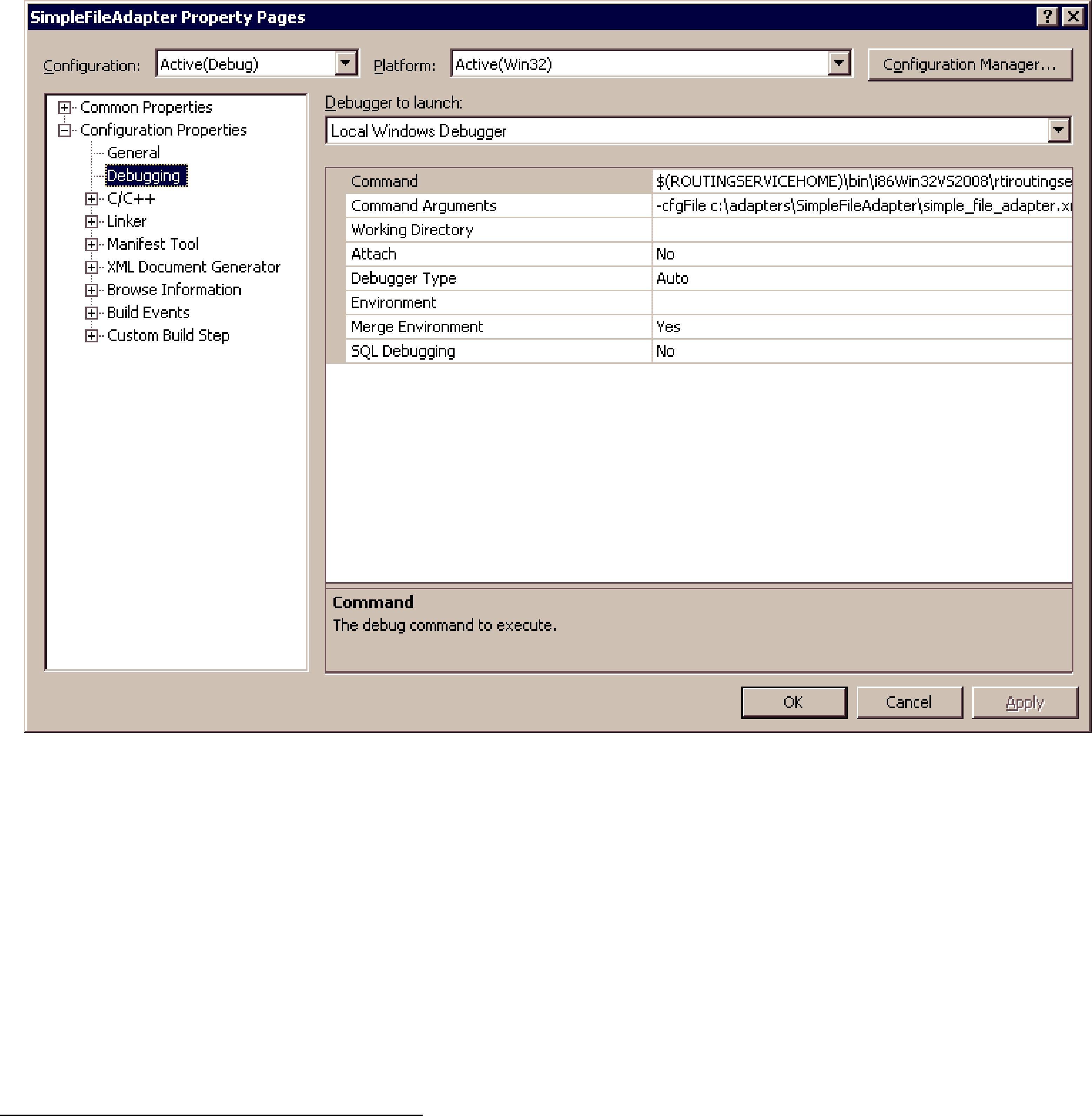
The first debugging capability is provided by the Routing Service SDK. The adapter SDK provides a way to access the verbosity level of Routing Service through the usage of the environment function RTI_RoutingServiceEnvironment_get_verbosity. It is highly recommendable that as part of the adapter implementation you instrument the code by adding status messages that will be printed with the INFO and DEBUG verbosity levels. This level of instrumentation will help you to capture
The second debugging capability is provided by third party tools. On a Windows system, you can debug the adapter shared libraries using Visual Studio. On a
8.3.4.1Debugging the Adapter with Visual
Let’s see how to debug the adapter library with Visual Studio 2008 using the SimpleFileAdapter implemented in Section 8.3.3.
1.Start Microsoft Visual Studio 2008 and open the solution SimpleFileAdapter.
2.In the Solution Configuration combo box select Debug configuration and recompile the SimpleFileAdapter project.
3.Edit simple_file_adapter.xml, the configuration file generated in Section 8.3.3.8. Replace the library in the <dll> tag with the debug version of the adapter. For example:
<dll>c:\adapters\SimpleFileAdapter\Debug\SimpleFileAdapter.dll</dll>
4.
•In the configuration combo box select Debug.
•Under Configuration Properties, Debugging; go to “Command” and add the following:
$(ROUTINGSERVICEHOME)\bin\i86Win32VS2008\rtiroutingservice
•Under Configuration Properties, Debugging; go to “Command Arguments” and add the following:
1. The location of your configuration file may be different. Replace the value with the right location.
•Click OK.
5.Open the file SimpleFileAdapter.c and insert breakpoints in the functions that you want to debug. Then press F5 to run Routing Service and debug the adapter.
If you get an information window that says there is no debugging information in rtiroutingservice, press YES. Although rtiroutingservice does not have debugging symbols, your adapter was built with debug information and you should not have any problems debugging it.
8.3.4.2Debugging the Adapter with
Let’s see how to debug the adapter library with gdb using the SimpleFileAdapter implemented in Section 8.3.3.
1.Go to the directory containing the SimpleFileAdapter makefile and build the debug ver- sion of the shared library as follows:
>gmake clean
>gmake DEBUG=1
The debug version of the adapter replaces the release version because is generated in the same location.
2.Edit the configuration file simple_file_adapter.xml generated in Section 8.3.3.8 and replace the library in the <dll> tag with the debug version of the adapter. For example:
<dll>/opt/adapters/simplefile/lib/i86Linux2.6gcc4.1.1/libsimplefileadapter.so</dll>
3.Run gdb:
>gdb $ROUTINGSERVICEHOME/bin/i86Linux2.6gcc4.1.1/rtiroutingservice
4.Insert breakpoints in the functions that you want to debug. For example:
(gdb) b SimpleFileAdapter_create_connection
Function "SimpleFileAdapter_create_connection" not defined.
Make breakpoint pending on future shared library load? (y or [n]) y
Breakpoint 1 (SimpleFileAdapter_create_connection) pending.
5. Execute Routing Service and debug your adapter.
(gdb) r
8.3.5Java Adapter API
This section does not intend to give complete information on the entire Java API, but rather to describe the aspects of the Java API that are specific to the Java language.
For detailed information about the Java API, please see the online (HTML) Routing Service documentation.
The Java Adapter API defines the interfaces in Table 8.10.
8.3.5.1Adapter Entry Point
Every Java adapter must create an Adapter class that implements the com.rti.routingservice.adapter.Adapter interface.
Adapter classes are registered with Routing Service using the tag <class_name> within <java_adapter_plugin> (see Section 8.1).
When Routing Service creates a new adapter object it will look for the following constructor:
MyAdapter(java.utils.Properties properties)
If the constructor does not exist, Routing Service will use the default constructor without arguments.
MyAdapter()
Table 8.10 Java Adapter API Interfaces
Interface |
|
Description |
|
|
|
||
|
|
||
|
Required |
||
com.rti.routingservice.adapter.Adapter |
The Adapter interface defines methods to: |
||
• |
get the adapter version |
||
|
|||
|
• |
create/destroy connections |
|
|
|
||
|
Required |
||
|
The Connection interface defines methods to: |
||
com.rti.routingservice.adapter.Connection |
• |
create/destroy Sessions |
|
• |
create/destroy StreamReaders |
||
|
|||
|
• |
create/destroy StreamWriters |
|
|
• |
update the Connection configuration |
|
|
|
||
com.rti.routingservice.adapter. |
The DiscoveryConnection interface defines methods to: |
||
• |
get the discovery StreamReaders (see Section 8.2.2) copy/ |
||
DiscoveryConnection |
|||
|
delete TypeRepresentations |
||
|
|
||
|
|
||
|
Required |
||
com.rti.routingservice.adapter.Session |
The Session interface defines methods to update the Session |
||
|
configuration |
||
|
|
||
|
Required for input adapters |
||
|
The StreamReader interface defines methods to: |
||
com.rti.routingservice.adapter.StreamReader |
• |
read samples |
|
|
• |
return the loan on the read samples |
|
|
• |
update the StreamReader configuration |
|
|
|
||
|
Required for output adapters |
||
com.rti.routingservice.adapter.StreamWriter |
The StreamWriter interface defines methods to: |
||
|
• |
write samples |
|
|
• |
update the StreamWriter configuration |
|
|
|
|
|
8.3.5.2Error Notification
Routing Service must be notified about errors in the adapter’s logic. To do so, use the following exception: com.rti.routingservice.adapter.infrastructure.AdapterException
8.3.5.3Adapter Verbosity
The property rti.routingservice.verbosity provided to the Adapter constructor can be used to get the verbosity level used to run Routing Service.
Table 8.11 describes the mapping between the
Table 8.11 Mapping between
rti.routingservice.verbosity |
|
|
|
0 |
none |
|
|
1 |
exception |
|
|
2 |
warn |
|
|
3 and 4 |
info |
|
|
5 and 6 |
debug |
|
|

8.3.6My First Java Adapter
This section shows how to create a simple Java adapter on Windows and
The new Adapter will be a simple file adapter where the input adapter reads lines from a text file and the output adapter saves the provided lines to an output text file.
The source code and scripts that you will create in the next sections are provided in <Routing
Service home>/adapters/tutorial/Java.
8.3.6.1Setting the Environment on the Development Machine
There are a few things to take care of before you start developing the simple file adapter.
1.Set the environment variable ROUTINGSERVICEHOME
Set the environment variable ROUTINGSERVICEHOME to the Routing Service installation directory. (Routing Service itself does not require that you set the environment variable. It is used to build, compile and run the example adapter).
2.On Windows Systems: To use a Java adapter, you must have the Visual Studio 2005
service pack 1 redistributable libraries. You can obtain this package from Microsoft or RTI (see the RTI Core Libraries and Utilities Release Notes1 for details).
3.Make sure Java 1.5 or higher is available.
Ensure that appropriate javac, jar and jdb (for debugging) executables are on your path. They can be found in the bin directory of your JDK installation.
4.Make sure you add the directory of the Java Virtual Machine dynamic library to your environment variable: LD_LIBRARY_PATH (on
setenv LD_LIBRARY_PATH ${LD_LIBRARY_PATH}:/local/java/jdk1.5.0_07/jre/lib/i386/client
8.3.6.2Creating a Build Script for
In this section, you will create a shell script to compile the Java adapter.
1.Create a directory that will contain the build script and the adapter implementation. The rest of this section assumes that you will use /opt/adapters/simplefile as the adapter directory.
2.In /opt/adapters/simplefile, create a file called build.sh with the following content.
#!/bin/sh
############################################
## RTI Routing Service File Simple Adapter ##
############################################
############################################
#Java compiler JAVAC=javac JAR=jar
#Path to RTI Routing Service Adapter API
ADAPTER_CLASSPATH="$ROUTINGSERVICEHOME/class/rtirsadapter.jar"
# Path to RTI Connext Java API DDS_CLASSPATH="$ROUTINGSERVICEHOME/class/nddsjava.jar"
ALL_SRC=`find routingservice/adapter/simplefile
1. See <Connext installation directory>/ndds.<version>/doc/pdf/RTI_CoreLibrariesAndUtilities_ReleaseNotes.pdf.

mkdir
# Builds all files from 'routingservice' to 'class'
echo "Building all the sources in 'rtiroutingservice' into 'class' directory..."
$JAVAC
rm
8.3.6.3Creating a Build Script for Windows Systems
In this section you will create a script to compile the Java adapter.
1.Create a directory that will contain the build script and the adapter implementation. The rest of this section assumes that you will use c:\adapters\SimpleFileAdapter as the adapter directory.
2.In c:\adapters\SimpleFileAdapter, create a file called build.cmd with the following content.
@ECHO OFF
REM #################################################
REM # RTI Routing Service Simple File Adapter #
REM #################################################
SETLOCAL enabledelayedexpansion
REM Get rid of quotes
SET ROUTINGSERVICEHOME_NQ=%ROUTINGSERVICEHOME:"=%
REM Path to Java
SET JAVAC=javac.exe
SET JAR=jar.exe
REM Path to RTI Routing Service Adapter API
SET ADAPTER_CLASSPATH="%ROUTINGSERVICEHOME_NQ%\class\rtirsadapter.jar"
REM Path to RTI Connext Java API
SET DDS_CLASSPATH="%ROUTINGSERVICEHOME_NQ%\class\nddsjava.jar"
REM Ensure 'objs' directory exists IF NOT EXIST class (
MD class
)
ECHO Building all the sources in 'routingservice' into 'class' directory...
FOR /R routingservice %%F IN (*.java) DO %JAVAC%
%JAR% cf class/simplefileadapter.jar
8.3.6.4Implementing the Adapter Class
In this section you will create the adapter class for the simple file adapter.
Every Java adapter has to create an Adapter class that implements the com.rti.routingservice.adapter.Adapter interface.
Adapter classes are registered with Routing Service using the tag <class_name> within <java_adapter_plugin> (Section 8.1).
Using your favorite Java editor, create a file called SimpleFileAdapter.java under <Adapter directory>1/routingservice/adapter/simplefile.
Insert the following content:
1.c:\adapters\SimpleFileAdapter for Windows systems, or /opt/adapters/simplefile for
/**** Simple File Adapter *****/
package routingservice.adapter.simplefile;
import com.rti.routingservice.adapter.Adapter;
import com.rti.routingservice.adapter.Connection;
import com.rti.routingservice.adapter.StreamReaderListener;
import com.rti.routingservice.adapter.infrastructure.AdapterException;
import com.rti.routingservice.adapter.infrastructure.Version;
import java.util.Properties;
/* Simple file adapter */ public class SimpleFileAdapter implements Adapter {
String verbosity;
/* Entry point to the adapter */
public SimpleFileAdapter(Properties props) { verbosity = props.getProperty(
"rti.routingservice.verbosity");
if (verbosity.equals("debug")) { System.out.println("CREATE " +
getClass().getName());
}
}
/* Create Connection */
public Connection createConnection( String routingServiceName, String routingServiceGroupName, StreamReaderListener
inputStreamDiscoveryListener, StreamReaderListener
outputStreamDiscoveryListener, Properties properties)
throws AdapterException
{
if (verbosity.equals("debug")) {
System.out.println("CALL " +
getClass().getName() + ".createConnection");
}
return new SimpleFileAdapterConnection( properties, verbosity);
}
/* Delete Connection */
public void deleteConnection(
Connection connection) throws AdapterException
{
if (verbosity.equals("debug")) { System.out.println("CALL " +
getClass().getName() + ".deleteConnection");
}
}
/* Return adapter version */ public Version getVersion() {
return new Version(1,0,0,0);
}
}

To create a SimpleFileAdapter object, Routing Service will use the constructor
SimpleFileAdapter(Properties props).
The props parameter is used to configure the adapter object. Some of the values can be set from the XML configuration file using the tag <property> within <java_adapter_plugin> and other values are set by Routing Service. One of the predefined values is "rti.routingservice.verbosity". This property provides information about the verbosity level used to run Routing Service (see Section 8.3.5.3).
Adapter objects are factories for Connection objects.
8.3.6.5Implementing the Connection Class
Connection objects provide access to data domains such as Connext domains or JMS network providers and they are configured using the XML tags <connection_1> and <connection_2> in a <domain_route> (see Section 2.4.2). In the SimpleFileAdapter example, the connection objects will provide access to a directory in your computer’s file system.
The next step consists of implementing the Connection Java class.
Create a file called SimpleFileAdapterConnection.java under <Adapter directory>1/ routingservice/adapter/simplefile.
Insert the following content:
/******* Simple File Adapter Connection *********/
package routingservice.adapter.simplefile;
import java.util.Properties;
import com.rti.routingservice.adapter.Connection;
import com.rti.routingservice.adapter.Session;
import com.rti.routingservice.adapter.StreamReader;
import com.rti.routingservice.adapter.StreamReaderListener;
import com.rti.routingservice.adapter.StreamWriter;
import com.rti.routingservice.adapter.infrastructure.AdapterException;
import com.rti.routingservice.adapter.infrastructure.StreamInfo;
/**
* Simple file connection. */
public class SimpleFileAdapterConnection implements Connection {
private String verbosity; private String directory = null;
/* Simple File Adapter Connection */ SimpleFileAdapterConnection(
Properties properties, String verbosity)
throws AdapterException
{
this.verbosity = verbosity;
directory = properties.getProperty("directory");
if (directory == null) {
1. c:\adapters\SimpleFileAdapter for Windows systems, or /opt/adapters/simplefile for
throw new AdapterException(0, "directory property is required");
}
}
/* Create Session */
public Session createSession(Properties properties) throws AdapterException
{
/* We do not need a session for the simple file adapter but we cannot return null */
return new Session() {
public void update(Properties properties) throws AdapterException {
}
};
}
/* Delete Session */
public void deleteSession(Session session) throws AdapterException
{
}
/* Create Stream Reader */
public StreamReader createStreamReader( Session session,
StreamInfo streamInfo, Properties properties, StreamReaderListener listener)
throws AdapterException
{
if (verbosity.equals("debug")) {
System.out.println("CALL " +
getClass().getName() + ".createStreamReader");
}
return new SimpleFileAdapterStreamReader( listener, streamInfo, properties, directory, verbosity);
}
/* Delete Stream Reader */
public void deleteStreamReader(
StreamReader streamReader) throws AdapterException
{
if (verbosity.equals("debug")) {
System.out.println("CALL " +
getClass().getName() + ".deleteStreamReader");
}
((SimpleFileAdapterStreamReader)streamReader).close();
}
/* Create Stream Writer */
public StreamWriter createStreamWriter( Session session,
StreamInfo streamInfo, Properties properties)
throws AdapterException
{
if (verbosity.equals("debug")) {
System.out.println("CALL " +
getClass().getName() + ".createStreamWriter");
}
return new SimpleFileAdapterStreamWriter( streamInfo, properties, directory, verbosity);
}
/* Delete Stream Writer */ public void
deleteStreamWriter(StreamWriter streamWriter) throws AdapterException
{
if (verbosity.equals("debug")) {
System.out.println("CALL " +
getClass().getName() + ".deleteStreamWriter");
}
((SimpleFileAdapterStreamWriter)streamWriter).close();
}
/* Get Attributes */
public Properties getAttributes() throws AdapterException
{
throw new AdapterException(0, "operation not supported");
}
/* Update */
public void update(Properties properties) throws AdapterException
{
}
}
Connection objects are configurable using properties (name/value pairs). The properties are set using the <property> tag within <connection_x>. For the SimpleFileAdapter example, there is one property called directory that is used to specify the directory containing the files to read/ write.
For example:
<connection_1 plugin_name="adapters::simple_file"> <registered_type name="TextLine"
type_name="TextLine"/> <property>
<value>
<element>
<name>directory</name>
<value>
/tmp/SimpleFileAdapter/input
</value>
</element>
</value>
</property> </connection_1>
Connection objects are factories for Session, StreamReader and StreamWriter objects. In the next sections you will implement StreamReader and StreamWriters. Session objects are not used in this example.
8.3.6.6Implementing the StreamReader Class
A StreamReader provides a way to read data samples of a specific type from a data domain.
In the configuration file, StreamReaders are associated with the tag <input> within <route> or <auto_route> (see Section 2.4.6).
The StreamReaders created by the SimpleFileAdapter connections read text files from the connection directory.
The data samples provided to Routing Service (using the read operation) are DynamicData with the following IDL type:
struct TextLine {
string<1024> value;
};
When a SimpleFileAdapter StreamReader is created, the name of the file is the input stream name with a .txt extension. The frequency at which the StreamReader notifies Routing Service of new lines is configurable using the read_period property. For example:
<route name="route"> <input connection="1">
<stream_name> HelloWorld </stream_name>
<registered_type_name> TextLine
</registered_type_name> <property>
<value>
<element> <name>read_period</name> <value>1000</value>
</element>
</value>
</property>
</input>
...
</route>
In the above example, the input StreamReader will read the lines of a file called HelloWorld.txt and provide one line per second to Routing Service.
The next step consist on the implementation of the StreamReader class. There are three main methods:
❏read()
This method will be called by Routing Service after being notified that the are new lines available. Although the signature of the method allows returning more than one sample (line), for the sake of simplicity, the implementation only returns one line every time the method is called.
Routing Service will not call the read operation until it is notified of the presence of new data (see Section 8.2.3). To provide data notification, the StreamReader implementation creates a thread (NotificationThread) that wakes up after read_period and notifies Rout- ing Service of new data if the end of the file has not been reached yet.
❏return_loan()
The loan on the samples provided by read() is returned to the StreamReader using this method. The SimpleFileAdapter implementation of return_loan is empty because of these reasons:
•The read operation does not create new samples and it always return a single sample stored in the StreamReader.
•Two calls to read() cannot occur in parallel.

❏ update()
The update methods will be called when the read_period is changed using remote administration.
Create a file called SimpleFileAdapterStreamReader.java under <Adapter directory>1/ routingservice/adapter/simplefile.
Insert the following content:
/** Simple File Adapter Stream Reader **/
package routingservice.adapter.simplefile;
import java.io.File;
import java.io.BufferedReader;
import java.io.FileReader;
import java.io.IOException; import java.util.List;
import java.util.Properties;
import com.rti.dds.dynamicdata.DynamicData;
import com.rti.dds.typecode.TypeCode;
import com.rti.routingservice.adapter.StreamReader;
import com.rti.routingservice.adapter.StreamReaderListener;
import com.rti.routingservice.adapter.infrastructure.AdapterException;
import com.rti.routingservice.adapter.infrastructure.StreamInfo;
public class SimpleFileAdapterStreamReader implements StreamReader {
private String verbosity; private int readPeriod;
private String fileName = null;
private BufferedReader fileReader = null;
private NotificationThread notificationThread = null;
private DynamicData dynamicData = null;
/* Parse Properties */ private void
parseProperties(Properties properties)
{
String readPeriodStr;
readPeriodStr =
properties.getProperty("read_period");
if (readPeriodStr == null) {
readPeriod = 1000;
} else {
readPeriod = new Integer(readPeriodStr).intValue();
}
}
/* Simple File Adapter Stream Reader */ SimpleFileAdapterStreamReader(
StreamReaderListener listener,
1. c:\adapters\SimpleFileAdapter for Windows systems, or /opt/adapters/simplefile for
StreamInfo streamInfo, Properties properties, String directory, String verbosity)
throws AdapterException
{
this.verbosity = verbosity; parseProperties(properties);
fileName = streamInfo.getStreamName() + ".txt";
try { fileReader =
new BufferedReader(new FileReader(
new File(directory,fileName)));
} catch (IOException e) {
throw new AdapterException(0, "error opening " + fileName);
}
dynamicData = new DynamicData( (TypeCode)
streamInfo.getTypeInfo().getTypeRepresentation(), DynamicData.PROPERTY_DEFAULT);
notificationThread = new NotificationThread( this, listener, fileReader, readPeriod);
notificationThread.start();
}
/* Close */ void close()
throws AdapterException {
try { notificationThread.terminate();
notificationThread.join();
if (fileReader != null) {
fileReader.close();
}
}catch (InterruptedException e) { throw new AdapterException(0,
"error finishing notification thread");
}catch (IOException e) {
throw new AdapterException(0, "error closing " + fileName);
}
}
/* Read */
public void read(List<Object> sampleList, List<Object> infoList)
throws AdapterException
{
String line;
if (verbosity.equals("debug")) {
System.out.println("CALL " +
getClass().getName() + ".read");
}
try {
sampleList.clear();
infoList.clear();
dynamicData.clear_all_members();
if (fileReader.ready()) {
line = fileReader.readLine();
dynamicData.set_string("value",
DynamicData.MEMBER_ID_UNSPECIFIED, line);
sampleList.add(dynamicData);
}
} catch (IOException e) {
throw new AdapterException(0, "error reading from file " + fileName, e);
} catch (Exception e) {
throw new AdapterException(0, "error reading", e);
}
}
/* Return Loan */
public void returnLoan(
List<Object> sampleList, List<Object> infoList) throws AdapterException {
if (verbosity.equals("debug")) { System.out.println(
"CALL " + getClass().getName() + ".returnLoan");
}
}
/* Update */
public void update(Properties properties) throws AdapterException {
parseProperties(properties);
notificationThread.setReadPeriod(readPeriod);
}
/* Notification thread
* This thread will notify of data availability in the file. */
class NotificationThread extends Thread {
private BufferedReader fileReader = null;
private int notificationPeriod;
private boolean _terminate;
private StreamReaderListener listener = null;
private StreamReader streamReader = null;
/* Notification Thread */
NotificationThread (
StreamReader streamReader, StreamReaderListener listener, BufferedReader fileReader, int notificationPeriod) {
this.listener = listener; this.fileReader = fileReader;
this.notificationPeriod = notificationPeriod;
this.streamReader = streamReader;
_terminate = false;
}
/* Run */
public void run() {
while (!_terminate) {
try { Thread.sleep(notificationPeriod);
if (fileReader.ready()) {
listener.onDataAvailable(streamReader);
}
} catch (Exception e) {}
}
}
/* Terminate */
public void terminate() { _terminate = true;
}
/* Set Read Period */
public void setReadPeriod(int readPeriod) {
notificationPeriod = readPeriod;
}
}
}
8.3.6.7Implementing the StreamWriter Class
A StreamWriter provides a way to write samples of a specific type into a data domain.
In the configuration file, StreamWriters are associated with the tag <output> within <route> or <auto_route> (see Section 2.4.6).
The SimpleFileAdapter StreamWriters create new files in the connection directory and store the lines read from the routes’ inputs.
The data samples provided to the StreamWriters’ write operation are DynamicData with the following IDL type:
struct TextLine { string<1024> value;
};
When a SimpleFileAdapter StreamWriter is created, the name of the file is the output stream name with a .txt extension. For debugging purposes, the StreamWriter can be configured to print the written samples on the console:
<route name="route">
...
<output> <stream_name>
HelloWorld </stream_name> <registered_type_name>
TextLine </registered_type_name> <property>
<value>
<element>
<name> print_to_stdout
</name>
<value>1</value>
</element>
</value>
</property>
</output>
</route>

In the above example, the output StreamWriter will store the lines provided by Routing Service on a file called HelloWorld.txt. It will also print the lines on the screen.
Insert the following code in the “Simple File Adapter: StreamWriter“ section of
SimpleFileAdapter.c.
Create a file called SimpleFileAdapterStreamWriter.java under <Adapter directory>1/ routingservice/adapter/simplefile.
Insert the following content:
/** Simple File Adapter Stream Writer **/
package routingservice.adapter.simplefile;
import java.io.File;
import java.io.FileWriter;
import java.io.BufferedWriter;
import java.io.IOException;
import java.util.List;
import java.util.ListIterator;
import java.util.Properties;
import com.rti.dds.dynamicdata.DynamicData;
import com.rti.routingservice.adapter.StreamWriter;
import com.rti.routingservice.adapter.infrastructure.AdapterException;
import com.rti.routingservice.adapter.infrastructure.StreamInfo;
public class SimpleFileAdapterStreamWriter implements StreamWriter {
private String verbosity = null; private String fileName = null;
private boolean printToStdout;
private BufferedWriter fileWriter = null;
/* Parses Properties */
private void
parseProperties(Properties properties) {
int printToStdoutInt; String printToStdoutStr;
printToStdoutStr = properties.getProperty("print_to_stdout");
if (printToStdoutStr == null) {
printToStdout = false;
}else {
printToStdoutInt =
new Integer(printToStdoutStr).intValue();
if (printToStdoutInt != 0) {
printToStdout = true;
} else {
printToStdout = false;
}
}
}
/* Simple File Adapter Stream Writer */
1. c:\adapters\SimpleFileAdapter for Windows systems, or /opt/adapters/simplefile for
SimpleFileAdapterStreamWriter( StreamInfo streamInfo, Properties properties,
String directory, String verbosity)
throws AdapterException {
this.verbosity = verbosity;
parseProperties(properties);
fileName = streamInfo.getStreamName() + ".txt";
try {
fileWriter = new BufferedWriter ( new FileWriter (
new File (directory, fileName))); }
catch (IOException e) {
throw new AdapterException ( 0, "error opening " + fileName);
}
}
/* Adapter Exception */
void close()
throws AdapterException {
try {
if (fileWriter != null) {
fileWriter.close();
}
} catch (IOException e) {
throw new AdapterException ( 0, "error closing " + fileName);
}
}
/* Write */
public int write(
List<Object> sampleList, List<Object> infoList) throws AdapterException {
String line;
ListIterator iterator = sampleList.listIterator();
DynamicData dynamicData = null;
if (verbosity.equals("debug")) {
System.out.println ("CALL " +
getClass().getName() + ".write");
}
try {
while (iterator.hasNext()) {
dynamicData = (DynamicData) iterator.next();
line = dynamicData.get_string("value", DynamicData.MEMBER_ID_UNSPECIFIED);
fileWriter.write(line);
fileWriter.newLine();
if (printToStdout) {
System.out.println(line);
}
}
} catch (IOException e) {
throw new AdapterException(0, "error writing to file " +

fileName, e);
} catch (Exception e) {
throw new AdapterException(0, "error writing", e);
}
return 0;
}
/* Update */
public void update (Properties properties) throws AdapterException {
parseProperties(properties);
}
}
8.3.6.8Running the SimpleFileAdapter
This section describes the steps required to use and run the SimpleFileAdapter with Routing Service. You will create a configuration file with a single route that reads a HelloWorld text file from an input directory and saves it into an output directory.
1.Compile and build the SimpleFileAdapter.
>cd /opt/adapters/simplefile
>./build.sh
Windows systems:
>cd c:\adapters\SimpleFileAdapter
>build.cmd
2.In the adapter project directory (c:\adapters\SimpleFileAdapter1 on Windows systems; /opt/adapters/simplefile1 on
3.In the input directory create a file called HelloWorld.txt with the following content.
Hello World 1!
Hello World 2!
Hello World 3!
Hello World 4!
Hello World 5!
Hello World 6!
Hello World 7!
Hello World 8!
Hello World 9!
Hello World 10!
4.In the adapter project directory, create a Routing Service XML configuration file called simple_file_adapter.xml with the following content. Replace the value of the directory property under both connections with the location of the input and output directories.
<?xml version="1.0"?> <dds>
<adapter_library name="adapters"> <java_adapter_plugin name="simple_file">
<class_name> routingservice.adapter.simplefile.SimpleFileAdapter
</class_name> </java_adapter_plugin>
</adapter_library>
<types>
<struct name="TextLine"> <member name=
1. Your directory may be different if you did not use the default locations.
"value" type="string" stringMaxLength="2048"/> </struct>
</types>
<routing_service name="file_to_file"> <jvm>
<class_path> <element>
./class/simplefileadapter.jar
</element> </class_path>
</jvm>
<domain_route name="domain_route">
<connection_1 plugin_name="adapters::simple_file"> <registered_type name= "TextLine" type_name="TextLine"/>
<property>
<value>
<element>
<name>directory</name>
<value>
/opt/adapters/simplefile/input
</value>
</element>
</value>
</property> </connection_1>
<connection_2 plugin_name="adapters::simple_file"> <registered_type name="TextLine" type_name="TextLine"/>
<property>
<value>
<element>
<name>directory</name>
<value>
/opt/adapters/simplefile/output
</value>
</element>
</value>
</property> </connection_2>
<session name="session"> <route name="route">
<input connection="1"> <stream_name> HelloWorld </stream_name>
<registered_type_name> TextLine
</registered_type_name> </input>
<output> <stream_name>
HelloWorld </stream_name> <registered_type_name>
TextLine </registered_type_name> <property>
<value>
<element>
<name> print_to_stdout
</name>
<value>1</value>
</element>
</value>
</property>
</output>
</route>
</session> </domain_route>
</routing_service> </dds>
5.Start Routing Service by entering the following in a command shell.
On
>cd <SimpleFileAdapter project directory>
>$ROUTINGSERVICEHOME/scripts/rtiroutingservice
On Windows systems:
>cd <SimpleFileAdapter project directory>
>%ROUTINGSERVICEHOME%\scripts\rtiroutingservice
6.On the screen you will see:
RTI Routing Service <version> started (with name file_to_file)
Hello World 1!
Hello World 2!
Hello World 3!
Hello World 4!
Hello World 5!
Hello World 6!
Hello World 7!
Hello World 8!
Hello World 9!
Hello World 10!
7.Verify that a file called HelloWorld.txt has been generated into the output directory. The content of this file should be identical to the content of the same file in the input directory.
8.3.7Debugging Java Adapters
When you develop a custom adapter, you will need to debug it and test it. This section describes the tools and APIs that you have available to debug and detect problems in Routing Service adapters written in Java.
The first debugging capability is provided by the Routing Service Adapter SDK. The adapter SDK provides a way to access the verbosity level of Routing Service as a property called rti.routingservice.verbosity, which can be obtained from the properties passed to the adapter constructor. It is highly recommended that, as part of the adapter implementation, you instrument the code by adding status messages that will be printed with the INFO and DEBUG verbosity levels. This level of instrumentation will help you to capture
The second debugging capability is provided by third party tools. The rest of this section shows how to debug a Java adapter using jdb (the
8.3.7.1Enabling Debugging in the Routing Service JVM
Before you start debugging with jdb or NetBeans, you have to enable debugging in the JVM- created Routing Service.
1.If you have not done so already, stop the existing Routing Service execution by pressing
2.Edit java_simple_adapter.xml and replace the content of the JVM tag with:
<jvm> <class_path>
<element>
./class/simplefileadapter.jar
</element> </class_path> <options>
</element>
</options>
</jvm>
The JVM option
The JVM option
For additional details on Java debugging see:
http://java.sun.com/javase/technologies/core/toolsapis/jpda
3.Save the changes.
4.Run Routing Service.
On
>cd <SimpleFileAdapter project directory>
>$ROUTINGSERVICEHOME/scripts/rtiroutingservice
On Windows systems:
>cd <SimpleFileAdapter project directory>
>%ROUTINGSERVICEHOME%\scripts\rtiroutingservice
You should see output like this:
Listening for transport dt_socket at address: 1024
At this point, the execution of Routing Service is suspended and waiting for a debugger to attach.
8.3.7.2Debugging with JDB
jdb is the
For more information about JDB see the following web page: http://java.sun.com/j2se/1.5.0/docs/tooldocs/windows/jdb.html
1.In a separate shell window, start jdb:
>cd /opt/adapters/simplefile
>jdb
Windows systems:
>cd c:\adapters\SimpleFileAdapter
>jdb

2. Set breakpoints in the methods or classes that you would like to debug.
For example, to set a breakpoint in the SimpleFileAdapter constructor enter the following:
main[1] stop in routingservice.adapter.simplefile.SimpleFileAdapter.<init>
3. Resume the execution of Routing Service by entering:
main[1] cont
You will see output similar to:
> Set deferred breakpoint routingservice.adapter.simplefile.SimpleFileAdapter.<init>
Breakpoint hit: "thread=main",
routingservice.adapter.simplefile.SimpleFileAdapter.<init>(), line=23 bci=0
23 public SimpleFileAdapter(Properties props) {
Use the command help to get a list of the command that will allow you to continue the debugging process.
8.3.7.3Debugging with NetBeans
NetBeans is an IDE for developing and debugging Java applications. This section is not intended to give complete coverage of all the NetBeans debugger functionality, but rather to provide basic information on how to attach the NetBeans debugger to the Routing Service JVM and start debugging.
1.Verify that NetBeans IDE 6.9 is installed on your system. The installation of NetBeans is beyond the scope of this document; please refer to NetBeans documentation.
2.Start NetBeans.
3.Make the adapter source code available to the debugger.
a.Select Window, Debugging, Sources.
b.
c.Enter the adapter directory.
4.Set breakpoints in the methods or classes that you would like to debug.
For example, to set a breakpoint in the SimpleFileAdapter constructor, follow the following steps:
a. Select Debug, New Breakpoint.

b.In the New Breakpoint window, select Method as the breakpoint type and provide routingservice.adapter.simplefile.SimpleFileAdapter as the class name and <init> as the method name.
c.Press OK.
5.Attach the debugger to Routing Service JVM.
a.Select Debug, Attach Debugger.
b.For the Host, enter the name of the host where Routing Service is running.
c.For the Port, enter 8192.
d.Press OK to start debugging the adapter.
8.3.8Testing an Adapter
A simple Java test adapter is provided with Routing Service Adapter SDK. You will find the class, com.rti.routingservice.adapter.test.TestAdapter, in rtirsadapter.jar.
This is a convenient way to test your own adapters. The TestAdapter is used as an output adapter that counts the number of samples that meet certain conditions defined in the configuration file.
Your adapter will act as the input and its samples will be passed to the TestAdapter. If the number of samples received by the TestAdapter is not between a defined range when you stop Routing Service, you will see a failure message. (Success or failure is determined when you stop Routing Service and it destroys the adapter.)
To use the TestAdapter to test your input adapter:
1.Write a configuration file in which your adapter is the input for one or more routes and the TestAdapter is the output.
Configure the TestAdapter with the expected number of samples within a range specified using the properties MinExpectedSamples and MaxExpectedSamples in the <output> tag.
2.Run Routing Service using that configuration file.
3.Wait the amount of time your adapter may require.
4.Stop Routing Service. The TestAdapter will print a failure or success message.
You can avoid steps
If you run Routing Service with
For an example of how to use and configure the TestAdapter, see <Routing Service home>/ example/testing/test_adapter.xml. This example tests the simple C file adapter introduced in previous sections.
You can also write your own adapter to extend the TestAdapter class. The source code is in rtirsadapter.jar.