3.24. Transport Priority
The TRANSPORT_PRIORITY QoS policy allows you to set a priority for the data being sent out by a DataWriter or a DataReader. This QoS policy is optional and only supported on certain operating systems and transports.
Type |
Field Name |
Description |
|---|---|---|
|
|
Hint as to how to set the data priority. |
Connext Micro will propagate the value set on a per-DataWriter or per-DataReader
basis to the transport when the DataWriter publishes data. It is up to the
implementation of the transport to do something with the value, if anything.
The DDS specification does not define how implementations must handle data with
different priorities; in many cases, a DDS implementation cannot treat
higher-priority data differently from lower-priority data. This limitation is
especially common when the same thread that calls the DataWriter’s write()
operation also sends the data directly to the physical transport. Also, many
physical network transports do not provide user-level control over packet
priority.
In Connext Micro, for the builtin UDP transport, the value set in the
TRANSPORT_PRIORITY
QoS policy can be used to set the differentiated services (DS) field bits of the
IPv4 header for datagrams sent by a DataWriter or DataReader. It is
platform-dependent on how and whether setting the DS field has an effect. Some
platforms may require external permissions in order to set the DS field.
Do not assume that enabling the TRANSPORT_PRIORITY QoS policy will affect end-to-end data delivery between a DataWriter and a DataReader. For priority handling to work, all network elements (such as switches and routers) must support and actively use the DS field to differentiate packet priority. Therefore, you must design and configure transport priority at the system level. Enabling it in the application alone may have no effect on transport behavior.
3.24.1. Using transport priority with UDP
In Connext Micro, the value you set in the
TRANSPORT_PRIORITY
QoS policy can control the DS field in the IPv4 header. The UDP transport does
not use the transport priority value directly; instead, it transforms the value
according to the following properties in
UDPInterfaceFactoryProperty:
Conceptually, the mapping works as follows:
transport_priority_maskselects which bits of the TRANSPORT_PRIORITY participate in the mapping.The selected value is then linearly scaled into the output range defined by
transport_priority_mapping_lowandtransport_priority_mapping_high.The resulting value is written into the DS/TOS field of the outgoing IP packet for IP-based transports.
Note
The mapping performs a linear scaling of the selected priority bits into the
configured [transport_priority_mapping_low, transport_priority_mapping_high]
range. While this mechanism can be used to expand or compress an application’s
transport priority space, modern networks typically use specific DSCP
codepoints to represent traffic classes. In such cases, applications may
prefer to configure transport_priority_mask = 0xff and directly specify
the desired DS value in the TRANSPORT_PRIORITY.
The mapping is computed as follows:
Let n be the number of 4-bit right shifts needed until (mask & 0xffff0000) == 0, then:
masked_prio = (transport_priority_in & mask) >> (n × 4)
mask’ = mask >> (n × 4)
IP_TOS = (masked_prio × range / mask’) + transport_priority_mapping_low
where range =
transport_priority_mapping_high - transport_priority_mapping_low.
To make the transport priority value map directly to the DS field (i.e., use the
priority value as-is), set the
transport_priority_mask
to 0xFF and leave the other properties at their default values.
3.24.2. Configuring transport priority
When registering the UDP Transport, you can set the transport_priority_mask and other values as shown in the following snippet:
struct UDP_InterfaceFactoryProperty *udp_property = NULL;

  /* Allocate a property structure for the heap, it must be valid as long
   * as the component is registered
   */
  udp_property = (struct UDP_InterfaceFactoryProperty )
                      malloc(sizeof(struct UDP_InterfaceFactoryProperty));
  if (udp_property != NULL)
  {
      udp_property = UDP_INTERFACE_FACTORY_PROPERTY_DEFAULT;
       /* using the transport priority
          as defined in the Transport Priority QoS policy */
       udp_property->transport_priority_mask = 0xFF;
       udp_property->transport_priority_mapping_high = 0xFF;
       udp_property->transport_priority_mapping_low = 0;
       /* create two send sockets in total */
       udp_property->max_unicast_send_sockets = 2;
      /* Register the transport
       */
      if (!RT_Registry_register(registry, "_udp",
               UDP_InterfaceFactory_get_interface(),
               (struct RT_ComponentFactoryProperty*)udp_property,
                NULL))
      {
          /* ERROR */
      }
  }
  else
  {
      /* ERROR */
  }
Then, for each DataWriter and DataReader, configure the transport priority using the TRANSPORT_PRIORITY QoS policy with a value between 0 and 0xFF. The priorities on DataWriters and DataReaders are independent; the priority set on a DataWriter will set the DS field for RTPS packets sent by the DataWriter, while the priority set on a DataReader will set the Type of Service (ToS) field for RTPS packets sent by the DataReader.
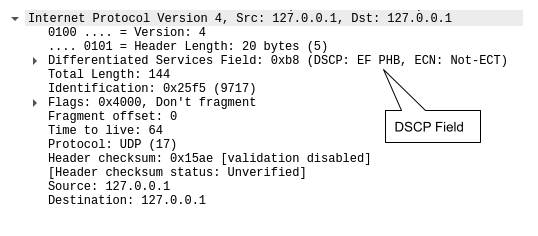
For example, if you want to prioritize the traffic sent by a DataWriter using the Expedited Forwarding (EF) traffic class, your priority should be set to the following:
struct DDS_DataWriterQos dw_qos = DDS_DataWriterQos_INITIALIZER;
dw_qos.transport_priority.value = 0XB8;
Where 0xB8 = 101110 00, and 101110 is the Differentiated Services
Code Point (DSCP) and 00 is the Explicit Congestion Notification (ECN).
See the Wireshark capture snapshot below showing how the DS field was set:
3.24.3. Examples
The following examples illustrate how different configurations affect the resulting priority value provided to the transport.
TRANSPORT_PRIORITY value |
mask |
mapping_low |
mapping_high |
Resulting IP_TOS |
Notes |
|---|---|---|---|---|---|
0xB8 |
0xFF |
0 |
0xFF |
0xB8 |
No scaling (direct mapping) |
0x00 |
0x03 |
0 |
0x03 |
0x00 |
Lowest priority |
0x01 |
0x03 |
0 |
0x3F |
0x15 |
Priority scaled into range |
0x02 |
0x03 |
0 |
0x3F |
0x2A |
Higher priority |
0x03 |
0x03 |
0 |
0x3F |
0x3F |
Highest priority |
3.24.4. Enforcing priority selection
By default, Connext Micro will enforce the priority assigned to the DataWriter or
DataReader. If the system call to change the priority on the socket fails,
the message will fail to send. However, you can change this by compiling the
PSL with RTIME_UDP_ENFORCE_TRANSPORT_PRIORITY set to false. Refer to
Building the PSL for compilation instructions.
3.24.5. System resource and performance considerations
By default, Connext Micro uses a single send socket when you use the reference UDP Transport. If multiple DataWriters and DataReaders use different transport priorities, this configuration can negatively affect throughput.
You can increase the number of unicast send sockets by setting max_unicast_send_sockets to a value greater than 1. Connext Micro will create the specified number of sockets and attempt to use them efficiently based on message priority. For the best performance, set max_unicast_send_sockets to a value equal to the total number of distinct transport priorities used by all DataWriters and DataReaders in the system. This count must include both user-defined entities and builtin DataWriters and DataReaders.
Note
Keep in mind that increasing the number of sockets improves priority separation but also increases system resource usage.