
Cloud Observability#
Introduction#
What you’ll learn
In this module, you’ll use Connext Cloud Observability to monitor one local Connext system.
You will do the following:
Run an edge Connext system
Create a Connext Cloud Observability Service
Start
rticloud gatewayin observability modeOpen a web dashboard and receive telemetry from the local Connext system
You can use this module with any running edge Connext system. The tutorial commands use the home automation publisher and subscriber from the Publish-Subscribe module as a concrete example: the publisher writes “WindowStatus” samples and the subscriber prints a warning when a window opens. Connext Cloud Observability receives telemetry from the edge site so you can inspect the health of the local DDS system.
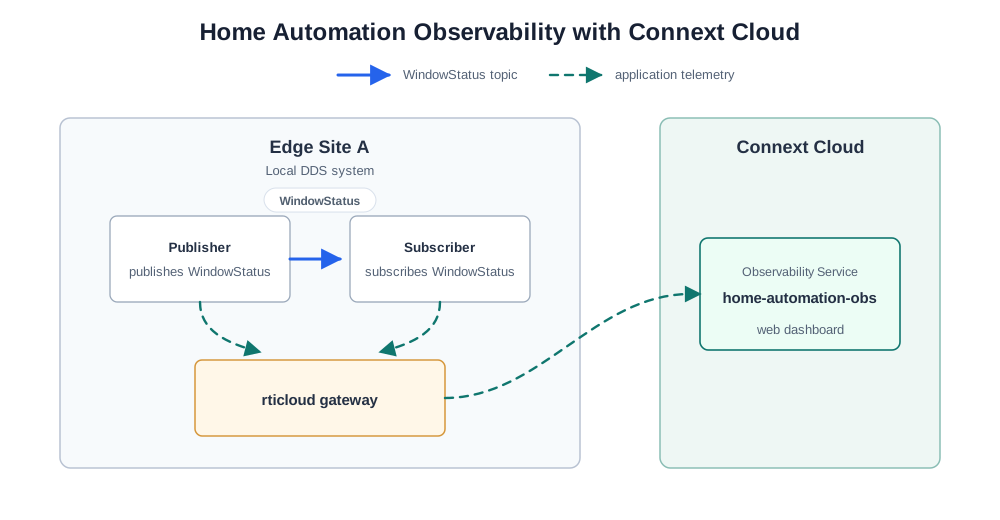
Home automation telemetry sent to Connext Cloud Observability.#
How to complete this module#
To complete this module, you’ll need the following:
A free Connext Cloud account.
The rticloud CLI installed.
A Connext 7.7.0 or newer installation on the edge machine to build and run your own edge applications. Follow the Installation guides.
A clone of the
rticonnextdds-examplesGitHub repository on the edge machine.
Cloning the GitHub repository
Clone the GitHub repository with the following command:
$ git clone --recurse-submodule https://github.com/rticommunity/rticonnextdds-examples.git
The code for this module is located in the tutorials/publish_subscribe
directory. See the README.md files for additional instructions.
This guide is designed for Connext 7.7.0 or newer. For Connext 7.3.1, checkout the branch release/7.3.1.
This module can monitor any edge Connext system. The steps below use the publisher and subscriber from the Publish-Subscribe module as the example edge applications.
It’s recommended to have completed the Publish-Subscribe module, but not required.
1. Run the edge applications#
Start a Connext system on the edge machine you want to monitor. This edge machine can be your own computer. If you already have one running, leave it running and continue to the next step.
To follow this tutorial with the home automation example, start from the cloned
rticonnextdds-examples repository. Run the subscriber in one terminal and
the publisher in another terminal. The examples use domain ID 0 by
default.
Keep both applications running while you create the Observability Service and start the gateway.
Make sure Connext and the Connext Python API are installed. In the Installation guides, choose the installer for your platform and follow the installation instructions.
Note
Connext 7.7.0 or newer is required to publish monitoring data
without application configuration changes. Configure the
environment in every terminal where you run a Python application
so it can load the monitoring libraries from your Connext
installation. Use the rtisetenv script for your platform and
shell. For example, in Bash:
$ source <installation directory>/resource/scripts/rtisetenv_<architecture>.bash
In the first terminal, run the subscriber:
$ cd rticonnextdds-examples/tutorials/publish_subscribe/py
$ python home_automation_subscriber.py
In the second terminal, run the publisher:
$ cd rticonnextdds-examples/tutorials/publish_subscribe/py
$ python home_automation_publisher.py Window1 LivingRoom
Build the applications:
$ cd rticonnextdds-examples/tutorials/publish_subscribe/c++11
$ mkdir -p build
$ cd build
$ cmake -DBUILD_SHARED_LIBS=ON ..
$ cmake --build .
In the first terminal, run the subscriber:
$ ./home_automation_subscriber
In the second terminal, run the publisher:
$ ./home_automation_publisher Window1 LivingRoom
Note
Connext 7.7.0 or newer is required to publish monitoring data
without application configuration changes. Applications must also
be dynamically linked. The -DBUILD_SHARED_LIBS=ON option
enables dynamic linking for this example.
The full instructions, including other programming languages, are in the Publish-Subscribe module.
The subscriber should print warnings like this:
WARNING: Window1 in LivingRoom is open!
2. Create an Observability Service#
Create the Observability Service in the Connext Cloud dashboard:
Open the Connext Cloud dashboard.
Go to Observability.
Select Create an Observability Service.
Name the service
home-automation-obs.Keep the default settings.
Review the settings and create the service.
Wait until the service shows an active status before continuing.
3. Start the observability gateway#
Open a new terminal on the edge machine. If you haven’t configured the CLI
before, run rticloud configure and choose us-east-2. Then run the
gateway:
$ rticloud gateway
Follow the interactive prompts:
Select Observability.
Select
home-automation-obs.Let the CLI create or select a collector template for the Observability Service.
Leave the command running. It starts the local gateway and stores the project
configuration and logs under .connext/ in the current directory.
Note
Keep rticloud gateway running while you continue the tutorial. If you stop
the gateway, run rticloud gateway again from the same directory to
restart it. Use rticloud gateway reset to reset the configuration if you
want to start over.
4. Open the observability dashboard#
Open the web dashboard (powered by Grafana) linked to the Observability Service:
Open the Connext Cloud dashboard.
Open the
home-automation-obsObservability Service. The Overview tab shows a summary with the number of entities in your system.Open the Grafana dashboard to access all the metrics and logs.
In the Grafana dashboard, confirm that telemetry is arriving from the edge site:
The home automation publisher and subscriber applications appear in the dashboard
The “WindowStatus” Topic and its DataWriter and DataReader are visible
The “WindowStatus” metrics update as the publisher writes new samples
Congratulations! You have successfully set up Connext Cloud Observability to monitor a local Connext system.
Learn more#
This module showed how to add Connext Cloud Observability on an edge
site. The local applications still communicate directly in the local DDS
domain. rticloud gateway adds telemetry export capabilities without
changing the application code.
Next Steps
In addition to monitoring data, you can integrate Topic data from different systems with a Connext Cloud Databus. The Cloud Data Streaming module shows how to connect publishers and subscribers on different edge sites.
