1 Key New Features in 7.3.0 LTS
RTI® Connext® 7.3.0 LTS is a long-term support release that is built upon and combines all of the features in releases 7.0.0, 7.1.0, and 7.2.0. See the Connext Releases page on the RTI website for more information on RTI's software release model.
This section highlights new features, platforms, and improvements in Connext since release 6.1.2 LTS. See Table 1.1 for key new features since 6.1.2 LTS. To see new features added by product, showing new features in each 7.x release, click the links in the Release Notes column of Table 1.2 .
For backward compatibility information between 7.3.0 LTS and previous releases, see the Migration Guide on the RTI Community Portal (https://community.rti.com/documentation).
Table 1.1 Key Features since 6.1.2 LTS

|
Participant Partitions enable partitioning the system into dynamic groups of applications for lower overhead and flexibility |
Performance and Resilience |

|
Simple Participant Discovery Protocol 2.0 improves large-scale, peer-to-peer discovery of applications with minimal overhead |
|

|
Instance State Consistency keeps instance states consistent across applications despite poor network conditions |
|

|
Link Selection enables applications to use the best available network interface to eliminate receiving redundant data on secondary networks |
|

|
Static Endpoint Discovery is easier to configure and now a standard feature of Connext Professional |
|

|
Dynamic Certificates Renewal and Revocation enables certificates to be dynamically revoked and renewed in operational systems |
Cybersecurity |

|
Pre-Shared Key (PSK) Protection extends existing Builtin Security Plugins capabilities to protect bootstrapping traffic (such as participant discovery) |
|

|
Lightweight Security offers a Security Plugins alternative for resource-constrained systems, leveraging Pre-Shared Key (PSK) Protection |
|

|
New Security Algorithms protect data up to TOP-SECRET level information |
|

|
OpenSSL Providers allow you to plug in a greater variety of external implementations for cryptographic operations without changes to your applications |
|

|
Connext Observability Framework (Experimental) scalably collects metrics, logs, and security events and delivers the data to third-party observability backends from which it can be aggregated and visualized. The framework has the following components: |
Observability |
|
||
|
||
|
||

|
Python API now available as a fully supported API, making Connext more accessible and easier to use than ever before |
Usability |

|
Graphical Data Publishing offers an easy way to publish data with Admin Console, making prototyping and validation easier |
|

|
Spy's New UI offers a much simpler output format making it a powerful CLI tool |
|

|
Discovery Snapshots offer access to the ground truth of the discovery status of applications and their resources |
|
|
Logging Improvements include new log categories that enable you to filter logging by two popular debugging topics: Discovery and Security |
||

|
Routing Service in System Designer enables you to set up routes more easily using System Designer |
|

|
User's Manual Reorganization helps new Connext users find information more intuitively |
Table 1.2 Product Highlights since 6.1.2 LTS
1.1 Monitor Health of Connext Applications Using New Connext Observability Framework (Experimental)
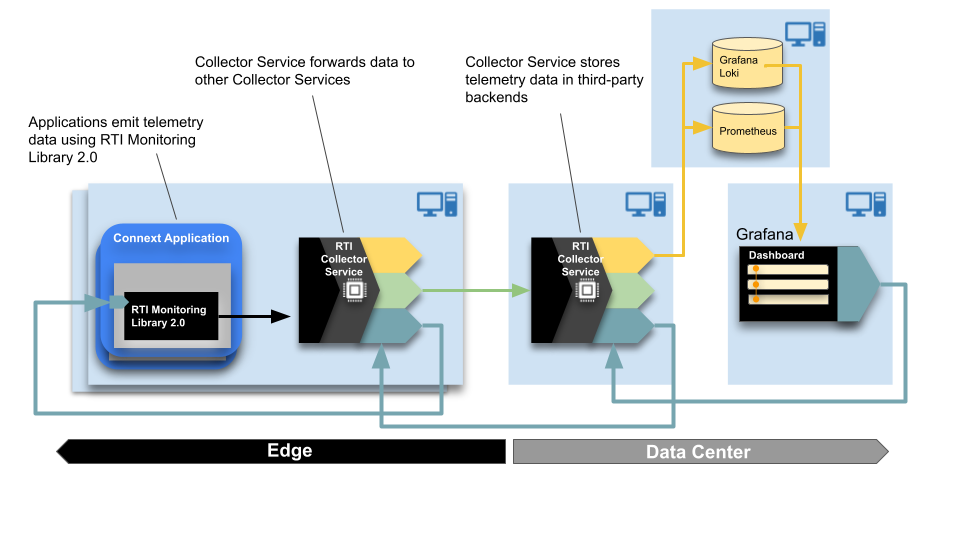
RTI Connext Observability Framework is a holistic solution that provides deep visibility into the current and past states of Connext applications, using logs, security events, and metrics as telemetry data. This visibility makes it easier to proactively identify and resolve potential issues, providing a higher level of confidence in the reliable operation of the system.
Connext Observability Framework consists of three key components:
- RTI Monitoring Library 2.0 allows instrumenting a Connext application to collect and forward telemetry data. The library also accepts remote commands (via the dashboards) to change the set of emitted telemetry data at runtime.
- RTI Observability Collector Service scalably collects telemetry data forwarded by Monitoring Library 2.0 in individual Connext applications and sends it for storage to third-party telemetry backends. The service provides native integration with Prometheus as the time-series database to store Connext metrics and with Grafana Loki as the log aggregation system to store Connext logs and security events. The service can also send data to an OTel Collector for integration with other third-party observability backends.
- RTI Observability Dashboards provide a way to visualize the telemetry data collected and forwarded from Connext applications using a set of reference Grafana dashboards that you can customize or use as an example to enhance and build dashboards in the platform of your choice.
Note: All product components in Observability Framework are experimental, so do not deploy them in production. Production-ready versions are expected to be available in a future Connext 7.3.x maintenance release.
Figure 1.1: Observability Framework Architecture
Observability Framework use cases include:
- Debugging: find the cause of an undesired behavior or determine if the system meets performance needs during development.
- CI/CD Monitoring: assess the performance impact of code or configuration changes.
- Monitoring-deployed applications: confirm that your systems are running as expected and fix potential performance issues proactively.
Observability Framework must be downloaded and installed separately. Check the RTI Customer portal or contact support@rti.com for information on how to obtain an Observability Framework package.
For information on installing Observability Framework, as well as a step-by-step guide for running it with the included example, see the RTI Observability Framework documentation.
1.1.1 Monitoring Library 2.0
Monitoring Library 2.0 allows instrumenting a Connext application to emit telemetry data (metrics, logs, and security events).
Monitoring Library 2.0 includes the following key features:
- Collection and emission of Connext metrics, logs, and security events.
- Configuration using a new MONITORING QoSPolicy. The QoS policy can be set programmatically or via XML.
- Runtime changes to the set of collected and forwarded telemetry data using remote commands coming from the Observability Collector Service.
- Ability to enable and disable use of Monitoring Library 2.0 at runtime by changing the MONITORING QoSPolicy.
- Lower overhead compared to the original Monitoring Library (described in
To learn more, see
1.1.2 Observability Collector Service
Observability Collector Service scalably collects telemetry data emitted by Monitoring Library 2.0 in a Connext application and sends it to third-party observability backend for storage:
The Observability Collector Service includes the following key features:
- Collection of telemetry data forwarded by Connext applications (using Monitoring Library 2.0).
- Storage of telemetry data in third-party backends: native integration with Prometheus for metrics, and Grafana Loki for logs and security events. Integration with other third-party backends by using OpenTelemtry and forwarding data to an OTel Collector.
- Remote command forwarding to the applications containing the resources to which the commands apply. The commands allow changing the set of telemetry data collected and forwarded by Connext applications using Monitoring Library 2.0. The commands can be sent from the Observability Dashboards or by invoking the Observability Collector Service REST API.
1.1.3 Observability Dashboards
This release includes a set of hierarchical Grafana dashboards that are built to alert you when a problem occurs and facilitate root cause analysis. The dashboards get the telemetry data that they visualize from the third-party backends in which Observability Collector Service stores the data.
The first layer of the Grafana dashboards provides a health status summary by focusing on the following alert categories: Security Events, Bandwidth, Saturation, Data Loss, System Errors, and Delays.
Figure 1.2: Grafana Dashboard with Errors

Starting on the first dashboard, you can get additional details on the error conditions by clicking on any of the alert categories showing a problem.
The top-level dashboard also provides access to the system logs and provides information about the number of entities running in the system.
1.2 Python API Is Now Fully Productized and Supported
The Python API is now a fully supported API that can be used in production systems. (Note: this API shouldn’t be confused with Connector for Python; this is a full Connext API.)
Like the other APIs in Connext, the Python API supports publishing and subscribing to user data types, which can be generated from IDL, XML, and XSD, or they can be defined in the user application as decorated dataclasses. For example, the following is a full and working application that publishes the type InventoryItem:
# MyInventoryPublisher.py
import rti.connextdds as dds
from rti.types import struct
@struct
class InventoryItem:
name: str = ""
price: float = 0.0
quantity: int = 0
participant = dds.DomainParticipant(domain_id=0)
topic = dds.Topic(participant, "MyInventory", InventoryItem)
writer = dds.DataWriter(topic)
writer.write(InventoryItem(name="Apple", price=0.45, quantity=10))
writer.write(InventoryItem(name="Orange", price=0.35, quantity=8))
writer.write(InventoryItem(name="Banana", price=0.25, quantity=6))
The type InventoryItem can be defined in the Python Publisher application as above, or it can be defined in IDL as follows:
// MyInventory.idl
struct InventoryItem {string name;
double price;
int64 quantity;
};
And then rtiddsgen can generate the Python type with the following command:
rtiddsgen -language Python -example universal MyInventory.idl
This release also adds support for the Connext Python API on Python 3.12. The API now runs on Python versions 3.6 to 3.12. For other recent improvements to the Python API since Connext 6.1.2, see 2.2.4.1 Python API Improvements.
For complete, current information about the API, see the Python language version of the RTI Connext Getting Started Guide to get started with the Python API and the Python API Reference HTML documentation.
1.3 Support for Systems Running beyond 2038
Connext applications have added support for systems running beyond the year 2038. This update, which is compliant with the latest OMG Real-Time Publish-Subscribe (RTPS) specification, version 2.5 (and was introduced in version 2.3), now makes it possible to run Connext applications up to year 2106. See also "What's New in 7.3.0 LTS" in the RTI Connext Core Libraries Release Notes for additional year 2038 supports.
As part of this change, the seconds field of the DDS_Time structure has been updated from a 32-bit value to a 64-bit value. This change to the seconds fields was made in anticipation of a future update to the OMG DDS specification, but for now the change is an RTI extension. Therefore, this change could affect portability of code between DDS vendors who follow the specification as it is today. See Secure BuiltinLoggingTopic renamed to BuiltinLoggingTypeV2 in the Migration Guide on the RTI Community Portal (https://community.rti.com/documentation) for more information.
Year 2038 support applies only to this and future releases of Connext; there are currently no plans to backport it to previous releases.
1.4 Graphical Data Publishing (Ability to Publish Samples) in Admin Console
You can now use Admin Console to publish data samples, to test your application. To do so, you can either right-click a Domain and publish to a new Topic or select an existing Topic that you want to publish samples of. To create the Publisher and DataWriter for sending the sample, Admin Console needs the Topic’s type-code definition; if Admin Console hasn’t already discovered it, you will be prompted to provide this information.
Once Admin Console has created the Publisher and DataWriter for your selected Topic, you can fill in the sample’s content using Python code within Admin Console. This sample can be cached and/or sent to available DataReaders. See the Graphical Data Publishing tutorial in the RTI Admin Console documentation for more information.
1.5 Ability to Partition Groups of Applications
Previously, the PARTITION QoS applied only to Publishers and Subscribers. It now also applies to DomainParticipants. Now DomainParticipants with the same domain ID, domain tag, and at least one matching partition can communicate.
Figure 1.3: Partitions at the DomainParticipant Level
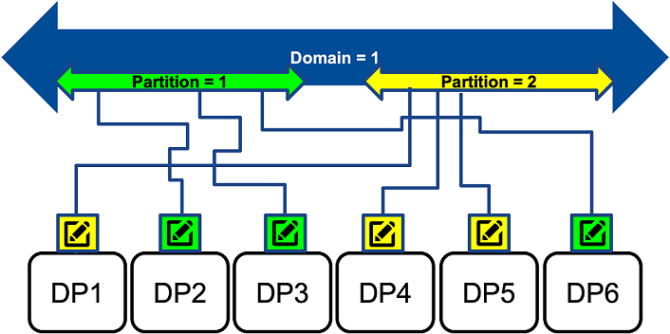
Partitioning at the DomainParticipant level can reduce the number of DomainParticipants that need to exchange endpoint discovery information. Partitioning at this level helps to reduce network, CPU, and memory utilization, because DomainParticipants without matching partitions will not exchange information about their DataWriters and DataReaders. Partitioning at the DomainParticipant level can be particularly useful in large, WAN, distributed systems (with thousands of participants) in which not all participants need to know about each other at any given time.
DomainParticipant partitions work just like Publisher and Subscriber partitions, except they apply at the DomainParticipant level.
As opposed to domain tags, DomainParticipant partitions can be changed dynamically. In addition, a DomainParticipant can be part of multiple partitions at once, and you can use regular expressions to match partitions.
DomainParticipant partitions are independent of Publisher and Subscriber partitions. You can use both features independently or in combination to provide the right level of isolation.
See
1.6 Dynamic Certificates Renewal and Revocation
When a certificate expires, certificate owners will be automatically removed, enabling long-running, uninterrupted operation of Connext secure systems. Dynamic Access Control can be created based on dynamic Identity Certificates that support renewal, Certificate Revocation Lists (CRL), or a whitelist of Identity Certificate Subject Names. Dynamic Certificates are seamlessly integrated with RTI Infrastructure Services and Admin Console.
See the following sections in the Security Plugins Release Notes for more information on these features:
- Changes Related to Dynamic Participant Renewal, Revocation, and Expiration in 7.0.0, in the RTI Security Plugins Release Notes
- Changes Related to Dynamic Participant Renewal, Revocation, and Expiration in 7.1.0, in the RTI Security Plugins Release Notes
- Changes Related to Dynamic Participant Renewal, Revocation, and Expiration in 7.2.0, in the RTI Security Plugins Release Notes
1.7 Pre-Shared Key (PSK) Protection
Pre-Shared Key (PSK) Protection expands the Security Plugins offering and enables basic-level protection wherever traditional DDS Security mechanisms are unavailable or infeasible due to limited resources, paramount performance requirements, or other reasons. The PSK secures all the traffic from the startup of a DDS Entity and restricts the communication only to Entities holding the correct pre-shared key seed.
Pre-Shared Key Protection can be leveraged in two different ways:
- As part of the Builtin Security Plugins: Pre-Shared Key Protection works alongside existing Builtin Security Plugins features and secures the communication happening before and during authentication (known as bootstrapping). Note: while RTPS Bootstrapping messages can only be protected through Pre-Shared Key Protection, non-bootstrapping messages can be protected either with a combination of Pre-Shared Key Protection with other security mechanisms from Builtin Security Plugins, or by using non-Pre-Shared Key Protection mechanisms exclusively.
- As part of Lightweight Builtin Security Plugins (also known as Lightweight Security): In this case, all traditional DDS Security mechanisms are disabled and the entire communication is protected with Pre-Shared Key Protection. Note: since Pre-Shared Key Protection by itself does not support granular security or topic permissions, Lightweight Builtin Security Plugins can only be used to provide domain-level protection from outsider adversaries.
Figure 1.4: Different Functions of the PSK

For more information, see Pre-Shared Key Protection, in the RTI Security Plugins User's Manual.
1.8 Lightweight Security
This release of the Security Plugins includes Lightweight Security, a lightweight solution that uses a pre-shared key (distributed out-of-band) to protect the information. This new feature can be used with the OpenSSL 3 and wolfSSL crypto libraries. The new library, nddslightweightsecurity, is included with the Security Plugins bundles.
Using Pre-Shared Key Protection, Lightweight Security can protect the confidentiality or integrity of the communication, without the overhead of authentication, key exchange, and enforcing permissions. Therefore, the RTI Lightweight Security library can be useful in resource-constrained scenarios.
The Lightweight Security library improves performance by not using the most demanding DDS Security mechanisms such as authentication or access control. It also reduces resource consumption from the CPU and memory. As a result, Lightweight Security does not support more sophisticated security features like granular-security and topic permissions enforcement: it only protects against spoofing, tampering, and information disclosure from actors not holding the pre-shared, user-configured key.
With Lightweight Security, secure DomainParticipants skip authentication and access control. Instead, security is based on a per-participant, pre-shared key that protects all messages (including discovery). The Security Plugins derive the per-participant pre-shared key based on a seed that you must set consistently across the whole system. The property for configuring the seed is dds.sec.crypto.rtps_psk_secret_passphrase. The entire communication is protected by default using the AES256+GCM cryptographic algorithm in ENCRYPT protection mode. You can choose another algorithm with the dds.sec.crypto.rtps_psk_symmetric_cipher_algorithm property. The available options are AES128+GCM and AES256+GCM. Likewise, you can change the protection mode with the dds.sec.access.rtps_psk_protection_kind property. The available options are NONE (do not protect), SIGN (protect the integrity), and ENCRYPT (protect the integrity and confidentiality).
The Lightweight Builtin Security Plugins library is also part of the Security Plugins SDK. This release also includes a tester for the Lightweight Builtin Security Plugins.
For more information, see the following documents:
- Lightweight Builtin Security Plugins, in the RTI Security Plugins User's Manual
- Lightweight Builtin Security Plugins and Security Plugins Interoperability, in the RTI Security Plugins User's Manual
1.9 New Security Algorithms
The Security Plugins can now operate at the Commercial National Security Algorithm (CNSA) Suite TOP-SECRET level. In particular, Connext 7 adds support for secp384r1 key-establishment and digital-signature algorithms. The extended algorithm support is complemented with:
- A new mechanism for early detection of cryptographic algorithms compatibility during the discovery phase.
- A new Governance Document-based mechanism to restrict which cryptographic algorithms are authorized to be used within a DDS system.
The specific new features related to this are described in:
- Changes Related to Cryptographic Algorithms, in the RTI Security Plugins Release Notes
- Changes Related to System Extensibility and Configurability, in the RTI Security Plugins Release Notes.
1.10 OpenSSL Providers
OpenSSL Providers allow you to plug in a greater variety of external implementations for cryptographic operations without changes to your applications. See the RTI Security Plugins Release Notes for more information.
1.11 RTI Routing Service in RTI System Designer
The following new Routing Service configuration views have been added in System Designer:
- Routing Services: Use this view to define the configuration of an execution of Routing Service. See Define Routing Services in the System Designer Getting Started Guide.
- Plugin Libraries: Use this view to define the pluggable components specific to a Routing Service. See Define Plugins in the System Designer Getting Started Guide.
- Configuration Variables: Use this view to assign default values to XML variables. See Define User Environment Variables in the System Designer Getting Started Guide.
1.12 DDS-XML format for Limited Bandwidth Endpoint Discovery Plugin
The Limited Bandwidth Endpoint Discovery plug-in (LBED) uses an XML file to statically specify the QoS (and other information, such as the Topic or type being used) of the endpoints that should be "discovered." However, this XML did not follow the OMG DDS Consolidated XML Syntax (DDS-XML) (the way to specify the configuration, the labels, the schema, etc.), unlike other RTI elements such as USER_QOS_PROFILES.xml, XML-Based Application Creation, or RTI System Designer. This created a coexistence of two different ways to define DDS systems using XML in the RTI ecosystem: the standardized one used by most RTI tools and the one that only LBED used.
Since it is possible to represent the LBED configuration using DDS-XML, this release has updated the LBED plug-in to follow the DDS-XML standard. This way, if you already have a DDS-XML description of your system, it can be used directly for LBED, without needing to translate it to another schema.
While improving the LBED XML configuration, other changes were made to improve the ease of use and LBED functionality, such as auto-determining the rtps_object_id of the endpoints when XML-Based Application Creation is used. These changes simplify the way in which LBED is enabled for a DomainParticipant and make additional XML configuration files optional.
See
See also 1.23.3 RTI Limited Bandwidth Endpoint Discovery now installed with RTI Connext Professional.
1.13 Enable Consistent View of Instance States Despite Disruptions to Connectivity, using New QoS Parameter
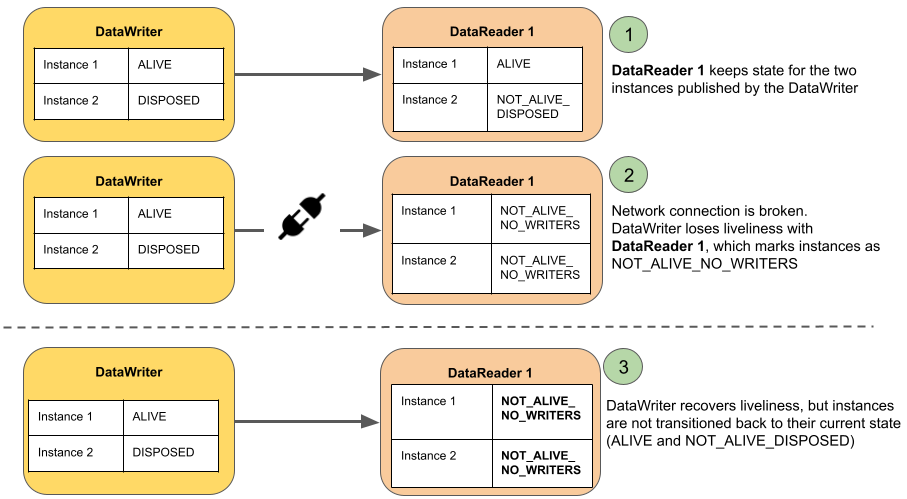
The NOT_ALIVE_NO_WRITERS state for an instance indicates that there are no active DataWriters that are currently updating that particular instance. This can occur because all of the DataWriters that were publishing the instance have unregistered themselves from the instance or they all have become not alive (through losing liveliness or being deleted). In this case, the DataReader will set the state of the instance to NOT_ALIVE_NO_WRITERS.
In previous releases, if the DataReader rediscovered a DataWriter previously publishing the instance, the state of the instance was not updated on the DataReader until the DataReader received a new sample for that instance. Instead, the instance would stay in the NOT_ALIVE_NO_WRITERS state. This could lead to inconsistent instance states: a late-joining DataReader (with a durability of TRANSIENT_LOCAL or higher) would have the correct instance state by virtue of discovery and receiving the historical samples from the DataWriter, whereas existing DataReaders would have the wrong state until they received a new sample. See Figure 1.5: Behavior without Instance State Consistency Enabled.
Figure 1.5: Behavior without Instance State Consistency Enabled
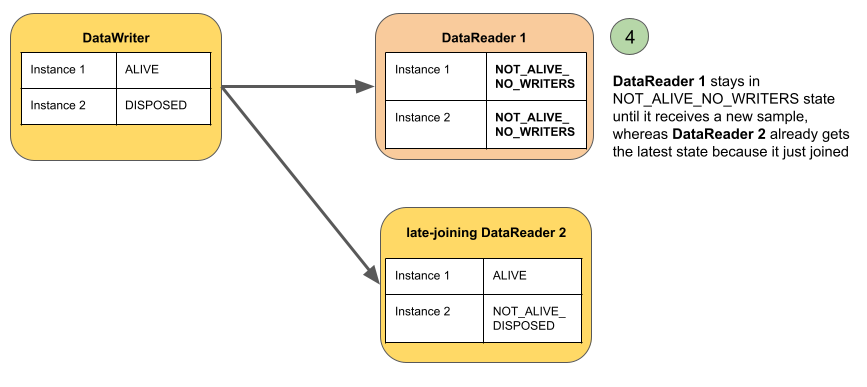
In this release, Connext provides a new QoS setting, instance_state_consistency_kind, in the RELIABILITY QoS Policy, that enables a DataReader to update the instance state when a DataWriter is rediscovered without the DataReader's having to receive samples for the instance. With instance state consistency enabled, when a DataWriter is rediscovered, the DataReader will send it a request for any instance state transitions that were missed while the two endpoints were disconnected. The DataWriter will send a response. The DataReader uses the information in the response, and some information stored locally in its cache, to set the state of the instances to the same state they would have been in had the disconnection never occurred. Everything happens without any intervention from you, other than setting the QoS. Any instance state transitions that occur due to the instance state consistency mechanism are presented to the user application in the form of samples with the valid_data flag set to FALSE in the associated SampleInfo.
Figure 1.6: Behavior with Instance State Consistency Enabled

For details, see the
Note: Instance state consistency is not fully integrated with the Infrastructure Services (Routing Service, Persistence Service, Web Integration Service, Recording Service). DataWriters and DataReaders communicating through Routing Service cannot communicate instance state consistency updates; however, a Routing Service output DataWriter can respond to instance state consistency requests.
1.14 More Scalable Peer-to-Peer Communications with New Simple Participant Discovery Protocol 2.0
The new Simple Participant Discovery Protocol (SPDP) 2.0 improves scalability by reducing the amount of redundant information that is sent during participant discovery and to maintain participant liveliness. SPDP 2.0 accomplishes this improvement by splitting participant discovery into separate phases. First, only the information that is required to make a match is sent periodically in a bootstrap phase (e.g., domain ID, partition). Second, if the two participants match based on their bootstrap information, the complete information is sent (e.g., properties, participant name) over a reliable channel so that it is not repeated unless there is a change. Finally, after two participants have exchanged bootstrap and configuration data, a periodic lightweight message is used to maintain liveliness.
SPDP 2.0 is not enabled by default. To enable it, set the builtin_discovery_plugins field in the DISCOVERY_CONFIG QosPolicy to (see DISCOVERY_CONFIG QosPolicy in the RTI Connext Core Libraries User's Manual) SPDP2 | SEDP. This will enable SPDP 2.0 and the existing Simple Endpoint Discovery Protocol.
In the current SPDP, participants send out participant announcements (also known as participant DATA submessages) that contain all of the information that a participant needs to communicate with remote participants. This includes information that is necessary in order to establish communication, like the domain ID and locators at which this participant can be reached, information that is needed only if the participants will continue with endpoint discovery, and information that is not strictly needed at all and is only useful for debuggability/observability, like system information properties. All of this information can add up to messages that are around 2kB or more, and they are sent not just to initially discover participants but to maintain liveliness with them. The size can be a problem, particularly in systems that are trying to avoid IP fragmentation by setting the DDS maximum transmission unit (MTU) to a small value (<1500) and using DDS-layer fragmentation.
SPDP 2.0 solves this problem by splitting the participant DATA submessages into three:
- Bootstrap (DATA(Pb)) messages, which send only the information required to make a match.
- Configuration (DATA(Pc)) messages, which send complete information only once a match is confirmed.
- Lightweight liveliness (DATA(m)) messages to maintain liveliness with a participant.
Figure 1.7: Simple Participant Discovery Protocol 2.0 (Experimental)
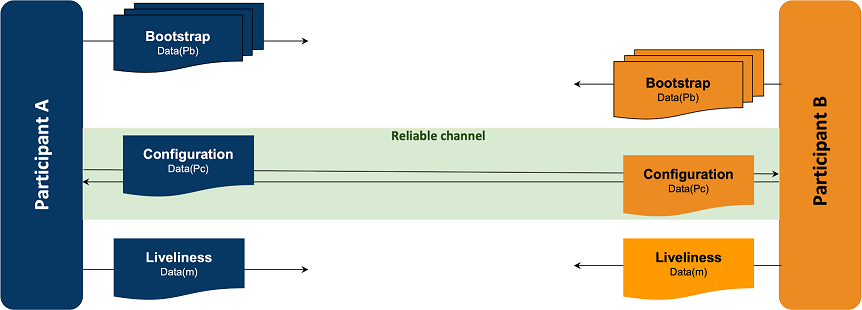
Participants using SPDP 2.0 further reduce ongoing bandwidth consumption by not sending bootstrap messages to remote participants that have already been fully discovered. Discovered participants will only receive lightweight, periodic liveliness messages, sent at the DiscoveryConfigQosPolicy.participant_liveliness_assert_period, and a single, reliable message whenever there is an update to a participant's configuration, such as a partition or locator change.
See
1.15 Reduce network bandwidth utilization by allowing Connext to limit allowed interfaces even further
Connection availability can be unpredictable in some environments. As a result, devices usually provide multiple connections. Previously, a DomainParticipant announced and received data over all up-and-running interfaces in the allowable interfaces list, which could sometimes result in data duplication and poor use of network bandwidth.
In this release, a DomainParticipant can now be configured to receive data over preferred interfaces only, by setting a new property, max_interface_count, which can be used in all IP-based transports. This property limits the number of network interface locators to be included in the DomainParticipant’s announcement, prioritizing whichever interface(s) are specified first (in a left-to-right manner) in the allow_interfaces_list for the transport.
Figure 1.8: Interface Selection Using max_interface_count
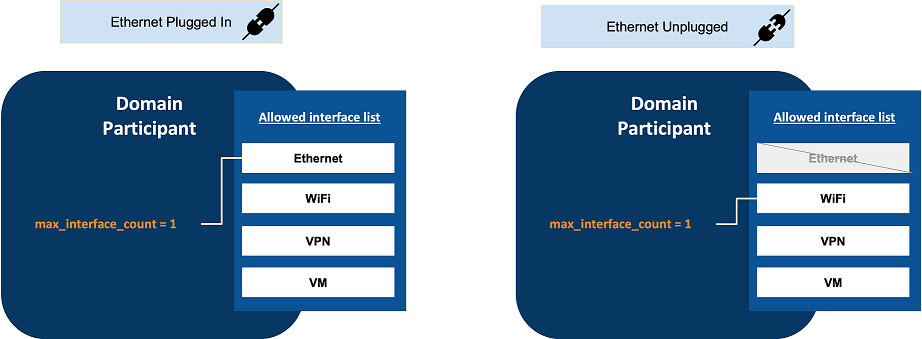
For example, you may have one wired and one wireless interface up and running. Receiving data over the wireless connection is only desired if no wired connectivity is available (for example, when the device is undocked). If max_interface_count is set to 1, the DomainParticipant will receive data over the interface you list first—for example, the wired interface. That way, when both interfaces are up and running, you will receive data only over the wired interface. If the wired interface is not in use (for example, the device is undocked), then you will receive data only over the next available up-and-running interface in your allow_interfaces_list, which would be the wireless interface.
The max_interface_count property also affects multicast traffic by limiting the interfaces over which a DomainParticipant sends multicast traffic.
The max_interface_count setting does not consider end-to-end connectivity to select interfaces. The decision is based purely on whether interfaces are up or down in a node. Therefore, this feature is not intended to be used in the following scenarios:
- A DomainParticipant is not reachable by other DomainParticipants in all the interfaces in the allow_interfaces_list. This could occur if the DomainParticipant is in different subnets, and some of these subnets cannot be reached by other DomainParticipants.
- End-to-end connectivity issues lead to situations in which the interfaces selected after applying max_interface_count cannot be reached by other DomainParticipants.
See information about the new max_interface_count field in the documentation for your transport, such as in
1.16 Support for OpenSSL 3.0
In this release, the Security Plugins only support OpenSSL 3.0 (which is supported until September, 2026). The support of OpenSSL 1.1.1 has been removed, because it was end-of-life in September, 2023:
- The Security Plugins are available as a set of nddssecurity libraries built against OpenSSL 3.0.12. See the RTI Security Plugins Release Notes.
- TLS Support is available as a set of nddstls libraries built against OpenSSL 3.0.12. See the RTI TLS Support Release Notes.
- Web Integration Service is built against OpenSSL 3.0.12. See the RTI Web Integration Service Release Notes.
- Shapes Demo is built against OpenSSL 3.0.12. See
1.17 DDS Spy and DDS Ping Improvements
RTI made major improvements to DDS Spy and DDS Ping in 7.0.0, including an output format that is easier to read and understand, "plain" and "compact" options for printing samples, ability to view partition information, and much more. See 2.3.8 DDS Spy and DDS Ping Improvements for a complete list of the major enhancements. See also the "What's New in 7.3.0" section of the RTI Connext Core Libraries Release Notes for recent enhancements made to support participant partitions and builtin discovery plugins.
See the RTI DDS Spy User's Manual and RTI DDS Ping User's Manual for complete, current information.
1.18 Discovery Snapshots Show Status of all Discovered Entities in System
You can now take a discovery snapshot representing the discovery status of your system, using the take_snapshot APIs. The discovery snapshot is useful for debugging discovery issues. You can get information about the discovery status among DomainParticipants, in addition to compatible and incompatible matches for DataWriters and DataReaders.
The output information can be printed to a file (if you provide a file name to the API) or through the Connext builtin logging system (if you do not provide a file name to the API).
An example output, for DomainParticipants, is as follows:
-------------------------------------------------------------------------
-------------------------------------------------------------------------
Participant guid="0x0101F2F1,0xC229B376,0x46572559:0x00000000"
domain_id=0 name="participantTestName" role="participantTestRole"
-----------------------------
Matched Participants:
-----------------------------
guid="0x0101D75E,0xB70D1850,0x2B0D229B:0x00000000"
name="participantTestName" role="participantTestRole"
unicastLocators="udpv4://10.70.2.68:7413
shmem://CA1B:28DA:1E18:F955:3727:3AFE:0000:0000:7413"
-------------------------------------------------------------------------
-------------------------------------------------------------------------
See
1.19 Logging Improvements
See the following sections for information on the new logging categories:
- 2.3.6.1 Troubleshoot security issues faster using new SECURITY logging category
- 2.3.1.4 Troubleshoot discovery issues faster using new DISCOVERY logging category
Many existing log messages have also been enhanced to display more useful information or no longer display at certain verbosities unnecessarily. See 2.3.7 Logging Improvements.
1.20 User's Manual Reorganization
The RTI Connext Core Libraries User's Manual has been reorganized to make it easier to find information. See 2.3.3.2 Reorganized Core Libraries User's Manual for easier browsing for a quick visual of the improvements.
1.21 Platform and Build Changes
1.21.1 New Platforms in 7.3.0 LTS
The following table lists the standard platforms added in 7.3.0 LTS, compared to 6.1.2.
For details on all platforms, please consult the RTI Connext Core Libraries Platform Notes.
|
OS |
OS Version |
CPU |
Toolchain |
RTI Architecture |
Note |
|---|---|---|---|---|---|
|
Android™ |
Android 12 |
Arm® v8 |
clang 12.0.8 (ndk r23b) |
arm64Android12clang12.0.8ndkr23b |
|
|
Linux® |
Red Hat® Enterprise Linux 9 |
x64 |
gcc 7.3.0 |
x64Linux4gcc7.3.0 |
[a] |
|
Ubuntu® 22.04 LTS |
x64 |
clang 15.0.1 |
x64Linux5Unreal5.2clang15 |
|
|
|
macOS® |
macOS 13 |
x64 |
clang 12.0, 13.0, 14.0 |
x64Darwin20clang12.0 |
[b] |
|
macOS 12, 13 |
Arm v8 |
clang 12.0, 13.0, 14.0 |
arm64Darwin20clang12.0 |
|
|
|
VxWorks™ |
VxWorks 23.09 |
x64 |
llvm 16.0 |
x64Vx23.09llvm16.0 x64Vx23.09llvm16.0_rtp |
|
|
Windows
|
Windows Server 2022 |
x64 |
VS2017 VS2019 VS2022 |
x64Win64VS2017 |
|
|
Windows 11 |
Arm v8 |
VS2022 |
arm64Win64VS2022 |
|
Notes:
[a] RTI has validated that the Connext libraries for Red Hat Enterprise Linux 8 systems (x64Linux4gcc7.3.0) also work on Red Hat Enterprise Linux 9 systems.
[b] The architecture name x64Darwin17clang9.0 has been replaced with x64Darwin20clang12.0.
The next table lists new (compared to 6.1.2 LTS) target libraries for which RTI offers custom support. If you are interested in using one of these platforms, please contact your local RTI sales representative or email sales@rti.com. These platforms are only available on demand.
Table 1.4 New Custom Platforms (on demand)
|
OS |
OS Version |
CPU |
Toolchain |
RTI Architecture |
Note |
|---|---|---|---|---|---|
|
Linux |
Red Hat Enterprise Linux |
x64 |
gcc 4.8.2 |
x64Linux3gcc4.8.2 |
[c] |
|
x86 |
gcc 4.8.2 |
i86Linux3gcc4.8.2 |
[c] |
||
|
RedHawk™ Linux 8.4.1 |
x64 |
gcc 8.5.0 |
x64RedHawk8.4gcc8.5.0 |
||
|
x86 |
gcc 8.5.0 |
i86RedHawk8.4gcc8.5.0 |
|||
|
TI® Linux 8.2.0.3 |
Arm v8 |
gcc 9.2.1 |
armv8Linux-armgcc9.2.1 |
|
|
|
QNX |
QNX for Safety (QOS) 2.2 |
Arm v8 |
qcc_cxx 8.3.0 (LLVM C++ library) |
armv8QOS2.2qcc_cxx8.3.0 |
|
|
QNX Neutrino 7.1 |
Arm v8 |
qcc_cxx 8.3.0 (LLVM C++ library) |
armv8QNX7.1qcc_cxx8.3.0 |
[c] |
|
|
QNX Neutrino 7.0.4 |
x64 |
qcc_gpp 5.4.0 (GNU C++ library) |
x64QNX7.0.0qcc_gpp5.4.0 |
[c] |
|
|
Arm v8 |
qcc_cxx 5.4.0 (LLVM C++ library) |
armv8QNX7.0.0qcc_cxx5.4.0 |
[c] |
||
|
VxWorks® |
VxWorks 22.03 |
ppc |
gcc8.3.0 |
ppc32Vx22.03gcc8.3.0_rtp |
|
|
VxWorks 7.0 (SR0630) |
x64 |
llvm 8.0.0.2 |
x64Vx7SR0630llvm8.0.0.2[_rtp] |
[c] |
|
|
Windows |
Windows 10, |
x64 |
VS 2015 |
x64Win64VS2015 |
[c] |
|
Windows 10,
|
x86 |
VS 2017, 2019 |
i86Win32VS2017 |
[c] |
|
|
VS 2015 |
i86Win32VS2015 |
[c] |
Note:
[c] This platform has transitioned from a standard platform in 6.1.2 LTS, to a custom-supported platform in 7.3.0 LTS and is only available on demand.
1.21.2 New host installation bundle for macOS systems on Apple silicon CPUs
There is a new host installation bundle for macOS systems on Apple silicon (Arm v8) CPUs. The bundle name is rti_connext_dds-<version>-<package-type>-host-arm64Darwin.dmg.
Where <package-type> may be pro or lm.
1.21.3 Renamed host installation bundle for macOS systems on Intel CPUs
The host installation bundle for macOS systems on x64 CPUs has been renamed to distinguish it from the new bundle for Apple silicon:
- Old name: rti_connext_dds-<version>-<package-type>-host-darwin.dmg
- New name: rti_connext_dds-<version>-<package-type>-host-x64Darwin.dmg
Where <package-type> may be pro or lm.
1.21.4 Features and products added to existing platforms
Monitoring Library 2.0 is new in 7.3.0 LTS and is supported on all platforms except x64Linux4gcc7.3.0FACE_GP. See 1.1.1 Monitoring Library 2.0 .
The platforms and features/products in the following table are not new (they existed in 6.1.2 LTS). However, what's new is that these platforms now support these features/products.
Table 1.5 Features/products now available on more platforms
|
These platforms... |
...now support these features/products |
||
|---|---|---|---|
|
macOS |
macOS 11 |
arm64Darwin20clang12.0 |
Host installer |
|
Linux
|
Red Hat Enterprise Linux 8 Ubuntu 18.04 LTS, 20.04 LTS, 22.04 LTS |
x64Linux4gcc7.3.0 |
Security Plugins for wolfSSL
|
|
Ubuntu 18.04 LTS, 22.04 LTS |
armv8Linux4gcc7.3.0 |
Python API |
|
|
Red Hat Enterprise Linux 7, 7.3, 7.5, 7.6 CentOS 7.0 |
x64Linux3gcc4.8.2 |
Observability Collector Service |
|
|
QNX |
QNX Neutrino 7.1 |
armv8QNX7.1qcc_gpp8.3.0 |
TLS Support |
|
x64QNX7.1qcc_cxx8.3.0 |
Security Plugins SDK |
||
|
armv8QNX7.1qcc_cxx8.3.0 |
Security Plugins SDK |
||
|
QNX Neutrino 7.0.4 |
x64QNX7.0.0qcc_gpp5.4.0 |
Security Plugins SDK |
|
|
armv8QNX7.0.0qcc_cxx5.4.0 |
CMake Find Package |
||
1.21.5 Software Bill of Materials (SBOM) now shipped with Connext installation so that you can easily track Connext third-party dependencies
Starting in Connext 7.3.0 LTS, the Software Bill of Materials (SBOM) for Connext libraries, services, and tools is now shipped as part of a Connext installation. SBOM files are available in <installation directory>/sbom and are provided in two different formats, CycloneDX and SPDX.
In contrast to the Third-Party Software documentation (available in <installation directory>/doc/manuals/connext_dds_professional/release_notes_3rdparty), which documents Connext's first-level third-party dependencies, the SBOM files document all of Connext's third-party dependencies (including both first-level and lower-level dependencies).
1.21.6 Additional changes
The tables in the following sections are summed up in 1.21.1 New Platforms in 7.3.0 LTS; however, you can find additional platform and build changes in these sections:
- 2.3.9 Platform and Build Changes in 7.0.0.
- 2.2.6 Platform and Build Changes in 7.1.0.
- 2.1.7 Platform and Build Changes in 7.2.0.
1.22 Deprecations and Removals
This section describes products, features, and platforms that are deprecated or removed in 7.3.0 LTS, compared to 6.1.2 LTS.
Deprecated means that the item is still supported in this release, but will be removed in a future release. Removed means that the item is discontinued or no longer supported. By specifying that an item is deprecated in this release, RTI is hereby providing customer notice that RTI reserves the right after one year from the date of this release and, with or without further notice, to immediately terminate maintenance (including without limitation, providing updates and upgrades) for the item, and no longer support the item, in a future release.
This section serves as notice under the Real-Time Innovations, Inc. Maintenance Policy #4220 and/or any other agreements by and between RTI and customer regarding maintenance and support of RTI’s software.
1.22.1 Deprecated features since 6.1.2 LTS
The following features have been deprecated in 7.3.0 LTS (compared to 6.1.2 LTS):
- 2.2.7.1 RTI Monitoring Library and RTI Monitor deprecated in this release
- 2.3.12.11 Deprecated rtps_overhead Property
- 2.1.8.2 Durable Writer History and Durable Reader State properties deprecated in this release
- 2.1.8.4 Deprecated computed_crc_kind property
1.22.2 Removed features and platforms since 6.1.2 LTS
The following features are removed in 7.3.0 LTS (compared to 6.1.2 LTS):
- 2.3.12.1 Legacy C# / .NET binding removed in this release
- 2.3.12.2 Support for pre-C++11 compilers removed for Modern C++ API
- DDS Spy command-line options -use510CompatibleLocatorKind and -use43LargeDataFormat; see 2.3.12.3 Old command-line options deprecated and removed in RTI DDS Spy
- 2.3.12.4 Durable writer history, durable reader state, and Persistence Service no longer support external databases
- 2.3.12.5 RTI Secure WAN Transport removed in this release
- 2.3.12.6 RTI Prototyper removed in this release
- 2.3.12.7 RTI Spreadsheet Add-in for Microsoft Excel removed in this release
- 2.2.7.2 Removed ability to share a database connection in Persistence Service and durable writer history
- 2.1.8.1 RTI Connector for Python removed in this release
- 2.1.8.3 OpenSSL 1.1.1 support removed in this release
See the following tables of platforms removed in 7.3.0 LTS (compared to 6.1.2 LTS).
Table 1.6 Platforms Removed in 7.3.0 LTS (compared to 6.1.2 LTS)
|
OS |
OS Version |
CPU |
Toolchain |
RTI Architecture |
|---|---|---|---|---|
|
Android |
Android 9.0 |
Arm v8 |
clang 8.0 (ndk r19b) |
arm64Android9.0clang8.0ndkr19b |
|
Arm v7 |
clang 8.0 (ndk r19b) |
armv7Android9.0clang8.0ndkr19b |
||
|
Linux |
SuSE 15 SP1 |
x64 |
gcc 7.4.1 |
x64Linuxgcc7.4.1 |
|
SuSE 12 SP2 |
x64 |
gcc 4.3.4 |
x64Linux2.6gcc4.3.4 |
|
|
Ubuntu 16.04 LTS |
x86 |
gcc 5.4.0 |
i86Linux3gcc5.4.0 |
|
|
x64 |
gcc 5.4.0 |
x64Linux3gcc5.4.0 |
||
|
Red Hat Enterprise Linux 6.0-6.8 CentOS 6.0-6.4 |
x86 |
gcc 4.4.5 |
i86Linux2.6gcc4.4.5 |
|
|
x64 |
gcc 4.4.5 |
x64Linux2.6gcc4.4.5 |
||
|
NI Linux 3 |
Arm v7 |
gcc 4.4.1 |
armv7AngstromLinux3.2gcc4.4.1.cortex-a9 |
|
|
Ubuntu 16.04 LTS |
Arm v8 |
gcc 5.4.0 |
armv8Linux4.4gcc5.4.0 |
|
|
Raspbian "Wheezy" 7.0 |
Arm v6 |
gcc 4.7.2 |
armv6vfphLinux3.xgcc4.7.2 |
|
|
macOS |
macOS 10.13, 10.14, 10.15 |
x64 |
clang 9.0, 10.0, 11.0 |
x64Darwin17clang9.0 |
|
QNX |
QNX Neutrino 7.0.4 |
Arm v8 |
qcc_gpp 5.4.0 (GNU C++ library) |
armv8QNX7.0.0qcc_gpp5.4.0 |
|
x64 |
qcc_cxx 5.4.0 (LLVM C++ library) |
x64QNX7.0.0qcc_cxx5.4.0 |
||
|
QNX Neutrino 6.5 SP1 |
Arm v7 |
qcc 4.4.2 |
armv7aQNX6.5.0SP1qcc_cpp4.4.2 |
|
|
QNX Neutrino 6.5 |
x86 |
qcc 4.4.2 |
i86QNX6.5qcc_gpp4.4.2 |
|
|
QNX Neutrino 6.4.1 |
x86 |
gcc 4.3.3 |
i86QNX6.4.1qcc_gpp |
|
|
VxWorks |
VxWorks 7.0 (SR0510) |
x64 |
gcc 4.8.1 |
pentium64Vx7.0gcc4.8.1[_rtp] |
|
VxWorks 6.9.4.6 |
PPC (e6500) |
diab 5.9.1 |
ppce6500Vx6.9.4.6diab5.9.1[_rtp] |
|
|
VxWorks 6.9.4.2 |
PPC (PPC32 w/ FPU) |
gcc 4.3.3 |
ppc604Vx6.9.4gcc4.3.3[_rtp] |
|
|
PPC (e500v2) |
gcc 4.3.3 |
ppce500v2Vx6.9.4gcc4.3.3[_rtp] |
||
|
VxWorks 6.9.3.2 |
x64 |
gcc 4.3.3 |
pentium64Vx6.9gcc4.3.3[_rtp] |
|
|
Windows |
Windows 8, 8.1 |
x86 |
VS 2013 |
i86Win32VS2013 |
|
Windows 8 Server 2012 R2 |
x64 |
VS 2013 |
x64Win64VS2013 |
|
|
Windows 8 |
x86 |
VS 2012 |
i86Win32VS2012 |
|
|
Windows 8 Server 2012 R2 |
x64 |
VS 2012 |
x64Win64VS2012 |
Table 1.7 Custom Platforms Removed in 7.3.0 LTS (compared to 6.1.2 LTS)
|
OS |
OS Version |
CPU |
Toolchain |
RTI Architecture |
|---|---|---|---|---|
|
INtime |
64-bit Windows 10 |
x86 |
INtime 6.3 with VS 2017 |
i86INtime6.3VS2017 |
|
Linux |
RedHawk Linux 8.2.1 |
x64 |
gcc 8.3.1 |
x64RedHawk8.2gcc8.3.1 |
|
RedHawk Linux 6.5 |
x64 |
gcc 4.9.2 |
x64RedHawk6.5gcc4.9.2 |
|
|
RedHawk Linux 6.5 |
x86 |
gcc 4.4.5 |
i86RedHawk6.5gcc4.9.2 |
|
|
RedHawk Linux 6.0 |
x64 |
x64Linux2.6gcc4.4.5 |
x64Linux2.6gcc4.4.5 |
|
|
Wind River Linux 7 |
PPC e6500 |
gcc 4.9.1 (32-bit) |
ppc32e6500Linuxgcc4.9.1 |
|
|
Wind River Linux 8 |
Arm v7 |
gcc 5.2.0 |
armv7aWRLinux8gcc5.2.0 |
|
|
Yocto Linux 2.5 |
Arm v8 |
gcc 7.3.0 |
armv8Linux4gcc7.3.0 |
|
|
Arm v7 |
gcc 7.3.0 |
armv7Linuxgcc7.3.0,
|
||
|
QNX |
QNX Neutrino 7.0.4 |
Arm v7 |
qcc 5.4.0 |
armv7aQNX7qcc_cxx |
|
qcc 5.4.0 |
i86QNX7.0.0qcc_gpp5.4.0 |
|||
|
QNX Neutrino 6.6 |
Arm v7 |
qcc 4.7.3 |
armv7aQNX6.6.0qcc_cpp4.7.3 42 |
|
|
qcc 4.7.3 |
i86QNX6.6qcc_cpp4.7.3 |
|||
|
QNX Neutrino 6.5 |
PPC (e500v2) |
qcc 4.4.2 |
ppce500v2QNX6.5.0qcc_cpp4.4.2 |
|
|
VxWorks |
VxWorks 7 SR0541 |
ppc |
gcc 4.8.1.11 |
ppc32Vx7SR0541gcc4.8.1.11_rtp |
|
VxWorks 7 SR0540 |
x86 |
gcc 4.8.1.10 |
pentiumVx7.0SR0540gcc4.8.1.10 |
|
|
VxWorks 6.9.4.11 |
Arm v7 |
gcc 4.3.3 |
armv7aVx6.9.4gcc4.3.3 |
|
|
armv7aVx6.9.4gcc4.3.3_rtp |
||||
|
VxWorks 6.9.3.2 |
MIPS |
gcc 4.3.3 |
mips32r2sfbeVx6.9gcc4.3.3 |
|
|
mips32r2sfbeVx6.9gcc4.3.3_rtp |
||||
|
VxWorks 6.9.3 |
PPC (e500v2) |
gcc 4.3.3 |
ppce500v2Vx6.9gcc4.3.3 |
|
|
ppce500v2Vx6.9gcc4.3.3_rtp |
||||
|
Arm v7 |
gcc 4.3.3 |
armv7aVx6.9gcc4.3.3 |
||
|
armv7aVx6.9gcc4.3.3_rtp |
1.23 Product Availability Changes
1.23.1 Database Integration Service no longer available
At RTI, we are developing a next-generation replacement for Database Integration Service. Consequently, the current Database Integration Service will no longer be available starting in Connext 7.3.0 LTS. (It was already not included starting in release 7.0.0; see 2.3.13.1 RTI Queuing Service.) The last version supporting this product is Connext 6.1.2 LTS.
We understand the importance of Database Integration Service to your applications and apologize for any inconvenience this change may cause. In some cases, customers can use 6.1.2 Database Integration Service with 7.3.0, provided they follow the Migration Guide and don't use non-interoperable new features. (See the Migration Guide on the RTI Community Portal (https://community.rti.com/documentation); look for the "Wire Protocol" sections to find wire protocol compatibility issues, if any, between the older release and the Connext 7 release. Address these issues before using 6.1.2 Database Integration Service with Connext 7.)
Rest assured that our strategic roadmap seeks to deliver an alternative solution that incorporates usability and feature feedback from our customers.
If you have any questions or concerns during this transition, feel free to reach out to your account representative or email info@rti.com.
We appreciate your understanding and patience as we work towards enhancing our products for your benefit.
1.23.2 RTI Queuing Service now experimental
Queuing Service has been an experimental product since release 6.1.2. Whereas in previous 7.x feature releases, Queuing Service was not included with the release, it is included again in release 7.3.0 and is still experimental.
As with all RTI experimental products, Queuing Service in release 6.1.2 and above should not be used in production applications. See Experimental Features in the RTI Connext Core Libraries Release Notes for information on RTI experimental products and features.
If you already have Queuing Service from another release (6.1.1 or earlier) in which it is fully supported, you can continue using it in that release. If you use an earlier version of Queuing Service with a Connext 7 release, see the Migration Guide on the RTI Community Portal (https://community.rti.com/documentation); look for the "Wire Protocol" sections to find wire protocol compatibility issues, if any, between the older release and the Connext 7 release. Address these issues before using an older version of Queuing Service with Connext 7.
1.23.3 RTI Limited Bandwidth Endpoint Discovery now installed with RTI Connext Professional
RTI Limited Bandwidth Endpoint Discovery (LBED) is installed with the RTI Connext Professional bundle. You no longer need to purchase and install LBED separately. It is installed with your rti_connext_dds-7.1.0-pro-<host or target>-<host platform or target architecture>.<extension or rtipkg> bundle. Because of this change, LBED is also no longer included with the RTI Limited Bandwidth Plugins. See
1.23.4 RTI Web Integration Service now installed with RTI Connext Professional
RTI Web Integration Service is installed with the RTI ConnextProfessional bundle. (It was always included with Professional, but you had to install it separately.) You no longer need to install Web Integration Service separately. It is installed with your rti_connext_dds-7.3.0-pro-<host or target>-<host platform or target architecture>.<extension or rtipkg> bundle. For more information, see the documentation for Web Integration Service in <NDDSHOME>/doc/manuals/connext_dds_professional/services/web_integration_service. See the Installation chapter.
1.23.5 Cloud Discovery Service now shipped as host + target, consistent with other Infrastructure Services, by providing target-specific libraries/executables
RTI Cloud Discovery Service is now shipped in two parts, as a host and a target package. This change brings Cloud Discovery Service in line with how other Connext packages are structured and ensures that you have target-specific libraries when using the service-as-a-library functionality. See the RTI Cloud Discovery Service documentation for more information.
1.23.6 Cloud Discovery Service no longer supported on two custom platforms
Cloud Discovery Service is no longer supported on these custom platforms:
- x64Linux3gcc4.8.2
- x64Win64VS2015