3.17. Application Generation Using XML
RTI Connext Micro’s Application Generation feature enables you to specify an application in XML. It simplifies and accelerates application development by enabling the creation of DDS Entities (and registration of the factories) used in an application by compiling an XML configuration file, linking the result to an application, and calling a single API. Once created, all Entities can be retrieved from the application code using standard “lookup_by_name” operations so that they can be used to read and write data. UDP transport, DPDE (Dynamic Participant Dynamic Endpoint), and DPSE (Dynamic Participant Static Endpoint) discovery configuration can also be configured as needed. C or C++ source code is generated from the XML configuration and compiled with the application.
Once you have your XML file definition, you must use the Micro Application Generator (MAG) tool to load the XML file definition into Connext Micro. MAG is needed because Connext Micro does not include an XML parser (this would significantly increase code size and amount of memory needed). MAG generates C source code from the XML configuration that you must then compile with the application. The generated C source code contains the same information as the XML configuration file. The generated C source code can be used from both the C API Reference and C++ API Reference.
The Connext Micro Application Generation is enabled by default in this release when compiling with rtime-make. However, future releases may disable the feature by default. Thus, it is advised to always compile with the Connext Micro Application Generation feature enabled (-DRTIME_DDS_ENABLE_APPGEN=1 to CMake).
Warning
Micro Application Generation is only tested with UTF-8 encoding. Other encoding standards are untested and can result in unexpected behavior.
3.17.1. Defining an Application in XML
Each Entity configured in the XML file is given a name. This name is used to retrieve the entities at runtime using the Connext Micro API.
In the XML file, you need to distinguish between two names:
Configuration name: The name of a specific Entity’s configuration. It is given by the name attribute of the corresponding element.
Entity name in the Entity’s QoS: The Entity name in the Entity’s QoS.
At runtime, the Entity will be created using the Entity name in the Entity’s QoS; the configuration name will be used if this is an empty string.
The attribute multiplicity indicates that a set of Entities should be created from the same configuration. Since each Entity must have a unique name, the system will automatically append a number to the Entity name in the Entity’s QoS (or, if it is an empty string, the configuration name) to obtain the Entity name. For example, if we specified a multiplicity of “N”, then for each index “i” between 0 and N-1, the system will assign Entity names according to the table below:
Entity Name |
Index: i |
|---|---|
“configuration_name” |
0 |
“configuration_name#i” |
[1,N-1] |
That is, the Entity name followed by the token “#” and an index.
See Generate Type-Support Code from the Type Definition for an example XML file.
3.17.1.1. Important Points
Applications can create a RTI Connext Micro Entity from a DomainParticipant configuration described in the XML configuration file. All the Entities defined by such DomainParticipant configuration are created automatically as part of the creation. In addition, multiple DomainParticipant configurations may be defined within a single XML configuration file.
All the Entities created from a DomainParticipant configuration are automatically assigned an entity name. Entities can be retrieved via “lookup_by_name” operations specifying their name. Each Entity stores its own name in the QoS policies of the Entity so that they can be retrieved locally (via a lookup) and communicated via discovery.
A configuration file is not tied to the application that uses it. Different applications may run using the same configuration file. A single file may define multiple DomainParticipant configurations. Normally, a single application will instantiate only one DomainParticipant, but an application can instantiate as many DomainParticipants as needed.
Changes in the XML configuration file require regenerating the C/C++ source code and recompiling the application.
3.17.2. Generating the Application from XML
Connext Micro comes with a tool, the Micro Application Generator (MAG). This tool is used to generate supporting files to create XML-defined applications at runtime.
3.17.2.1. Micro Application Generator (MAG) Tool
Micro Application Generator (MAG) is a required tool to configure Connext Micro applications by generating code from an XML configuration file; it creates DDS entities and registers all the components needed for a Connext Micro-based application. MAG can process your own XML configuration file, or it can process an XML-Based Application Creation file that you created for RTI Connext Professional.
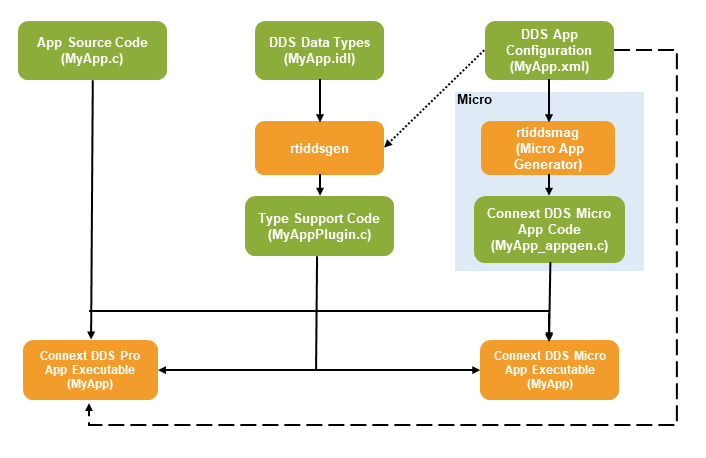
Connext Micro Application Generation, in combination with MAG, enables two important use cases:
Users who may eventually develop with Connext Micro, but who haven’t determined their final platform, can prototype applications on a generic platform and validate that the QoS and DDS Entity configuration is within scope of what Connext Micro supports. MAG ignores fields in the XML file that Connext Micro doesn’t use (and produces an error for the few fields it cannot ignore; see “Unsupported values” in Errors caused by invalid configurations).
Users who want to develop directly with Connext Micro can simplify their development efforts through shared XML files that can be configuration-managed. This reduces the burden on system integrators who want to configure Connext Micro systems without having to manually code in static configurations.
The main features of MAG are:
Generates code for the languages supported by Connext Micro: C and C++.
Automatically configures the remote entities that are needed to communicate with applications that use static discovery.
Automatically tries to use the default values used by Connext Micro, to reduce the size of the generated code.
Optimizes the components used by your application. By default, MAG generates code that will unregister transports that your application is not using.
Ignores fields and transports not supported by Connext Micro (any fields or transports not described in the API Reference) and raises errors for things it can’t ignore. See Errors caused by invalid configurations.
Note
MAG has been tested with Java 17.0.6, which is included in the Connext Professional installation.
MAG does not support customizable templates. (It doesn’t support the functionality described in Customizing the Generated Code in the Code Generator User’s Manual.)
3.17.2.2. Generating the Application with MAG
3.17.2.2.1. Running MAG
To run the MAG tool, use the following command:
For example, on a Windows system:
<RTIMEHOME>/rtiddsmag/scripts/rtiddsmag.bat -language C -referencedFile HelloWorldQos.xml HelloWorld.xml
For example, on a Linux or macOS system:
<RTIMEHOME>/rtiddsmag/scripts/rtiddsmag -language C -referencedFile HelloWorldQos.xml HelloWorld.xml
Please refer to MAG Command-Line Options for valid command-line options.
3.17.2.2.2. Generated Files
The following table shows the files that MAG creates for an example XML file, HelloWorld.xml (which contains the application definition) and a referenced file, HelloWorldQos.xml (which contains the QoS definition). This second file is optional; you can define the QoS in the application file.
Note
Changes in the XML configuration file require regenerating the C/C++ source code and recompiling the application.
Generated Files |
Description |
|---|---|
HelloWorldAppgen.h (C and C++) |
Generated code for each DDS Entity and its run-time components. |
HelloWorldAppgen.c (C and C++) |
Generated code for each Entity Model; also contains the values of each array used in the header file. |
HelloWorldAppgen_plugin.h (C++ only) |
Header file that contains the declarations of all the wrappers. |
HelloWorldAppgen_plugin.cxx (C++ only) |
A wrapper for the _get() call (get_plugin_type): struct DDS_TypePluginI *HelloWorldPlugin_get_cpp(void)
{
return HelloWorldPlugin_get();
}
|
Warning
You should not modify the generated code. MAG will overwrite your modifications
when it regenerates the C/C++ code from XML if the -replace argument is used.
3.17.2.3. MAG Command-Line Options
The following table shows the options available when using rtiddsmag to generate code for Connext Micro applications.
Option |
Description |
|---|---|
|
Controls the structure and templates used in code generation. Valid
values are
|
|
Specify the directory where the AUTOSAR templates are. The default path for AUTOSAR code generation templates is
Note: This option is only valid when |
|
Generates the output in the specified directory. By default, MAG will generate files in the directory where the XML file is located. |
|
Generates code for a single deployment instance, selected from a deployment scenario defined in the XML file. When this option is specified, rtiddsmag will:
This capability is essential for multi-deployment scenarios where different Electronic Control Units (ECUs) require different DDS configurations and code artifacts. |
|
Use this flag to avoid adding the input file location of fields into the generated files. By default (when this flag is not used), MAG will add the location where an entity was defined in the XML file. The location will be placed above the definition of that entity in the generated code. |
|
Use this flag to avoid static endpoint discovery optimization. Then MAG will include all DataWriters and DataReaders when calculating the remote entities. By default (when this option is not used) MAG will optimize the number of remote entities by only including Data Writers and DataReaders that use the same Topic in the remote model. |
|
Use this flag to avoid automatically updating the resource limit settings for the DomainParticipantFactory, DomainParticipants, DataReaders, and DataWriters. Note: The use of this flag for the DomainParticipantFactory is currently not supported. By default (when this flag is not used), MAG will update the resource limits so it will at least be able to support the entities defined in the XML file. If your applications communicate with more remote entities that the ones specified in the XML file, you might need to manually update them. |
|
Use this flag to avoid automatically generating code using default QoS policy values when possible. By default (when this flag is not used), MAG will check whether the values that are set in every element of the QoS policies for each entity are the same as the defaults used by Connext Micro. If that’s the case, the generated code will contain the default values for those policies, instead of the values set by the user. |
|
Specifies the name used by MAG when registering a DPDE discovery
plugin. By default, this name is |
|
Specifies the name used by MAG when registering a DPSE discovery
plugin. By default, this name is |
|
Prints out the command-line options for MAG. |
|
Specifies the IDL file name used by rtiddsgen to generate the code. This value is used by MAG to specify the Plugin header generated by rtiddsgen. By default, MAG uses the name of the XML file. |
|
Specifies the XML configuration file used to generate code. The XML configuration file can be passed directly to MAG without using the -inputXml option, by default MAG knows that any argument with no option is the input file. |
|
Specifies the language to use for the generated files. The default language is C. |
|
Causes MAG to just validate the input file. It will not generate any code. |
|
Use this flag to display the final values of the specified QoS profile after applying inheritance. Although MAG currently doesn’t generate code to set the QoS for Connext Micro, using this flag will determine the final values in the profile after applying inheritance. For complex XML files, with multiple levels of inheritance, it might be a challenge to determine the final QoS values. Using this flag simplifies the process. Note: This option does not check whether or not the final values are supported by Connext Micro. |
|
Change the name of the pre-shared key (PSK) component for
the Lightweight Security Plugin. The default name is |
|
Specifies a file which is referenced from the one being used to generate code. In general, it is recommended to split the application definition from the QoS definition. This way, the QoS can be shared among various applications. Note: Can be repeated.
|
|
Use this flag to overwrite existing generated files. |
|
Specifies the name used by MAG when registering a shared
memory (SHMEM) transport plugin. By default, this name is
|
|
Specifies the name used by MAG when registering a UDP
transport plugin. By default, this name is |
|
Use this flag to add the |
|
Sets the MAG verbosity: 1: Exceptions. 2: Exceptions and warnings. (Default) 3: Exceptions, warnings, and information. 4: Exceptions, warnings, information, and debug. |
|
Displays the version of MAG being used, such as 4.3.0. |
|
Specifies the name MAG uses when registering a Zero Copy v2
transport plugin. By default, this name is |
3.17.2.4. Integrating Generated Files into Your Application’s Build
Integrating the generated files into your application is as easy as including the generated files HelloWorldAppgen.h and HelloWorldAppgen.c in your application. If your application uses C++, you will also need to include HelloWorldAppgen_plugin.h and HelloWorldAppgen_plugin.cxx.
Then you can create entities using the standard
DDS_DomainParticipantFactory_create_participant_from_config()
operation and retrieve all the entities from your application code using
the standard lookup_<entity>_by_name() operations, such as
lookup_datawriter_by_name(). For details on these operations, see
the DomainParticipantFactory
module in the Connext Micro API reference HTML documentation.
3.17.3. Creating the Application
We’ll create an example application using rtiddsgen as seen in Data Types and learn from the generated files.
3.17.3.1. Generate Type-Support Code from the Type Definition
The first step is to describe the data type in a programming language-neutral manner. Three languages are supported by RTI Code Generator: XML, IDL, and XSD. These three languages provide equivalent type-definition capabilities, so you can choose whichever one you prefer. You can even transform between one of these three languages and another with RTI Code Generator. That said, since the rest of the configuration files use XML, it is often more convenient to also use XML to describe the data types, so they can be shared or moved to other XML configuration files.
Create a file called HelloWorld.xml that contains the following XML content:
<types>
    <const name="MAX_NAME_LEN" type="long" value="64"/>
    <const name="MAX_MSG_LEN"  type="long" value="128"/>
    <struct name="HelloWorld">
        <member name="sender"  type="string" stringMaxLength="MAX_NAME_LEN" key="true"/>
        <member name="message" type="string" stringMaxLength="MAX_MSG_LEN"/>
        <member name="count"   type="long"/>
    </struct>
</types>
We’ll use this data type for the following example. The data associated with the HelloWorld Topic consists of two strings and a numeric counter:
The first string contains the name of the sender of the message. This field is marked as the “key” since it signals the identity of the data-object.
The second string contains a message.
The third field is a simple counter, which the application increments with each message.
Once the type has been defined, we use rtiddsgen to generate the code for the HelloWorld data type.
We will generate a DPDE example. From your command shell, change to the directory where you created HelloWorld.xml and type:
To generate code with rtiddsgen:
On a Windows system:
<RTIMEHOME>\rtiddsgen\scripts\rtiddsgen.bat -example -exampleTemplate mag/dpde -language C HelloWorld.xml -replace
On a Linux or macOS system:
<RTIMEHOME>/rtiddsgen/scripts/rtiddsgen -example -exampleTemplate mag/dpde -language C HelloWorld.xml -replace
After running rtiddsgen, you will see HelloWorldQos.xml and the following
files and their associated header files in the HelloWorld_mag_dpde directory:
HelloWorld.c
HelloWorldPlugin.c
HelloWorldSupport.c
HelloWorldAppgen.c
HelloWorld_publisher.c
HelloWorld_subscriber.c
HelloWorldApplication.c
The most notable files are HelloWorld.h and HelloWorldPlugin.h:
HelloWorld.h contains the declaration of the C structure, built according to the specification in the XML file:
#define MAX_NAME_LEN (64L)
#define MAX_MSG_LEN (128L)
typedef struct HelloWorld
{
    DDS_String   sender;
    DDS_String   message;
    DDS_Long   count;
} HelloWorld;
HelloWorldPlugin.h contains the
TypePlugin_get()function that MAG will use when generating the code to create all the DDS entities:NDDSUSERDllExport extern struct NDDS_Type_Plugin* HelloWorldTypePlugin_get(void);
3.17.3.2. Generate DDS Entities from the System Definition
This step uses rtiddsmag to generate code to support the creation of DDS entities using Application Generation in Connext Micro.
rtiddsmag supports C and C++. We will generate the DPDE example.
Note
Type code doesn’t need to exist when running rtiddsmag. However, we’ll be using the HelloWorldQos.xml and HelloWorld.xml files generated from the Generate Type-Support Code from the Type Definition section.
From your command shell, change to the directory where you created HelloWorld.xml and type:
To generate code with rtiddsmag:
On a Windows system:
<RTIMEHOME>\rtiddsmag\scripts\rtiddsmag.bat -language C -referencedFile HelloWorldQos.xml HelloWorld.xml
On a Linux or macOS system:
<RTIMEHOME>/rtiddsmag/scripts/rtiddsmag -language C -referencedFile HelloWorldQos.xml HelloWorld.xml
We will examine the content of the generated files in the next section.
3.17.3.3. Examining the application
rtiddsmag generates two applications: HelloWorld_publisher, which writes the Topic, HelloWorldTopic, and HelloWorld_subscriber, which subscribes to that Topic.
rtiddsmag also generates the following examples from the DPSE and the DPDE directories:
Domain Participant “HelloWorldDPDEPubDP”
This application defines a publisher which uses DPDE discovery.
The application has one named “HelloWorldDPDEPubDP”, one named “HelloWorldDPDEPub”, and one named “HelloWorldDPDEDW” which uses topic name “Example HelloWorld”. The application registers one type with name “HelloWorld” and defines one with name “Example HelloWorld” which uses the type “HelloWorld”.
Domain Participant “HelloWorldDPDESubDP”
This application defines a subscriber which uses DPDE discovery.
The application has one named “HelloWorldDPDESubDP”, one named “HelloWorldDPDESub”, and one named “HelloWorldDPDEDR” which uses topic name “Example HelloWorld”. The application registers one type with name “HelloWorld” and defines one with name “Example HelloWorld” which uses the type “HelloWorld”.
3.17.3.4. Call API to Create DomainParticipant
Call the API create_participant_from_config() to create the application from the generated XML definition. This API creates the DomainParticipant; all applications start with the DomainParticipant. This API receives the configuration name and creates all the Entities defined by that configuration.
3.17.3.5. Retrieve Entities by Name
After DomainParticipant creation, you can retrieve the defined Entities by using lookup_by_name() operations.
3.17.4. Examine example XML configuration files
An entire HelloWorld.xml file is shown below. Let’s review its content to see how this scenario was constructed. The main sections in the file are:
<?xml version="1.0"?>
<dds xmlns:xsi="http://www.w3.org/2001/XMLSchema-instance"
 xsi:noNamespaceSchemaLocation="http://community.rti.com/schema/current/rti_dds_profiles.xsd">
    <!-- Type Definition -->
    <types>
        <const name="MAX_NAME_LEN" type="int32" value="64"/>
        <const name="MAX_MSG_LEN"  type="int32" value="128"/>
        <struct name="HelloWorld">
            <member name="sender"  type="string" stringMaxLength="MAX_NAME_LEN" key="true"/>
            <member name="message" type="string" stringMaxLength="MAX_MSG_LEN"/>
            <member name="count"   type="int32"/>
        </struct>
    </types>
    <!-- Domain Library -->
    <domain_library name="HelloWorldLibrary">
        <domain name="HelloWorldDomain" domain_id="0">
            <register_type name="HelloWorldType" type_ref="HelloWorld">
            </register_type>
            <topic name="HelloWorldTopic" register_type_ref="HelloWorldType">
                <registered_name>HelloWorldTopic</registered_name>
            </topic>
        </domain>
    </domain_library>
    <!-- Participant Library -->
    <domain_participant_library name="HelloWorldAppLibrary">
        <domain_participant name="HelloWorldDPDEPubDP"
         domain_ref="HelloWorldLibrary::HelloWorldDomain">
            <publisher name="HelloWorldDPDEPub">
                <data_writer topic_ref="HelloWorldTopic" name="HelloWorldDPDEDW">
                    <datawriter_qos base_name="QosLibrary::DPDEProfile"/>
                </data_writer>
            </publisher>
            <domain_participant_qos base_name="QosLibrary::DPDEProfile"/>
        </domain_participant>
        <domain_participant name="HelloWorldDPDESubDP"
         domain_ref="HelloWorldLibrary::HelloWorldDomain">
            <subscriber name="HelloWorldDPDESub">
                <data_reader topic_ref="HelloWorldTopic" name="HelloWorldDPDEDR">
                    <datareader_qos base_name="QosLibrary::DPDEProfile"/>
                </data_reader>
            </subscriber>
            <domain_participant_qos base_name="QosLibrary::DPDEProfile"/>
        </domain_participant>
        <domain_participant name="HelloWorldDPSEPubDP"
         domain_ref="HelloWorldLibrary::HelloWorldDomain">
            <publisher name="HelloWorldDPSEPub">
                <data_writer topic_ref="HelloWorldTopic" name="HelloWorldDPSEDW">
                <datawriter_qos base_name="QosLibrary::DPSEProfile"/>
                </data_writer>
            </publisher>
            <domain_participant_qos base_name="QosLibrary::DPSEProfile"/>
        </domain_participant>
        <domain_participant name="HelloWorldDPSESubDP"
         domain_ref="HelloWorldLibrary::HelloWorldDomain">
            <subscriber name="HelloWorldDPSESub">
                <data_reader topic_ref="HelloWorldTopic" name="HelloWorldDPSEDR">
                    <datareader_qos base_name="QosLibrary::DPSEProfile"/>
                </data_reader>
            </subscriber>
            <domain_participant_qos base_name="QosLibrary::DPSEProfile"/>
        </domain_participant>
    </domain_participant_library>
</dds>
3.17.4.1. Type Definition
rtiddsmag doesn’t use the types section of the XML file to generate any code. This section is used by rtiddsgen to generate the code to support the direct use of the structure ‘HelloWorld’ from application code (see Generate Type-Support Code from the Type Definition).
<types>
    <const name="MAX_NAME_LEN" type="int32" value="64"/>
    <const name="MAX_MSG_LEN"  type="int32" value="128"/>
    <struct name="HelloWorld">
        <member name="sender"  type="string" stringMaxLength="MAX_NAME_LEN" key="true"/>
        <member name="message" type="string" stringMaxLength="MAX_MSG_LEN"/>
        <member name="count"   type="int32"/>
    </struct>
</types>
3.17.4.2. Domain Definition
The domain section defines the system’s Topics and their corresponding data types. To define a Topic, the associated data type must be registered with the domain, giving it a registered type name. The registered type name is used to refer to that data type within the domain when the Topic is defined.
In this example, the configuration file registers the previously defined
HelloWorld type under the name HelloWorldType. Then it defines a Topic
named HelloWorldTopic, which is associated with the registered type,
referring to its registered name, HelloWorldType. The value used in
TypePlugin_get depends on how the registration of the data-type is
configured inside the domain:
If a <register_type> tag is specified without a type_ref attribute, the value of
TypePlugin_getis generated from the <register_type> tag plus the string “Plugin_get”.If a <register_type> tag is specified with a type_ref attribute, the value of
TypePlugin_getis generated from that attribute plus the string “TypePlugin_get”. Our example has type_ref = “HelloWorld”, so the value ofTypePlugin_getwill beHelloWorldTypePlugin_get.
<!-- Domain Library -->
<domain_library name="HelloWorldLibrary">
    <domain name="HelloWorldDomain" domain_id="0">
        <register_type name="HelloWorld" type_ref="HelloWorld">
        </register_type>

        <topic name="HelloWorldTopic" register_type_ref="HelloWorld">
            <registered_name>HelloWorldTopic</registered_name>
        </topic>
    </domain>
</domain_library>
rtiddsmag generates the following code for each entity that uses this Topic:
HelloWorldAppgen.c
const struct APPGEN_TypeRegistrationModel
HelloWorldAppLibrary_HelloWorldDPDEPubDP_type_registrations[1] =
{
   {
      "HelloWorldType", /* registered_type_name */
      HelloWorldTypePlugin_get /* get_type_plugin */
   }
};
const struct APPGEN_TopicModel
HelloWorldAppLibrary_HelloWorldDPDEPubDP_topics[1] =
{
   {
      "HelloWorldTopic", /* topic_name */
      "HelloWorldType", /* type_name */
      DDS_TopicQos_INITIALIZER /* topic_qos*/
   }
};
These two structures are used in the DomainParticipant definition, where they will be registered by Connext Micro when calling the Micro Application Generation API.
HelloWorldAppgen.h
extern const struct APPGEN_TypeRegistrationModel
HelloWorldAppLibrary_HelloWorldDPDEPubDP_type_registrations[1];

extern const struct APPGEN_TopicModel
HelloWorldAppLibrary_HelloWorldDPDEPubDP_topics[1];

#define RTI_APP_GEN__DP_HelloWorldAppLibrary_HelloWorldDPDEPubDP \
{ \
   ...
   1UL, /* type_registration_count */ \
   HelloWorldAppLibrary_HelloWorldDPDEPubDP_type_registrations, /* type_registrations*/ \
   1UL, /* topic_count */ \
   HelloWorldAppLibrary_HelloWorldDPDEPubDP_topics, /* topics */ \
   ...
}
Note
Connext Micro automatically registers the types that rtiddsmag generates. This means the content inside the Domain definition must match the types generated by rtiddsgen.
3.17.4.3. DomainParticipant Definition
The DomainParticipant section defines the DomainParticipants in the system and the DataWriters and DataReaders that each DomainParticipant has. DomainParticipants are defined within the <domain_participant_library> tag.
Each DomainParticipant:
Has a unique name (within the library) which will be used later by the application that creates it.
Is associated with a domain, which defines the
domain_id, Topics, and the data types the DomainParticipant will use.Defines the Publishers and Subscribers within the DomainParticipant. Publishers contain DataWriters, Subscribers contain DataReaders.
Defines the set of DataReaders it will use to read data. Each DataReader has a QoS and a unique name which can be used from application code to retrieve it.
Defines the set of DataWriters it will use to write data. Each DataWriter has a QoS and a unique name which can be used from application code to retrieve it.
Optionally, the DomainParticipants, Publishers, Subscribers, DataWriters, and DataReaders can specify a QoS profile that will be used to configure them.
The example below defines four DomainParticipants, two of them (HelloWorldDPDEPubDP and HelloWorldDPDESubDP) use Dynamic Participant/Dynamic Endpoint (DPDE) and the other two (HelloWorldDPSEPubDP and HelloWorldDPSESubDP) use Dynamic Participant/Static Endpoint (DPSE) discovery:
<!-- Participant Library -->
<domain_participant_library name="HelloWorldAppLibrary">
    <domain_participant name="HelloWorldDPDEPubDP"
     domain_ref="HelloWorldLibrary::HelloWorldDomain">
        <publisher name="HelloWorldDPDEPub">
            <data_writer topic_ref="HelloWorldTopic" name="HelloWorldDPDEDW">
                <datawriter_qos base_name="QosLibrary::DPDEProfile"/>
            </data_writer>
        </publisher>
        <domain_participant_qos base_name="QosLibrary::DPDEProfile"/>
    </domain_participant>

    <domain_participant name="HelloWorldDPDESubDP"
     domain_ref="HelloWorldLibrary::HelloWorldDomain">
        <subscriber name="HelloWorldDPDESub">
            <data_reader topic_ref="HelloWorldTopic" name="HelloWorldDPDEDR">
                <datareader_qos base_name="QosLibrary::DPDEProfile"/>
            </data_reader>
        </subscriber>
        <domain_participant_qos base_name="QosLibrary::DPDEProfile"/>
    </domain_participant>

    <domain_participant name="HelloWorldDPSEPubDP"
     domain_ref="HelloWorldLibrary::HelloWorldDomain">
        <publisher name="HelloWorldDPSEPub">
            <data_writer topic_ref="HelloWorldTopic" name="HelloWorldDPSEDW">
                <datawriter_qos base_name="QosLibrary::DPSEProfile"/>
            </data_writer>
        </publisher>
        <domain_participant_qos base_name="QosLibrary::DPSEProfile"/>
    </domain_participant>

    <domain_participant name="HelloWorldDPSESubDP"
     domain_ref="HelloWorldLibrary::HelloWorldDomain">
        <subscriber name="HelloWorldDPSESub">
            <data_reader topic_ref="HelloWorldTopic" name="HelloWorldDPSEDR">
                <datareader_qos base_name="QosLibrary::DPSEProfile"/>
            </data_reader>
        </subscriber>
        <domain_participant_qos base_name="QosLibrary::DPSEProfile"/>
    </domain_participant>
</domain_participant_library>
Examining the XML, we see that:
Each DomainParticipant is bound to the Domain, HelloWorldLibrary::HelloWorldDomain.
The two DomainParticipants that use DPDE as their discovery mechanism inherit from the profile QosLibrary::DPDELibrary, while the other two that use DPSE as their discovery mechanism inherit from QosLibrary::DPSELibrary.
Each DomainParticipant contains a single Publisher or Subscriber, which it turn contains a single DataWriter or DataReader that inherits from QosLibrary::DPDELibrary or QosLibrary::DPSELibrary, depending on the discovery mechanism used by its DomainParticipant.
Each DataWriter writes the Topic HelloWorldTopic, which is defined in the domain HelloWorldLibrary::HelloWorldDomain. Each DataReader reads the same Topic.
Since both Dynamic DomainParticipants (those which are using DPDE as their discovery mechanism) are in the same the domain and the DataWriter writes the same Topic that the DataReader reads, the two DomainParticipants will communicate. This also apply to both static participants (those which are using DPSE as their discovery mechanism); the only difference is that rtiddsmag will generate extra code to configure the remote entities (for details, see Static Discovery).
Let’s look at the content of a DomainParticipant definition to explain the code generated by rtiddsmag.
<domain_participant name="HelloWorldDPDEPubDP"
 domain_ref="HelloWorldLibrary::HelloWorldDomain">
    <publisher name="HelloWorldDPDEPub">
        <data_writer topic_ref="HelloWorldTopic" name="HelloWorldDPDEDW">
            <datawriter_qos base_name="QosLibrary::DPDEProfile"/>
        </data_writer>
    </publisher>
    <domain_participant_qos base_name="QosLibrary::DPDEProfile"/>
</domain_participant>
rtiddsmag generates the code needed to register each component used by
this DomainParticipant and unregister those components that are not
being used. In our example, for each DomainParticipant, rtiddsmag
registers the discovery transport, dpde or dpse; registers the
UDP transport used by each DomainParticipant (since they use the same
configuration, only one UDP transport configuration is generated); and
unregisters the default UDP and INTRA transports, since they are not
being used (these two are the only ones that can be unregistered by
rtiddsmag).
It also creates the code for each entity. In this case, it generates the code needed to create:
A Publisher named HelloWorldDPDEPub
A DataWriter named HelloWorldDPDEDW
A DomainParticipant named HelloWorldDPDEPubDP
The QoS used by this DomainParticipant (see QoS Definition)
HelloWorldAppgen.c
const struct ComponentFactoryUnregisterModel
HelloWorldAppLibrary_HelloWorldDPDEPubDP_unregister_components[2] =
{
    {
        "_udp", /* NETIO_DEFAULT_UDP_NAME */
        NULL, /* udp struct RT_ComponentFactoryProperty** */
        NULL  /* udp struct RT_ComponentFactoryListener** */
    },
    {
        "_intra", /* NETIO_DEFAULT_INTRA_NAME */
        NULL, /* _intra struct RT_ComponentFactoryProperty** */
        NULL  /* _intra struct RT_ComponentFactoryListener** */
    }
};

const struct DPDE_DiscoveryPluginProperty
HelloWorldAppLibrary_HelloWorldDPDEPubDP_dpde[1] =
{
    RTI_APP_GEN___dpde__HelloWorldAppLibrary_HelloWorldDPDEPubDP_dpde1
};
const struct UDP_InterfaceFactoryProperty
HelloWorldAppLibrary_HelloWorldDPDEPubDP_udpv4[1] =
{
    RTI_APP_GEN___udpv4__HelloWorldAppLibrary_HelloWorldDPDEPubDP_udp1
};
const struct ComponentFactoryRegisterModel
HelloWorldAppLibrary_HelloWorldDPDEPubDP_register_components[2] =
{
    {
        "dpde1", /* register_name */
        DPDE_DiscoveryFactory_get_interface, /* register_intf */
        &HelloWorldAppLibrary_HelloWorldDPDEPubDP_dpde[0]._parent, /* register_property */
        NULL /* register_listener */
    },
    {
        "udp1", /* register_name */
        UDP_InterfaceFactory_get_interface, /* register_intf */
        &HelloWorldAppLibrary_HelloWorldDPDEPubDP_udpv4[0]._parent._parent, /* register_property */
        NULL /* register_listener */
    }
};

...

const struct APPGEN_DataWriterModel
HelloWorldAppLibrary_HelloWorldDPDEPubDP_publisher_HelloWorldDPDEPub_data_writers[1] =
{
    {
        "HelloWorldDPDEDW", /* name */
        1UL, /* multiplicity */
        "HelloWorldTopic", /* topic_name */
        RTI_APP_GEN___DW_QOS_HelloWorldAppLibrary_HelloWorldDPDEPubDP_HelloWorldDPDEPub_HelloWorldDPDEDW /* writer_qos */
    }
};
const struct APPGEN_PublisherModel
HelloWorldAppLibrary_HelloWorldDPDEPubDP_publishers[1] =
{
    {
        "HelloWorldDPDEPub", /* name */
        1UL, /* multiplicity */
        DDS_PublisherQos_INITIALIZER, /* publisher_qos */
        1UL, /* writer_count */
        HelloWorldAppLibrary_HelloWorldDPDEPubDP_publisher_HelloWorldDPDEPub_data_writers /* data_writers */
    }
};
HelloWorldAppgen.h
extern const struct DPDE_DiscoveryPluginProperty HelloWorldAppLibrary_HelloWorldDPDEPubDP_dpde[1];
extern const struct UDP_InterfaceFactoryProperty HelloWorldAppLibrary_HelloWorldDPDEPubDP_udpv4[1];
extern const struct ComponentFactoryUnregisterModel
  HelloWorldAppLibrary_HelloWorldDPDEPubDP_unregister_components[2];
extern const struct ComponentFactoryRegisterModel
  HelloWorldAppLibrary_HelloWorldDPDEPubDP_register_components[2];

#define RTI_APP_GEN__DPF_HelloWorldAppLibrary_HelloWorldDPDEPubDP \
{ \
    2UL, /* unregister_count */ \
    HelloWorldAppLibrary_HelloWorldDPDEPubDP_unregister_components, /* unregister_components */\
    2UL, /* register_count */ \
    HelloWorldAppLibrary_HelloWorldDPDEPubDP_register_components, /* register_components */ \
    RTI_APP_GEN___DPF_QOS_QosLibrary_DefaultProfile /* factory_qos */ \
}

extern const struct APPGEN_TypeRegistrationModel
  HelloWorldAppLibrary_HelloWorldDPDEPubDP_type_registrations[1];
extern const struct APPGEN_TopicModel HelloWorldAppLibrary_HelloWorldDPDEPubDP_topics[1];
extern const struct APPGEN_PublisherModel
  HelloWorldAppLibrary_HelloWorldDPDEPubDP_publishers[1];

#define RTI_APP_GEN__DP_HelloWorldAppLibrary_HelloWorldDPDEPubDP \
{ \
    "HelloWorldDPDEPubDP", /* name */ \
    RTI_APP_GEN__DPF_HelloWorldAppLibrary_HelloWorldDPDEPubDP, /* domain_participant_factory */ \
    RTI_APP_GEN___DP_QOS_HelloWorldAppLibrary_HelloWorldDPDEPubDP, /* domain_participant_qos */ \
    0L, /* domain_id */ \
    1UL, /* type_registration_count */ \
    HelloWorldAppLibrary_HelloWorldDPDEPubDP_type_registrations, /* type_registrations */ \
    1UL, /* topic_count */ \
    HelloWorldAppLibrary_HelloWorldDPDEPubDP_topics, /* topics */ \
    1UL, /* publisher_count */ \
    HelloWorldAppLibrary_HelloWorldDPDEPubDP_publishers, /* publishers */ \
    0UL, /* subscriber_count */ \
    NULL, /* subscribers */ \
    0UL, /* remote_participant_count */ \
    NULL, /* remote_participants */ \
    0UL, /* custom_flow_controller_count */ \
    NULL /* custom_flow_controllers */ \
}
3.17.4.4. QoS Definition
The defined DDS Entities have an associated QoS Policy, which can be defined in a separate file such as HelloWorldQos.xml or within the System XML file.
For more information on how to configure DDS Entities in an XML file, see Configuring QoS with XML (if you have internet access).
See the entire file below. Then we will examine the file section by section, showing the code generated by rtiddsmag for the DPSE example.
<?xml version="1.0"?>
<dds xmlns:xsi="http://www.w3.org/2001/XMLSchema-instance"
 xsi:noNamespaceSchemaLocation="http://community.rti.com/schema/current/rti_dds_profiles.xsd">
    <qos_library name="QosLibrary">
        <qos_profile name="DefaultProfile" is_default_participant_factory_profile="true">

            <!-- Participant Factory Qos -->
            <participant_factory_qos>
                <entity_factory>
                    <autoenable_created_entities>false</autoenable_created_entities>
                </entity_factory>
            </participant_factory_qos>

            <!-- Participant Qos -->
            <domain_participant_qos>
                <discovery>
                    <accept_unknown_peers>false</accept_unknown_peers>
                    <initial_peers>
                        <element>127.0.0.1</element>
                        <element>239.255.0.1</element>
                    </initial_peers>
                    <enabled_transports>
                        <element>udpv4</element>
                    </enabled_transports>
                    <multicast_receive_addresses>
                        <element>udpv4://127.0.0.1</element>
                        <element>udpv4://239.255.0.1</element>
                    </multicast_receive_addresses>
                </discovery>
                <default_unicast>
                    <value>
                        <element>
                            <transports>
                                <element>udpv4</element>
                            </transports>
                        </element>
                    </value>
                </default_unicast>
                <transport_builtin>
                    <mask>UDPv4</mask>
                </transport_builtin>
                <resource_limits>
                    <local_writer_allocation>
                        <max_count>1</max_count>
                    </local_writer_allocation>
                    <local_reader_allocation>
                        <max_count>1</max_count>
                    </local_reader_allocation>
                    <local_publisher_allocation>
                        <max_count>1</max_count>
                    </local_publisher_allocation>
                    <local_subscriber_allocation>
                        <max_count>1</max_count>
                    </local_subscriber_allocation>
                    <local_topic_allocation>
                        <max_count>1</max_count>
                    </local_topic_allocation>
                    <local_type_allocation>
                        <max_count>1</max_count>
                    </local_type_allocation>
                    <remote_participant_allocation>
                        <max_count>8</max_count>
                    </remote_participant_allocation>
                    <remote_writer_allocation>
                        <max_count>8</max_count>
                    </remote_writer_allocation>
                    <remote_reader_allocation>
                        <max_count>8</max_count>
                    </remote_reader_allocation>
                    <max_receive_ports>32</max_receive_ports>
                    <max_destination_ports>32</max_destination_ports>
                </resource_limits>
            </domain_participant_qos>
            <!-- DataWriter Qos -->
            <datawriter_qos>
                <history>
                    <depth>32</depth>
                </history>
                <resource_limits>
                    <max_instances>2</max_instances>
                    <max_samples>64</max_samples>
                    <max_samples_per_instance>32</max_samples_per_instance>
                </resource_limits>
                <reliability>
                    <kind>RELIABLE_RELIABILITY_QOS</kind>
                </reliability>
                <protocol>
                    <rtps_reliable_writer>
                        <heartbeat_period>
                            <nanosec>250000000</nanosec>
                            <sec>0</sec>
                        </heartbeat_period>
                    </rtps_reliable_writer>
                </protocol>
                <!-- transports -->
                <unicast>
                    <value>
                        <element>
                            <transports>
                                <element>udpv4</element>
                            </transports>
                        </element>
                    </value>
                </unicast>
            </datawriter_qos>
            <!-- DataReader Qos -->
            <datareader_qos>
                <history>
                    <depth>32</depth>
                </history>
                <resource_limits>
                    <max_instances>2</max_instances>
                    <max_samples>64</max_samples>
                    <max_samples_per_instance>32</max_samples_per_instance>
                </resource_limits>
                <reliability>
                    <kind>RELIABLE_RELIABILITY_QOS</kind>
                </reliability>
                <reader_resource_limits>
                    <max_remote_writers>10</max_remote_writers>
                    <max_remote_writers_per_instance>10</max_remote_writers_per_instance>
                </reader_resource_limits>
                <!-- transports -->
                <unicast>
                    <value>
                        <element>
                            <transports>
                                <element>udpv4</element>
                            </transports>
                        </element>
                    </value>
                </unicast>
                <multicast>
                    <value>
                        <element>
                            <receive_address>127.0.0.1</receive_address>
                            <transports>
                                <element>udpv4</element>
                            </transports>
                        </element>
                    </value>
                </multicast>
            </datareader_qos>
        </qos_profile>

        <qos_profile name="DPDEProfile" base_name="DefaultProfile">
            <domain_participant_qos>
                <discovery_config>
                    <builtin_discovery_plugins>SDP</builtin_discovery_plugins>
                </discovery_config>
            </domain_participant_qos>
        </qos_profile>

        <qos_profile name="DPSEProfile" base_name="DefaultProfile">
            <domain_participant_qos>
                <discovery_config>
                    <builtin_discovery_plugins>DPSE</builtin_discovery_plugins>
                </discovery_config>
            </domain_participant_qos>
        </qos_profile>
    </qos_library>
</dds>
Note
rtiddsmag only generates code for the QoS policies used by at least
one entity, unless the QoS profile has either of the default flags
is_default_participant_factory_profile or is_default_qos set
to true.
Note
The QoS policies that are generated by rtiddsmag are those specified in the XML file. If a QoS policy is only partially specified, rtiddsmag will fill in the missing attributes with the corresponding default values defined in Connext Micro
3.17.4.4.1. DomainParticipant Factory QoS
rtiddsmag only generates code for the <participant_factory_qos> in the
<qos_profile> that has the flag
is_default_participant_factory_profile set to true. The log
verbosity can also be configured by using <verbosity> inside <logging>.
For example:
<!-- Participant Factory Qos -->
<participant_factory_qos>
    <entity_factory>
        <autoenable_created_entities>false</autoenable_created_entities>
    </entity_factory>
    <resource_limits>
        <max_participants>4</max_participants>
        <max_components>20</max_components>
    </resource_limits>
</participant_factory_qos>
rtiddsmag generates the following code:
HelloWorldAppgen.h
#define RTI_APP_GEN___DPF_QOS_QosLibrary_DefaultProfile \
{ \
    {  /* entity_factory */ \
       DDS_BOOLEAN_FALSE /* autoenable_created_entities */ \
    }, \
    {  /* resource_limits */ \
       4L, /* max_participants  */ \
       20L /* max_components */ \
    } \
}
#define RTI_APP_GEN__DPF_HelloWorldAppLibrary_HelloWorldDPDEPubDP \
{ \
    ...,
    RTI_APP_GEN___DPF_QOS_QosLibrary_DefaultProfile /* factory_qos */ \
}
3.17.4.4.2. DomainParticipant QoS
The example defines a base profile named DefaultProfile, which contains the base QoSs used by each DomainParticipant. You can see the content of the DomainParticipant QoS below.
<domain_participant_qos>
    <discovery>
        <accept_unknown_peers>false</accept_unknown_peers>
        <initial_peers>
            <element>127.0.0.1</element>
            <element>239.255.0.1</element>
        </initial_peers>
        <enabled_transports>
            <element>udpv4</element>
        </enabled_transports>
        <multicast_receive_addresses>
            <element>udpv4://127.0.0.1</element>
            <element>udpv4://239.255.0.1</element>
        </multicast_receive_addresses>
    </discovery>
    <default_unicast>
        <value>
            <element>
                <transports>
                    <element>udpv4</element>
                </transports>
            </element>
        </value>
    </default_unicast>
    <transport_builtin>
        <mask>UDPv4</mask>
    </transport_builtin>
    <resource_limits>
        <local_writer_allocation>
            <max_count>1</max_count>
        </local_writer_allocation>
        <local_reader_allocation>
            <max_count>1</max_count>
        </local_reader_allocation>
        <local_publisher_allocation>
            <max_count>1</max_count>
        </local_publisher_allocation>
        <local_subscriber_allocation>
            <max_count>1</max_count>
        </local_subscriber_allocation>
        <local_topic_allocation>
            <max_count>1</max_count>
        </local_topic_allocation>
        <local_type_allocation>
            <max_count>1</max_count>
        </local_type_allocation>
        <remote_participant_allocation>
            <max_count>8</max_count>
        </remote_participant_allocation>
        <remote_writer_allocation>
            <max_count>8</max_count>
        </remote_writer_allocation>
        <remote_reader_allocation>
            <max_count>8</max_count>
        </remote_reader_allocation>
        <max_receive_ports>32</max_receive_ports>
        <max_destination_ports>32</max_destination_ports>
    </resource_limits>
</domain_participant_qos>
This DomainParticipant is then inherited by two different profiles, which set up the discovery mechanism:
<domain_participant_qos>
    <discovery_config>
        <builtin_discovery_plugins>SDP</builtin_discovery_plugins>
    </discovery_config>
</domain_participant_qos>
<domain_participant_qos>
    <discovery_config>
        <builtin_discovery_plugins>DPSE</builtin_discovery_plugins>
    </discovery_config>
</domain_participant_qos>
rtiddsmag generates the following code for each DomainParticipant whose QoS inherits from any of the previous ones, adding those values that are specified in the XML configuration file (which is not the case in our example).
HelloWorldAppgen.c
const char *const HelloWorldAppLibrary_HelloWorldDPDEPubDP_initial_peers[2] =
{
    "127.0.0.1",
    "239.255.0.1"
};
const char *const HelloWorldAppLibrary_HelloWorldDPDEPubDP_discovery_enabled_transports[3] =
{
    "udp1://",
    "udp1://127.0.0.1",
    "udp1://239.255.0.1"
};
const char *const HelloWorldAppLibrary_HelloWorldDPDEPubDP_transport_enabled_transports[1] =
{
    "udp1"
};
const char *const HelloWorldAppLibrary_HelloWorldDPDEPubDP_user_traffic_enabled_transports[1] =
{
    "udp1://"
};
HelloWorldAppgen.h
extern const char *const HelloWorldAppLibrary_HelloWorldDPDEPubDP_initial_peers[2];
extern const char *const HelloWorldAppLibrary_HelloWorldDPDEPubDP_discovery_enabled_transports[3];
extern const char *const HelloWorldAppLibrary_HelloWorldDPDEPubDP_transport_enabled_transports[1];
extern const char *const HelloWorldAppLibrary_HelloWorldDPDEPubDP_user_traffic_enabled_transports[1];

#define RTI_APP_GEN___DP_QOS_HelloWorldAppLibrary_HelloWorldDPDEPubDP \
{ \
    {   /* entity_factory */ \
        DDS_BOOLEAN_TRUE /* autoenable_created_entities */ \
    }, \
    {   /* discovery */ \
        REDA_StringSeq_INITIALIZER_W_LOAN(HelloWorldAppLibrary_HelloWorldDPDEPubDP_initial_peers, 2, 2), /* initial_peers */ \
        REDA_StringSeq_INITIALIZER_W_LOAN(HelloWorldAppLibrary_HelloWorldDPDEPubDP_discovery_enabled_transports, 3, 3), /* enabled_transports */ \
        { \
            { { "dpde1" } }, /* RT_ComponentFactoryId_INITIALIZER */ \
                NDDS_Discovery_Property_INITIALIZER \
        }, /* discovery_component */ \
        DDS_BOOLEAN_FALSE /* accept_unknown_peers */ \
    }, \
    {   /* resource_limits  */ \
        1L, /* local_writer_allocation */ \
        1L, /* local_reader_allocation */ \
        1L, /* local_publisher_allocation */ \
        1L, /* local_subscriber_allocation */ \
        1L, /* local_topic_allocation */ \
        1L, /* local_type_allocation */ \
        8L, /* remote_participant_allocation */ \
        8L, /* remote_writer_allocation */ \
        8L, /* remote_reader_allocation */ \
        32L, /* matching_writer_reader_pair_allocation */ \
        32L, /* matching_reader_writer_pair_allocation */ \
        32L, /* max_receive_ports */ \
        32L, /* max_destination_ports */ \
        65536, /* unbound_data_buffer_size */ \
        500UL, /* shmem_ref_transfer_mode_max_segments */ \
        0L, /* participant_user_data_max_length */ \
        DDS_SIZE_AUTO, /* participant_user_data_max_count */ \
        0L, /* topic_data_max_length */ \
        DDS_SIZE_AUTO, /* topic_data_max_count */ \
        0L, /* publisher_group_data_max_length */ \
        DDS_SIZE_AUTO, /* publisher_group_data_max_count */ \
        0L, /* subscriber_group_data_max_length */ \
        DDS_SIZE_AUTO, /* subscriber_group_data_max_count */ \
        0L, /* writer_user_data_max_length */ \
        DDS_SIZE_AUTO, /* writer_user_data_max_count */ \
        0L, /* reader_user_data_max_length */ \
        DDS_SIZE_AUTO, /* reader_user_data_max_count */ \
        64L, /* max_partitions */ \
        256L, /* max_partition_cumulative_characters */ \
        DDS_LENGTH_UNLIMITED, /* max_partition_string_size */ \
        DDS_LENGTH_UNLIMITED /* max_partition_string_allocation */ \
    }, \
    DDS_ENTITY_NAME_QOS_POLICY_DEFAULT, \
    DDS_WIRE_PROTOCOL_QOS_POLICY_DEFAULT, \
    {   /* transports */ \
        REDA_StringSeq_INITIALIZER_W_LOAN(HelloWorldAppLibrary_HelloWorldDPDEPubDP_transport_enabled_transports, 1, 1) /* enabled_transports */ \
    }, \
    {   /* user_traffic */ \
        REDA_StringSeq_INITIALIZER_W_LOAN(HelloWorldAppLibrary_HelloWorldDPDEPubDP_user_traffic_enabled_transports, 1, 1) /* enabled_transports */ \
    }, \
    DDS_TRUST_QOS_POLICY_DEFAULT, \
    DDS_PROPERTY_QOS_POLICY_DEFAULT, \
    DDS_USER_DATA_QOS_POLICY_DEFAULT \
 }
3.17.4.4.3. Publisher QoS
Our example doesn’t specify any value for Publisher QoS, however rtiddsmag would generate code if it was specified.
3.17.4.4.4. DataWriter QoS
The example defines a base profile named DefaultProfile, which contains the base QoSs used by each DomainParticipant. You can see the content of the DataWriter QoS below.
<!-- DataWriter Qos -->
<datawriter_qos>
   <history>
      <depth>32</depth>
   </history>
   <resource_limits>
      <max_instances>2</max_instances>
      <max_samples>64</max_samples>
      <max_samples_per_instance>32</max_samples_per_instance>
    </resource_limits>
    <reliability>
       <kind>RELIABLE_RELIABILITY_QOS</kind>
    </reliability>
    <protocol>
        <rtps_reliable_writer>
           <heartbeat_period>
              <nanosec>250000000</nanosec>
              <sec>0</sec>
            </heartbeat_period>
        </rtps_reliable_writer>
    </protocol>
    <!-- transports -->
    <unicast>
        <value>
            <element>
                <transports>
                    <element>udpv4</element>
                </transports>
            </element>
        </value>
    </unicast>
</datawriter_qos>
rtiddsmag generates the following code:
HelloWorldAppgen.c
const char *const
HelloWorldAppLibrary_HelloWorldDPDEPubDP_HelloWorldDPDEPub_HelloWorldDPDEDW_transport_enabled_transports[1] =
{
   "udp1://"
};
HelloWorldAppgen.h
extern const char *const
HelloWorldAppLibrary_HelloWorldDPDEPubDP_HelloWorldDPDEPub_HelloWorldDPDEDW_transport_enabled_transports[1];

#define RTI_APP_GEN___DW_QOS_HelloWorldAppLibrary_HelloWorldDPDEPubDP_HelloWorldDPDEPub_HelloWorldDPDEDW \
{ \
    DDS_DEADLINE_QOS_POLICY_DEFAULT, \
    DDS_LIVELINESS_QOS_POLICY_DEFAULT, \
    {   /* history */ \
        DDS_KEEP_LAST_HISTORY_QOS, /* kind */ \
        32L /* depth */ \
    }, \
    {   /* resource_limits */ \
        64L, /* max_samples */ \
        2L, /* max_instances */ \
        32L /* max_samples_per_instance */ \
    }, \
    DDS_OWNERSHIP_QOS_POLICY_DEFAULT, \
    DDS_OWNERSHIP_STRENGTH_QOS_POLICY_DEFAULT, \
    DDS_LATENCY_BUDGET_QOS_POLICY_DEFAULT, \
    {   /* reliability */ \
        DDS_RELIABLE_RELIABILITY_QOS, /* kind */ \
        {   /* max_blocking_time */ \
            0L, /* sec */ \
            100000000L /* nanosec */ \
        } \
    }, \
    DDS_DURABILITY_QOS_POLICY_DEFAULT, \
    DDS_DESTINATION_ORDER_QOS_POLICY_DEFAULT, \
    DDS_TRANSPORT_ENCAPSULATION_QOS_POLICY_DEFAULT, \
    DDS_DATA_REPRESENTATION_QOS_POLICY_DEFAULT, \
    {   /* protocol */ \
        DDS_RTPS_AUTO_ID, /* rtps_object_id */ \
        { /* rtps_reliable_writer */ \
        {   /* heartbeat_period */ \
            0L, /* sec */ \
            250000000L /* nanosec */ \
        },  \
        1L, /* heartbeats_per_max_samples */ \
        DDS_LENGTH_UNLIMITED, /* max_send_window */ \
        DDS_LENGTH_UNLIMITED, /* max_heartbeat_retries */ \
        {   /* first_write_sequence_number */ \
            0, /* high */ \
            1  /* low */ \
        } \
    }, \
    DDS_BOOLEAN_TRUE /* serialize_on_write */ \
    }, \
    DDS_TYPESUPPORT_QOS_POLICY_DEFAULT, \
    {   /* transports */ \
        REDA_StringSeq_INITIALIZER_W_LOAN(HelloWorldAppLibrary_HelloWorldDPDEPubDP_HelloWorldDPDEPub_HelloWorldDPDEDW_transport_enabled_transports, 1, 1) /* enabled_transports */ \
    }, \
    RTI_MANAGEMENT_QOS_POLICY_DEFAULT, \
    DDS_DATAWRITERRESOURCE_LIMITS_QOS_POLICY_DEFAULT, \
    DDS_PUBLISH_MODE_QOS_POLICY_DEFAULT, \
    DDS_USER_DATA_QOS_POLICY_DEFAULT, \
    DDS_DATAWRITERQOS_APPGEN_INITIALIZER \
    NULL, \
    DDS_DataWriterTransferModeQosPolicy_INITIALIZER \
}
3.17.4.4.5. Subscriber QoS
Our example doesn’t specify any value for Subscriber QoS, however rtiddsmag would generate code if it was specified.
3.17.4.4.6. DataReader QoS
The example defines a base profile named DefaultProfile, which contains the base QoSs used by each DomainParticipant. You can see the content of the DataReader QoS below.
<!-- DataReader QoS -->
<datareader_qos>
    <history>
        <depth>32</depth>
    </history>
    <resource_limits>
        <max_instances>2</max_instances>
        <max_samples>64</max_samples>
        <max_samples_per_instance>32</max_samples_per_instance>
    </resource_limits>
    <reliability>
        <kind>RELIABLE_RELIABILITY_QOS</kind>
    </reliability>
    <reader_resource_limits>
        <max_remote_writers>10</max_remote_writers>
        <max_remote_writers_per_instance>10</max_remote_writers_per_instance>
    </reader_resource_limits>
    <!-- transports -->
    <unicast>
        <value>
            <element>
                <transports>
                    <element>udpv4</element>
                </transports>
            </element>
        </value>
    </unicast>
    <multicast>
        <value>
            <element>
                <receive_address>127.0.0.1</receive_address>
                <transports>
                    <element>udpv4</element>
                </transports>
            </element>
        </value>
    </multicast>
</datareader_qos>
rtiddsmag generates the following code:
HelloWorldAppgen.c
const char *const
HelloWorldAppLibrary_HelloWorldDPDESubDP_HelloWorldDPDESub_HelloWorldDPDEDR_transport_enabled_transports[2] =
{
   "udp1://",
   "udp1://127.0.0.1"
};
HelloWorldAppgen.h
extern const char *const
HelloWorldAppLibrary_HelloWorldDPDESubDP_HelloWorldDPDESub_HelloWorldDPDEDR_transport_enabled_transports[2];
#define RTI_APP_GEN___DR_QOS_HelloWorldAppLibrary_HelloWorldDPDESubDP_HelloWorldDPDESub_HelloWorldDPDEDR \
{ \
    DDS_DEADLINE_QOS_POLICY_DEFAULT, \
    DDS_LIVELINESS_QOS_POLICY_DEFAULT, \
    {   /* history */ \
        DDS_KEEP_LAST_HISTORY_QOS, /* kind */ \
        32L /* depth */ \
    }, \
    {   /* resource_limits */ \
        64L, /* max_samples */ \
        2L, /* max_instances */ \
        32L /* max_samples_per_instance */ \
    }, \
    DDS_OWNERSHIP_QOS_POLICY_DEFAULT, \
    DDS_LATENCY_BUDGET_QOS_POLICY_DEFAULT, \
    {   /* reliability */ \
        DDS_RELIABLE_RELIABILITY_QOS, /* kind */ \
        {   /* max_blocking_time */ \
            0L, /* sec */ \
            0L /* nanosec */ \
        } \
    }, \
    DDS_DURABILITY_QOS_POLICY_DEFAULT, \
    DDS_DESTINATION_ORDER_QOS_POLICY_DEFAULT, \
    DDS_TRANSPORT_ENCAPSULATION_QOS_POLICY_DEFAULT, \
    DDS_DATA_REPRESENTATION_QOS_POLICY_DEFAULT, \
    DDS_TYPESUPPORT_QOS_POLICY_DEFAULT, \
    DDS_DATA_READER_PROTOCOL_QOS_POLICY_DEFAULT, \
    {   /* transports */ \
        REDA_StringSeq_INITIALIZER_W_LOAN(HelloWorldAppLibrary_HelloWorldDPDESubDP_HelloWorldDPDESub_HelloWorldDPDEDR_transport_enabled_transports, 2, 2) /* enabled_transports */ \
    }, \
    {   /* reader_resource_limits */ \
        10L, /* max_remote_writers */ \
        10L, /* max_remote_writers_per_instance */ \
        1L, /* max_samples_per_remote_writer */ \
        1L, /* max_outstanding_reads */ \
        DDS_NO_INSTANCE_REPLACEMENT_QOS, /* instance_replacement */ \
        4L, /* max_routes_per_writer */ \
        DDS_MAX_AUTO, /* max_fragmented_samples */ \
        DDS_MAX_AUTO, /* max_fragmented_samples_per_remote_writer */ \
        DDS_SIZE_AUTO /* shmem_ref_transfer_mode_attached_segment_allocation */ \
    }, \
    RTI_MANAGEMENT_QOS_POLICY_DEFAULT,  \
    DDS_USER_DATA_QOS_POLICY_DEFAULT, \
    DDS_DATAREADERQOS_APPGEN_INITIALIZER \
    NULL \
}
3.17.4.4.7. Topic QoS
Our example doesn’t specify any value for Topic QoS; however, rtiddsmag would generate code if it were specified.
3.17.4.5. Transport and Discovery Configuration
rtiddsmag creates the code necessary to configure each one of the available transports used by Connext Micro (UDP, SHMEM, and Zero Copy v2) and the discovery mechanism (Dynamic and Static discovery). It also generates the name automatically for each component regardless of if it is a transport or discovery; for this rtiddsmag will add a DomainParticipant number at the end of its name, only if that configuration is not used by any other DomainParticipant with the exception of the UDP transport, which will always have the same name regardless of the DomainParticipant number:
UDP Transport:
udpv4.SHMEM Transport:
shmem+ participant_number.Zero Copy v2 Transport:
zcopy+ participant_number.DPDE:
dpde+ participant_number.DPSE:
dpse+ participant_number.
These names can be changed by using the ...Name options described
in MAG Command-Line Options.
Note
rtiddsmag will only create the transport configuration based on the strongly typed XML elements in the schema. rtiddsmag will not use the values in the property tag to configure the transport.
If the length of one of these names exceeds the maximum length, rtiddsmag will throw an error.
-incrementUdpNamecan be used to add theparticipant_numbersuffix to the UDP transport name if needed.
The following configuration specifies dynamic discovery:
<domain_participant_qos>
    <discovery_config>
        <builtin_discovery_plugins>SDP</builtin_discovery_plugins>
    </discovery_config>
</domain_participant_qos>
HelloWorldAppgen.h
#define RTI_APP_GEN___dpde__HelloWorldAppLibrary_HelloWorldDPDEPubDP_dpde1 \
{ \
    RT_ComponentFactoryProperty_INITIALIZER, /* _parent */ \
    {   /*participant_liveliness_assert_period */ \
        30L, /* sec */ \
        0L /* nanosec */ \
    }, \
    {   /*participant_liveliness_lease_duration */ \
        100L, /* sec */ \
        0L /* nanosec */ \
    }, \
    5, /* initial_participant_announcements */ \
    {   /*initial_participant_announcement_period */ \
        1L, /* sec */ \
        0L /* nanosec */ \
    }, \
    DDS_BOOLEAN_FALSE, /* cache_serialized_samples */ \
    DDS_LENGTH_AUTO, /* max_participant_locators */ \
    4, /* max_locators_per_discovered_participant */ \
    8, /* max_samples_per_builtin_endpoint_reader */ \
    DDS_LENGTH_UNLIMITED, /* builtin_writer_max_heartbeat_retries */ \
    {   /*builtin_writer_heartbeat_period */ \
        0L, /* sec */ \
        100000000L /* nanosec */ \
    }, \
    1L /* builtin_writer_heartbeats_per_max_samples */ \
    DDS_PARTICIPANT_MESSAGE_READER_RELIABILITY_KIND_INITIALIZER \
}

#define RTI_APP_GEN___DP_QOS_HelloWorldAppLibrary_HelloWorldDPDEPubDP \
{ \
    ...
    {   /* discovery */ \
        REDA_StringSeq_INITIALIZER_W_LOAN(HelloWorldAppLibrary_HelloWorldDPDEPubDP_initial_peers, 2, 2), /* initial_peers */ \
        REDA_StringSeq_INITIALIZER_W_LOAN(HelloWorldAppLibrary_HelloWorldDPDEPubDP_discovery_enabled_transports, 3, 3), /* enabled_transports */ \
        { \
            { { "dpde1" } }, /* RT_ComponentFactoryId_INITIALIZER */ \
                NDDS_Discovery_Property_INITIALIZER \
        }, /* discovery_component */ \
        DDS_BOOLEAN_FALSE /* accept_unknown_peers */ \
    }, \
    ...
}
Note
rtiddsmag will generate an error if the list of available transports for the DomainParticipant, DataWriter, and DataReader contains a transport alias that is not part of the
transport_builtinmask.rtiddsmag will not generate code for the SHMEM or UDPv4 transport if it is not specified in the
transport_builtinmask.UDP transformation is not supported in XML.
When using the transport alias to specify the enabled_transports for
the discovery DomainParticipant, DataWriter or DataReader, you
could use the transport names for the built-in transport plugins:
shmem, udpv4, and zcopy. rtiddsmag will automatically modify this
alias to match the new one with the DomainParticipant number at the
end of the name.
The Zero Copy v2 transport is configured differently than the other transports.
It cannot be configured through the transport_builtin element in XML, and
it cannot be enabled with the transport_builtin mask. Instead, it
can be configured through properties in the XML file. The following properties
are required by rtiddsmag to configure the Zero Copy v2 transport:
- 1
This property is only required if you choose to implement your own notification mechanism and not use the default implementation provided by RTI.
- 2
Resolves to ZCOPY_NotifMechanismProperty when using the default notification mechanism.
The following additional properties are only required if you are using
the default implementation of the notification mechanism for Zero Copy v2;
see Register the Zero Copy v2 transport for more information.
When configuring the user_intf in Zero Copy v2, you must define all
or none of the values. If only some of them are defined, MAG will report an
error and the generated code will not work with Connext Micro.
The following additional properties are only required if you are using your own notification mechanism for Zero Copy v2, NOT the default implementation.
The following code is an example of how to configure the Zero Copy v2 transport in XML and the resulting code that rtiddsmag generates:
<property>
   <value>
       <element>
           <name>dds.micro.zero_copy.enable</name>
           <value>true</value>
       </element>
       <element>
           <name>dds.micro.zero_copy.max_samples_per_notif</name>
           <value>256</value>
       </element>
       <element>
           <name>dds.micro.zero_copy.user_property.intf_addr</name>
           <value>125</value>
       </element>
   </value>
</property>
HelloWorldAppgen.c
const struct ZCOPY_NotifMechanismProperty zcopy1_user_property = RTI_APP_GEN___zcopy__HelloWorldAppLibrary_HelloWorldDPDEPubDP_zcopy1_NOTIF_USER_PROPERTY;
const struct ZCOPY_NotifLoaderFactoryProperty HelloWorldAppLibrary_HelloWorldDPDEPubDP_zcopy[1] =
{
    RTI_APP_GEN___zcopy__HelloWorldAppLibrary_HelloWorldDPDEPubDP_zcopy1
};
const struct ComponentFactoryRegisterModel HelloWorldAppLibrary_HelloWorldDPDEPubDP_register_components[3] =
{
    /* … */
    {
        "zcopy1_", /* register_name */
        ZCOPY_Loader_get_interface, /* register_intf */
        &HelloWorldAppLibrary_HelloWorldDPDEPubDP_zcopy[0]._parent._parent._parent, /* register_property */
        NULL /* register_listener */
    }
};
HelloWorldAppgen.h
#define RTI_APP_GEN___zcopy__HelloWorldAppLibrary_HelloWorldDPDEPubDP_zcopy1_NOTIF_USER_PROPERTY \
{ \
    125U, /* intf_addr */ \
    OSAPI_ThreadProperty_INITIALIZER, \
    2U, /* max_receive_ports */ \
    32U /* max_routes */ \
}


extern const struct ZCOPY_NotifMechanismProperty zcopy1_user_property;


#define RTI_APP_GEN___zcopy__HelloWorldAppLibrary_HelloWorldDPDEPubDP_zcopy1_PROPERTY \
{ \
    NETIO_InterfaceFactoryProperty_INITIALIZER, \
    256L, /* max_samples_per_notif */ \
    NULL, /* user_intf */ \
    &zcopy1_user_property /* user_property */ \
}


#define RTI_APP_GEN___zcopy__HelloWorldAppLibrary_HelloWorldDPDEPubDP_zcopy1 \
{ \
    RTI_APP_GEN___zcopy__HelloWorldAppLibrary_HelloWorldDPDEPubDP_zcopy1_PROPERTY, /* _parent */ \
    "zcopy1" /* notif_transport_name */ \
}
3.17.4.5.1. UDP Transport Configuration
The following UDP transport properties must be configured via the PROPERTY QoS policy for the DomainParticipant:
The names of these properties should use the prefix dds.transport.UDPv4.builtin.:
<participant_qos>
    <property>
        <value>
            <element>
                <name>dds.transport.UDPv4.builtin.disable_multicast_bind</name>
                <value>TRUE</value>
            </element>
            <element>
                <name>dds.transport.UDPv4.builtin.disable_multicast_interface_select</name>
                <value>FALSE</value>
            </element>
            <element>
                <name>dds.transport.UDPv4.builtin.transport_priority_mapping_low</name>
                <value>0</value>
            </element>
        </value>
    </property>
</participant_qos>
Most other UDP transport properties can be configured directly as XML tags under <transport_builtin><udpv4>:
<transport_builtin>
    <mask>UDPv4</mask>
    <udpv4>
        <ignore_loopback_interface>0</ignore_loopback_interface>
        <allow_interfaces_list>
            <element>eth0</element>
            <element>eth1</element>
        </allow_interfaces_list>
        <recv_socket_buffer_size>65535</recv_socket_buffer_size>
        <send_socket_buffer_size>65535</send_socket_buffer_size>
        <multicast_ttl>100</multicast_ttl>
    </udpv4>
</transport_builtin>
The following table provides a comprehensive reference of all UDP transport configuration properties:
Property Name |
Configuration Method |
Description |
Default Value |
MAG Support |
|---|---|---|---|---|
allow_interface |
XML Tag via allow_interfaces_list |
String sequence of network interface names (e.g., “en0”, “eth1”) that are allowed for communication. Empty sequence allows all interfaces. |
Empty (all allowed) |
Yes |
deny_interface |
XML Tag via deny_interfaces_list |
String sequence of network interface names that are NOT allowed for communication. Checked after allow_interface list. Empty sequence denies no interfaces. |
Empty (none denied) |
Yes |
max_send_buffer_size |
XML Tag via send_socket_buffer_size |
Maximum size of the send socket buffer. Must be at least as large as the largest sample. Typically a multiple of maximum concurrent samples. |
256 KB |
Yes |
max_receive_buffer_size |
XML Tag via recv_socket_buffer_size |
Maximum size of the receive socket buffer. Must be at least as large as the largest sample. Typically a multiple of maximum concurrent samples. |
256 KB |
Yes |
max_message_size |
XML Tag via message_size_max |
Maximum size of the message which can be received, including packet overhead. |
8192 bytes |
Yes |
multicast_ttl |
XML Tag |
Multicast Time-To-Live value. Limits the number of hops a packet can pass through before being dropped. Used only for multicast. |
1 |
Yes |
nat |
Cannot be configured through MAG |
Network Address Translation table for NAT traversal. Requires programmatic configuration via |
Empty |
No |
if_table |
XML Tag via interface_table |
Manual configuration of available network interfaces. Used when IP stack does not support reading interface lists. Requires programmatic configuration via |
{(0,0,0)} |
Yes |
multicast_interface |
XML Tag |
Specific network interface to use for sending multicast packets. Leave unset for OS to select. |
Any (OS selects) |
Yes |
is_default_interface |
Constant and cannot be configured |
Flag indicating whether this UDP transport is used if no other transport is found. |
TRUE |
Yes (hardcoded TRUE) |
disable_auto_interface_config |
XML Tag |
Prevents UDP transport from reading the interface list on platforms that support it. Set to TRUE to disable auto-detection. |
FALSE |
Yes |
multicast_loopback_disabled |
XML Tag |
Controls whether Connext Micro puts multicast packets onto the loopback interface. |
FALSE (loopback enabled) |
Yes |
recv_thread |
XML Tag via receiver_pool.thread |
Configuration of all receive threads. Refer to Threading Model documentation for details. |
Platform defaults |
Yes |
enable_interface_bind |
Constant and cannot be configured |
When TRUE, UDP transport binds each receive port to a specific interface when allow_interface/deny_interface lists are non-empty. Increases thread count. Ignored when transformations are enabled and interface lists are non-empty. |
FALSE |
Yes (hardcoded FALSE) |
disable_multicast_bind |
Property QoS |
Determines whether to bind to a specific multicast address receive address (0/FALSE) or bind to ANY multicast address (1/TRUE). |
FALSE (bind to specific address) |
Yes |
disable_multicast_interface_select |
Property QoS |
Controls whether to use |
FALSE (interface selection enabled) |
Yes |
source_rules |
None |
Rules for transforming received UDP payloads based on source address. |
None |
No (not implemented) |
destination_rules |
None |
Rules for transforming sent UDP payloads based on destination address. |
None |
No (not implemented) |
transform_udp_mode |
None |
Determines how regular UDP is supported when transformations are enabled. When transformations are enabled, default value is |
None |
No (not implemented) |
transform_locator_kind |
None |
Locator to use for locators with transformations. When transformation rules are enabled, they are announced as vendor-specific locators. This property overrides the default value. NOTE: Changing this may prevent communication. |
None |
No (not implemented) |
ignore_loopback_interface |
XML Tag |
Controls whether loopback interface (127.0.0.1) is ignored for communication. |
-1 (loopback enabled) |
Yes |
transport_priority_mapping_low |
Property QoS |
Set low value of output range to IPv4 TOS. |
0 |
Yes |
transport_priority_mapping_high |
Property QoS |
Highest transport priority value for DSCP mapping. |
255 |
Yes |
transport_priority_mask |
Property QoS |
Set mask for use of transport priority field. |
0 |
Yes |
max_unicast_send_socket |
Property QoS |
The number of unicast send sockets to create per transport instance. |
1 |
Yes |
The following UDP transport properties are defined by Connext Micro but are not currently configurable by MAG:
Property Name |
Why MAG Does Not Consume It |
Notes |
|---|---|---|
nat |
Requires explicit programmatic NAT entry construction via C API; MAG does not model these entries. |
Micro supports it, MAG does not expose it. |
is_default_interface |
The template emits this as |
Present in generated C, not user-configurable through MAG. |
enable_interface_bind |
The template emits this as |
Present in generated C, not user-configurable through MAG. |
source_rules |
MAG does not model UDP transformation rules. |
Transformation support not implemented. |
destination_rules |
MAG does not model UDP transformation rules. |
Transformation support not implemented. |
transform_udp_mode |
Depends on transformation support that MAG does not implement. |
Transformation support not implemented. |
transform_locator_kind |
Depends on transformation support that MAG does not implement. |
Transformation support not implemented. |
3.17.4.5.3. Discovery Configuration
rtiddsmag supports configuring the following DISCOVERY QoS policy fields:
dds.micro.discovery.enable_participant_discovery_by_namedds.micro.discovery.enable_endpoint_discovery_queue
However, you must configure these fields via the PROPERTY QoS policy instead of DISCOVERY, as shown in the example code below:
<property>
   <value>
       <element>
           <name>dds.micro.discovery.enable_participant_discovery_by_name</name>
           <value>true</value>
       </element>
       <element>
           <name>dds.micro.discovery.enable_endpoint_discovery_queue</name>
           <value>true</value>
       </element>
   </value>
</property>
For more information on these fields, refer to DomainParticipant Discovery by Name and [Major] Possible mismatched endpoint messages during discovery.
3.17.4.6. Flow Controllers
rtiddsmag creates code which will be used by Connext Micro to
create a custom flow controller. The custom flow controller is configured through
properties in the XML file. Let’s see an example of how to configure a custom
flow controller named custom_flowcontroller and the code that
rtiddsmag generates:
<domain_participant_qos>
    ...
    <property>
        <value>
            <element>
                <name>
  dds.flow_controller.token_bucket.custom_flowcontroller.token_bucket.max_tokens
                </name>
                <value>2</value>
            </element>
            <element>
                <name>
  dds.flow_controller.token_bucket.custom_flowcontroller.token_bucket.tokens_added_per_period
                </name>
                <value>2</value>
            </element>
            <element>
                <name>
  dds.flow_controller.token_bucket.custom_flowcontroller.token_bucket.tokens_leaked_per_period
                </name>
                <!-- The value -1 means LENGTH_UNLIMITED -->
                <value>-1</value>
            </element>
            <element>
                <name>
  dds.flow_controller.token_bucket.custom_flowcontroller.token_bucket.period.sec
                </name>
                <value>0</value>
            </element>
            <element>
                <name>
  dds.flow_controller.token_bucket.custom_flowcontroller.token_bucket.period.nanosec
                </name>
                <value>100000000</value>
            </element>
            <element>
                <name>
  dds.flow_controller.token_bucket.custom_flowcontroller.token_bucket.bytes_per_token
                </name>
                <value>1024</value>
            </element>
        </value>
    </property>
</domain_participant_qos>

<datawriter_qos>
    <publish_mode>
        <flow_controller_name>
            dds.flow_controller.token_bucket.custom_flowcontroller
        </flow_controller_name>
        <kind>ASYNCHRONOUS_PUBLISH_MODE_QOS</kind>
        <priority>12</priority>
    </publish_mode>
</datawriter_qos>
HelloWorldAppgen.c
const struct APPGEN_CustomFlowControllerModel
HelloWorldAppLibrary_HelloWorldDPDEPubDP_flow_controllers[1] =
{
    {
        "custom_flowcontroller", /* name */
        RTI_APP_GEN___FC_P_QOS_HelloWorldAppLibrary_HelloWorldDPDEPubDP_custom_flowcontroller /* flow_controller_property */
    }
};
HelloWorldAppgen.h
#define
RTI_APP_GEN___FC_P_QOS_HelloWorldAppLibrary_HelloWorldDPDEPubDP_custom_flowcontroller \
{ \
    NETIO_FlowControllerProperty_INITIALIZER, \
    DDS_EDF_FLOW_CONTROLLER_SCHED_POLICY, /* scheduling_policy */ \
    { /* token_bucket */ \
        2L, /* max_tokens */ \
        2L, /* tokens_added_per_period */ \
        -1L, /* tokens_leaked_per_period */ \
        { /* period */ \
            0L, /* sec */ \
            100000000L /* nanosec */ \
        }, \
        1024L /* bytes_per_token */ \
    }, \
    DDS_BOOLEAN_FALSE /* is_vendor_specific */ \
}

#define
RTI_APP_GEN___DW_QOS_HelloWorldAppLibrary_HelloWorldDPDEPubDP_HelloWorldDPDEPub_HelloWorldDPDEDW \
{ \
    ...
    {   /* publish_mode */ \
        DDS_ASYNCHRONOUS_PUBLISH_MODE_QOS, /* max_remote_readers */ \
        "custom_flowcontroller", /* flow_controller_name */ \
        12L /* priority */ \
    }, \
    ...
}

extern const struct APPGEN_CustomFlowControllerModel
HelloWorldAppLibrary_HelloWorldDPDEPubDP_flow_controllers[1];

#define RTI_APP_GEN__DP_HelloWorldAppLibrary_HelloWorldDPDEPubDP \
{ \
    ...
    1UL, /* custom_flow_controller_count */ \
    HelloWorldAppLibrary_HelloWorldDPDEPubDP_flow_controllers /* custom_flow_controllers */ \
}
The three built-in Flow Controllers are also supported by rtiddsmag:
DEFAULT_FLOW_CONTROLLER_NAME
FIXED_RATE_FLOW_CONTROLLER_NAME
ON_DEMAND_FLOW_CONTROLLER_NAME
The generated code is slightly different when any of these three built-in Flow Controllers are configured, as there is no need to generate code to register the Flow Controller.
<datawriter_qos>
    <publish_mode>
        <flow_controller_name>DEFAULT_FLOW_CONTROLLER_NAME</flow_controller_name>
        <kind>ASYNCHRONOUS_PUBLISH_MODE_QOS</kind>
        <priority>12</priority>
    </publish_mode>
</datawriter_qos>
HelloWorldAppgen.h
#define
RTI_APP_GEN___DW_QOS_HelloWorldAppLibrary_HelloWorldDPDEPubDP_HelloWorldDPDEPub_HelloWorldDPDEDW \
{ \
    ...
    {   /* publish_mode */ \
        DDS_ASYNCHRONOUS_PUBLISH_MODE_QOS, /* max_remote_readers */ \
        "DDS_DEFAULT_FLOW_CONTROLLER_NAME", /* flow_controller_name */ \
        12L /* priority */ \
    }, \
    ...
}

#define RTI_APP_GEN__DP_HelloWorldAppLibrary_HelloWorldDPDEPubDP \
{ \
    ...
    0UL, /* custom_flow_controller_count */ \
    NULL /* custom_flow_controllers */ \
}
Note
A flow controller is only used by Micro when the publish_mode kind is set to either ASYNCHRONOUS_PUBLISH_MODE_QOS or AUTOMATIC_PUBLISH_MODE_QOS.
3.17.4.7. Static Discovery
rtiddsmag iterates through each DomainParticipant definition in the
XML configuration file, creating the remote entities that are needed to
communicate with applications that use static discovery, and updating
the object_id of each DataWriter or DataReader involved if they
don’t have a valid value or they are using the default value.
Let’s see an example of two applications that use static discovery and how rtiddsmag generates the necessary code that will be asserted by Connext Micro to communicate with both applications:
<domain_participant name="HelloWorldDPSEPubDP"
    domain_ref="HelloWorldLibrary::HelloWorldDomain">
    <publisher name="HelloWorldDPSEPub">
        <data_writer topic_ref="HelloWorldTopic" name="HelloWorldDPSEDW">
            <datawriter_qos base_name="QosLibrary::DPSEProfile"/>
        </data_writer>
    </publisher>
    <domain_participant_qos base_name="QosLibrary::DPSEProfile"/>
</domain_participant>

<domain_participant name="HelloWorldDPSESubDP"
    domain_ref="HelloWorldLibrary::HelloWorldDomain">
    <subscriber name="HelloWorldDPSESub">
        <data_reader topic_ref="HelloWorldTopic" name="HelloWorldDPSEDR">
          <datareader_qos base_name="QosLibrary::DPSEProfile"/>
        </data_reader>
    </subscriber>
    <domain_participant_qos base_name="QosLibrary::DPSEProfile"/>
</domain_participant>
For these two DomainParticipants, rtiddsmag will update the
rtps_object_id for the DataWriter and DataReader, since they
didn’t have any values set in the XML file. You can see this in the
following snippet from HelloWorldAppgen.h:
#define
RTI_APP_GEN___DW_QOS_HelloWorldAppLibrary_HelloWorldDPSEPubDP_HelloWorldDPSEPub_HelloWorldDPSEDW \
{ \
    ...
    {   /* protocol */ \
        1UL, /* rtps_object_id */ \
        { /* rtps_reliable_writer */ \
            {   /* heartbeat_period */ \
                0L, /* sec */ \
                250000000UL /* nanosec */ \
            },  \
            1L, /* heartbeats_per_max_samples */ \
            DDS_LENGTH_UNLIMITED, /* max_send_window */ \
            DDS_LENGTH_UNLIMITED, /* max_heartbeat_retries */ \
            {   /* first_write_sequence_number */ \
                0, /* high */ \
                1  /* low */ \
            } \
        }, \
        DDS_BOOLEAN_TRUE /* serialize_on_write */ \
    }, \
    ...
}

#define
RTI_APP_GEN___DR_QOS_HelloWorldAppLibrary_HelloWorldDPSESubDP_HelloWorldDPSESub_HelloWorldDPSEDR \
{ \
    ...
    {   /* protocol */ \
        2UL /* rtps_object_id */ \
    }, \
    ...
}
rtiddsmag will also generate the remote DomainParticipants, DataWriters, and DataReaders that need to be asserted in order for endpoints to match:
HelloWorldAppgen.c
const struct APPGEN_RemoteSubscriptionModel
HelloWorldAppLibrary_HelloWorldDPSEPubDP_remote_subscribers[1] =
{
    RTI_APP_GEN__RSD_HelloWorldAppLibrary_HelloWorldDPSEPubDP_HelloWorldAppLibrary_HelloWorldDPSESubDP_HelloWorldDPSESub_HelloWorldDPSEDR
};

const struct APPGEN_RemoteParticipantModel
HelloWorldAppLibrary_HelloWorldDPSEPubDP_remote_participants[1] =
{
    {
        "HelloWorldDPSESubDP", /* name */
        0UL,  /* remote_publisher_count */
        NULL, /* remote_publishers */
        1UL,  /* remote_subscriber_count */
        HelloWorldAppLibrary_HelloWorldDPSEPubDP_remote_subscribers /* remote_subscribers */
    }
};

const struct APPGEN_RemotePublicationModel
HelloWorldAppLibrary_HelloWorldDPSESubDP_remote_publishers[1] =
{
    RTI_APP_GEN__RPD_HelloWorldAppLibrary_HelloWorldDPSESubDP_HelloWorldAppLibrary_HelloWorldDPSEPubDP_HelloWorldDPSEPub_HelloWorldDPSEDW
};

const struct APPGEN_RemoteParticipantModel
HelloWorldAppLibrary_HelloWorldDPSESubDP_remote_participants[1] =
{
    {
        "HelloWorldDPSEPubDP", /* name */
        1UL, /* remote_publisher_count */
        HelloWorldAppLibrary_HelloWorldDPSESubDP_remote_publishers, /* remote_publishers */
        0UL, /* remote_subscriber_count */
        NULL /* remote_subscribers */
    }
};
HelloWorldAppgen.h
#define RTI_APP_GEN__RSD_HelloWorldAppLibrary_HelloWorldDPSEPubDP_HelloWorldAppLibrary_HelloWorldDPSESubDP_HelloWorldDPSESub_HelloWorldDPSEDR \
{ \
    { /* subscription_data */ \
        { \
            { 0, 0, 0, 2 } /* key */ \
        }, \
        { \
            { 0, 0, 0, 0 } /* participant_key */ \
        }, \
        "HelloWorldTopic", /* topic_name */ \
        "HelloWorldType",  /* type_name */ \
        DDS_DEADLINE_QOS_POLICY_DEFAULT, \
        DDS_OWNERSHIP_QOS_POLICY_DEFAULT, \
        DDS_LATENCY_BUDGET_QOS_POLICY_DEFAULT, \
        {   /* reliability */ \
            DDS_RELIABLE_RELIABILITY_QOS, /* kind */ \
            {   /* max_blocking_time */ \
                0L, /* sec */ \
                0L  /* nanosec */ \
            } \
        }, \
        DDS_LIVELINESS_QOS_POLICY_DEFAULT, \
        DDS_DURABILITY_QOS_POLICY_DEFAULT, \
        DDS_DESTINATION_ORDER_QOS_POLICY_DEFAULT, \
        DDS_SEQUENCE_INITIALIZER, \
        DDS_SEQUENCE_INITIALIZER, \
        DDS_DATA_REPRESENTATION_QOS_POLICY_DEFAULT \
    }, \
    HelloWorldTypePlugin_get /* get_type_plugin */ \
}
extern const struct APPGEN_RemoteSubscriptionModel HelloWorldAppLibrary_HelloWorldDPSEPubDP_remote_subscribers[1];
extern const struct APPGEN_RemoteParticipantModel HelloWorldAppLibrary_HelloWorldDPSEPubDP_remote_participants[1];

#define RTI_APP_GEN__DP_HelloWorldAppLibrary_HelloWorldDPSEPubDP \
{ \
    "HelloWorldDPSEPubDP", /* name */ \
    RTI_APP_GEN__DPF_HelloWorldAppLibrary_HelloWorldDPSEPubDP, /* domain_participant_factory */ \
    RTI_APP_GEN___DP_QOS_HelloWorldAppLibrary_HelloWorldDPSEPubDP, /* domain_participant_qos */ \
    0L,  /* domain_id */ \
    1UL, /* type_registration_count */ \
    HelloWorldAppLibrary_HelloWorldDPSEPubDP_type_registrations, /* type_registrations */ \
    1UL, /* topic_count */ \
    HelloWorldAppLibrary_HelloWorldDPSEPubDP_topics, /* topics */ \
    1UL, /* publisher_count */ \
    HelloWorldAppLibrary_HelloWorldDPSEPubDP_publishers, /* publishers */ \
    0UL,  /* subscriber_count */ \
    NULL, /* subscribers */ \
    1UL,  /* remote_participant_count */ \
    HelloWorldAppLibrary_HelloWorldDPSEPubDP_remote_participants /* remote_participants */ \
    0UL,  /* custom_flow_controller_count */ \
    NULL, /* custom_flow_controllers */ \
}

#define RTI_APP_GEN__RPD_HelloWorldAppLibrary_HelloWorldDPSESubDP_HelloWorldAppLibrary_HelloWorldDPSEPubDP_HelloWorldDPSEPub_HelloWorldDPSEDW \
{ \
    { /* publication_data */ \
        { \
            { 0, 0, 0, 1 } /* key */ \
        }, \
        { \
            { 0, 0, 0, 0 } /* participant_key */ \
        }, \
        "HelloWorldTopic", /* topic_name */ \
        "HelloWorldType",  /* type_name */ \
        DDS_DEADLINE_QOS_POLICY_DEFAULT, \
        DDS_OWNERSHIP_QOS_POLICY_DEFAULT, \
        DDS_OWNERSHIP_STRENGTH_QOS_POLICY_DEFAULT, \
        DDS_LATENCY_BUDGET_QOS_POLICY_DEFAULT, \
        {   /* reliability */ \
            DDS_RELIABLE_RELIABILITY_QOS, /* kind */ \
            {   /* max_blocking_time */ \
                0L, /* sec */ \
                100000000L /* nanosec */ \
            } \
        }, \
        DDS_LIVELINESS_QOS_POLICY_DEFAULT, \
        DDS_DURABILITY_QOS_POLICY_DEFAULT, \
        DDS_DESTINATION_ORDER_QOS_POLICY_DEFAULT, \
        DDS_SEQUENCE_INITIALIZER, \
        DDS_DATA_REPRESENTATION_QOS_POLICY_DEFAULT \
    }, \
    HelloWorldTypePlugin_get /* get_type_plugin */ \
}

extern const struct APPGEN_RemotePublicationModel HelloWorldAppLibrary_HelloWorldDPSESubDP_remote_publishers[1];
extern const struct APPGEN_RemoteParticipantModel HelloWorldAppLibrary_HelloWorldDPSESubDP_remote_participants[1];

#define RTI_APP_GEN__DP_HelloWorldAppLibrary_HelloWorldDPSESubDP \
{ \
    "HelloWorldDPSESubDP", /* name */ \
    RTI_APP_GEN__DPF_HelloWorldAppLibrary_HelloWorldDPSESubDP, /* domain_participant_factory */ \
    RTI_APP_GEN___DP_QOS_HelloWorldAppLibrary_HelloWorldDPSESubDP, /* domain_participant_qos */ \
    0L,  /* domain_id */ \
    1UL, /* type_registration_count */ \
    HelloWorldAppLibrary_HelloWorldDPSESubDP_type_registrations, /* type_registrations */ \
    1UL, /* topic_count */ \
    HelloWorldAppLibrary_HelloWorldDPSESubDP_topics, /* topics */ \
    0UL,  /* publisher_count */ \
    NULL, /* publishers */ \
    1UL,  /* subscriber_count */ \
    HelloWorldAppLibrary_HelloWorldDPSESubDP_subscribers, /* subscribers */ \
    1UL, /* remote_participant_count */ \
    HelloWorldAppLibrary_HelloWorldDPSESubDP_remote_participants /* remote_participants */ \
    0UL, /* custom_flow_controller_count */ \
    NULL /* custom_flow_controllers */ \

#define RTI_APP_GEN__RSD_HelloWorldAppLibrary_HelloWorldDPSEPubDP_HelloWorldAppLibrary_HelloWorldDPSESubDP_HelloWorldDPSESub_HelloWorldDPSEDR \
{ \
    { /* subscription_data */ \
        { \
            { 0, 0, 0, 2 } /* key */ \
        }, \
        { \
            { 0, 0, 0, 0 } /* participant_key */ \
        }, \
        "HelloWorldTopic", /* topic_name */ \
        "HelloWorldType",  /* type_name */ \
        DDS_DEADLINE_QOS_POLICY_DEFAULT, \
        DDS_OWNERSHIP_QOS_POLICY_DEFAULT, \
        DDS_LATENCY_BUDGET_QOS_POLICY_DEFAULT, \
        {   /* reliability */ \
            DDS_RELIABLE_RELIABILITY_QOS, /* kind */ \
            {   /* max_blocking_time */ \
                0L, /* sec */ \
                0L  /* nanosec */ \
            } \
        }, \
        DDS_LIVELINESS_QOS_POLICY_DEFAULT, \
        DDS_DURABILITY_QOS_POLICY_DEFAULT, \
        DDS_DESTINATION_ORDER_QOS_POLICY_DEFAULT, \
        DDS_SEQUENCE_INITIALIZER, \
        DDS_SEQUENCE_INITIALIZER, \
        DDS_DATA_REPRESENTATION_QOS_POLICY_DEFAULT \
    }, \
    HelloWorldTypePlugin_get /* get_type_plugin */ \
}
extern const struct APPGEN_RemoteSubscriptionModel HelloWorldAppLibrary_HelloWorldDPSEPubDP_remote_subscribers[1];
extern const struct APPGEN_RemoteParticipantModel HelloWorldAppLibrary_HelloWorldDPSEPubDP_remote_participants[1];

#define RTI_APP_GEN__DP_HelloWorldAppLibrary_HelloWorldDPSEPubDP \
{ \
    "HelloWorldDPSEPubDP", /* name */ \
    RTI_APP_GEN__DPF_HelloWorldAppLibrary_HelloWorldDPSEPubDP, /* domain_participant_factory */ \
    RTI_APP_GEN___DP_QOS_HelloWorldAppLibrary_HelloWorldDPSEPubDP, /* domain_participant_qos */ \
    0L,  /* domain_id */ \
    1UL, /* type_registration_count */ \
    HelloWorldAppLibrary_HelloWorldDPSEPubDP_type_registrations, /* type_registrations */ \
    1UL, /* topic_count */ \
    HelloWorldAppLibrary_HelloWorldDPSEPubDP_topics, /* topics */ \
    1UL, /* publisher_count */ \
    HelloWorldAppLibrary_HelloWorldDPSEPubDP_publishers, /* publishers */ \
    0UL,  /* subscriber_count */ \
    NULL, /* subscribers */ \
    1UL,  /* remote_participant_count */ \
    HelloWorldAppLibrary_HelloWorldDPSEPubDP_remote_participants /* remote_participants */ \
    0UL,  /* custom_flow_controller_count */ \
    NULL, /* custom_flow_controllers */ \
}

#define RTI_APP_GEN__RPD_HelloWorldAppLibrary_HelloWorldDPSESubDP_HelloWorldAppLibrary_HelloWorldDPSEPubDP_HelloWorldDPSEPub_HelloWorldDPSEDW \
{ \
    { /* publication_data */ \
        { \
            { 0, 0, 0, 1 } /* key */ \
        }, \
        { \
            { 0, 0, 0, 0 } /* participant_key */ \
        }, \
        "HelloWorldTopic", /* topic_name */ \
        "HelloWorldType",  /* type_name */ \
        DDS_DEADLINE_QOS_POLICY_DEFAULT, \
        DDS_OWNERSHIP_QOS_POLICY_DEFAULT, \
        DDS_OWNERSHIP_STRENGTH_QOS_POLICY_DEFAULT, \
        DDS_LATENCY_BUDGET_QOS_POLICY_DEFAULT, \
        {   /* reliability */ \
            DDS_RELIABLE_RELIABILITY_QOS, /* kind */ \
            {   /* max_blocking_time */ \
                0L, /* sec */ \
                100000000L /* nanosec */ \
            } \
        }, \
        DDS_LIVELINESS_QOS_POLICY_DEFAULT, \
        DDS_DURABILITY_QOS_POLICY_DEFAULT, \
        DDS_DESTINATION_ORDER_QOS_POLICY_DEFAULT, \
        DDS_SEQUENCE_INITIALIZER, \
        DDS_DATA_REPRESENTATION_QOS_POLICY_DEFAULT \
    }, \
    HelloWorldTypePlugin_get /* get_type_plugin */ \
}

extern const struct APPGEN_RemotePublicationModel HelloWorldAppLibrary_HelloWorldDPSESubDP_remote_publishers[1];
extern const struct APPGEN_RemoteParticipantModel HelloWorldAppLibrary_HelloWorldDPSESubDP_remote_participants[1];

#define RTI_APP_GEN__DP_HelloWorldAppLibrary_HelloWorldDPSESubDP \
{ \
    "HelloWorldDPSESubDP", /* name */ \
    RTI_APP_GEN__DPF_HelloWorldAppLibrary_HelloWorldDPSESubDP, /* domain_participant_factory */ \
    RTI_APP_GEN___DP_QOS_HelloWorldAppLibrary_HelloWorldDPSESubDP, /* domain_participant_qos */ \
    0L,  /* domain_id */ \
    1UL, /* type_registration_count */ \
    HelloWorldAppLibrary_HelloWorldDPSESubDP_type_registrations, /* type_registrations */ \
    1UL, /* topic_count */ \
    HelloWorldAppLibrary_HelloWorldDPSESubDP_topics, /* topics */ \
    0UL,  /* publisher_count */ \
    NULL, /* publishers */ \
    1UL,  /* subscriber_count */ \
    HelloWorldAppLibrary_HelloWorldDPSESubDP_subscribers, /* subscribers */ \
    1UL, /* remote_participant_count */ \
    HelloWorldAppLibrary_HelloWorldDPSESubDP_remote_participants /* remote_participants */ \
    0UL, /* custom_flow_controller_count */ \
    NULL /* custom_flow_controllers */ \
}
3.17.4.8. Lightweight Security Plugin
rtiddsmag can generate code to configure the Lightweight Security Plugin for Connext Micro. You can configure the plugin through properties in the XML file.
rtiddsmag requires the following properties to configure the plugin:
dds.sec.crypto.enabledds.sec.crypto.rtps_psk_secret_passphrasedds.sec.crypto.rtps_psk_symmetric_cipher_algorithm
The following properties are optional:
dds.micro.transform.get_interface_func3dds.micro.transform.namedds.micro.transform.err_listener.callback4dds.micro.transform.err_listener.user_ptr4dds.micro.pass_tracker.get_interface_func5dds.micro.pass_tracker.polling_interval_ms6dds.micro.pass_tracker.enable_init_read6dds.micro.pass_tracker.err_listener.callback6dds.micro.pass_tracker.err_listener.user_ptr6dds.sec.access.rtps_psk_protection_kindcom.rti.serv.secure.cryptography.max_blocks_per_session
- 3
If
dds.micro.transform.get_interface_funcis not set, the defaultPSK_OSSL_get_interfaceis used.- 4(1,2)
This property is only supported when
dds.micro.transform.get_interface_funcis not set, or is set toPSK_OSSL_get_interface.- 5
If
dds.micro.pass_tracker.get_interface_funcis not set, the defaultPSK_FilePassTracker_get_interfaceis used.- 6(1,2,3,4)
This property is only supported when
dds.micro.pass_tracker.get_interface_funcis not set, or is set toPSK_FilePassTracker_get_interface:
rtiddsmag automatically generates the name of the pre-shared key (PSK) component. rtiddsmag also appends a DomainParticipant number to the name, as long as the particular configuration is not being used by any other DomainParticipant:
psk + participant_number
For example, the first unique pre-shared key configuration would be named
psk1; the second, psk2; and so on.
This name can be changed with the -pskName option described in
MAG Command-Line Options.
Note
If the length of the name exceeds the maximum length, rtiddsmag will throw an error.
Refer to the following code snippet as an example of how to configure the Lightweight Security Plugin in XML and the resulting code that rtiddsmag generates:
<property>
  <value>
      <element>
          <name>dds.micro.crypto.enable</name>
          <value>true</value>
      </element>
      <element>
          <name>dds.sec.crypto.rtps_psk_secret_passphrase</name>
          <value>data:,404166165:castle super radar denial swing lunar kind swarm wet toilet output harbor basic begin margin huge year visit</value>
      </element>
      <element>
          <name>dds.sec.crypto.rtps_psk_symmetric_cipher_algorithm</name>
          <value>AUTO</value>
      </element>
      <element>
          <name>dds.sec.access.rtps_psk_protection_kind</name>
          <value>ENCRYPT</value>
      </element>
      <element>
          <name>com.rti.serv.secure.cryptography.max_blocks_per_session</name>
          <value>12</value>
      </element>
      <element>
          <name>dds.micro.transform.get_interface_func</name>
          <value>PSK_OSSL_get_interface</value>
      </element>
      <element>
          <name>dds.micro.transform.name</name>
          <value>myTransf</value>
      </element>
      <element>
          <name>dds.micro.transform.err_listener.callback</name>
          <value>myCallback</value>
      </element>
      <element>
          <name>dds.micro.transform.err_listener.user_ptr</name>
          <value>myUserPtr</value>
      </element>
      <element>
          <name>dds.micro.pass_tracker.get_interface_func</name>
          <value>PSK_FilePassTracker_get_interface</value>
      </element>
      <element>
          <name>dds.micro.pass_tracker.polling_interval_ms</name>
          <value>250</value>
      </element>
      <element>
          <name>dds.micro.pass_tracker.enable_init_read</name>
          <value>false</value>
      </element>
      <element>
          <name>dds.micro.pass_tracker.err_listener.callback</name>
          <value>myPassTrackerCallback</value>
      </element>
      <element>
          <name>dds.micro.pass_tracker.err_listener.user_ptr</name>
          <value>myPassTrackerUserPtr</value>
      </element>
  </value>
</property>
HelloWorldAppgen.c
const struct DDS_PskServiceFactoryProperty HelloWorldAppLibrary_HelloWorldDPDEPubDP_psk[1] =
{
    RTI_APP_GEN___psk__HelloWorldAppLibrary_HelloWorldDPDEPubDP_psk1
};
const struct ComponentFactoryRegisterModel HelloWorldAppLibrary_HelloWorldDPDEPubDP_register_components[2] =
{
    /* … */
    {
        "psk1", /* register_name */
        DDS_PskServiceFactory_get_interface, /* register_intf */
        &HelloWorldAppLibrary_HelloWorldDPDEPubDP_psk[0]._parent, /* register_property */
        NULL /* register_listener */
    }
};
HelloWorldAppgen.h
extern const struct PSK_ErrListener psk1_configuration_err_listener;
extern const struct DDS_SecTransform_Configuration psk1_configuration;

extern const struct PSK_FilePassTrackerErrListener psk1_pass_tracker_configuration_err_listener;
extern const struct PSK_PassTrackerConfiguration psk1_pass_tracker_configuration;

#define RTI_APP_GEN___psk__HelloWorldAppLibrary_HelloWorldDPDEPubDP_psk1 \
{ \
    RT_ComponentFactoryProperty_INITIALIZER, \
    "psk1", /* service_name */ \
    &PSK_OSSL_get_interface, /* psl_get_interface_func */ \
    &psk1_configuration, /* psl_config */ \
    &PSK_FilePassTracker_get_interface, /* pass_tracker_get_interface_func */ \
    &psk1_pass_tracker_configuration /* pass_tracker_config */ \
}

#define RTI_APP_GEN___psk__HelloWorldAppLibrary_HelloWorldDPDEPubDP_psk1_PASS_TRACKER_CONFIG \
{ \
    250, /* polling_interval_ms */ \
    RTI_FALSE, /* enable_init_read */ \
    RTI_APP_GEN___psk__HelloWorldAppLibrary_HelloWorldDPDEPubDP_psk1_PASS_TRACKER_CONFIG_ERROR_LISTENER /* err_listener */ \
}

#define RTI_APP_GEN___psk__HelloWorldAppLibrary_HelloWorldDPDEPubDP_psk1_PASS_TRACKER_CONFIG_ERROR_LISTENER \
{ \
    myPassTrackerCallback, /* callback */ \
    &myPassTrackerUserPtr /* user_ptr */ \
}

extern const struct DDS_PskServiceFactoryProperty HelloWorldAppLibrary_HelloWorldDPDEPubDP_psk[1];
3.17.4.9. Content filtering
rtiddsmag can configure Content Filtering with syntax that is compatible with Connext Professional application configuration.
3.17.4.9.1. Configuring DataReaders
Unlike in manual configuration, we don’t configure content filters in the DataReader’s QoS. Instead, we configure it on the DataReader itself. Refer to the following code snippet for an example DataReader configuration and the code that rtiddsmag generates:
<subscriber name="HelloWorldDPDESub">
    <data_reader topic_ref="HelloWorldTopic" name="HelloWorldDPDEDR">
        <datareader_qos base_name="QosLibrary::DPDEProfile"/>
        <content_filter name="myFilter1" kind="builtin.sql">
            <expression>id == 1</expression>
        </content_filter>
    </data_reader>
</subscriber>
Note
When using rtiddsmag, the only supported filter kind is builtin.sql. The
syntax is the same as when configuring a DDS_ContentFilterQosPolicy.
HelloWorldAppgen.h
#define RTI_APP_GEN___DR_QOS_HelloWorldAppLibrary_HelloWorldDPDESubDP_HelloWorldDPDESub_HelloWorldDPDEDR \
{ \
    DDS_DEADLINE_QOS_POLICY_DEFAULT, \
    DDS_LIVELINESS_QOS_POLICY_DEFAULT, \
    {   /* history */ \
        DDS_KEEP_LAST_HISTORY_QOS, /* kind */ \
        32L /* depth */ \
    }, \
    {   /* resource_limits */ \
        64L, /* max_samples */ \
        2L, /* max_instances */ \
        32L /* max_samples_per_instance */ \
    }, \
    DDS_OWNERSHIP_QOS_POLICY_DEFAULT, \
    DDS_LATENCY_BUDGET_QOS_POLICY_DEFAULT, \
    {   /* reliability */ \
        DDS_RELIABLE_RELIABILITY_QOS, /* kind */ \
        {   /* max_blocking_time */ \
            0L, /* sec */ \
            0L /* nanosec */ \
        } \
    }, \
    DDS_DURABILITY_QOS_POLICY_DEFAULT, \
    DDS_DESTINATION_ORDER_QOS_POLICY_DEFAULT, \
    DDS_TRANSPORT_ENCAPSULATION_QOS_POLICY_DEFAULT, \
    DDS_DATA_REPRESENTATION_QOS_POLICY_DEFAULT, \
    DDS_TYPESUPPORT_QOS_POLICY_DEFAULT, \
    DDS_DATA_READER_PROTOCOL_QOS_POLICY_DEFAULT, \
    {   /* transports */ \
        REDA_StringSeq_INITIALIZER_W_LOAN(HelloWorldAppLibrary_HelloWorldDPDESubDP_HelloWorldDPDESub_HelloWorldDPDEDR_transport_enabled_transports, 2, 2) /* enabled_transports */ \
    }, \
    {   /* reader_resource_limits */ \
        10L, /* max_remote_writers */ \
        10L, /* max_remote_writers_per_instance */ \
        1L, /* max_samples_per_remote_writer */ \
        1L, /* max_outstanding_reads */ \
        DDS_NO_INSTANCE_REPLACEMENT_QOS, /* instance_replacement */ \
        4L, /* max_routes_per_writer */ \
        DDS_MAX_AUTO, /* max_fragmented_samples */ \
        DDS_MAX_AUTO, /* max_fragmented_samples_per_remote_writer */ \
        DDS_SIZE_AUTO /* shmem_ref_transfer_mode_attached_segment_allocation */ \
    }, \
    RTI_MANAGEMENT_QOS_POLICY_DEFAULT,  \
    DDS_USER_DATA_QOS_POLICY_DEFAULT, \
    DDS_PROPERTY_QOS_POLICY_DEFAULT, \
    { /* content_filter */ \
        "myFilter1", /* filter_name */ \
        "DDSSQL", /* filter_class_name */ \
        "id == 1", /* filter_expression */ \
        DDS_SEQUENCE_INITIALIZER /* expression_parameters */ \
    }, \
    DDS_DATAREADERQOS_APPGEN_INITIALIZER \
    NULL \
}
HelloWorldAppgen.c
const struct ComponentFactoryRegisterModel
HelloWorldAppLibrary_HelloWorldDPDEPubDP_register_components[3] =
{
    {
        "dpde1", /* register_name */
        DPDE_DiscoveryFactory_get_interface, /* register_intf */
        &HelloWorldAppLibrary_HelloWorldDPDEPubDP_dpde[0]._parent, /* register_property */
        NULL /* register_listener */
    },
    {
        "udp1", /* register_name */
        UDP_InterfaceFactory_get_interface, /* register_intf */
        &HelloWorldAppLibrary_HelloWorldDPDEPubDP_udpv4[0]._parent._parent, /* register_property */
        NULL /* register_listener */
    },
    {
        DDS_FILTER_PLUGIN_FACTORY_DEFAULT_NAME, /* register_name */
        DDS_FilterPluginFactory_get_interface, /* register_intf */
        NULL, /* register_property */
        NULL /* register_listener */
    },
};

/* Companion variable: only emitted when the QoS XML specifies
 * dds.filter.micro.sql.predicate_max_count_per_expression and does
 * not explicitly set dds.filter.micro.disable_builtin_sql_filter=true.
 */
#if DDS_ENABLE_SQL_FILTER
static const struct DDS_SqlFilterProperty
    RTI_APP_GEN___DP_QOS_HelloWorldAppLibrary_HelloWorldDPDEPubDP_sql_filter_prop =
{
    8L
};
#endif /* DDS_ENABLE_SQL_FILTER */
3.17.4.9.2. Configuring DomainParticipants
To enable filtering support on a specific DomainParticipant, set the following property in the DomainParticipant’s QoS:
<participant_qos>
    <property>
        <value>
            <element>
                <name>dds.filter.micro.enable</name>
                <value>true</value>
            </element>
        </value>
    </property>
</participant_qos>
When filtering support is enabled on any DomainParticipant, the filter plugin
factory will be registered automatically. Unlike manual configuration, enabling
filter support for a single DomainParticipant does not automatically enable it
for all DomainParticipants; the property must be set to true for each
DomainParticipant that wishes to use the feature.
The following optional properties are supported on the DomainParticipant.
These options are all equivalent to the fields of the DDS_FilterQosPolicy.
Property |
Type |
|---|---|
|
Boolean |
|
Boolean |
|
Boolean |
|
DDS_Long [1, 15] |
|
DDS_Long [1, 2147483647] |
|
DDS_Long [1, 255] |
|
DDS_Long [1, 2147483646] or DDS_LENGTH_AUTO |
|
DDS_Long [0, 16] |
|
DDS_Long [0, 2147483646] |
|
DDS_Long [1, 65535], default: 4 |
- 7
This is an optional property, because by default rtiddsmag will automatically generate code to register the component in the DomainParticipantFactory if there is at least one content filter used by one DataReader.
Note
When dds.filter.micro.sql.predicate_max_count_per_expression is set in
the QoS XML (at any value) and dds.filter.micro.disable_builtin_sql_filter
is not explicitly set to true, rtiddsmag automatically sets
disable_builtin_sql_filter to true in the generated
DDS_FilterQosPolicy and then registers the builtin SQL filter manually
with the configured DDS_SqlFilterProperty. If
dds.filter.micro.disable_builtin_sql_filter is explicitly true, the
filter is not registered and the predicate count has no effect.
Refer to the following code snippet for an example DomainParticipant configuration and the code that rtiddsmag generates:
<!-- Content filtering properties -->
    <element>
        <name>dds.filter.micro.disable_writer_filtering</name>
        <value>true</value>
        <propagate>false</propagate>
    </element>
    <element>
        <name>dds.filter.micro.disable_builtin_sql_filter</name>
        <value>true</value>
        <propagate>false</propagate>
    </element>
    <element>
        <name>dds.filter.micro.sql.predicate_max_count_per_expression</name>
        <value>8</value>
        <propagate>false</propagate>
    </element>
    <element>
        <name>dds.filter.micro.resource_limits.filter_class_max_length</name>
        <value>7</value>
        <propagate>false</propagate>
    </element>
    <element>
        <name>dds.filter.micro.resource_limits.filter_class_max_count</name>
        <value>1</value>
        <propagate>false</propagate>
    </element>
    <element>
        <name>dds.filter.micro.resource_limits.filter_expression_max_length</name>
        <value>63</value>
        <propagate>false</propagate>
    </element>
    <element>
        <name>dds.filter.micro.resource_limits.filter_expression_max_count</name>
        <value>LENGTH_AUTO</value>
        <propagate>false</propagate>
    </element>
    <element>
        <name>dds.filter.micro.resource_limits.filter_parameter_max_count_per_expression</name>
        <value>4</value>
        <propagate>false</propagate>
    </element>
    <element>
        <name>dds.filter.micro.resource_limits.filter_parameter_max_length</name>
        <value>15</value>
        <propagate>false</propagate>
    </element>
HelloWorldAppgen.c
#define RTI_APP_GEN___DP_QOS_HelloWorldAppLibrary_HelloWorldDPDEPubDP \
{ \
    {   /* entity_factory */ \
        DDS_BOOLEAN_TRUE /* autoenable_created_entities */ \
    }, \
    {   /* discovery */ \
        REDA_StringSeq_INITIALIZER_W_LOAN(HelloWorldAppLibrary_HelloWorldDPDEPubDP_initial_peers, 2, 2), /* initial_peers */ \
        REDA_StringSeq_INITIALIZER_W_LOAN(HelloWorldAppLibrary_HelloWorldDPDEPubDP_discovery_enabled_transports, 3, 3), /* enabled_transports */ \
        { \
            { { "dpde1" } }, /* RT_ComponentFactoryId_INITIALIZER */ \
                NDDS_Discovery_Property_INITIALIZER \
        }, /* discovery_component */ \
        DDS_BOOLEAN_FALSE /* accept_unknown_peers */ \
    }, \
    {   /* resource_limits  */ \
        1L, /* local_writer_allocation */ \
        1L, /* local_reader_allocation */ \
        1L, /* local_publisher_allocation */ \
        1L, /* local_subscriber_allocation */ \
        1L, /* local_topic_allocation */ \
        1L, /* local_type_allocation */ \
        8L, /* remote_participant_allocation */ \
        8L, /* remote_writer_allocation */ \
        8L, /* remote_reader_allocation */ \
        32L, /* matching_writer_reader_pair_allocation */ \
        32L, /* matching_reader_writer_pair_allocation */ \
        32L, /* max_receive_ports */ \
        32L, /* max_destination_ports */ \
        65536, /* unbound_data_buffer_size */ \
        500UL, /* shmem_ref_transfer_mode_max_segments */ \
        0L, /* participant_user_data_max_length */ \
        DDS_SIZE_AUTO, /* participant_user_data_max_count */ \
        0L, /* topic_data_max_length */ \
        DDS_SIZE_AUTO, /* topic_data_max_count */ \
        0L, /* publisher_group_data_max_length */ \
        DDS_SIZE_AUTO, /* publisher_group_data_max_count */ \
        0L, /* subscriber_group_data_max_length */ \
        DDS_SIZE_AUTO, /* subscriber_group_data_max_count */ \
        0L, /* writer_user_data_max_length */ \
        DDS_SIZE_AUTO, /* writer_user_data_max_count */ \
        0L, /* reader_user_data_max_length */ \
        DDS_SIZE_AUTO, /* reader_user_data_max_count */ \
        64L, /* max_partitions */ \
        256L, /* max_partition_cumulative_characters */ \
        DDS_LENGTH_UNLIMITED, /* max_partition_string_size */ \
        DDS_LENGTH_UNLIMITED /* max_partition_string_allocation */ \
    }, \
    DDS_ENTITY_NAME_QOS_POLICY_DEFAULT, \
    DDS_WIRE_PROTOCOL_QOS_POLICY_DEFAULT, \
    {   /* transports */ \
        REDA_StringSeq_INITIALIZER_W_LOAN(HelloWorldAppLibrary_HelloWorldDPDEPubDP_transport_enabled_transports, 1, 1) /* enabled_transports */ \
    }, \
    {   /* user_traffic */ \
        REDA_StringSeq_INITIALIZER_W_LOAN(HelloWorldAppLibrary_HelloWorldDPDEPubDP_user_traffic_enabled_transports, 1, 1) /* enabled_transports */ \
    }, \
    DDS_TRUST_QOS_POLICY_DEFAULT, \
    DDS_PROPERTY_QOS_POLICY_DEFAULT, \
    DDS_USER_DATA_QOS_POLICY_DEFAULT \
    ,{ /* filter */ \
        DDS_FILTER_PLUGIN_FACTORY_DEFAULT_ID, /* name */ \
        { /* resource_limits */ \
            7L, /* filter_class_max_length */ \
            2L, /* filter_class_max_count */ \
            63L, /* filter_expression_max_length */ \
            DDS_LENGTH_AUTO, /* filter_expression_max_count */ \
            4L, /* filter_parameter_max_count_per_expression */ \
            15L /* filter_parameter_max_length */ \
        }, \
        DDS_BOOLEAN_TRUE, /* disable_writer_filtering */ \
        DDS_BOOLEAN_TRUE /* disable_builtin_sql_filter */ \
    } \
}
3.17.5. Generating AUTOSAR Applications
This section demonstrates how to use deployment-aware code generation features to create AUTOSAR-compatible DDS applications. The process involves:
Defining a complete system in DDS system XML format.
Running
rtiddsmagwith-deploymentand-applicationTypeselectors.Attention
To generate AUTOSAR code,
-deploymentand-applicationTypemust be specified together. If-deploymentis not specified, the output will only includeAppgen.candAppgen.hfiles. If-applicationTypeis missing, the output will default toMicro4, which is not yet fully supported.Running
rtiarcgento generate AUTOSAR type ARXML from DDS XML types.rtiarcgenwill also internally callrtiddsgenin the same execution to generate the DDS Type support files.Attention
We highly recommend letting
rtiarcgencallrtiddsgenby passing the-ddsTypeSupportoption tortiarcgeninstead of callingrtiddsgenseparately. Callingrtiddsgenseparately fromrtiarcgencan cause AUTOSAR types and DDS types to have conflicting names.Generating AUTOSAR code from an AUTOSAR toolchain (we use Vector DaVinci in examples) to a specific location to utilize already-implemented runnables.
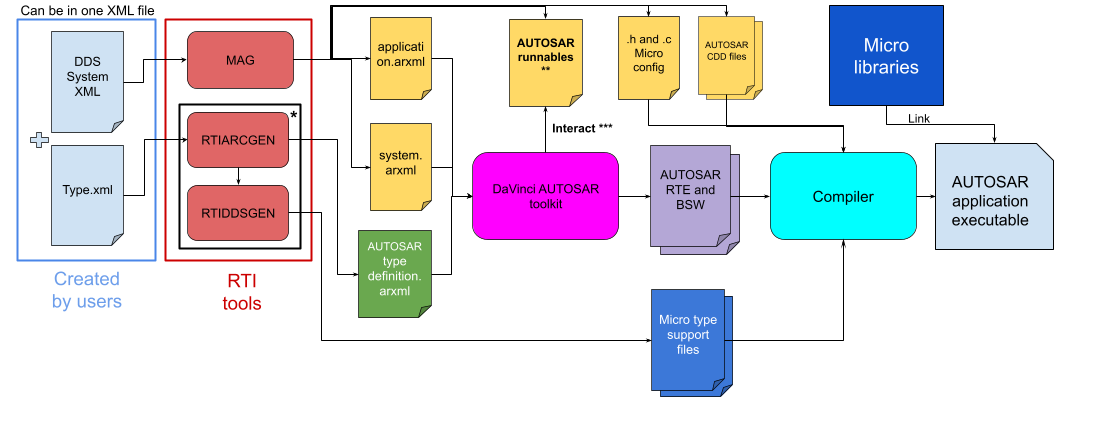
Figure 3.9 Workflow for converting XML files into AUTOSAR application code
* rtiarcgen can be configured to call rtiddsgen by adding
-ddsTypeSupport to the command. We recommend using this
option to generate DDS type support files for AUTOSAR workflows.
** MAG creates and populates some runnables with basic functionalities. Note that DaVinci toolkits may add new, empty runnables or rename existing ones.
*** For more details about the interaction between DaVinci toolkits and the generated runnables, refer to AUTOSAR runnables.
We’ll go through these steps in more detail in the following subsections.
3.17.5.1. Define your system in DDS system XML
The DDS System XML format allows you to define the complete topology of your
distributed system, including topics, participants, nodes, and deployment
configurations. The following example demonstrates a one-node deployment of the
hello_world application in an AUTOSAR environment. The application is
organized as follows:
Deployment Library
└── Deployment Scenario
    └── Deployment
        └── Applications
            └── Application
                └── Domain Participant
                    └── Publisher
                       └── DataWriter HelloWorldTopic
                    └── Subscriber
                       └── DataReader HelloWorldTopic
This XML structure organizes the system into five key libraries:
Domain Library: Defines DDS topics and associated data types used for communication.
Participant Library: Groups domain participants (publishers and subscribers) with their QoS policy configuration.
Application Library: Wraps DomainParticipants into logical deployable applications.
Node Library: Represents target deployment nodes (e.g., ECUs, processors, and devices).
Deployment Library: Maps applications to nodes and specifies deployment-specific configuration such as memory heaps and AUTOSAR resource ranges.
The XML schema is located at resource/schema/dds-xml_system_definitions.xsd.
Use this in your XML files with:
xsi:noNamespaceSchemaLocation="resource/schema/dds-xml_system_definitions.xsd"
The following example code demonstrates a complete DDS System XML configuration with deployment sections, based on the DDS System use case:
<dds xmlns:xsi="http://www.w3.org/2001/XMLSchema-instance"
    xsi:noNamespaceSchemaLocation="resource/schema/dds-xml_system_definitions.xsd">
    <types>
        <struct name= "HelloWorld">
            <member name="initialFirstName" type="char8"/>
            <member name="initialLastName" type="char8"/>
        </struct>
    </types>

    <qos_library name="QosLibrary">
        <qos_profile name="DefaultProfile" is_default_participant_factory_profile="true">
            <!-- Participant Factory Qos -->
            <participant_factory_qos>
                <entity_factory>
                    <autoenable_created_entities>false</autoenable_created_entities>
                </entity_factory>
            </participant_factory_qos>
            <!-- Participant Qos -->
            <participant_qos>
                <discovery>
                    <accept_unknown_peers>false</accept_unknown_peers>
                    <initial_peers>
                        <element>127.0.0.1</element>
                    </initial_peers>
                    <enabled_transports>
                        <element>udpv4</element>
                    </enabled_transports>
                </discovery>
                <default_unicast>
                    <value>
                        <element>
                            <transports>
                                <element>udpv4</element>
                            </transports>
                        </element>
                    </value>
                </default_unicast>
                <resource_limits>
                    <local_writer_allocation>
                        <max_count>1</max_count>
                    </local_writer_allocation>
                    <local_reader_allocation>
                        <max_count>1</max_count>
                    </local_reader_allocation>
                    <local_publisher_allocation>
                        <max_count>1</max_count>
                    </local_publisher_allocation>
                    <local_subscriber_allocation>
                        <max_count>1</max_count>
                    </local_subscriber_allocation>
                    <local_topic_allocation>
                        <max_count>1</max_count>
                    </local_topic_allocation>
                    <local_type_allocation>
                        <max_count>1</max_count>
                    </local_type_allocation>
                    <remote_participant_allocation>
                        <max_count>8</max_count>
                    </remote_participant_allocation>
                    <remote_writer_allocation>
                        <max_count>8</max_count>
                    </remote_writer_allocation>
                    <remote_reader_allocation>
                        <max_count>8</max_count>
                    </remote_reader_allocation>
                    <max_receive_ports>32</max_receive_ports>
                    <max_destination_ports>32</max_destination_ports>
                </resource_limits>
                <transport_builtin>
                    <mask>UDPv4</mask>
                    <udpv4>
                        <disable_auto_interface_config>true</disable_auto_interface_config>
                    </udpv4>
                </transport_builtin>
                <discovery_config>
                    <builtin_discovery_plugins>SDP</builtin_discovery_plugins>
                    <initial_participant_announcements>5</initial_participant_announcements>
                    <max_initial_participant_announcement_period>
                        <sec>1</sec>
                        <nanosec>0</nanosec>
                    </max_initial_participant_announcement_period>
                    <participant_liveliness_assert_period>
                        <sec>10</sec>
                        <nanosec>0</nanosec>
                    </participant_liveliness_assert_period>
                    <participant_liveliness_lease_duration>
                        <sec>30</sec>
                        <nanosec>0</nanosec>
                    </participant_liveliness_lease_duration>
                </discovery_config>

            </participant_qos>
            <!-- DataWriter Qos -->
            <datawriter_qos>
                <history>
                    <depth>32</depth>
                </history>
                <resource_limits>
                    <max_instances>2</max_instances>
                    <max_samples>64</max_samples>
                    <max_samples_per_instance>32</max_samples_per_instance>
                </resource_limits>
                <reliability>
                    <kind>RELIABLE_RELIABILITY_QOS</kind>
                </reliability>
                <protocol>
                    <rtps_reliable_writer>
                        <heartbeat_period>
                            <nanosec>250000000</nanosec>
                            <sec>0</sec>
                        </heartbeat_period>
                    </rtps_reliable_writer>
                </protocol>
            </datawriter_qos>
            <!-- DataReader Qos -->
            <datareader_qos>
                <history>
                    <depth>32</depth>
                </history>
                <resource_limits>
                    <max_instances>2</max_instances>
                    <max_samples>64</max_samples>
                    <max_samples_per_instance>32</max_samples_per_instance>
                </resource_limits>
                <reliability>
                    <kind>RELIABLE_RELIABILITY_QOS</kind>
                </reliability>
                <reader_resource_limits>
                    <max_remote_writers>10</max_remote_writers>
                    <max_remote_writers_per_instance>10</max_remote_writers_per_instance>
                </reader_resource_limits>
            </datareader_qos>
        </qos_profile>
        <qos_profile name="CddProfile" base_name="DefaultProfile">
            <participant_qos>
                <transport_builtin>
                    <!-- Set correct interface name(s)-->
                    <udpv4>
                        <ignore_loopback_interface>1</ignore_loopback_interface>
                        <interface_table>
                            <element>
                                <interface_name>ethernet</interface_name>
                                <address>10.10.65.152</address>
                                <net_mask>255.255.0.0</net_mask>
                                <flags>
                                    UDP_INTERFACE_INTERFACE_UP_FLAG</flags>
                            </element>
                        </interface_table>
                        <allow_interfaces_list>
                            <element>ethernet</element>
                        </allow_interfaces_list>
                    </udpv4>
                </transport_builtin>
            </participant_qos>
        </qos_profile>
    </qos_library>

    <!-- Domain Library -->
    <domain_library name="DomainLibrary">
        <domain name="myDomain" domain_id="0">
            <register_type name="HelloWorld" type_ref="HelloWorld" />

            <topic name="HelloWorldTopic" register_type_ref="HelloWorld" />
        </domain>
    </domain_library>

    <!-- Participant Library -->
    <domain_participant_library name="AppLibrary">
        <domain_participant name="MCU_DDS_CDD"
            domain_ref="DomainLibrary::myDomain">
            <publisher name="MCU_DDS_CDD_Pub">
                <data_writer topic_ref="HelloWorldTopic" name="MCU_DDS_CDD_HelloWorld_DW">
                    <datawriter_qos base_name="QosLibrary::CddProfile" />
                </data_writer>
            </publisher>
            <subscriber name="MCU_DDS_CDD_Sub">
                <data_reader topic_ref="HelloWorldTopic" name="MCU_DDS_CDD_HelloWorld_DR">
                    <datareader_qos base_name="QosLibrary::CddProfile" />
                </data_reader>
            </subscriber>
            <participant_qos base_name="QosLibrary::CddProfile" />
        </domain_participant>
    </domain_participant_library>

    <!-- Added manually to utilize deployment features -->
    <application_library name="MyApplicationLib">
        <application name="MyApplication" isCert="false" >
            <domain_participant name="MCU_DDS_CDD" base_name="AppLibrary::MCU_DDS_CDD" />
        </application>
    </application_library>

    <node_library name="MyNodeLib">
        <node name="MyNode1"/>
        <node name="MyNode2"/>
    </node_library>

    <deployment_library name="MyDeploymentLib">
        <deployment_scenario name="MyDeploymentScenario">
            <deployment name="MyDeployment1">
                <node node_ref="MyNodeLib::MyNode1" />
                <applications>
                    <application name="AutosarApp" application_ref="MyApplicationLib::MyApplication" />
                </applications>
                <configuration>
                    <autosar>
                        <heap>
                            <element>
                                <size>240</size>
                                <start_address>0x60000100</start_address>
                                <name>Heap_area_1</name>
                            </element>
                            <element>
                                <size>96</size>
                                <start_address>0x50000100</start_address>
                                <name>Heap_area_2</name>
                            </element>
                            <element>
                                <size>96</size>
                                <start_address>0x40000100</start_address>
                                <name>Heap_area_3</name>
                            </element>
                            <element>
                                <size>96</size>
                                <start_address>0x30000100</start_address>
                                <name>Heap_area_4</name>
                            </element>
                            <element>
                                <size>96</size>
                                <start_address>0x10000100</start_address>
                                <name>Heap_area_5</name>
                            </element>
                        </heap>
                        <mutex_resource_id>MutexResource1</mutex_resource_id>
                        <max_local_addr_id>2</max_local_addr_id>
                        <send_local_addr_id>2</send_local_addr_id>
                    </autosar>
                </configuration>
            </deployment>
        </deployment_scenario>
    </deployment_library>
</dds>
3.17.5.2. Run MAG with deployment and application type selectors
After creating your DDS System XML file, use rtiddsmag to generate
deployment-aware code for a specific deployment target. The -deployment
option selects the deployment from your XML, and the
-applicationType AUTOSAR_CDD option generates AUTOSAR CDD configuration and
adapter artifacts.
Both options are required when using the deployment-aware workflow.
rtiddsmag will generate the following:
Layer-specific implementations (DDS layer, adapter layer, AUTOSAR configuration).
Deployment-specific code organization matching the selected deployment.
Multi-deployment artifacts if you run
rtiddsmagmultiple times with different-deploymentvalues.
Run the following command with your XML and deployment name:
$RTIMEHOME/bin/rtiddsmag -inputXml hello_world.xml -deployment MyDeployment1 -applicationType AUTOSAR_CDD -language C -replace
$RTIMEHOME/bin/rtiddsmag -inputXml hello_world.xml -deployment MyDeployment1 -applicationType AUTOSAR_CDD -language C -replace
%RTIMEHOME%\bin\rtiddsmag.bat -inputXml hello_world.xml -deployment MyDeployment1 -applicationType AUTOSAR_CDD -language C -replace
When you run this command, rtiddsmag generates code with the following
directory structure:
MyDeploymentLib/
└── MyDeploymentScenario/
    └── MyDeployment1/
        └── AutosarApp/
            └── MCU_DDS_CDD/
                └── adaptation /
                    ├── dds_cdd_adapter.h
                    └── dds_cdd_adapter.c
                └── autosar_gen /
                    └── Autosar runnables DdsCdd.c
                └── autosar_model /
                    └── DdsCddType.arxml
                └── dds_impl /
                    ├── dds_impl.h
                    ├── dds_impl.c
                    ├── *Appgen.h
                    └── *Appgen.c
            └── MCU_DDS_CDD_EXAMPLE_ASWC /
                └── autosar_model /
                    └── application.arxml
The generated code is organized hierarchically by deployment scenario and
deployment name. This structure enables maintaining separate code artifacts for
different ECUs without file name conflicts. The generated files will be
located in
<deployment_library_name>/<scenario_name>/<deployment_name>/<application_name>.
We’ll refer to this directory as <MAG_output_folder> in the documentation
going forward.
Note
Refer to DDS CDD configuration for instructions on how to configure the DDS CDD for use on MicroSAR platforms.
3.17.5.3. Generate AUTOSAR type ARXML with rtiarcgen
After running rtiddsmag for AUTOSAR integration, you must generate AUTOSAR
type definitions from your DDS XML types using rtiarcgen. More information
on rtiarcgen can be found in the
AUTOSAR Runtime CDD Code Generator User’s Manual.
This section will only cover the commands and configuration necessary for this
workflow.
First, we recommend running the following commands as a pre-check:
rtiarcgen -help
rtiarcgen -selfTest
The -selfTest command validates template access and checks optional
integration with rtiddsgen. Resolve any template path issues before
proceeding.
Create the dds_gen directory at <MAG_output_folder>/<Domain_Participant_name>/
Next, use the following commands to generate AUTOSAR type ARXML from your DDS XML:
cd <MAG_output_folder>/<Domain_Participant_name>/dds_gen
export RTIDDSGEN_PATH=<Micro Installation Path>/rtiddsgen/scripts/rtiddsgen
export RTIDDSGEN_PARAMS="-create typefiles -micro -language C”

rtiarcgen -arxmlTypes "$SYSTEM_XML" -arxmlPath . -singleFile -target "$TARGET" -ddsTypeSupport -conversions
cd <MAG_output_folder>/<Domain_Participant_name>/dds_gen
export RTIDDSGEN_PATH=<Micro Installation Path>/rtiddsgen/scripts/rtiddsgen
export RTIDDSGEN_PARAMS="-create typefiles -micro -language C”

rtiarcgen -arxmlTypes "$SYSTEM_XML" -arxmlPath . -singleFile -target "$TARGET" -ddsTypeSupport -conversions
cd <MAG_output_folder>/<Domain_Participant_name>/dds_gen
set RTIDDSGEN_PATH=<Micro Installation Path>\rtiddsgen\scripts\rtiddsgen.bat
set RTIDDSGEN_PARAMS="-create typefiles -micro -language C"

rtiarcgen.bat -arxmlTypes "%SYSTEM_XML%" -arxmlPath . -singleFile -target "%TARGET%" -ddsTypeSupport -conversions
If needed, you can convert the type IDL to XML with the following command:
rtiddsgen -convertToXml ../$TYPE_IDL
rtiddsgen -convertToXml ../$TYPE_IDL
rtiddsgen.bat -convertToXml ../$TYPE_IDL
Expected output:
One AUTOSAR type file (typically
<input_basename>_types.arxml) in<MAG_output_folder>/<Domain_Participant_name>/dds_genDDS type support files:
<input_basename>_types.hand<input_basename>_types.c<input_basename>_typesPlugin.hand<input_basename>_typesPlugin.c<input_basename>_typesSupport.hand<input_basename>_typesSupport.c
DDS AUTOSAR type conversion files (
<input_basename>_conversions.hand<input_basename>_conversions.c)
Note
When using rtiarcgen, input mode is inferred from the first file
extension. For this step, provide DDS XML (.xml) input files only,
not mixed ARXML+XML inputs.
3.17.5.4. Import both ARXML outputs into AUTOSAR toolchain
After running rtiarcgen and rtiddsmag, import both ARXML outputs into
your AUTOSAR authoring environment. For Vector DaVinci, use this order:
Import type definitions first: import the ARXML generated by
rtiarcgen(for example,dds_gen/<input_basename>_types.arxml).Import deployment/configuration second: import MAG ARXML output from
<MAG_output_folder>/<participant>/autosar_model/DdsCddType.arxml.Import application configuration: import MAG second ARXML output from
<MAG_output_folder>/<participant>__EXAMPLE_ASWC/autosar_model/application.arxml.
Importing in this order ensures that type references used by the MAG-generated AUTOSAR configuration are already present in the DaVinci project.
We recommend the following Vector DaVinci workflow:
Open your target ECU DaVinci project (DaVinci Developer/Configurator).
Import the
rtiarcgentype ARXML into the project data type package.Run model validation and resolve any namespace/package merge prompts.
Import the MAG-generated AUTOSAR configuration ARXML.
Re-run validation and confirm that all type references resolve.
Regenerate RTE/BSW artifacts according to your ECU build flow.
If your system contains multiple deployments, repeat rtiddsmag generation
per deployment and import each deployment-specific rtiddsmag ARXML after
the shared type ARXML has already been imported.
The generated code is organized in deployment-specific directories that isolate each deployment’s artifacts. This structure supports multi-deployment scenarios where a single system XML may generate code for multiple target deployments (e.g., separate code for publisher and subscriber ECUs).
For each deployment, rtiddsmag generates three layers:
DDS Layer
dds_impl/: Contains the MAG-generated C code for DDS configuration (DomainParticipant initialization, QoS settings, heaps, memory management.dds_gen/: Core DDS type support code; serialization and deserialization plugins, type definitions, transport support, and type conversion between DDS and AUTOSAR. This folder also contains the AUTOSAR type definition ARXML file. These files are portable across AUTOSAR environments and implement the DDS wire protocol.
Adapter Layer
adaptation/: Bridges the DDS layer and AUTOSAR application code. Adapters provide AUTOSAR-specific interfaces to DDS participants, publishers, and subscribers. This layer isolates your application from DDS implementation details.
AUTOSAR Configuration and Runnables
autosar_model/: Contains AUTOSAR System Description ARXML. This file is intended for an AUTOSAR toolchain integration. It defines the AUTOSAR application structure, including components, ports, and interfaces, based on your DDS System XML configuration.
autosar_gen/: Generated AUTOSAR code with a few runnables already implemented. This file is intended to interface with the DaVinci Configurator. When the DaVinci Configurator is configured to output runnables at this directory, the DaVinci Configurator might add new empty runnables or change the names of the existing ones, but preserve the existing implementation. The empty runnables still need to be implemented manually. This file is intended to help reduce manual implementation effort required to integrate DDS into your AUTOSAR application.
To integrate into your AUTOSAR application:
Include the generated DDS header files in your adapter layer.
Call the adapter APIs to initialize DDS participants and allocate publishers and subscribers.
Link the DDS and adapter object files into your application binary.
Configure AUTOSAR memory and timing constraints using the generated configuration files.
Note
Any required manual modifications to the file are marked with TODO
comments.
3.17.5.5. Examples of generated code
When you run MAG with the DDS System XML configuration and deployment options, the tool generates a complete example of a deployable application structure. The generated code is organized by deployment, allowing you to maintain separate code artifacts for different ECUs and deployment scenarios.
This section shows the structure and content of the output artifacts generated for the example mentioned above, including representative samples from header files, source files, and generated configuration.
3.17.5.5.1. Deployment-specific header file and source file
Generated header files contain deployment-targeted macros and configuration that reflect the selected deployment’s topology, participants, and QoS settings.
Generated source files populate initialization arrays for discovery transport
configuration, peer discovery lists, and QoS profiles derived from your XML
definition. This code is generated specifically for the selected deployment.
These files have the same structure as when MAG is running in non-deployment
mode. Please refer to Appgen.h and Appgen.c for more detail.
3.17.5.5.2. Directory structure
When you run MAG with the -deployment and -applicationType AUTOSAR_CDD
options, the generated code is organized hierarchically by deployment scenario
and deployment name. This structure enables maintaining separate code artifacts
for different ECUs without file name conflicts:
MyDeploymentLib/
└── MyDeploymentScenario/
    └── MyDeployment1/
        └── AutosarApp/
            └── MCU_DDS_CDD/
                └── adaptation /
                    ├── dds_cdd_adapter.h
                    └── dds_cdd_adapter.c
                └── autosar_gen /
                    └── Autosar runnables DdsCdd.c
                └── autosar_model /
                    └── DdsCddType.arxml
                └── dds_gen (``rtiarcgen``) /
                    ├── *conversions.h
                    ├── *conversions.c
                    ├── *types.arxml
                    ├── *types.h
                    ├── *types.c
                    ├── *typesPlugin.h
                    ├── *typesPlugin.c
                    ├── *typesSupport.h
                    └── *typesSupport.c
                └── dds_impl /
                    ├── dds_impl.h
                    ├── dds_impl.c
                    ├── *Appgen.h
                    └── *Appgen.c
            └── MCU_DDS_CDD_EXAMPLE_ASWC /
                └── autosar_model /
                    └── application.arxml
The key points of this structure are:
Deployment Isolation: Each deployment generates independent code in its own directory subtree, preventing file name collisions in multi-deployment builds.
DDS Layer: The
dds_gen/directory contains portable DDS type support code (serialization plugins, data types, and RTE/DDS type conversions) generated byrtiarcgenthat can be shared if multiple deployments use the same topics. Thedds_impldirectory contains DDS related implementations such as read and write functions along with DDS entities creation.Adapter Layer: The
adaptation/directory contains deployment-specific bridge code connecting DDS implementation to your AUTOSAR application code.AUTOSAR Configuration: The
autosar_gencontain generated C header/source files for runnables implementation, andautosar_model/contains AUTOSAR XML (ARXML) configuration files for toolchain integration.
Note
The generated ARXML files, such as DdsCddType.arxml,
application.arxml, and *_types.arxml are validated against the
AUTOSAR schema R4.0.3. However, you may need to customize these files to fit
specific requirements. Refer to Custom AUTOSAR Templates for
more details.
3.17.5.5.3. DDS layer
The most notable file from this layer is the dds_impl.c that provides
functions to create and enable DDS entities.
int DdsImpl_CreateEntities()
{
    DDS_DomainParticipantFactory *factory = NULL;

    RT_Registry_T *registry = NULL;
    struct APPGEN_FactoryProperty model_xml = APPGEN_FactoryProperty_INITIALIZER;
    char *participant_name = NULL;

#if (OSAPI_ENABLE_LOG == 1 && OSAPI_ENABLE_TRACE == 1)
    /* Configure RTI DDS Micro logging */
    struct OSAPI_LogProperty property;
    OSAPI_Log_get_property(&property);
    property.write_buffer = my_log_write_function;
    OSAPI_Log_set_verbosity(OSAPI_LOG_VERBOSITY_ERROR);
    if (!OSAPI_Log_set_property(&property)) {
        printf("Failed to set log property\n");
    }
#endif

    OSAPI_Heap_allocate_buffer(
            (char **)&application,
            sizeof(struct Application),
            OSAPI_ALIGNMENT_DEFAULT);
    if (application == NULL)
    {
        printf("failed to allocate application\n");
        return -1;
    }

    /* Retrieve Domain Participant Factory and registry */
    factory = DDS_DomainParticipantFactory_get_instance();
    registry = DDS_DomainParticipantFactory_get_registry(factory);

    /* Register Appgen */
    model_xml._model = APPGEN_get_library_seq();
    if (!APPGEN_Factory_register(registry, &model_xml))
    {
        printf("DdsImpl_CreateEntities: failed to register Application Generation\n");
        return -1;
    }

    /* Create participant from XML profile */
    participant_name = "AppLibrary::MCU_DDS_CDD";
    application->MCU_DDS_CDD =
    DDS_DomainParticipantFactory_create_participant_from_config(
            factory,
            participant_name);

    if (application->MCU_DDS_CDD == NULL)
    {
        printf("DdsImpl_CreateEntities: failed to create participant %s\n",
        participant_name);
        return -1;
    }

    return 0;
}

int DdsImpl_EnableEntities(void)
{
    DDS_ReturnCode_t retcode;
    if (application == NULL) {
        printf("DdsImpl_EnableEntities: application is NULL\n");
        return -1;
    }
    retcode = DDS_Entity_enable(DDS_DomainParticipant_as_entity(application->MCU_DDS_CDD));
    if (retcode != DDS_RETCODE_OK) {
        printf("DdsImpl_EnableEntities: Failed to enable participant "
        "AppLibrary::MCU_DDS_CDD\n");
        return -1;
    }

    return 0;
}
APPGEN_get_library_seq is defined in hello_worldAppgen.c to get DDS
models that represent the DDS system specified in the system definition XML.
APPGEN_Factory_register creates DDS entities required by the system
definition XML with specified QoS.
dds_impl.c also provides DDS write and read functions:
int DdsImpl_HelloWorldTopic_WriteSample(const dds_HelloWorld* dds_sample)
{
    DDS_ReturnCode_t retcode;
    DDS_DataWriter *datawriter_untyped = NULL;
    static dds_HelloWorldDataWriter *datawriter = NULL;
    const char *datawriter_name = "MCU_DDS_CDD_Pub::MCU_DDS_CDD_HelloWorld_DW";

    if (dds_sample == NULL)
    {
        return -1;
    }

    datawriter_untyped = DDS_DomainParticipant_lookup_datawriter_by_name(
            application->MCU_DDS_CDD,
            datawriter_name);
    if (datawriter_untyped == NULL)
    {
        printf("DdsImpl_HelloWorldTopic_WriteSample: datawriter_untyped == NULL\n");
        return -1;
    }
    datawriter = dds_HelloWorldDataWriter_narrow(datawriter_untyped);
    if (datawriter == NULL)
    {
        printf("DdsImpl_HelloWorldTopic_WriteSample: datawriter == NULL\n");
        return -1;
    }

    /* Write sample to DDS DataWriter */
    retcode = dds_HelloWorldDataWriter_write(
            datawriter,
            dds_sample,
            &DDS_HANDLE_NIL);

    if (retcode != DDS_RETCODE_OK)
    {
        printf("DdsImpl_HelloWorldTopic_WriteSample: Failed to write sample, retcode(%d)\n", retcode);
        return -1;
    }

    return 0;
}

int DdsImpl_HelloWorldTopic_TakeNextSample(dds_HelloWorld* dds_sample, int* is_valid)
{
    DDS_ReturnCode_t retcode;
    struct DDS_SampleInfo sample_info = DDS_SampleInfo_INITIALIZER;
    DDS_DataReader *datareader_untyped = NULL;
    static dds_HelloWorldDataReader *datareader = NULL;
    const char *datareader_name = "MCU_DDS_CDD_Sub::MCU_DDS_CDD_HelloWorld_DR";

    if (dds_sample == NULL || is_valid == NULL)
    {
        return -1;
    }

    datareader_untyped = DDS_DomainParticipant_lookup_datareader_by_name(
            application->MCU_DDS_CDD,
            datareader_name);
    if (datareader_untyped == NULL)
    {
        printf("DdsImpl_HelloWorldTopic_TakeNextSample: datareader_untyped == NULL\n");
        return -1;
    }

    datareader = dds_HelloWorldDataReader_narrow(datareader_untyped);
    if (datareader == NULL)
    {
        printf("DdsImpl_HelloWorldTopic_TakeNextSample: datareader == NULL\n");
        return -1;
    }

    *is_valid = 0;

    /* Take next sample from DataReader */
    retcode = dds_HelloWorldDataReader_take_next_sample(
            datareader,
            dds_sample,
            &sample_info);

    if (retcode == DDS_RETCODE_NO_DATA)
    {
        /* No data available - not an error */
        return 0;
    }

    if (retcode != DDS_RETCODE_OK)
    {
        printf("DdsImpl_HelloWorldTopic_TakeNextSample: Failed to take sample, retcode(%d)\n", retcode);
        return -1;
    }

    /* Check if the sample contains valid data */
    if (sample_info.valid_data)
    {
        *is_valid = 1;
    }

    return 0;
}
3.17.5.5.4. Adapter layer
Deployment-specific bridge code connecting DDS implementation to your AUTOSAR application code. The most notable thing about this layer is that it calls DDS functions from the DDS layer and sets the AUTOSAR system properties. These properties must be specified in the system definition XML:
<deployment_library name="MyDeploymentLib">
    <deployment_scenario name="MyDeploymentScenario">
        <deployment name="MyDeployment1">
            …
            <configuration>
                <autosar>
                    <heap>
                        <element>
                            <size>240</size>
                            <start_address>0x60000100</start_address>
                            <name>Heap_area_1</name>
                        </element>
                        <element>
                            <size>96</size>
                            <start_address>0x50000100</start_address>
                            <name>Heap_area_2</name>
                        </element>
                        <element>
                            <size>96</size>
                            <start_address>0x40000100</start_address>
                            <name>Heap_area_3</name>
                        </element>
                        <element>
                            <size>96</size>
                            <start_address>0x30000100</start_address>
                            <name>Heap_area_4</name>
                        </element>
                        <element>
                            <size>96</size>
                            <start_address>0x10000100</start_address>
                            <name>Heap_area_5</name>
                        </element>
                    </heap>
                    <mutex_resource_id>MutexResource1</mutex_resource_id>
                    <max_local_addr_id>2</max_local_addr_id>
                    <send_local_addr_id>2</send_local_addr_id>
                </autosar>
            </configuration>
        </deployment>
    </deployment_scenario>
</deployment_library>
The generated output from the above XML is as follows:
#define DDSCDD_NUMBER_OF_HEAP_AREAS    5


#define DDSCDD_HEAP_AREA_1_SIZE (240 * 1024) - 0x200
#define DDSCDD_HEAP_AREA_2_SIZE (96 * 1024) - 0x200
#define DDSCDD_HEAP_AREA_3_SIZE (96 * 1024) - 0x200
#define DDSCDD_HEAP_AREA_4_SIZE (96 * 1024) - 0x200
#define DDSCDD_HEAP_AREA_5_SIZE (96 * 1024) - 0x200

    static const uint32 heap_area_size[DDSCDD_NUMBER_OF_HEAP_AREAS] =
{
            DDSCDD_HEAP_AREA_1_SIZE,
            DDSCDD_HEAP_AREA_2_SIZE,
            DDSCDD_HEAP_AREA_3_SIZE,
            DDSCDD_HEAP_AREA_4_SIZE,
            DDSCDD_HEAP_AREA_5_SIZE
};

static char heap_area1[DDSCDD_HEAP_AREA_1_SIZE] __at(0x60000100);
static char heap_area2[DDSCDD_HEAP_AREA_2_SIZE] __at(0x50000100);
static char heap_area3[DDSCDD_HEAP_AREA_3_SIZE] __at(0x40000100);
static char heap_area4[DDSCDD_HEAP_AREA_4_SIZE] __at(0x30000100);
static char heap_area5[DDSCDD_HEAP_AREA_5_SIZE] __at(0x10000100);

static char* const heap_area[DDSCDD_NUMBER_OF_HEAP_AREAS] =
{
        heap_area1,
        heap_area2,
        heap_area3,
        heap_area4,
        heap_area5
};

static int SetSystemProperties(void)
{
    struct OSAPI_SystemAutosar system_property;

    if (!OSPSL_AutosarSystem_get_property(&system_property))
    {
        printf("failed to get system properties\n");
        return -1;
    }

    /* Task OSAPI_SystemAutosar_timer_task is configured to run every 10 ms */
    system_property.psl_property.timer_resolution_ms = 10;

    /* Configure static memory heap areas */
    system_property.psl_property.number_of_heap_areas = DDSCDD_NUMBER_OF_HEAP_AREAS;
    system_property.psl_property.heap_area_size = heap_area_size;
    system_property.psl_property.heap_area = (const char **)heap_area;
    system_property.psl_property.enable_thread_safe_heap =
    RTI_FALSE; /* TODO: Default is not thread safe, change to true if using multithread */

    /* Connext DDS Micro will use Resources as synchronization method */
    system_property.psl_property.sync_type = OSAPI_AUTOSAR_SYNCKIND_RESOURCES;
    system_property.psl_property.mutex_resource_id = MutexResource1;

    /* AUTOSAR synchronization configuration - Resources only */
    system_property.psl_property.semaphore_max_count = 0;
    system_property.psl_property.first_give_event = 0;
    system_property.psl_property.first_timeout_event = 0;
    system_property.psl_property.first_alarm = 0;

    /* Enable AUTOSAR TcpIp Socket Owner integration */
    system_property.psl_property.use_socket_owner = TRUE;

    /* Configure socket limits based on multicast support */
#if defined(NETIO_CONFIG_ENABLE_MULTICAST) && (NETIO_CONFIG_ENABLE_MULTICAST)
    system_property.psl_property.max_receive_sockets = 4;  /* With multicast */
#else
    system_property.psl_property.max_receive_sockets = 2;  /* Unicast only */
#endif

    /* Disable internal UDP buffers - use AUTOSAR TcpIp stack buffers */
    system_property.psl_property.number_of_rcv_buffers = 0;
    system_property.psl_property.rcv_buffer_size = 0;

    /* Set AUTOSAR TcpIp integration callbacks */
    system_property.psl_property.get_socket = DdsCdd_GetSocket;
    system_property.psl_property.send_data = NULL;
    system_property.psl_property.max_local_addr_id = 2;

    system_property.psl_property.send_local_addr_id = 2;

    /* Configure UDP thread handling - use synchronous mode for AUTOSAR */
    system_property.psl_property.use_udp_thread = FALSE;
    system_property.psl_property.dds_rxindication =
    DdsCddRxIndication; /* TODO: Default name for dds rx indication, change if using custom callback */

    if (!OSPSL_AutosarSystem_set_property(&system_property))
    {
        printf("failed to set system properties\n");
        return -1;
    }

    return 0;
}

/* TcpIp_[SocketOwnerName]GetSocket - TODO: update if using different SocketOwner name */
#define DDSCDD_SOCKET_OWNER_GET_SOCKET   TcpIp_DdsCddGetSocket
For more information on how to populate these properties, refer to OSAPI_PortProperty reference.
Note
Properties with TODO comments require close attention from the
integrator to check and make sure they have the correct values based on the
peripheral AUTOSAR environment.
3.17.5.6. Custom AUTOSAR Templates
MAG supports custom AUTOSAR templates to allow users to customize the generated
files’ contents. To use custom templates, create a directory with the same
structure as the default templates in
RTIMEHOME/rtiddsmag/resource/templates/autosar:
autosar
├── application
│   └── autosar_model
│       ├── application.arxml.vm
│       └── application_macro.arxml.vm
├── arxml.xml.vm
└── CDD
    ├── adaptation
    │   ├── dds_cdd_adapter.c.vm
    │   ├── dds_cdd_adapter.h.vm
    │   ├── dds_cdd_adapter_macro.c.vm
    │   └── dds_cdd_adapter_macro.h.vm
    ├── autosar_gen
    │   ├── DdsCdd.c.vm
    │   └── DdsCdd_macros.c.vm
    └── dds_impl
        ├── dds_impl.c.vm
        ├── dds_impl.h.vm
        ├── dds_impl_macro.c.vm
        └── dds_impl_macro.h.vm
Then, run rtiddsmag with the -autosarTemplatePath <Path> option to point
to your custom template directory.
The <Path> can be an absolute path or a path relative to the current working
directory that is pointing to the directory containing application, arxml.xml.vm,
and/or CDD folders.
If the custom template directory is missing any of the required template files, MAG will fall back to the default template for those files.
Note
Overriding the default template should be done with caution. Please contact RTI support for more information.
For example, you have the following custom template directory:
my_autosar_templates
└── application
    └── autosar_model
        └── application.arxml.vm
rtiddsmag -inputXml hello_world.xml -deployment MyDeployment1 -applicationType AUTOSAR_CDD -language C -replace -autosarTemplatePath ./my_autosar_templates
While my_autosar_templates contains only the
application/autosar_model/application.arxml.vm template, MAG will use the
custom template for generating application.arxml and use the default
templates for all other generated files.
This allows you to customize only the files you need, while still benefiting from the default generation for the rest of the files and keeping the modifications separate from the default templates.
3.17.5.7. Limitations and considerations
Take note of the following known limitations and design considerations when generating AUTOSAR code with MAG:
Deployment Isolation: Each deployment generates independent code. If multiple deployments use the same topics and types, you may observe code duplication in the generated DDS layer (serialization/deserialization plugins). This is intentional and allows each deployment to be compiled and deployed autonomously.
AUTOSAR Resource Configuration: The
<autosar>configuration block in deployment sections supports memory heap definitions and resource range specification for AUTOSAR integration. However, advanced AUTOSAR configuration (timing, scheduling, runnable mapping) must be completed manually in your AUTOSAR toolchain after code generation.XML Schema Validation: The DDS System XML schema is located at
resource/schema/dds-xml_system_definitions.xsd. Ensure your XML editor or IDE is configured to validate against this schema for development and testing. Validation errors during schema checking do not prevent MAG execution but may indicate configuration issues that impact deployment-aware code generation.XML Discrepancies with |core_pro|: There are discrepancies between what the Connext Professional XSD supports and what Connext Micro supports. In the Connext Professional XSD,
transportBuiltinQosPolicy:udpv4allows socket buffer size fields to be specified as strings. If one of the Pro socket buffer size enum constants is provided instead of a numeric value, MAG cannot verify thatmax_message_sizeis consistent and will emit a warning.Custom AUTOSAR Templates: When using the
-autosarTemplatePath <Path>parameter, custom templates must have the same directory structure and names as the default templatesRTIMEHOME/rtiddsmag/resource/templates/autosar, only the content of the template files can be different. Although MAG will fall back to the default template if the custom template is missing.
3.17.6. Generating native DDS applications with deployment-aware code generation
Attention
This is an experimental feature in Connext Micro 4.3.0. It is not guaranteed to be consistent or supported and should not be used in production. C++ is not yet supported for this workflow.
Refer to Experimental Features for more information.
This section describes how to use deployment-aware code generation to create native DDS applications for embedded or standalone systems. Unlike AUTOSAR applications, native applications have direct control over the DDS middleware and can be deployed to various platforms without the AUTOSAR framework. The process involves:
Defining a complete system in DDS system XML format.
Running
rtiddsmagwith-deploymentand-applicationType micro4selectors to generate deployment-specific code.Attention
To generate native application code,
-deploymentand-applicationTypemust be specified together. The-applicationType micro4option generates code optimized for Connext Micro runtime deployment.Generating type support files with
rtiddsgen.Setting up the runtime environment variables (
RTIMEHOMEandRTIME_TARGET_NAME) to point to your Connext Micro installation.Building the application using CMake, which automatically resolves Connext Micro dependencies and generates the native executable.
We’ll go over each of these steps in more detail below.
3.17.6.1. Define your system in DDS system XML
The DDS System XML format allows you to define the complete topology of your distributed system, including Topics, DomainParticipants, nodes, and deployment configurations. For native applications, follow the same XML structure as AUTOSAR applications (see Define your system in DDS system XML for detailed information on XML schema and structure).
The key difference for native applications is that the deployment configuration should target a native platform, rather than an AUTOSAR ECU. For native applications, the configuration tag is not required and does not apply.
Note
Each deployment configuration generates code for a single application. The schema supports multiple applications per deployment, but MAG’s current implementation generates code for only one application. Undefined behavior may occur if multiple applications are defined under the same deployment.
The following example demonstrates a snippet of a DDS System XML file with a deployment configuration for a native application:
<dds xmlns:xsi="http://www.w3.org/2001/XMLSchema-instance"
    xsi:noNamespaceSchemaLocation="resource/schema/dds-xml_system_definitions.xsd">

    ...

    <!-- Deployment configuration -->
    <deployment_library name="MyDeploymentLib">
        <deployment_scenario name="MyDeploymentScenario">
            <deployment name="MyDeployment1">
                <node node_ref="MyNodeLib::MyNode1" />
                <applications>
                    <application name="NativeApp" application_ref="MyApplicationLib::MyApplication" />
                </applications>
                <!-- <configuration> is not required for native applications -->
            </deployment>
        </deployment_scenario>
    </deployment_library>

</dds>
3.17.6.2. Run MAG with deployment and application type selectors
After creating your DDS System XML file, use rtiddsmag to generate
deployment-aware code for native application targets. Run the following
command with your XML and deployment name:
$RTIMEHOME/bin/rtiddsmag -language C <dds_system>.xml -d output -replace \\
    -deployment MyDeployment1 -applicationType micro4 -verbosity 3
$RTIMEHOME/bin/rtiddsmag -language C dds_system.xml -d output -replace \\
    -deployment MyDeployment1 -applicationType micro4 -verbosity 3
%RTIMEHOME%\bin\rtiddsmag.bat -language C dds_system.xml -d output -replace ^
    -deployment MyDeployment1 -applicationType micro4 -verbosity 3
The -deployment option selects the deployment scenario from your XML, and
the -applicationType micro4 option generates code optimized for Connext Micro
runtime execution. Both options are required when using the deployment-aware
workflow for native applications. rtiddsmag will generate the following:
Deployment-specific source code organized by deployment name.
*Appgen.cand*Appgen.hfiles containing the DDS entity initialization code for the selected deployment.Generated C header and source files containing DDS entity definitions, type support code, and application configuration.
A
CMakeLists.txtfile to build the application with proper Connext Micro library linkage.A
main.cfile that demonstrates the basic application lifecycle.Optional type-specific implementation files for handling data reads and writes.
3.17.6.3. Generate type support files with rtiddsgen
Next, generate type support files for your data types using rtiddsgen,
as shown below:
Attention
If you use an XML file (such as dds_system.xml) as input for rtiddsgen, you must
call it at a specific directory to validate the XML file against the schema.
Since dds_system.xml specifies the schema location as
resource/schema/dds-xml_system_definitions.xsd, which refers to the
$RTIMEHOME/rtiddsmag/resource/schema/dds-xml_system_definitions.xsd,
the current working directory must be set to $RTIMEHOME/rtiddsmag when calling
rtiddsgen with dds_system.xml as input.
cd $RTIMEHOME/rtiddsmag

$RTIMEHOME/bin/rtiddsgen -create typefiles -micro -language C dds_system.xml -d <path_to_output>/<deployment_library_name>/<scenario_name>/<deployment_name>/<application_name>
cd $RTIMEHOME/rtiddsmag

$RTIMEHOME/bin/rtiddsgen -create typefiles -micro -language C dds_system.xml -d <path_to_output>/<deployment_library_name>/<scenario_name>/<deployment_name>/<application_name>
cd %RTIMEHOME%\rtiddsmag

%RTIMEHOME%\bin\rtiddsgen.bat -create typefiles -micro -language C dds_system.xml -d <path_to_output>\<deployment_library_name>\<scenario_name>\<deployment_name>\<application_name>\
3.17.6.4. Understanding the generated files
When you run the above commands, rtiddsmag and rtiddsgen generate code with
the following directory structure:
output/
└── MyDeploymentLib (<deployment_library_name>) /
    └── MyDeploymentScenario (<scenario_name>) /
        └── MyDeployment1 (<deployment_name>) /
            └── NativeApp (<application_name>) /
                ├── CMakeLists.txt
                ├── main.c
                ├── NativeApp.h (<application name>.h)
                ├── NativeApp.c (<application name>.c)
                ├── dds_system.h (<type xml filename>.h)
                ├── dds_system.c (<type xml filename>.c)
                ├── dds_systemPlugin.h (<type xml filename>Plugin.h)
                ├── dds_systemPlugin.c (<type xml filename>Plugin.c)
                ├── dds_systemSupport.h (<type xml filename>Support.h)
                ├── dds_systemSupport.c (<type xml filename>Support.c)
                ├── dds_systemAppgen.h (<type xml filename>Appgen.h)
                ├── dds_systemAppgen.c (<type xml filename>Appgen.c)
                └── build_test/
                    (build output directory)
The files generated by rtiddsmag for native applications serve specific
purposes in the application lifecycle:
Application Header and Implementation
NativeApp.handNativeApp.c: The main application interface that abstracts DDS entity creation and lifecycle management. This file contains theApplicationstructure, initialization functions (DDS_Configure(),DDS_Init(),DDS_Run()), and wrapper functions for publishing and subscribing to topics.Type Support Files
These are generated by
rtiddsgenbased on the data types defined in your XML configuration:dds_system.h: Contains the C structure definitions for all data types defined in your XML configuration.dds_systemPlugin.handdds_systemPlugin.c: Provide type plugin factories that enable serialization and deserialization of your data types for DDS transport.dds_systemSupport.handdds_systemSupport.c: Contain utility functions for creating, managing, and operating on your data types.
Application Generation Files
dds_systemAppgen.handdds_systemAppgen.c: Generated byrtiddsmagto contain the DDS entity configurations and initialization code. This file implements theDDS_Configure()function that creates all DomainParticipants, Publishers, Subscribers, DataWriters, and DataReaders as specified in your XML deployment.
Build Configuration
CMakeLists.txt: Defines the build process for your application. It:Requires
RTIMEHOMEandRTIME_TARGET_NAMEenvironment variables;Links against the appropriate Connext Micro libraries for your target platform;
Compiles all source files;
Produces a native executable in the
objs/<TARGET_NAME>/directory.
Entry Point
main.c: A simple main function that demonstrates the basic application lifecycle: configure DDS entities, initialize the DDS layer, and run the application event loop.
3.17.6.5. Building and running native applications
Before building, ensure that the following environment variables are set:
RTIMEHOME: Path to your Connext Micro installation directory.RTIME_TARGET_NAME: The target platform identifier (e.g.,x64Linux4gcc7.3.0for 64-bit Linux with GCC 7.3.0).
Then run the following command:
export RTIMEHOME=/path/to/rti_connext_dds_micro-4.3.0
export RTIME_TARGET_NAME=x64Linux4gcc7.3.0
cd output/<deployment_library_name>/<scenario_name>/<deployment_name>/<application_name>
cmake -S . -B build_test
cmake --build build_test -j
set RTIMEHOME=C:\path\to\rti_connext_dds_micro-4.3.0
set RTIME_TARGET_NAME=x64Win64VS2015
cd output\<deployment_library_name>\<scenario_name>\<deployment_name>\<application_name>
cmake -S . -B build_test
cmake --build build_test -j
After a successful build, the native executable will be located in:
objs/<RTIME_TARGET_NAME>/<application_name>
You can run the application directly from the command line:
./objs/x64Linux4gcc7.3.0/<application_name>
objs\x64Win64VS2015\<application_name>.exe
3.17.6.6. Customizing native applications
Due to MAG’s limited ability to infer type definitions, the generated code does populate the sample with default values, but does not read actual data fields for your types. It only prints out when a sample is published or received, without accessing the relevant data fields.
You can customize your application’s behavior with some hooks in the generated
<application_name>.c file:
Topic Write Functions: For each DataWriter in your configuration, a function like
<topic>_write(const <type> *data)is generated. Modify this function to populate and publish data to the corresponding topic.Topic Read Callbacks: For each DataReader in your configuration, a function like
<topic>_read(const <type> *data)is generated. This function is called whenever data is received on the corresponding topic. Implement this to read the fields of the incoming data.Main Application Loop: Modify the
DDS_Run()function to implement your application’s event loop, including periodic publishing, responding to callbacks, or application-specific business logic.
3.17.6.7. Troubleshooting
Aside from Errors caused by invalid configurations, here are some solutions to possible issues with generating AUTOSAR applications:
Schema validation errors
Ensure your XML file includes the correct schema location:
xsi:noNamespaceSchemaLocation="resource/schema/dds-xml_system_definitions.xsd".Generated code will not compile
Check that all referenced types (via the
type_refandbase_nameattributes) are defined in the same XML file or imported via type registration.rtiarcgen reports template or tool errors
Run
rtiarcgen -selfTestand verify your environment and tool installation before generation. If using type support generation in other flows, verify thatRTIDDSGEN_PATHis configured.Import unresolved references in AUTOSAR toolchain
Import order matters when using the Vector DaVinci toolchain. Import the
rtiarcgentypes ARXML first, then import the MAG-generated AUTOSAR configuration ARXML for each deployment.
3.17.7. Errors caused by invalid configurations
This section explains the different results thrown by MAG if it receives invalid configuration files.
Invalid XML content
MAG will fail to validate the configuration file if it contains invalid content, such as elements/attributes that don’t exist in the schema or values that aren’t supported by any of the existing types. For example:
<dds>
    ...
    <!-- Participant Library -->
    <domain_participant_library name="FeatureTestLibrary">
        <domain_participant name="01_EmptyDomainParticipant"
        domain_ref="HelloWorldLibrary::HelloWorldDomain">
            <invalid_tag></invalid_tag>
        </domain_participant>
    </domain_participant_library>
    ...
</dds>
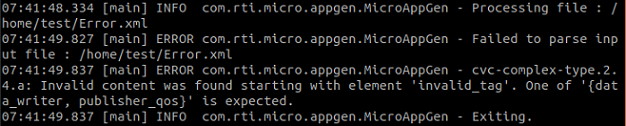
Unsupported elements
MAG will throw a warning for any elements that are not supported by Connext Micro. Unsupported elements will be ignored, such as the user_data in the following:
<dds>
    ...
    <!-- Participant Library -->
    <domain_participant_library name="FeatureTestLibrary">
        <domain_participant name="01_EmptyDomainParticipant"
        domain_ref="HelloWorldLibrary::HelloWorldDomain">
            <domain_participant_qos>
                <!-- user_data is not supported by Micro -->
                <user_data/>
            </domain_participant_qos>
        </domain_participant>
    </domain_participant_library>
</dds>

Unsupported values
MAG will throw an error if it finds a value that is not supported by Connext Micro.
<dds>
    ...
    <!-- Participant Library -->
    <domain_participant_library name="FeatureTestLibrary">
        <domain_participant name="01_EmptyDomainParticipant"
        domain_ref="HelloWorldLibrary::HelloWorldDomain">
            <publisher name ="test">
                <data_writer topic_ref="HelloWorldTopic1" name="testW">
                    <datawriter_qos>
                        <durability>
                            <!-- transient is not supported by Micro -->
                            <kind>TRANSIENT_DURABILITY_QOS</kind>
                        </durability>
                    </datawriter_qos>
                </data_writer>
            </publisher>
        </domain_participant>
    </domain_participant_library>
</dds>
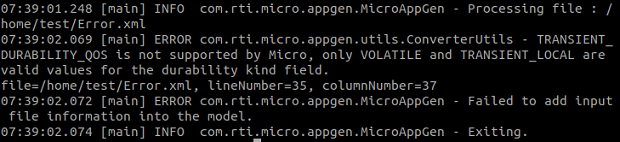
MAG will throw an error if the QoS values are not consistent with values supported in Connext Micro. For example, the following XML contains a deadline period that is too large.
<dds>
    ...
    <!-- Participant Library -->
    <domain_participant_library name="FeatureTestLibrary">
        <domain_participant name="01_EmptyDomainParticipant"
        domain_ref="HelloWorldLibrary::HelloWorldDomain">
            <publisher name ="test">
                <data_writer topic_ref="HelloWorldTopic1" name="testW">
                    <datawriter_qos>
                        <deadline>
                            <!-- this deadline exceeds the maximum -->
                            <period>
                                <sec>123213123</sec>
                                <nanosec>12</nanosec>
                            </period>
                        </deadline>
                    </datawriter_qos>
                </data_writer>
            </publisher>
        </domain_participant>
    </domain_participant_library>
</dds>
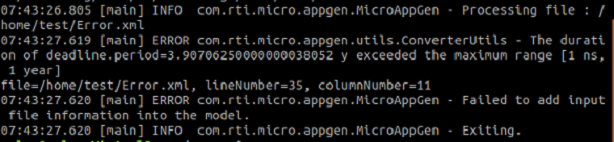
MAG will throw an error if the
dds.xtypes.compliance_maskproperty uses a different value than 0x00000008.
Unsupported QoS
Not all the QoS policies supported by Connext Micro can be configured in XML.
QoS settings related to UDP transformation cannot be configured in XML. See the UDP Transport section for more information on UDP transformation.
MAG does not support any PROPERTY QoS policy properties except the
dds.xtypes.compliance_maskproperty.
Unknown deployment name
MAG will throw an error if the
-deploymentoption is specified with a name that is not defined in your XML file.Verify that the deployment name specified with
-deploymentexactly matches a deployment defined in your XML file’s<deployment_library>/<deployment_scenario>/<deployment>hierarchy.Application type AUTOSAR_CDD not supported without -deployment
The
-applicationType AUTOSAR_CDDoption requires the-deploymentoption. Specify both to enable AUTOSAR CDD code generation.