2.4.10.6. DDS Data Type View
The DDS Data Type View presents hierarchical and textual views of a data type used by a DataWriter or DataReader. This view includes two tabs:
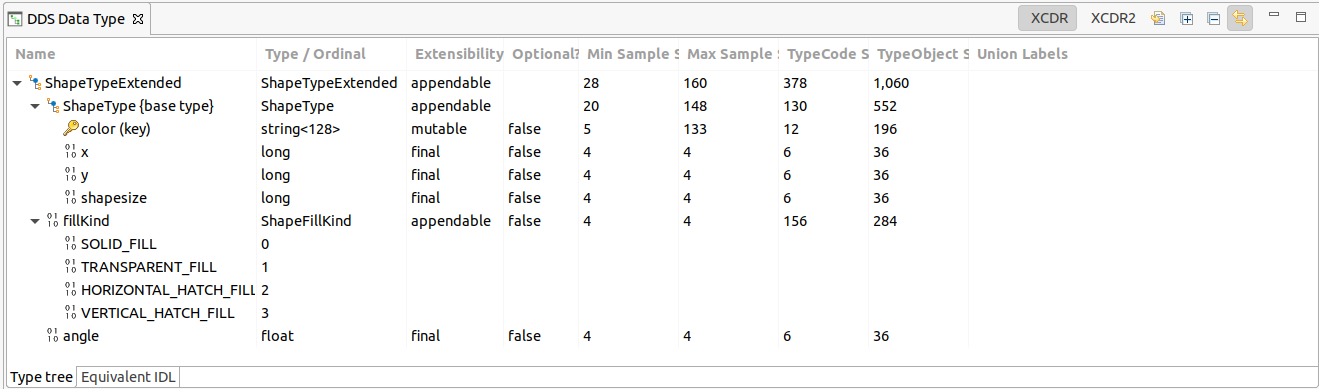
The Type tree tab presents the data type as a hierarchy.
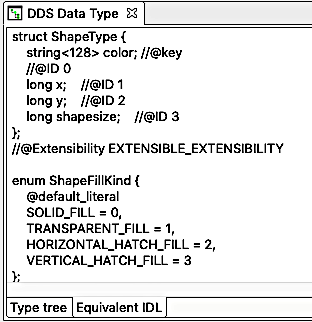
The Equivalent IDL tab presents the same information in IDL.
2.4.10.6.1. Overview
The Type tree tab in DDS Data Type View includes the following columns:
Name - The name of the type or field represented by this row. If the row is a field and the field is part of the type’s key, then it will have the key icon
 as well as having the text “(key)” following the name.
Type / Ordinal - The field’s type or enumerate’s ordinal.
Extensibility - Indicates the field’s extensibility status. Note that not every row will have this indication, for example, enumerates inside an enumeration will have no indication here.
Optional? - Indicates if the field is optional (true), not optional (false) or blank if this concept is not applicable for the row.
Min Sample Size - The minimum size that samples of this type can be when serialized for distribution. Note that this size does not account for protocol overhead.
Max Sample Size - The maximum size that samples of this type can be when serialized for distribution. Not that this size does not account for protocol overhead.
TypeCode Size - The serialized size of the TypeCode. Note that this is not the size for samples, those are explained above in the Min/Max Sample Sizes. Rather, this is the size needed to transfer information about the data type itself.
TypeObject Size - The serialized size of the TypeObject. Note that this is not the size for samples, those are explained above in the Min/Max Sample Sizes. Rather, this is the size needed to transfer information about the data type itself.
Union Labels - If the field is part of a union, then the associated labels will be shown here.
The Equivalent IDL tab displays a read-only textual representation of the data type. The text in this view can be exported to a file or selected and copied to the clipboard through the standard OS shortcuts or through the right-click menu.
Note
The min and max sample serialized size columns are provided as a guide to show representative sizes. The actual sizes may vary somewhat from the calculated values due to byte alignments as a sample is serialized. Also, row 1 is calculated to include encapsulation whereas other rows are not (since only the top level type includes encapsulation). As a result of this, the sum of rows 2 and greater may not be equal to the value displayed in row 1.
Note
The TypeCode Size and TypeObject Size columns provide size estimates and not exact values. The actual sizes may vary due to padding, alignment, and other factors. Also, the values in a single column may not sum up to the total size for the top-level type because of these variations.
2.4.10.6.2. Toolbar
The toolbar  in this view contains controls to:
Choose how the min and max sample serialized sizes are calculated, using the XCDR and XCDR2 buttons.
 Export IDL to a file.
- Export type tree contents to a CSV file.
 Expand all tree nodes.
 Collapse all tree nodes.
 Link with selection - Toggling this button will link/unlink
this view to/from displaying information about the current selection. One
way to use this feature is to select something and then unlink this view
from the selection. Then, a new instance of this view can be created and
a populated with a new selection. Data can then be compared between the
first and second selection.
Link with selection - Toggling this button will link/unlink
this view to/from displaying information about the current selection. One
way to use this feature is to select something and then unlink this view
from the selection. Then, a new instance of this view can be created and
a populated with a new selection. Data can then be compared between the
first and second selection.Minimize and maximize the view.