2.4.9.2. DDS Logical View
2.4.9.2.1. Overview
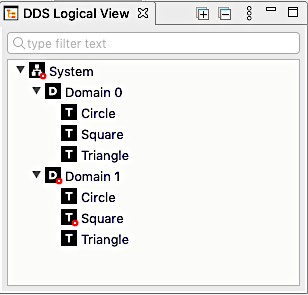
The DDS logical view presents a hierarchical view of the system from
a DDS perspective. It shows a list of DDS domains  and the
topics
and the
topics  within them.
The rows in this view indicate health with error  and warning
 badges.
You can filter the tree by typing in the text box (which says “type filter text” when it is empty).
2.4.9.2.2. Toolbar
The toolbar  in this view contains controls to:
 Expand all tree nodes.
 Collapse all tree nodes.
 Remove entities which are no longer present.
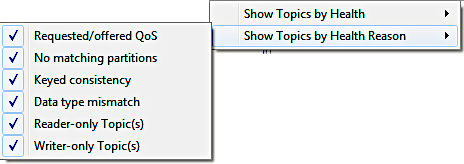
 The view menu which contains items for filtering (see the next section for more).
Buttons to minimize and maximize the view.
2.4.9.2.3. Filter Menus
The filter menus allow filtering by health or by health reason.